

Spotify is an odd company to review as a podcast platform, because for a long time it wasn’t really a podcast platform at all. It was the music streaming app that wanted to become something larger: an audio company, then a creator company, and now—if its recent product direction is any indication—a video podcast and fan-engagement platform as much as a listening app.
Most podcast hosts started with RSS, storage, and distribution, then slowly added analytics, monetization, and marketing tools. Spotify came at the market from the opposite direction. It already had the audience, the recommendation engine, the listening app, the ad business, and the subscriber base. What it needed was creator infrastructure. That explains the company’s acquisition of Anchor and Gimlet in 2019, the later combination of Anchor’s free hosting and distribution tools into Spotify for Podcasters in 2023, and the 2024/2025 evolution into Spotify for Creators—a platform built not only for traditional audio podcasters, but for video shows, fan communities, and monetization.
That origin gives Spotify for Creators its biggest advantage and its biggest limitation. This is not the most neutral podcast host on the market. It is not just a place to upload an MP3 and push it through RSS. Its center of gravity is Spotify itself: discovery inside the app, engagement inside the app, video consumption inside the app, and monetization increasingly tied to Spotify’s own ad and subscription infrastructure. For some creators, that is exactly the point. For others, especially those who think of podcasting as open distribution first and platform-native growth second, it may feel like a trade-off.
Still, the timing is hard to ignore. Podcasting is becoming more visual, more platform-driven, and more creator-economy shaped. Edison Research found that 73% of Americans age 12+ had consumed a podcast in either audio or video format in 2025, while 55% were monthly podcast consumers; the same research pointed to YouTube as the most-used service among U.S. weekly podcast listeners, a clear sign that “podcast platform” now means something broader than an RSS app. Spotify’s answer is not to abandon audio, but to make podcasts behave more like shows: watchable, commentable, promotable, measurable, and monetizable across ads, subscriptions, sponsorships, and Premium video revenue.
Pricing
Spotify for Creators is free to use for podcast hosting and distribution. Spotify says creators can get free podcast hosting, video, RSS distribution, creator support, monetization access in select markets, and performance tools in one place.
The pricing picture gets more nuanced once monetization enters the conversation:
Spotify for Creators Hosting, $0/mo — Free hosting, uploads, storage, audio and video publishing, analytics, comments, monetization tools, and RSS distribution. Spotify says its free hosting model is supported by taking a percentage of ad revenue generated by monetized shows.
Subscriptions, creator-set pricing — Creators can charge for paid content on Spotify and other listening platforms, but must have at least two published episodes and at least 100 Spotify users in the last 30 days. Spotify says creators keep 100% of subscription earnings, excluding payment processing fees.
Subscription transaction fees — Spotify lists a 5.5% payment processing fee, foreign exchange fees when subscriber and creator currencies differ, and small cash-out/payout fees depending on whether Stripe or Spotify Payouts is used.
Spotify Partner Program, eligible creators only — Eligible shows can earn from ad revenue and Premium video revenue. Spotify says approved creators earn a 50% share of revenue recognized when Spotify-monetized ads play in their episodes, both on and off Spotify. Premium video revenue applies when Spotify Premium members in select markets stream video episodes without dynamic ads.
Megaphone, custom enterprise pricing — Spotify positions Megaphone as its enterprise podcasting platform for publishers with multiple shows, teams, and advanced monetization needs.
The Details
Spotify for Creators is best evaluated as a publishing and growth layer built around Spotify’s own listener ecosystem. The platform still covers the basics of podcast hosting—episode uploads, RSS feeds, show settings, analytics, team access, and monetization—but its strongest value comes from what happens after the episode is published. Creators can see how their show appears across Spotify surfaces, how many people act on those impressions, where consumption drops, which links produce plays, how fans respond, and whether the audience is large enough to unlock monetization.
That makes Spotify for Creators a better fit for teams that think of podcasting as an audience-development channel, rather than a simple audio archive. The workflow rewards teams that actively test packaging, episode structure, video formats, clips, paid content, and direct listener interaction.
Publishing audio and video episodes
The core publishing workflow is simple enough for solo creators, but there are technical details worth getting right from the start. Audio episodes can be uploaded as MP3, M4A, or WAV files in mono or stereo. Spotify does not state a hard file-size limit for audio uploads, though large files create the usual operational problems: slower processing, higher chance of failed uploads, and more friction when a producer is working with a weak connection or sending final files across a team.
For MP3s, the cleaner the export, the better. Embedded artwork, oversized metadata, and unnecessary ID3v2 tags can create avoidable processing weight. For a casual creator, this may not matter. For a brand or media team publishing on a recurring schedule, it is worth standardizing the export workflow: final loudness target, ID3 handling, file naming, version control, and a QA check before upload.
Video is where Spotify for Creators becomes more strategically interesting. Spotify supports MOV, MPG, and MP4 video files, and recommends H.264 High Profile encoding, though H.265 is also compatible. For video resolution, 1080p or higher is recommended, with 16:9 widescreen preferred. Other aspect ratios can work, but they may appear with letterboxing or pillarboxing in certain playback environments. That is not a small design issue for branded shows. If a podcast includes sponsor overlays, product demos, presentation slides, lower thirds, or visual branding, a poor aspect-ratio decision can make the show look less polished inside the Spotify player.
Spotify’s recommended bitrate is 25 Mbit/second CBR for 1080p and 35 Mbit/second CBR for 4K. Supported frame-rate recommendations include 24, 25, 30, 50, and 60 FPS. Spotify also recommends roughly one keyframe per second, with at least one keyframe every 60 seconds, and a presentation timestamp difference of 50ms or less between the first frame and time zero. For color, Rec.709 and standard dynamic range are recommended, although Rec.2020 and HDR are compatible.
For marketers, those details affect the production brief. A video podcast should not be exported only for YouTube and then treated as universally ready. Spotify’s player, discovery surfaces, mobile experience, and thumbnail behavior all create different packaging requirements. If the show is intended to support a brand, product category, executive voice, or partner sponsorship, the team should test how the episode looks on mobile before building a full video cadence around it.
The shift away from built-in creation tools
Spotify for Creators is no longer an all-in-one recording studio in the way Anchor once was. Native recording and editing are no longer the center of the product. Creators are expected to record and edit elsewhere, then use Spotify for Creators to publish, measure, manage, and monetize the show.
That is not necessarily a weakness. Serious podcasts are usually produced in dedicated tools anyway: Riverside, Descript, Adobe Audition, Premiere Pro, Final Cut, Logic Pro, Pro Tools, or other production setups. Spotify’s current role is closer to the layer after production. It handles publishing, Spotify visibility, audience feedback, Clips, comments, polls, show customization, monetization, and performance analytics.
This creates a clearer operational model for teams. Producers own the recording and post-production workflow. The podcast or content lead owns publishing and editorial packaging. The marketing team owns Clips, links, distribution, and performance analysis. The monetization or partnerships lead owns subscriptions, sponsorships, and Partner Program performance. Spotify for Creators is the shared dashboard where those functions meet.
RSS, distribution, and platform control
Spotify-hosted shows are automatically available on Spotify, but distribution outside Spotify requires more work. After the first episode is published, Spotify creates an RSS feed. The creator needs to enable that feed and submit the show to other listening platforms, such as Apple Podcasts or Amazon Music, through their respective submission processes.
That setup matters because Spotify is easy to start with, but it does not remove the need for distribution management. A team moving from another host should plan for RSS verification, external platform submission, category selection, artwork compliance, show-description consistency, platform profile links, and the timing of episode updates across listening apps.
There is also a data implication. Spotify-hosted shows can see certain analytics from all platforms where the show is distributed, such as location and platform/device information. Other audience details, including age and gender, are Spotify-specific. A marketer using Spotify analytics for sponsor decks, audience research, or content planning needs to understand that split. Spotify can provide a useful view of the audience, but it is not a complete identity or buyer-intent layer.
For teams already hosted elsewhere, Spotify has become more flexible. Some external hosting platforms can publish video episodes to Spotify through Spotify’s Distribution API. This is useful for publishers that do not want to move their hosting stack but still want Spotify video distribution. The limitation is operational: availability depends on whether the current host supports the integration. A publisher using a host outside the supported group needs to verify that capability before making Spotify video a core part of the publishing plan.
Replacing audio episodes with video
One useful workflow is the ability to replace an existing Spotify-hosted audio episode with video. This lets a creator upgrade older content without creating a new episode listing. The uploaded video must include the audio from the episode, and the replacement has to be done from the web version of Spotify for Creators, not the mobile app.
This is helpful for shows moving gradually from audio-first to video-first production. A team can start with audio, identify high-performing episodes, then replace selected episodes with video versions where it makes sense. It also gives marketers a practical way to test video without rebuilding the entire publishing archive.
For example, a B2B show might start by adding video to founder interviews, product explainers, high-retention episodes, or conversations with recognizable guests. A creator-led show might prioritize episodes that have strong short-form potential. The point is to avoid treating video as an all-or-nothing migration. Spotify gives teams a path to test it episode by episode.
Discovery analytics
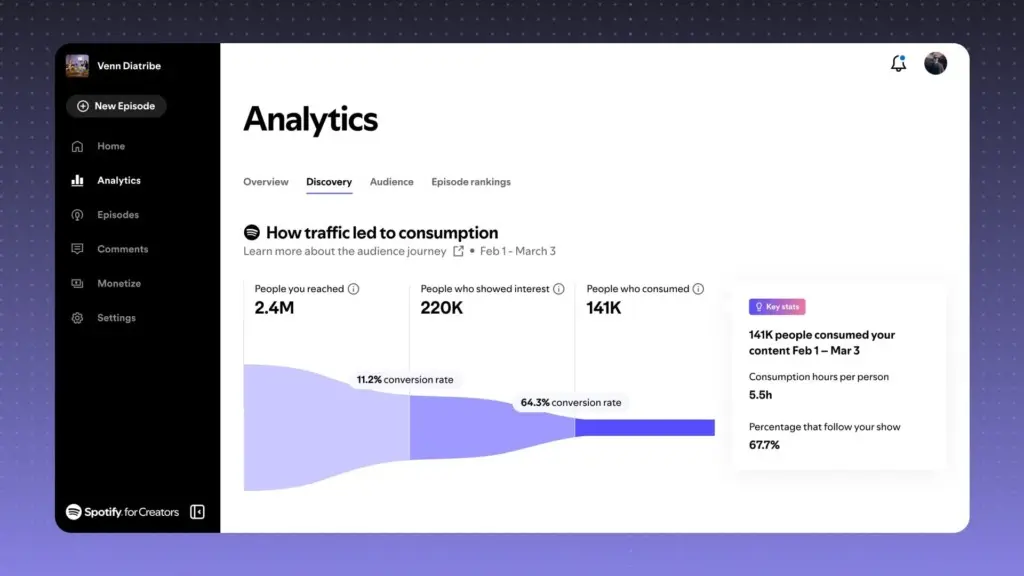
The Discovery analytics are one of the most important parts of Spotify for Creators because they connect visibility to action. The dashboard shows how people find a show on Spotify and what they do after seeing it. The key metrics include impressions, conversion rate, plays, and average completion rate.
An impression is counted when a show, episode, or Clip appears on a Spotify discovery surface. Conversion rate shows the percentage of impressions that led to plays. Plays show how many people actively tried the content. Average completion rate shows the percentage of the audience that made it at least 95% of the way through an episode published in the selected period.
That combination is useful because it separates three problems that often get blended together in podcast reporting: discovery, packaging, and content quality.
If impressions are low, the show may not be reaching enough discovery surfaces, or the release cadence may be too weak to generate repeated visibility. If impressions are high but plays are weak, the issue is likely packaging: title, thumbnail, show art, episode premise, preview, Clip, or topic framing. If plays are healthy but completion is weak, the problem is probably inside the episode: slow intro, weak guest fit, unclear structure, too much setup, poor pacing, or a mismatch between the episode promise and the actual conversation.
For marketers, that is much more useful than a raw download count. Downloads can tell you that an episode traveled. Discovery analytics help diagnose why it traveled, where it stalled, and whether the content held attention after the initial click.
The “Where on Spotify your content was discovered” breakdown adds another useful layer. Spotify can show whether discovery came from Home, Library, Search, or other Spotify surfaces. Search-driven discovery can suggest strong brand recall, guest demand, or category relevance. Home-driven discovery may reflect recommendation performance. Library activity points more toward existing followers and saved behavior. For a show trying to grow beyond its current audience, those distinctions should influence how the team titles episodes, selects guests, writes descriptions, and creates Clips.
Link and sharing analytics
Spotify for Creators also gives teams analytics for links created through the platform. Shared links can be tracked for clicks, Spotify plays, and click-to-play conversion rate. This is especially useful for marketers because podcast promotion often happens across fragmented channels: newsletters, LinkedIn posts, creator accounts, employee advocacy, paid social, communities, guest promotion, PR placements, and partner emails.
Without link-level performance, it is easy to overvalue the channel that generates the most visible engagement. A LinkedIn post may get comments but produce limited episode consumption. A newsletter may look quieter publicly but convert more readers into listeners. A guest’s post may drive clicks but low play-through if the audience was curious about the guest rather than the topic. Spotify’s sharing analytics help close that gap.
This does not replace a full attribution system. It will not show CRM impact, pipeline influence, or multi-touch contribution. But for a podcast team, it creates a practical feedback loop: which distribution links are creating actual Spotify plays, which audience segments are only clicking, and which promotional angles produce better click-to-play behavior.
Engagement analytics
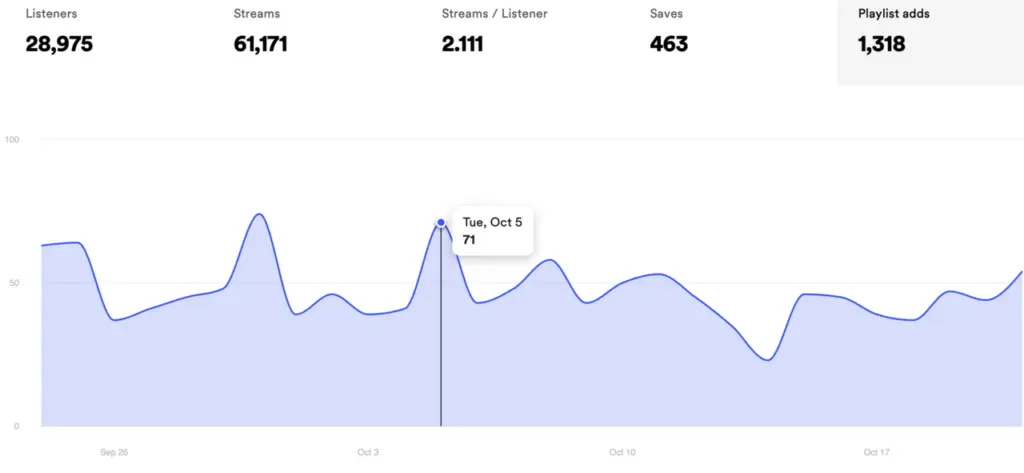
Engagement analytics focus on how people interact with the show on Spotify. The dashboard includes consumption time, average consumption time, comments, followers, episode completion rates, and week-over-week retention.
Consumption time is especially useful for comparing formats. A 20-minute solo episode and a 75-minute interview may generate similar play counts, but the consumption profile will show which one actually holds attention. Average consumption time can also help a team evaluate whether longer episodes are earning their length. For video podcasts, watch behavior becomes even more important because the team needs to understand whether users are watching, listening passively, or switching between modes.
Episode completion rates are shown for recent episodes in their first seven days after publishing, with an average line for comparison. That first-week view is valuable because it controls for time in market. An older episode will usually have more total consumption, but the first seven days give a cleaner read on launch performance, packaging, guest interest, and audience loyalty.
Week-over-week retention is another metric marketers should watch closely. It shows whether the show is building habitual audience behavior or relying on isolated episode spikes. A show with strong guest-driven peaks but weak retention may be useful for awareness, but harder to monetize or build into a community. A show with steadier retention may have a smaller audience but better long-term value.
Comments, polls, and fan feedback
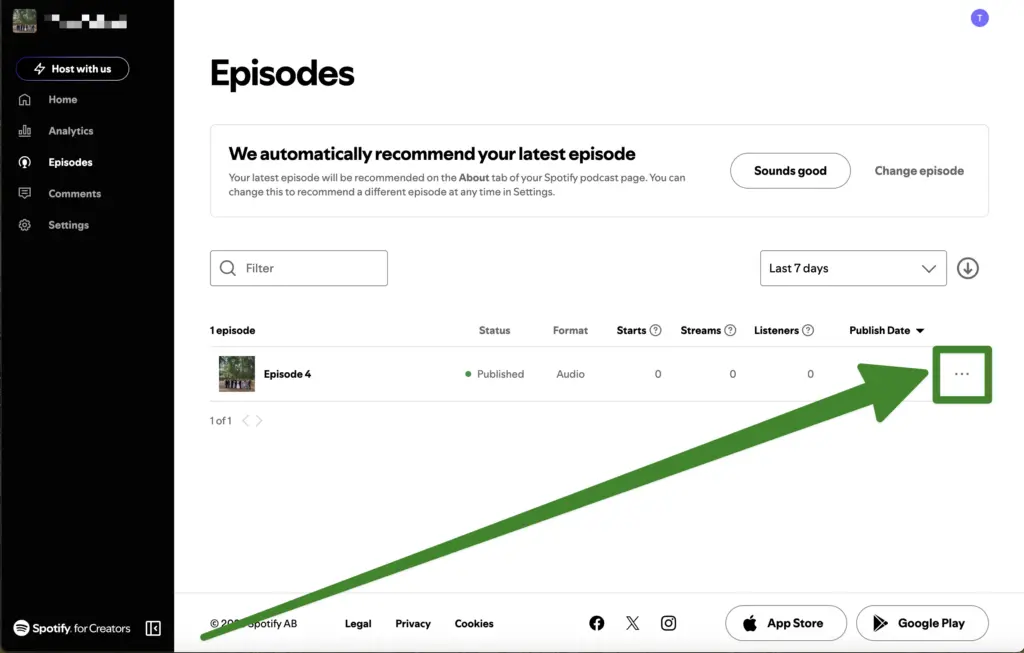
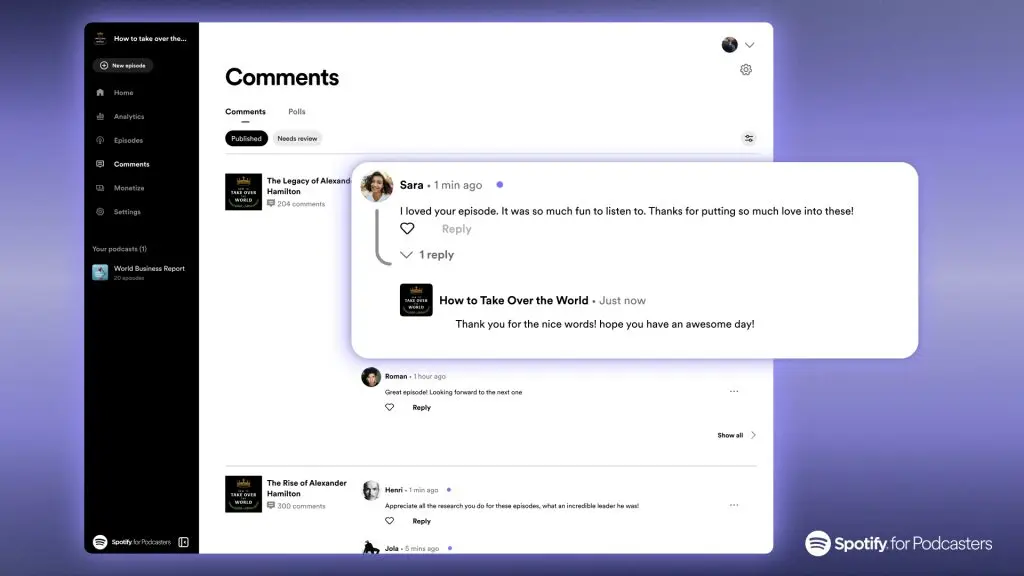
Spotify’s fan-engagement tools make podcasts feel less static. Comments can be managed from Spotify for Creators, where teams can review, approve, react to, pin, and reply to listener comments. Replies appear with the show art, which is a useful product detail for branded shows because it makes the response feel official.
The moderation controls are practical for small and mid-sized shows. Teams can delete comments, report comments, block commenters, and create a blocked words and phrases list. The blocked list is limited, so it is not a replacement for enterprise-grade community moderation, but it gives creators enough control to handle obvious spam, abuse, or brand-safety concerns.
For marketers, comments are useful because they create qualitative feedback in the same environment where the content is consumed. A comment thread can reveal which guests triggered interest, which topics confused people, which segments prompted follow-up questions, and which audience members are recurring enough to become part of the show’s community. That is valuable editorial input, especially for education-led brands and creator-led product content.
Polls add a more structured layer of feedback. A poll can include two to seven answer options, optional multiple-choice selection, and scheduled start and end dates. This makes polls useful for topic selection, format testing, guest feedback, audience research, and lightweight product education. A software company could ask listeners which workflow they want covered next. A retail brand could test which product concern is most common. A media brand could ask whether the audience prefers teardown episodes, interviews, debates, or trend briefings.
Polls should not be treated as statistically representative research. They are better understood as zero-party directional feedback from engaged listeners. For many podcast teams, that is still more useful than guessing based only on downloads.
Clips, previews, and short-form discovery
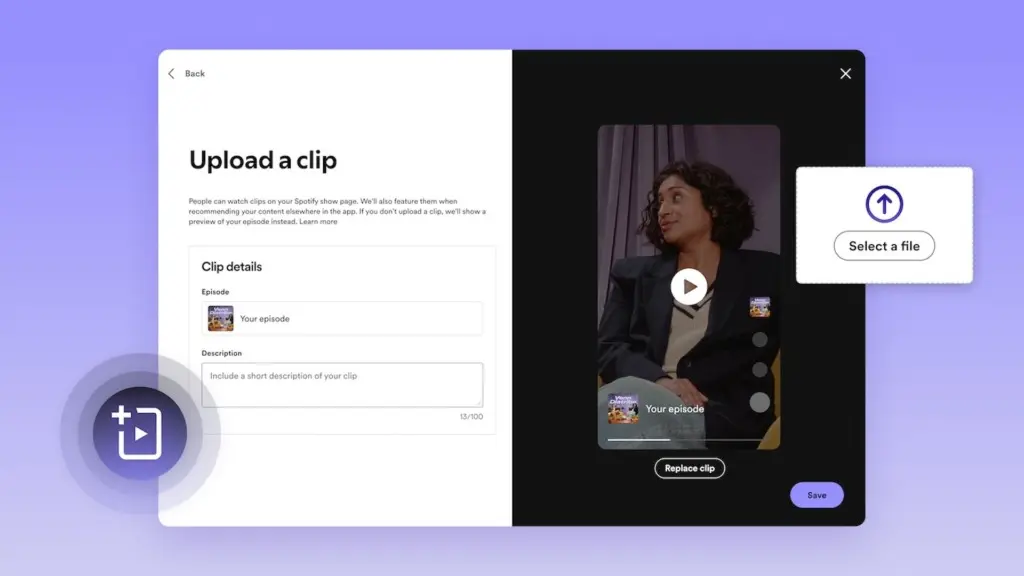
Clips are one of Spotify’s strongest growth tools for video-oriented shows. A Clip is a short video attached to an episode and designed to help the full episode get discovered. Creators can upload one Clip per episode. Clips must be 15 to 90 seconds long, under 1GB, contain audio, and use MP4 or MOV. Spotify recommends vertical video, though horizontal video is also supported.
Clips can appear on the show page, Home, Podcast feeds, Browse, and Now Playing View. Their analytics include impressions and plays from Clips, where plays are counted when someone watches or listens to the content within 24 hours of viewing the Clip. That gives creators a clearer read on whether a short-form moment is actually moving people into the episode.
This is important because many podcast teams already create short-form assets for TikTok, Reels, YouTube Shorts, LinkedIn, and X. Spotify Clips give that work a native role inside Spotify. The best use case is not recycling every social cut, especially if it contains platform watermarks or external calls to action. The better approach is to create Spotify-specific Clips that introduce the episode’s strongest tension, question, claim, guest insight, or useful takeaway.
Previews are different from Clips. Previews are square, can be generated automatically or selected by timestamp, and can appear if a Clip has not been uploaded. Clips are creator-uploaded, longer, and more flexible. For a team with a serious video workflow, Clips should be planned during editing rather than added as an afterthought.
Transcripts and episode metadata
Transcripts can improve accessibility, repurposing, search context, and editorial QA. Spotify allows some creators to view, download, edit externally, and re-upload transcripts. Transcript files need to be VTT or SRT, with a maximum size of 5MB. Synced playback requires timestamps. The limitation is that transcripts cannot be edited directly inside Spotify for Creators, and availability is not universal.
For content teams, transcripts should still live in the broader editorial workflow. They can support show notes, blog recaps, quote extraction, newsletter snippets, YouTube descriptions, sales enablement, internal review, and social copy. Spotify’s transcript support is useful, but it should not be the only transcript source for a brand publishing program.
Episode metadata also deserves attention. Titles, descriptions, thumbnails, show notes, categories, and episode order all influence how a show is understood by listeners and platforms. Spotify also gives video creators thumbnail customization, which is especially important for shows competing on visual packaging. A bland thumbnail can weaken an episode even when the guest or topic is strong.
Team access and operational control
Spotify for Creators supports team access, with admins able to invite members, remove members, and assign permissions by feature. A show can have more than one admin. This is enough for lean teams, but larger publishers should be careful with account structure and permissions.
The main limitation is that team-level access can apply across multiple shows under the same account. That can be convenient for small networks, but risky for larger operations where producers, editors, analysts, and monetization leads should have different permissions. Spotify also notes that actions taken by team members cannot currently be reversed. For a brand or publisher, that means the admin model should be decided before bringing in freelancers, agencies, or rotating production support.
A practical setup would separate responsibilities. Admin access should be limited. Producers may need episode-management access. Analysts may need analytics access. Community managers may need comment and poll access. Monetization leads may need access to earnings, ads, sponsorships, and subscriptions. Treating everyone as an admin is faster in the beginning, but creates unnecessary risk as the show grows.
Monetization and Partner Program economics
Spotify for Creators offers several monetization paths, but eligibility depends on region, hosting setup, and audience size. Subscriptions are available to creators with at least two published episodes and at least 100 Spotify users in the last 30 days. Paid content can work well for bonus episodes, subscriber-only interviews, educational series, private feeds, and deeper community-driven programming.
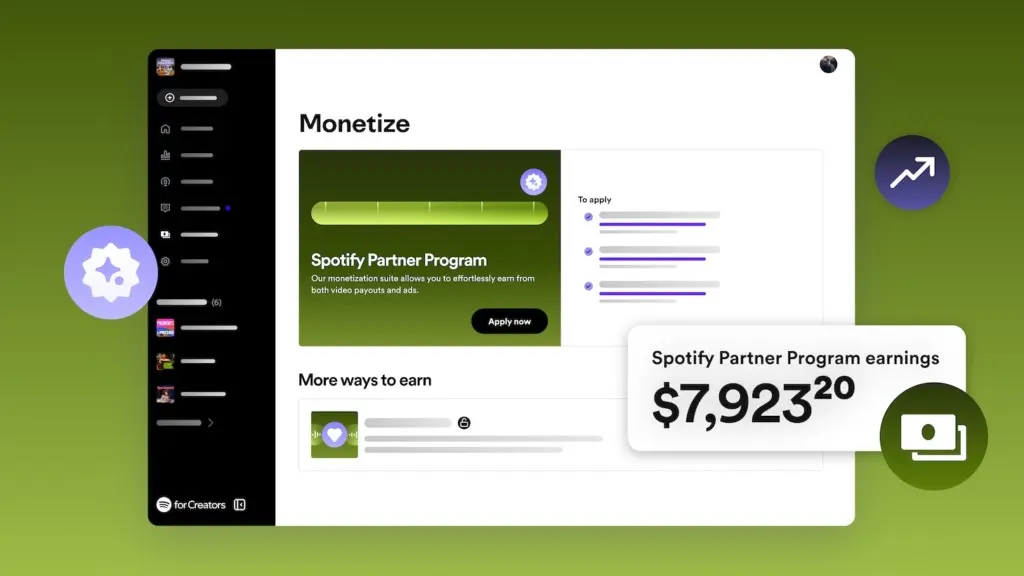
The Spotify Partner Program is the more important monetization layer for shows with traction. Eligibility requires the show to be hosted on Spotify for Creators, have a legal address in an eligible market, publish at least three episodes, reach at least 2,000 consumption hours on Spotify in the last 30 days, and reach at least 1,000 audience count on Spotify in the last 30 days. The program can generate revenue from Spotify-monetized ads and Premium video revenue.
The ad model gives creators a 50% share of recognized revenue when Spotify-monetized ads play in eligible episodes. Creators need to insert at least one ad break into an episode to earn ad revenue from that episode. Premium video revenue is tied to video consumption by Premium users in select markets, where viewers can watch without dynamic ads.
For marketers, this means Spotify monetization should be judged by audience depth, not only audience size. A niche show with strong watch time, high completion, active comments, useful Clips, and loyal returning listeners may be more valuable than a broader show with shallow sampling. The platform is clearly designed to reward consumption and engagement, especially around video.
Sponsorship management is also becoming more flexible. Spotify has been rolling out tools that allow eligible creators to remove, replace, and add host-read sponsorships in video episodes, schedule sponsorship updates, and track delivery metrics. That helps solve a common podcast problem: baked-in sponsorships age badly. A time-sensitive offer, outdated URL, expired promotion, or old partner mention can make evergreen content feel stale. More flexible sponsorship management gives creators a cleaner way to keep older episodes commercially useful.
Where Spotify for Creators fits
Spotify for Creators is strongest for shows that want to build inside Spotify’s ecosystem while keeping enough distribution flexibility through RSS. It is especially useful for independent creators, video podcasters, branded shows, education-led companies, and lean media teams that care about audience behavior, short-form discovery, fan feedback, and eventual monetization.
It is less ideal for publishers that need enterprise-grade ad operations, highly granular permissions, deep off-platform attribution, advanced network management, or a fully open hosting strategy with minimal platform dependency. Those teams may still prefer Megaphone or another enterprise host, especially if they already operate a multi-show network with direct sales, dynamic ad insertion, and complex reporting needs.
The product’s strongest signal is the direction of travel. Spotify for Creators is moving toward video, direct fan interaction, richer Spotify-native analytics, flexible sponsorship tools, and revenue models tied to active consumption. For marketers, that makes it more than a free host. Used properly, it becomes a control room for understanding how a podcast performs inside one of the most important podcast consumption environments.
Conclusion
Spotify for Creators is no longer just “Anchor with a new name.” It is Spotify’s attempt to redefine podcast hosting around the way podcasts are now consumed: partly through RSS, partly through recommendation feeds, partly through video, partly through social interaction, and increasingly through platform-native monetization.
Its strongest use case is clear. If you are an independent creator, video podcaster, interview host, education creator, or small podcast team that wants a free way to publish, measure, engage, and eventually monetize through Spotify, this is one of the most compelling platforms available. The hosting is free, the analytics are deeper than basic download reporting, the fan tools are useful, and the Partner Program gives successful shows a path into ad and Premium video revenue.
But the product is also very Spotify-shaped. The best discovery, engagement, video, and monetization tools live inside Spotify’s ecosystem. Native recording and editing are no longer part of the platform, RSS distribution requires manual setup beyond Spotify, and advanced publisher needs may push larger teams toward Megaphone instead. For creators who want the most open, platform-neutral hosting setup, that may be a concern. For creators who see Spotify as one of their most important audience channels, it is the whole reason to use it.
The broader market is moving toward podcasts as shows, not just audio files. Spotify for Creators is built for that world. It is not the most traditional podcast host, and that is exactly why it is interesting.


