

If you’ve ever run Meta ads at scale—or managed a brand page that gets steady traction—you already know the uncomfortable truth: the comment section isn’t a side effect. It’s part of the asset.
It can convert for you (clarifying questions, social proof, objections handled in public), or it can quietly bleed trust (spam links, toxicity, competitor jabs, misinformation, off-brand replies, and the kind of weird bot chaos that makes a paid post feel unsafe). And because Meta comments show up everywhere—on organic posts, on boosted posts, on ads running through multiple accounts, across time zones—the “just keep an eye on it” approach stops working fast.
CommentGuard is built around that reality. Founded in 2020 and HQ’d in the Netherlands (Seedr B.V., Gouda), it positions itself as a specialized moderation platform exclusively for Facebook and Instagram comment workflows. Your submission notes a small team (1–10) and a customer base of 2,500+ brands—with client names intentionally undisclosed. The core idea is simple: centralize everything, automate what’s repetitive, and keep the brand-safe bar high without hiring a night shift.
Pricing
CommentGuard’s pricing is structured around monthly comment volume, with a 7-day free trial noted in your submission. Plans are also described as customizable month-to-month.
Your provided tiers:
- Starter ($29/mo) up to 5,000 comments
- Growth ($49/mo) up to 10,000
- Pro ($99/mo) up to 25,000
- Elite ($199/mo) up to 50,000
- Ultimate 100K ($399/mo) up to 100,000
- Ultimate 150K ($599/mo) up to 150,000
- Ultimate 200K ($799/mo) up to 200,000
- Ultimate 250K ($999/mo) up to 250,000
The important positioning detail: plans are described as including full access to core features (moderation, AI-powered filtering, auto replies), plus “unlimited connected pages” and “unlimited team members” per your submission.
Details
A lot of tools treat comment moderation like a checkbox: block a few keywords, maybe filter profanity, and call it done. CommentGuard is built around a different assumption—that comments are a workflow, not just a risk. That’s why the product experience doesn’t start with “rules.” It starts with a single inbox and then layers moderation, routing, and AI replies on top of that foundation.
Setup and how “connected” it really is
The setup is intentionally lightweight: you connect a Facebook profile and then select the Facebook Pages and Instagram Business Accounts you want managed inside the dashboard. It’s not designed as an import-everything “history engine.” Moderation begins from the moment a page is added; it doesn’t retroactively pull and process older comments.
One operational detail matters here if you’re managing multiple entities: a CommentGuard account connects to one Facebook profile at a time. The product’s own guidance is to use a profile that has full admin access to the pages you need, and some teams keep separate subscriptions if they want strict separation between different business entities or client portfolios.
The unified inbox: where the product actually “lives”
Once pages are connected, CommentGuard’s day-to-day value shows up in the inbox experience. Instead of hopping between Page notifications, Ads Manager threads, and Instagram surfaces, you’re meant to process everything from one place: review what came in, triage what matters, and apply actions in bulk when volume spikes. It’s very clearly designed for the reality of paid social—where a single ad set can generate a messy mix of genuine purchase questions, competitor spam, and drive-by negativity within the same hour.
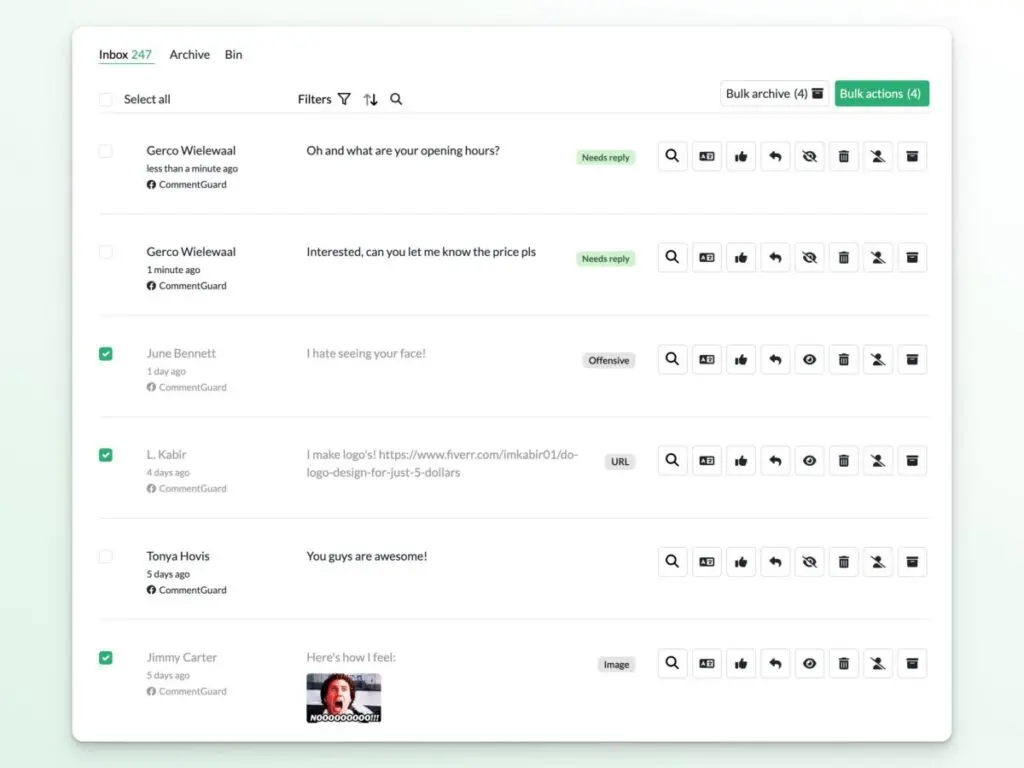
Notably, the platform also includes a Messages inbox for Facebook and Instagram DMs, which pushes it beyond “comment filtering” into broader community management—at least at the visibility level. But CommentGuard draws a hard line between helping you manage DMs and automating DMs: you can respond manually inside the Messages inbox, and you can use AI to draft replies, but automations and agents apply to comments, not direct messages.
Moderation: less “keyword list,” more layered controls
CommentGuard’s moderation is built as a set of toggles you can mix based on how strict you want to be. At the highest level, you choose between two philosophies:
- Hide/delete everything first and approve later (the “nothing hits the page unless we say so” approach), or
- Let most comments publish, and automatically hide/delete only what triggers selected filters.
Where it gets more interesting is how the filters combine classic pattern-based controls with AI-based judgment.
On the AI side, the platform has Profanity AI and Negativity AI designed to work “in any language,” and it also supports “custom topics” moderation—where you describe up to three topics you want removed (for example: comments pushing people to buy elsewhere, or comments about a sensitive product issue you don’t want debated publicly). The Negativity AI also supports adding page context to avoid false positives—so the system can interpret tone differently depending on what your page is about.
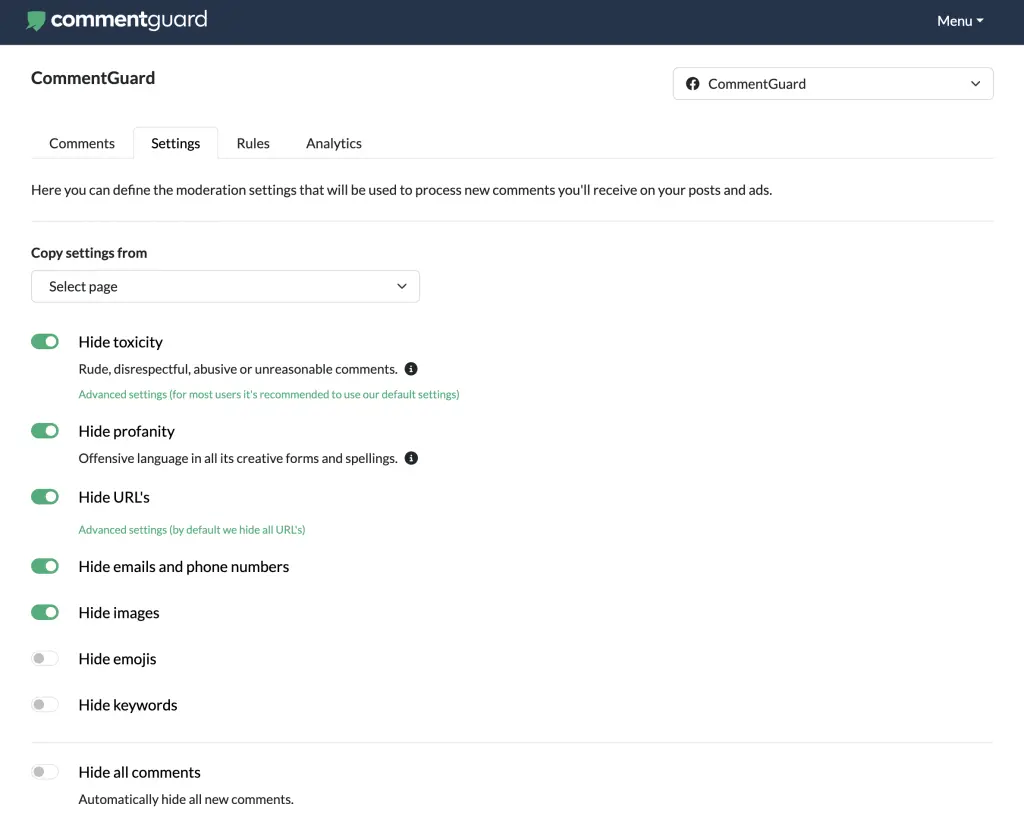
On the deterministic side, the product leans into the exact spam patterns that destroy ad threads: URLs, email/phone, mentions, hashtags, emoji spam, images/GIFs, and competitor keyword drops. It also includes whitelisting controls so you can exclude specific domains, handles, or terms from filters when you need “safe exceptions.”
Two operational controls matter a lot for paid teams:
- You can choose whether moderation applies to posts only, ads only, or both—so you don’t accidentally run strict ad rules across organic community posts (or vice versa).
- You can switch from “hide” to “delete.” CommentGuard treats this as a deliberate decision because deletion can’t be undone, and it introduces a small randomized delay (up to ~10 seconds) when deleting to avoid looking overly mechanical.
To reduce the “set it and hope” risk, there’s also a testing playground where you can paste example comments and see which filter would trigger before you turn the rules loose on a live campaign.
Engagement tooling: the product isn’t just defensive
A lot of moderation tools stop at “hide the bad stuff.” CommentGuard is explicitly trying to turn comment volume into something you can use—because fast, consistent replies don’t just protect brand perception; they also keep performance campaigns from rotting in the comments.
That’s why you’ll see features like saved replies, bulk actions, and the ability to respond with either public replies or private messages. If a comment needs a longer customer-support style exchange, you can reply as a DM (Instagram Direct or Facebook Messenger) and the dashboard marks it with a clear “PM” indicator so your team knows it wasn’t a public reply.
This also shows up in how the platform frames ad comments: it positions ad-thread engagement as something that can influence outcomes, not as an afterthought. The product’s own guidance emphasizes that ad comments are operationally hard to manage inside native tools at scale, which is exactly the gap CommentGuard is aiming to close.
Automations vs. Agents: two different ways to scale responses
CommentGuard splits reply scaling into two systems, and the distinction is useful if you’re building a real workflow:
Automations are rules. If a comment contains X keyword, send Y reply. These are best when you want deterministic outcomes for repeated patterns—shipping questions, “price?” comments, store location, discount code prompts, and similar repeat threads.
Agents are AI-driven. Instead of matching a trigger to a canned response, an agent can decide whether a comment needs a reply, generate the reply based on your brand knowledge and instructions, and (if enabled) send it with a randomized delay so responses don’t look like instant bot behavior.
The agent setup is positioned like training a specialized teammate: you assign pages, add instructions for tone and behavior, and paste in a knowledge base (FAQs, product constraints, support policies, and brand-specific details). That same knowledge and instruction set is used both for labeling “needs reply” comments and for generating drafts or automated replies.
One detail that affects how “hands-off” you can realistically be: there isn’t a formal “handover” mechanism where the agent escalates to a human. The practical workaround is configuration—you can limit the agent so it replies only to top-level comments, leaving threaded back-and-forth for your team to handle manually.
Also, if your team is wondering whether they need to manage AI costs: the platform explicitly does not support bringing your own OpenAI API key, because it includes unlimited AI responses inside the plans.
Team collaboration and accountability
CommentGuard’s collaboration features are designed for the reality that brands often need to involve VAs, internal team members, or agencies—without sharing passwords or giving broad access to the underlying social accounts. The platform supports multiple users and role-based control (admins/managers/moderators), and it tracks productivity-style metrics like response time and how replies are being generated (team vs. automations vs. agents).
On the reporting side, it’s less “marketing attribution” and more operational insight: total comments handled, how many were visible vs hidden/deleted, and team output. It also supports exporting comments and replies to CSV, which is useful if you want to review patterns outside the tool (or archive threads tied to campaign launches).
For notifications, it avoids spamming you per comment (there are no email alerts for each incoming comment), but it does support a daily digest when there’s new activity waiting in the inbox.
The boundaries: what CommentGuard doesn’t try to be
This is where the product’s positioning becomes clear: it’s intentionally narrow, and that’s part of why it works.
- There’s no Zapier integration and no public API, which tells you the product expects to be the place your team works—not a node in a huge automation web.
- There’s no dedicated iOS/Android app, but the web app is designed to be fully usable on mobile.
- It does not support Facebook Group comments, due to API realities.
And like all Meta-adjacent tooling, Instagram has platform constraints. For example: liking Instagram comments and blocking Instagram commenters can’t be done through the tool because the Instagram API doesn’t support it, and certain ad identity setups can affect whether ad comments are imported.
What’s left is a product that’s very clearly optimized for one thing: keep Facebook and Instagram comment sections clean, fast-moving, and conversion-friendly—without turning your team into full-time comment janitors.
Conclusion
CommentGuard’s strongest move is refusing to be “a little bit of everything.”
It doesn’t try to become a full social media suite. It doesn’t pretend it’s social listening. It treats Facebook and Instagram comments—especially on ads—as a real operational surface that needs the same discipline as support tickets or inbound leads.
The platform’s value is in how it compresses the daily chaos: a single place to manage comments, filter by context (ads vs organic), act quickly (block, export, private reply), and scale response handling through two automation layers—rules for certainty, AI agents for breadth.
If your world is primarily Meta, and your bottleneck is time + consistency + brand safety, CommentGuard is positioned as a tight tool for exactly that. If you need broad-channel coverage, deep integrations, or enterprise security controls like 2FA and APIs, its intentionally narrow scope will feel limiting.
Ratings:
-
Ease of Use:
-
Features:
-
Reporting: