
Manual vs. Automatic Chapters: Control vs. Convenience
As YouTube evolves, creators are increasingly faced with the choice: rely on automatic chapters or take full control via manual chaptering. Each approach has strengths and trade-offs — and in many cases, the ideal strategy is hybrid: Auto + manual override.
Below, we break down when and how to use each, plus real-world lessons.
How Automatic Chapters Work in 2026
YouTube Studio now offers a built-in option to “Allow automatic chapters and key moments”. By default, new uploads have this box checked (if the video is eligible).
Behind the scenes, YouTube’s system attempts to detect “natural segment boundaries” based on pauses, visual transitions, transcript cues, scene changes, and insert chapter breaks accordingly.
If you later add manual chapter timestamps in the description, YouTube will override the automatic chapters (i.e., the manual versions take precedence). There’s even a UI convenience: when auto chapters are available, you may import them into your description for refinement.
However, not every video is eligible for automatic chapters. If YouTube determines the content is unsuitable (due to strikes, content sensitivity, or lack of clear structure), the option may be withheld.
Why Manual Chapters Still Matter (and When They Win)
While auto chapters save time, they often mislocate breaks or label them poorly, particularly in narrative, puzzle, or entertainment content.
For example, a creator who tells a long-form story might want to delay revealing a twist until a specific moment; auto chapters could prematurely name that segment, spoiling the surprise. Or, auto might split a segment awkwardly mid-sentence or mid-concept.
One creator on r/NewTubers lamented exactly that:
“Does anyone know if it’s possible to override the automatic chapters with manual ones?”
This reflects a real concern: Auto chapters lacking context or emotional pacing.
Creators of high narrative and scripted content (e.g., documentaries, storytelling, episodic content) often prefer manual chapters to preserve flow. In such cases, they’ll let auto-generate, then selectively override or disable it entirely to maintain narrative cohesion.
Manual chaptering also gives you full control over naming. You can use jargon or vocabulary that resonates with your audience, including keyword phrases aligned with SEO, rather than generic auto-generated labels.
Hybrid Workflow: Enable Auto, But Refine Selectively
A practical workflow many creators adopt:
- Enable automatic chapters by default for the basic structure.
- Review the auto chapters carefully soon after upload.
- Import onto your description (via YouTube’s UI import function) when available.
- Edit or override only where necessary — rename timestamps, merge or drop splits, or reposition boundaries.
- Disable auto chapters entirely only if the auto system introduces more harm than help.
This hybrid approach gives speed (auto baseline) without surrendering narrative control.
In a published Vidyard guide, the team notes that manual chaptering avoids confusion caused by auto chapters and provides better alignment with search labeling. They demonstrate a video where they added manual chapters so that Google Search surfaces “Key Moments” aligned with their intended framing, rather than letting auto introduce irrelevant splits.
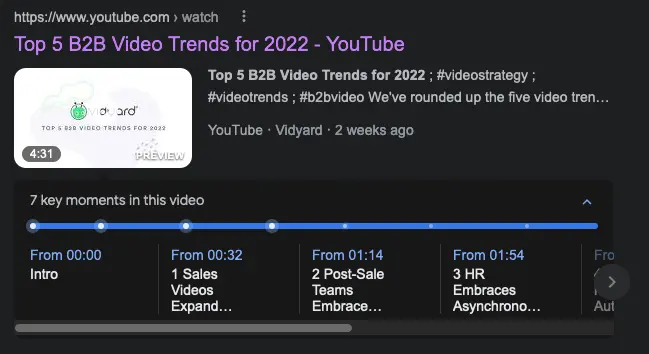
Vidyard also emphasizes that manually labeled chapters give Google’s algorithms clearer, intentional segment naming, which helps avoid mixed semantics or ambiguous labels.
Structuring Titles for Key Moments in Google Search
To fully leverage Key Moments in Google Search, your chapter titles and timestamp labels must do more than “Chapter 1/Chapter 2.” They need to be crafted with SEO intent, clear semantics, and click appeal without dumping your full explanation into the title.
Below, we'll unpack how to structure titles to appear as search-optimized key moments, the trade-offs, and examples from creators who seem to be doing this well.
Why Title Labels Matter for Key Moments in Search
Google’s Key Moments feature surfaces timestamped segments of videos directly in search results, letting users jump to specific parts. Google will prioritize key moments you set, via structured data or from YouTube chapter timestamps, over automatically inferred segments.
Thus, your labeled timestamps effectively become mini-titles that Google can index, display, and rank (they act as metadata-level search signals for video segments).
The better your title for each timestamp, meaning semantically aligned with search queries, the more chance Google will treat that segment as a standalone “answerable unit.” But if you over-reveal, you risk spoiling or cannibalizing view duration for later parts.
Best Practices: Title Length, Keywords & Clarity
Here’s a refined checklist when crafting your key moment titles:
| Principle | Why It Matters | How To Do It |
|---|---|---|
| Descriptive but concise | Long titles may be truncated in Search; ambiguity loses rank signal | Aim for 4–8 words, e.g., “Step 3: Install Plugin” rather than “Here’s how we install the plugin in WordPress step by step” |
| Use target keywords early | Google tends to weigh earlier words more | If your video is “How to Grow Tomatoes”, label “Grow Tomatoes: Soil Prep” or “Tomato Watering Tips” |
| Avoid full answers | You want curiosity & a “click” to watch, not full resolution in the snippet | Don’t write “The answer is …” — use “Why X matters” or “Fixing Y error” |
| Maintain coherence with narration | The chapter title should match what you verbally introduce | As you enter a new segment, say the title (“Now, let’s talk soil pH”) so voice + metadata reinforce each other |
| Unique titles per timestamp | Duplicate or generic labels confuse indexing | Don’t use repeated “Part 1,” “Part 2” — instead differentiate by topic |
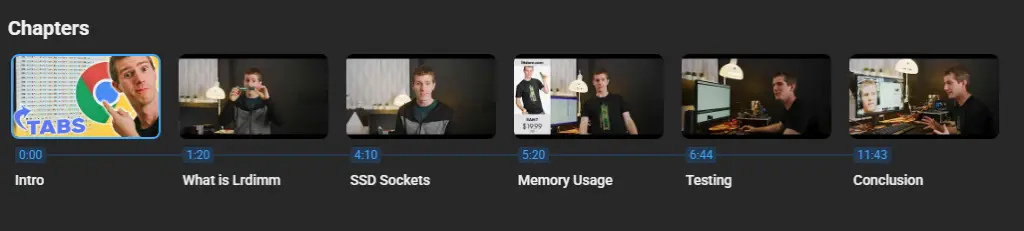
Linus Tech Tips often timestamps segments like “Unboxing & Contents,” “Thermal Testing,” “Final Thoughts”. These are likely to match how users search: “thermals for GPU X”, “unboxing Y device”. Even if Google auto-generates Key Moments, segments with strong titles tend to be favored.
Avoiding Spoilers While Still Being Searchable
One tension: a timestamp title that's too descriptive might reveal conclusions, reducing viewer engagement for later parts.
To balance:
- Use topic-based titles (e.g., “Why It Failed”) instead of result-based (e.g,. “It Breaks at 10,000 RPM”).
- Be slightly vague but enticing: “Fixing X Error” instead of “How I’m Fixing That Error.”
- Delay revealing the outcome. For example, label “Testing Reaction Time”, not “Final Reaction Time: 150ms”.
By structuring your key moment titles with search intent in mind, concise, semantically aligned, non-spoiler, you increase the odds that Google surfaces the right segments.
Check out the YouTube Adds AI Editing, Live Upgrades, and Monetization Tools at Made on YouTube 2025
The SEO-Retention Trade-Off
YouTube chapters and Google key moments undeniably make videos easier to navigate and more discoverable. But for creators, every timestamp is also a potential exit point.
The trade-off: Improved visibility and segment-level ranking versus a possible dip in overall retention. Understanding how to A/B test and interpret those analytics is what separates high-performing channels from those unintentionally cannibalizing their own views.
How Chapters Influence Watch Behavior
When Google surfaces your timestamps as Key Moments, users can click directly into mid-video segments from search. This can boost impressions and click-through rate, but it also means many viewers skip your setup entirely.
In YouTube Analytics, this behavior shows up as a sharp drop at the moment of a search-linked jump, followed by a stable mid-segment audience.
A 2024 report from Munch, which analyzed over 1,000 videos across niches, found that videos with chapters achieved a 2.18× to 2.8× higher like-to-view ratio than those without. For short videos (under 20 minutes), the difference was even starker — 2.96% vs. 1.25% — suggesting that chapters drive greater per-view engagement even if they fragment watch time.
This supports what many creators observe: chapters increase discoverability and interactivity, but they also make it easier for viewers to “hopscotch” through your content, lowering average view duration.
When Chapters Boost Retention Instead
While chapters can shorten continuous watch time in entertainment or review formats, they often improve engagement in educational or how-to content, where users value quick re-entry and structured navigation.
In these cases, the metric to monitor isn’t raw average view duration, but returning session retention, how often viewers return to finish a video over multiple sessions.
According to Think with Google, 7 in 10 viewers say YouTube makes them feel empowered, informed, or capable of learning something new, a finding that underscores why structured, chaptered content performs so well in educational contexts.
When videos are broken into timestamped learning blocks, audiences are more likely to rewatch specific sections and share segments that answer a particular question; a behavior pattern that strengthens long-term engagement even if the average session length dips slightly.
For example, Khan Academy’s official YouTube channel organizes multi-concept lessons into discrete segments such as “Derivatives of Logarithmic Functions” or “Introduction to Limits.” This consistent timestamping allows learners to skip directly to topics they’re revising while keeping them within the Khan Academy ecosystem rather than bouncing to unrelated search results.
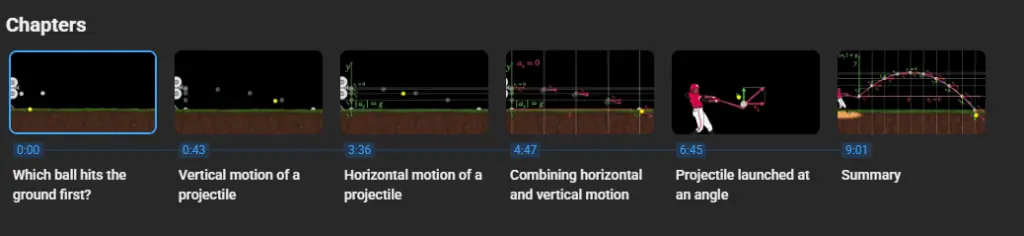
The same pattern holds for CrashCourse, where detailed timestamps in playlists like World History or Biology let viewers resume from prior lessons without friction. Both channels benefit from high watch-time per user across sessions, even if each viewing segment is short.

What these examples highlight is that chaptered structure doesn’t automatically reduce engagement — it reshapes it. For information-dense videos, timestamps act as navigational signposts, making long-form content more approachable and increasing the odds that users will return or share specific moments.
A/B Testing Chapters for Retention & Search
Creators can now A/B test chapters using YouTube’s Experiment feature in Studio, toggling automatic chapters on one upload while leaving them off on a comparable one.
Metrics to monitor:
- CTR from Google Search vs. YouTube Search — higher with chapters.
- Average view duration — often lower when users enter mid-video.
- Total watch time per impression — a truer measure of impact.
- Re-watches and segment replays — signs of usefulness despite shorter continuous views.
To mitigate retention loss, creators use strong narrative “hooks” at each segment boundary — giving viewers a reason to keep watching beyond the chapter they landed on. Their retention graphs show smaller mid-video drop-offs compared to static, one-topic creators.
Finding the Right Balance
- For search-driven videos (e.g., tutorials, product reviews): embrace detailed timestamps for SEO and usability, even at the cost of slightly lower continuous watch time.
- For narrative videos (e.g., documentaries, storytelling): restrict or rename timestamps to preserve suspense.
- For hybrid content: test both, but always evaluate session-level metrics — not just per-video retention.
The core insight: Discovery and retention aren’t enemies, but parallel goals that require different timestamp strategies. Chapters make you findable; storytelling keeps you watchable.
2026 Updates: Studio & Developer Tools Converge
In 2026, YouTube and Google’s tooling are aligning ever more closely, giving creators richer control and better discovery leverage. The gap between the YouTube Studio experience and Google’s video search indexing is narrowing.
This section walks through the major updates you need to know: auto chapter toggles, override workflows, and developer-level markup like SeekToAction/Key Moments, along with how to use them smartly.
Automatic Chapters & Key Moments in YouTube Studio
YouTube’s Help documentation now confirms that “Allow automatic chapters and key moments” is a checkbox in Studio’s video settings. By default, this box is checked for new uploads (if eligible). You can also enable or disable it in bulk, or turn it off in your upload defaults.
When enabled, YouTube attempts to detect “natural” segment boundaries and seed them as chapters and key moments. If you later include manual timestamps in the description, those manual chapters override the auto ones. This hybrid design — auto first, manual override second — is now fundamental to the 2026 Studio experience.
One helpful convenience: YouTube exposes an import auto-chapters into description feature. If auto chapters are detected, you can bring them into the description and fine-tune them there. That saves you from retyping all timestamps manually.
However, eligibility is not universal. Videos may not qualify for auto chapters due to policy flags, content sensitivity, or YouTube’s internal heuristics. If auto-detection fails or misfires, creators must fallback to manual segmentation.
SeekToAction/Key Moments Markup & Google Discovery
Beyond Studio, Google’s SeekToAction/Key Moments schema gives creators a more direct line into how Google Search surfaces chapters. When you embed structured metadata (or rely on timestamped chapters), Google can show “jump to” links for major segments of videos — linking directly into key moments.
Google’s documentation states that manually labeled chapters (via structured data or in descriptions) are prioritized over auto-inferred ones.
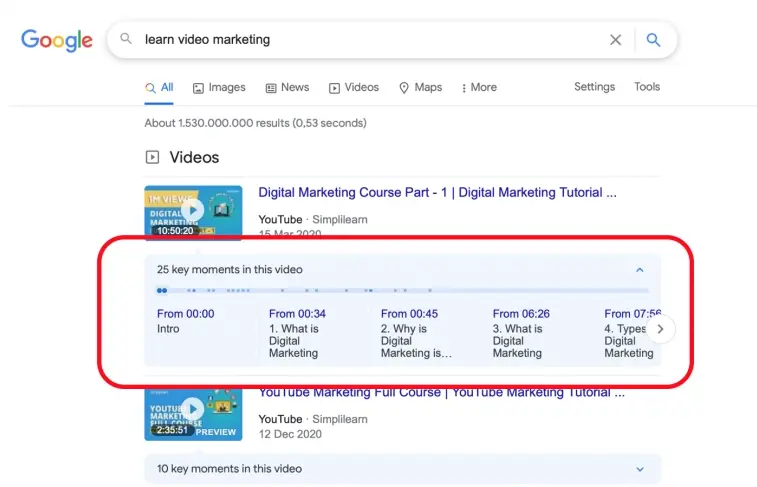
That means your chapter labels aren’t just UI details — they’re search signals. As more creators adopt this, the ecosystem is tilting: Google increasingly expects good timestamp structure. In practice, if your chapter titles are well-aligned with search intent and you’ve provided them manually, Google is more likely to display those jumps, improving your SEO for video content.
One update to watch for: Google is investing in more semantic understanding of video — so in 2025, you may see hybrid chapter/prominent snippet models where key moments are surfaced as answers or “People Also Ask” options.
Best Practices for Using These Tools in 2026
- Enable auto chapters by default, but always review and refine. The new workflow assumes auto first, human edit later.
- Import auto chapters into your description quickly, then polish and rename to match SEO goals and narrative consistency.
- Embed SeekToAction / Key Moments structured data (or ensure your timestamp markup is compliant) to help Google trust your chapter labels over generic auto guesses.
- Be selective where you override: leave auto chapters intact in safe, low-risk segments; override only where pacing, suspense, or naming matter.
- Monitor how Google surfaces your chapters: use Search Console to see if your key moments show as jump links, and refine titles accordingly.
In sum, 2025 is a turning point: Creators no longer choose between YouTube UX and Google SEO — the tools are converging so that good chapter structure rewards both retention and discoverability.
Crafting Chapters That Work for Humans and Algorithms
YouTube’s shift toward smarter Chapters and Key Moments has made one thing clear: discovery and storytelling no longer sit on opposite ends of the spectrum. With Studio now auto-generating timestamps and Google indexing them through SeekToAction, creators can reach new audiences in search — but the real skill lies in shaping those jumps without breaking narrative flow.
The best results come from hybrid thinking: let automation map the skeleton, then refine it with human intention. Label chapters for clarity, curiosity, and search alignment — not spoilers. Treat every timestamp as both a viewer invitation and a retention test.
As YouTube and Google converge on smarter metadata, creators who master this dual language of storytelling and structure will rise higher in both search and satisfaction. The future of video SEO timestamps isn’t about feeding algorithms; it’s about designing discovery that feels natural to watch.
Frequently Asked Questions
How can creators improve their YouTube ranking beyond just adding chapters?
Optimizing metadata like titles, descriptions, and tags still plays a major role, especially when paired with YouTube SEO services that refine on-page and keyword strategies across every upload.
What’s the difference between regular SEO and video-specific optimization?
Video content relies heavily on engagement signals, thumbnails, and structured timestamps — core elements emphasized in specialized video SEO services for online visibility designed to enhance both YouTube and Google Search performance.
How do trending searches influence which chapters appear in Google results?
Chapters aligned with real-time discovery topics tend to perform better when creators track trending keywords relevant to their niche and naturally integrate them into chapter labels and video titles.
Can external growth tools help sustain retention after Key Moments boost traffic?
Yes, comprehensive YouTube growth services combining analytics and content planning can reveal which segments draw search viewers yet underperform on retention, allowing creators to adapt pacing and structure.
Should creators use YouTube Community posts to promote chaptered videos?
Repurposing snippets or visuals from key timestamps in Community posts on YouTube helps re-engage subscribers and encourage re-entry into longer videos, boosting overall session duration.
How can analytics refine future chapter placement?
Deeper data exploration through YouTube Analytics can uncover viewer drop-offs or replays tied to specific timestamps, guiding smarter segmentation in future uploads.
What editing habits improve clarity before timestamping content?
Efficient creators simplify their cuts, pacing, and visual cues following proven methods in how to edit YouTube videos for viewer flow so that chapter transitions feel seamless rather than abrupt.
How can Shorts extend the reach of chaptered long-form content?
Highlighting peak segments as YouTube Shorts drives new discovery paths while funnelling fresh audiences back into the full video via Key Moments.


![YouTube Title Generator [FREE] : Powered by AI](https://s.influencermarketinghub.com/imaginary/resize?width=400&height=200&type=webp&url=https://influencermarketinghub.com/wp-content/uploads/2021/09/YouTube-Title-Generator.png)
