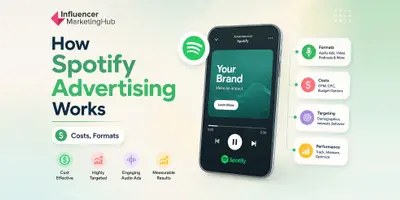
Spotify display ads are one of the simplest ways for brands to get a visual message in front of Spotify listeners. Unlike audio ads, which rely on sound to communicate a message, display ads use static creative assets that appear throughout the Spotify app on mobile and desktop devices.
Many marketers focus on Spotify's audio inventory first, which makes sense given the platform's roots in music and podcast streaming.
Display ads, however, serve a different purpose. They can reinforce brand awareness, support product launches, drive website traffic, and give advertisers a clickable visual format that works alongside broader Spotify campaigns.
Spotify offers display inventory through both Spotify Ads Manager and Spotify Ad Exchange, giving advertisers access to placements across key areas of the platform. Campaigns can be targeted using audience signals such as demographics, location, interests, and listening behavior.
In this guide, we'll cover how Spotify display ads work, where they appear, current display ad specifications, targeting options, Spotify Ads costs, best practices, and when they make sense compared to other Spotify advertising formats.
- What Are Spotify Display Ads?
- Types of Spotify Display and Visual Ad Formats
- Where Do Spotify Display Ads Appear?
- Spotify Display Ad Specifications
- How to Create a Spotify Display Ad Campaign
- Spotify Display Ad Targeting Options
- How Much Do Spotify Display Ads Cost?
- Spotify Display Ad Best Practices
- More Than Just Banner Ads
- Frequently Asked Questions
What Are Spotify Display Ads?
Spotify Display Ads Definition
Spotify display ads are visual banner-style advertisements that appear across Spotify's app and desktop experiences. They allow advertisers to combine imagery, branding, and a clickable call-to-action within placements that users encounter while browsing, searching, or listening on the platform.
Display ads differ from Spotify's audio and video formats because they rely entirely on visual creative. Instead of delivering a spoken message, advertisers use images and text to capture attention and encourage action.
Spotify currently offers several display placements across its advertising ecosystem. Depending on the buying method and available inventory, ads may appear in locations such as the Now Playing screen, Browse pages, Search results, Homepage feeds, or desktop leaderboard placements.
For advertisers, display ads are often used to support objectives such as:
- Brand awareness
- Website traffic
- Product launches
- Event promotion
- App downloads
- Retargeting and cross-channel campaigns
Display ads can also complement audio campaigns. A listener might hear an audio ad while streaming music and later encounter a display ad from the same brand elsewhere in the Spotify experience. Combining formats can help reinforce messaging and increase campaign visibility.
The format remains particularly attractive for advertisers who already have static creative assets available. Producing a display ad typically requires far less creative investment than developing a video campaign, making it one of the more accessible entry points into Spotify advertising.
From a campaign planning perspective, Spotify display ads sit somewhere between traditional banner advertising and streaming media advertising. Advertisers gain access to Spotify's audience targeting capabilities while maintaining the simplicity and familiarity of standard display creative.
Types of Spotify Display and Visual Ad Formats
Spotify offers several visual advertising formats, each designed for different campaign goals. Some formats focus on simplicity and reach, while others provide more room for storytelling, product discovery, or programmatic buying.
| Format | Available Through | Best For |
| In-Feed Display Ads | Spotify Ads Manager, Direct IO | Awareness and website traffic |
| Carousel Ads | Spotify Ads Manager | Multiple products and storytelling |
| Ad Exchange Display Ads | Programmatic DSPs | Automated buying and scale |
| Leaderboard Ads | Spotify Ad Exchange | Premium visibility |
Spotify In-Feed Display Ads
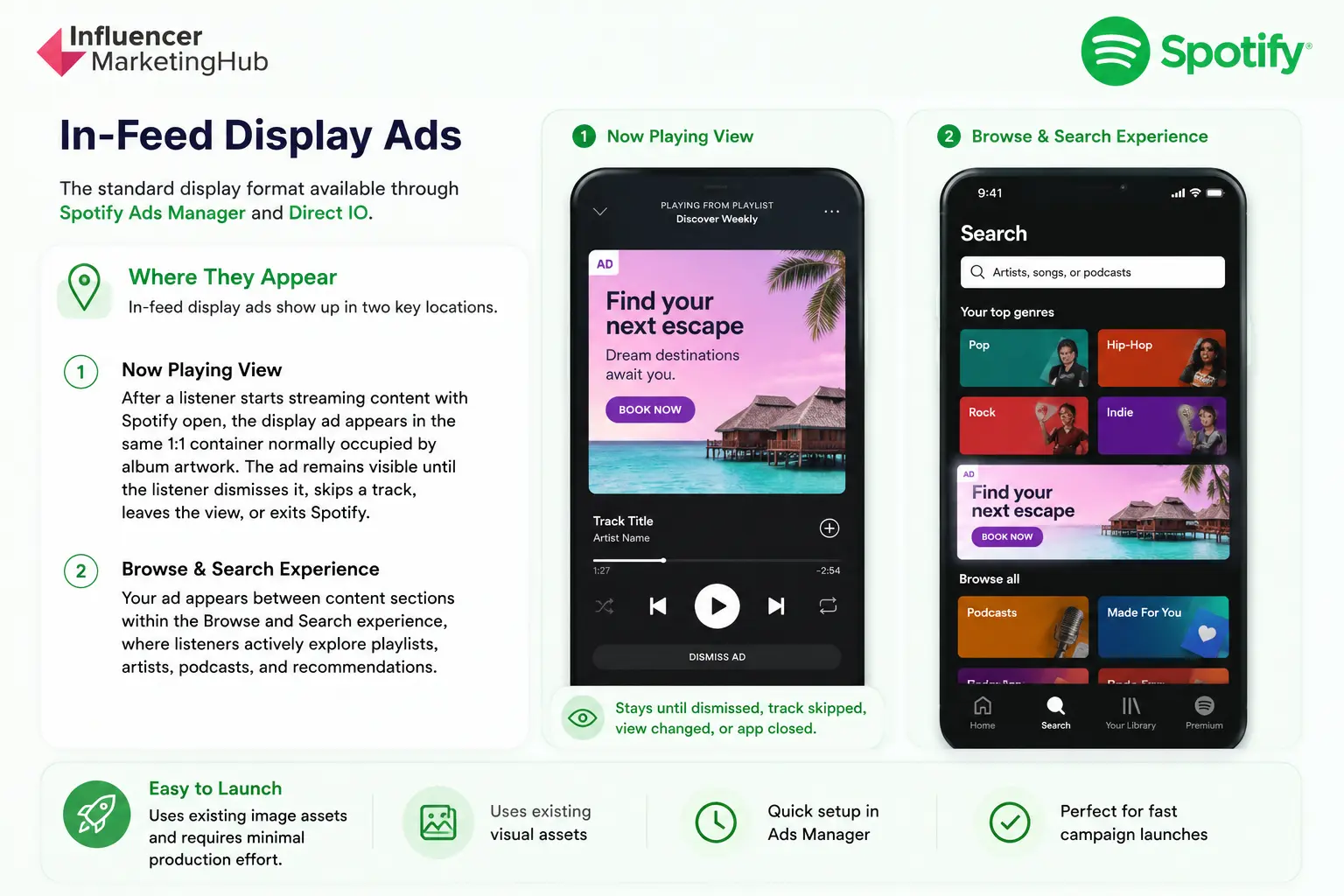
In-feed display ads are the standard display format available through Spotify Ads Manager and Direct IO.
These ads appear in two primary locations.
The first placement is the Now Playing view. After a listener starts streaming content with Spotify open, the display ad appears in the same 1:1 container normally occupied by album artwork. The ad remains visible until the listener dismisses it, skips a track, leaves the view, or exits Spotify.
The second placement appears within the Browse and Search experience, where listeners actively explore playlists, artists, podcasts, and recommendations.
For many advertisers, this is the easiest Spotify visual format to launch because it uses existing image assets and requires minimal production effort.
Spotify Carousel Ads
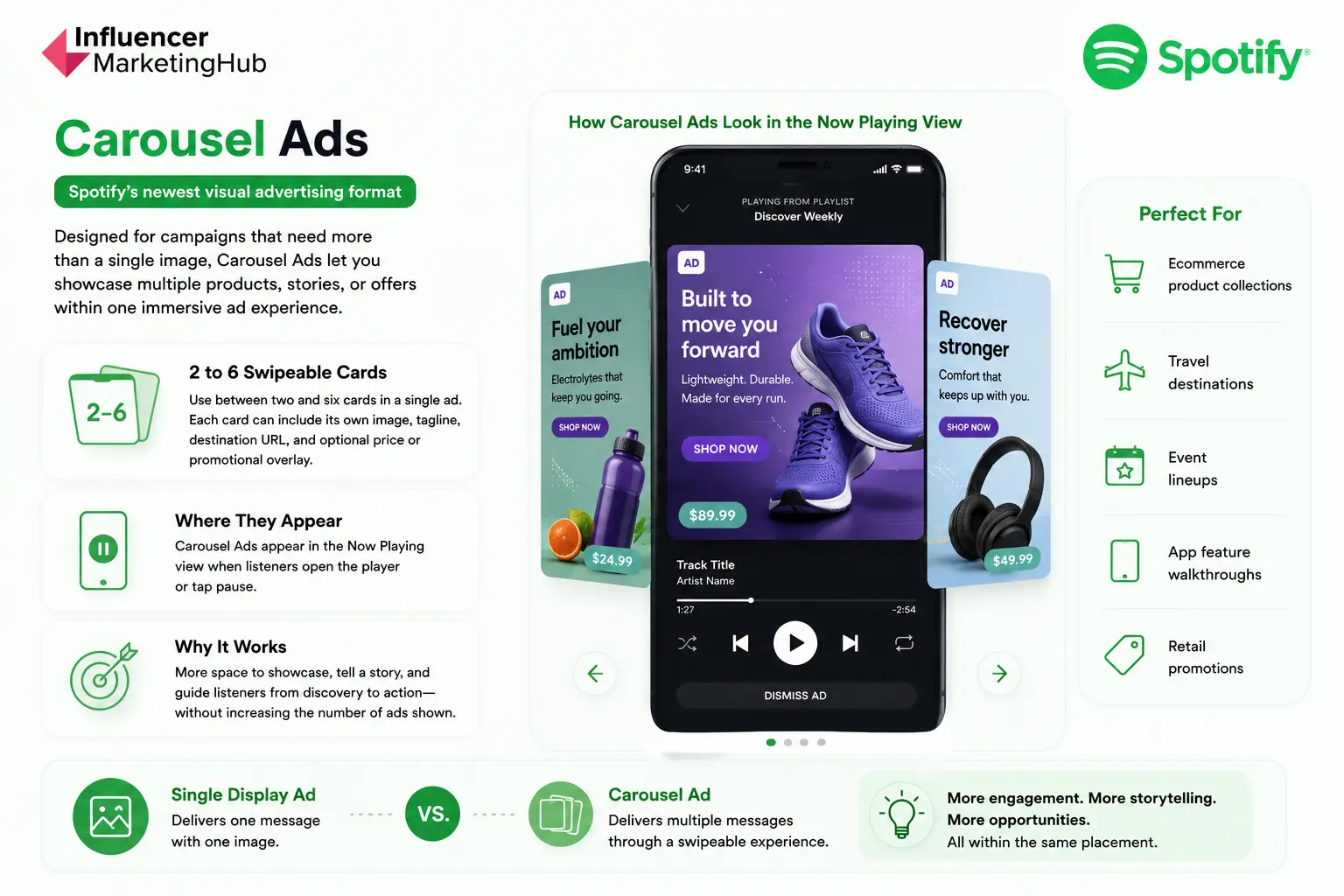
Carousel Ads are Spotify's newest visual advertising format and are designed for campaigns that need more than a single image.
Rather than presenting one creative asset, Carousel Ads allow advertisers to use between two and six swipeable cards within a single ad experience. Each card can have its own image, tagline, destination URL, and optional price or promotional overlay.
Carousel Ads appear in the Now Playing view when listeners open the player or tap pause. Spotify describes the format as a way to give advertisers more space to showcase products, build sequential stories, or guide users from discovery to action without increasing the number of ads shown.
The format can be particularly useful for:
- Ecommerce product collections
- Travel destinations
- Event lineups
- App feature walkthroughs
- Retail promotions
A single display ad delivers one message. A carousel campaign can deliver several messages within the same placement.
Spotify Ad Exchange Display Ads
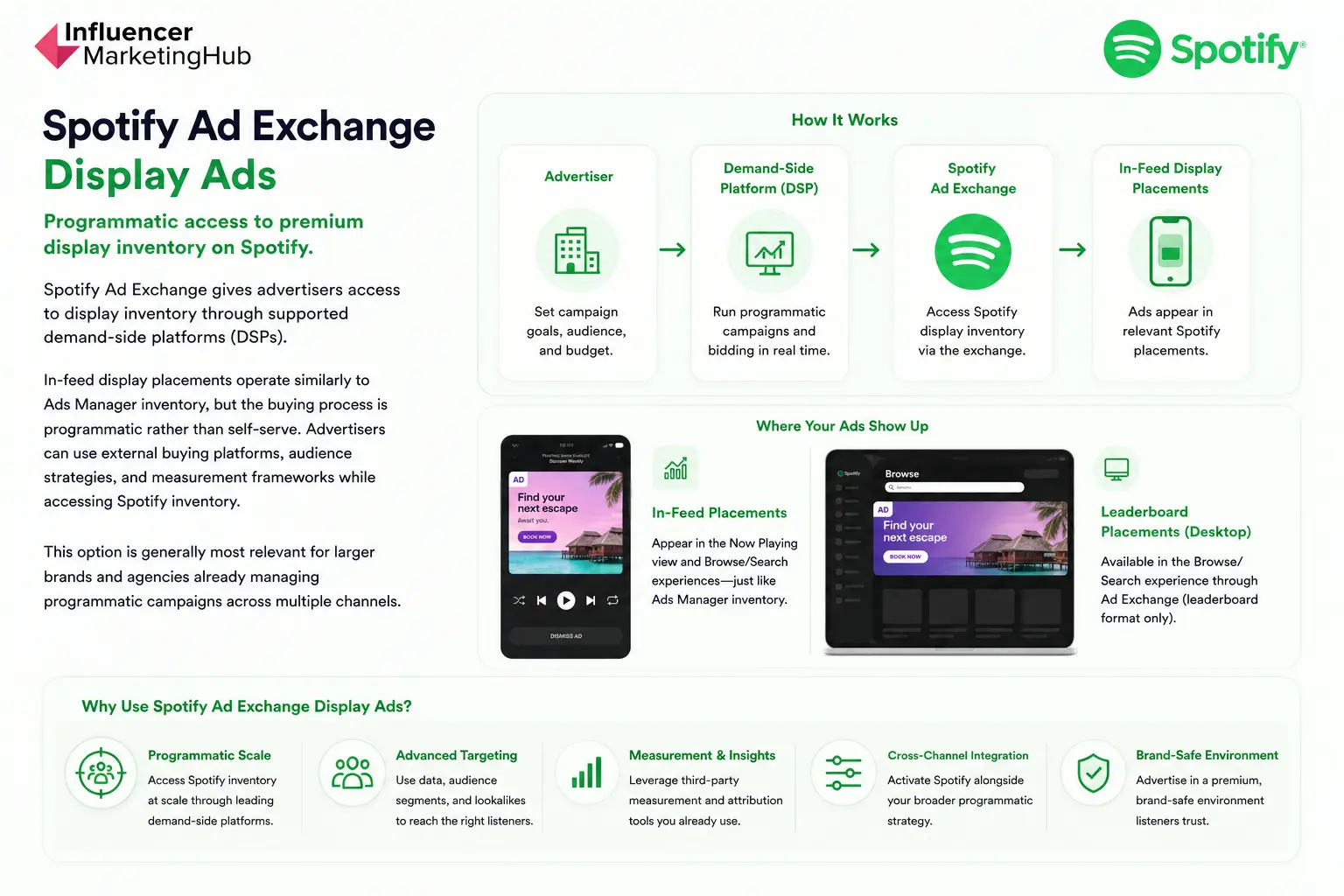
Spotify Ad Exchange gives advertisers access to display inventory through supported demand-side platforms (DSPs).
In-feed display placements operate similarly to Ads Manager inventory, but the buying process is programmatic rather than self-serve. Advertisers can use external buying platforms, audience strategies, and measurement frameworks while accessing Spotify inventory.
This option is generally most relevant for larger brands and agencies already managing programmatic campaigns across multiple channels.
Leaderboard Display Ads
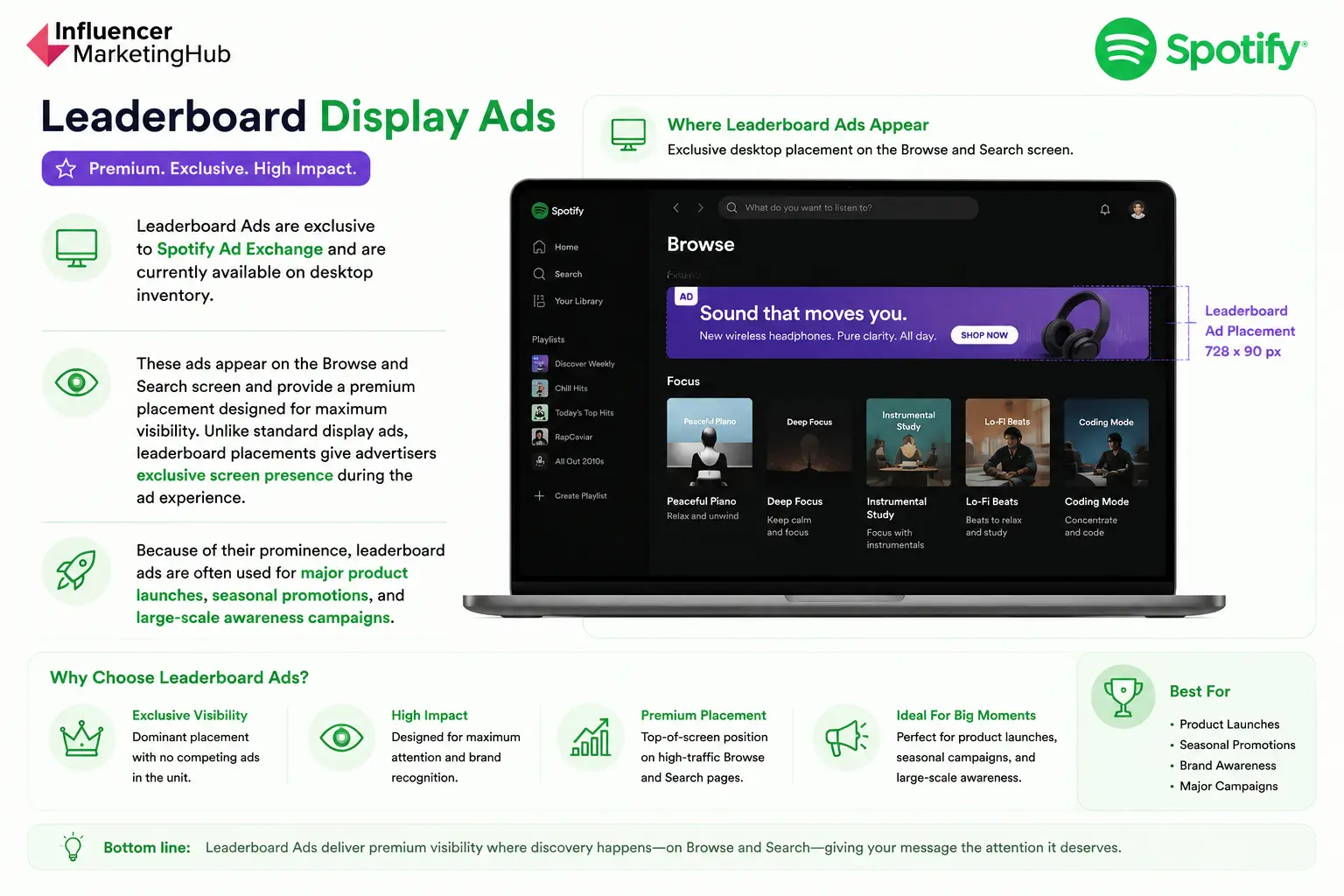
Leaderboard Ads are exclusive to Spotify Ad Exchange and are currently available on desktop inventory.
These ads appear on the Browse and Search screen and provide a premium placement designed for maximum visibility. Unlike standard display ads, leaderboard placements give advertisers exclusive screen presence during the ad experience.
Because of their prominence, leaderboard ads are often used for major product launches, seasonal promotions, and large-scale awareness campaigns.
Choosing the right format ultimately depends on campaign goals. Brands looking for a simple visual message may find standard display ads sufficient. Advertisers promoting multiple products or offers may benefit from Carousel Ads, while programmatic teams often prefer Ad Exchange inventory and leaderboard placements.
Where Do Spotify Display Ads Appear?
Spotify display ads appear throughout the platform's mobile and desktop environments, giving advertisers multiple opportunities to reach listeners while they browse, search, and consume content.
Placement matters because user behavior changes depending on where an ad is shown. Someone actively searching for music behaves differently from someone casually browsing playlists or viewing the Now Playing screen.
The most common Spotify display ad placements include:
| Placement | Device | Primary Purpose |
| Now Playing View | Mobile | High-visibility awareness |
| Browse | Mobile | Discovery and exploration |
| Search | Mobile | Intent-driven exposure |
| Homepage Feed | Mobile | Broad audience reach |
| Leaderboard | Desktop | Desktop awareness campaigns |
Now Playing View
The Now Playing screen is one of Spotify's most visible mobile placements. Users visit this screen while actively listening to music, podcasts, or audiobooks, making it a valuable location for advertisers seeking strong visibility.
Because listeners frequently return to the Now Playing screen during a session, placements here can generate repeated exposure throughout a campaign.
Browse and Search
Browse and Search placements allow brands to reach users while they're actively looking for content.
Search inventory can be particularly valuable because listeners have already demonstrated intent. Someone searching for a specific artist, podcast, playlist, or genre is actively engaging with the platform rather than passively consuming content.
Browse placements support discovery moments when users are exploring recommendations, playlists, charts, and other content categories.
Homepage Feed
Homepage placements provide broad visibility across Spotify's mobile experience.
Many users begin their listening sessions on the Home screen, making it an effective placement for awareness-focused campaigns that prioritize reach.
Desktop Leaderboards
Desktop display inventory is often available through Spotify Ad Exchange.
Leaderboard placements offer larger creative real estate than many mobile placements and can help advertisers maintain visibility among users listening on desktop devices throughout the workday.
The exact placements available can vary depending on campaign setup, buying method, geography, and available inventory. Advertisers using Spotify Ads Manager or Spotify Ad Exchange should review current placement availability when building campaigns.
Spotify Display Ad Specifications
Creative specifications are one of the most important parts of launching a Spotify display campaign. Incorrect dimensions, unsupported file formats, or missing creative elements can lead to delays during the approval process or prevent ads from serving correctly.
Requirements vary depending on the display format. Standard in-feed display ads, Carousel Ads, Ad Exchange inventory, and Leaderboard Ads all have different creative specifications, dimensions, and asset requirements.
The tables below summarize the current requirements for each format.
Spotify Display Ad Format Comparison
| Format | Placement | Best For | Creative Type |
| In-Feed Display Ads | Now Playing, Browse, Search | Awareness, Traffic | Single Image |
| Carousel Ads | Now Playing, Pause Screen | Storytelling, Multiple Products | 2-6 Cards |
| Ad Exchange Display Ads | Programmatic Inventory | Scale and Automation | Single Image |
| Leaderboard Ads | Desktop Browse/Search | Premium Visibility | Banner |
In-Feed Display Ad Specifications
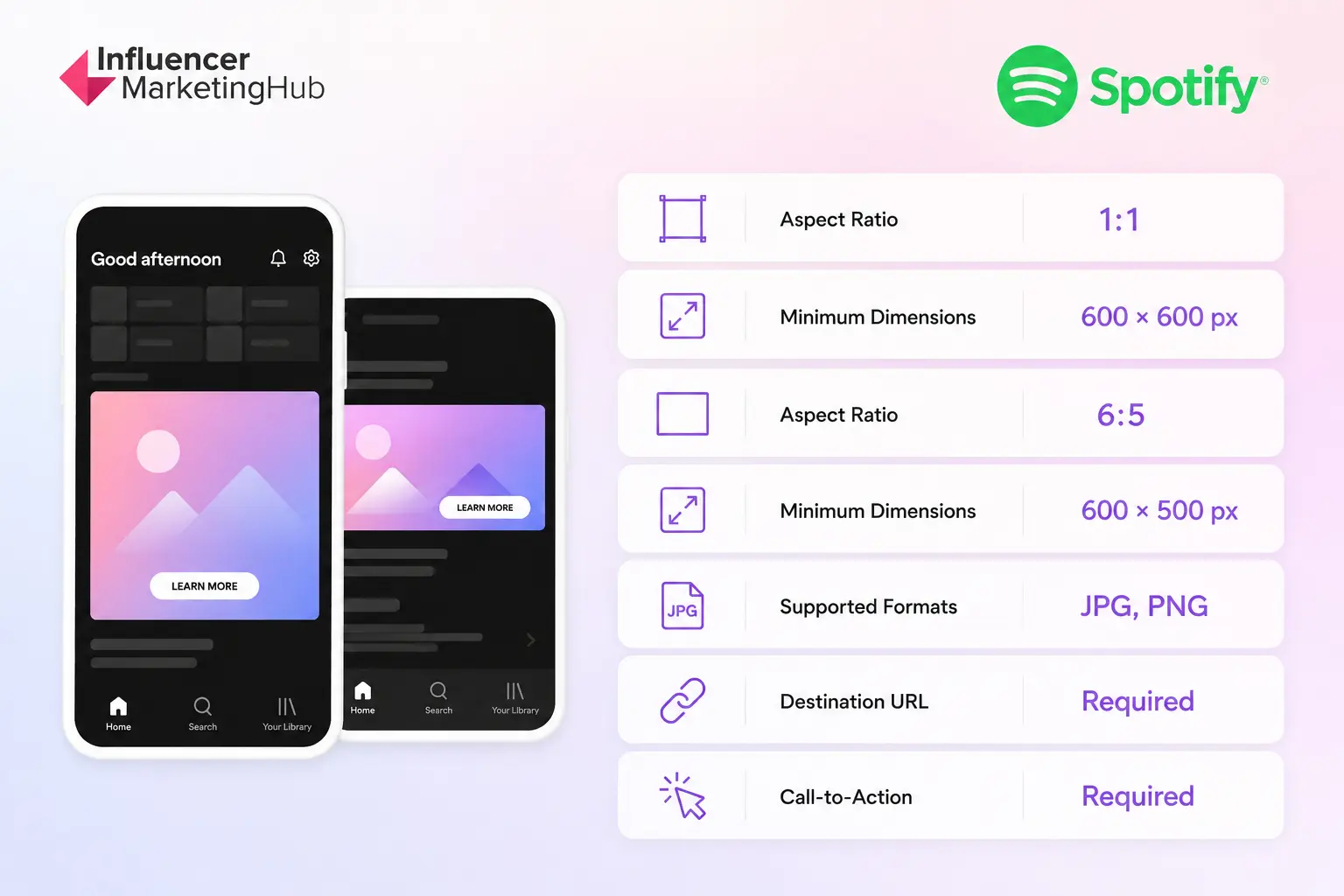
In-feed display ads are the most commonly used Spotify display format. They appear in the Now Playing view and Browse/Search experience and can often be built using existing creative assets.
Spotify supports both square and rectangular display creatives.
A 1:1 creative uses minimum dimensions of 600 × 600 pixels, while a 6:5 creative uses minimum dimensions of 600 × 500 pixels.
Starting with larger source files often helps preserve image quality across different placements and device types.
Many advertisers searching for Spotify banner sizes are ultimately looking for these requirements.
Spotify currently accepts JPG and PNG image files for display advertising.
PNG files can be useful when creative assets require sharper graphic elements, while JPG files often provide smaller file sizes for image-heavy designs.
Carousel Ad Specifications
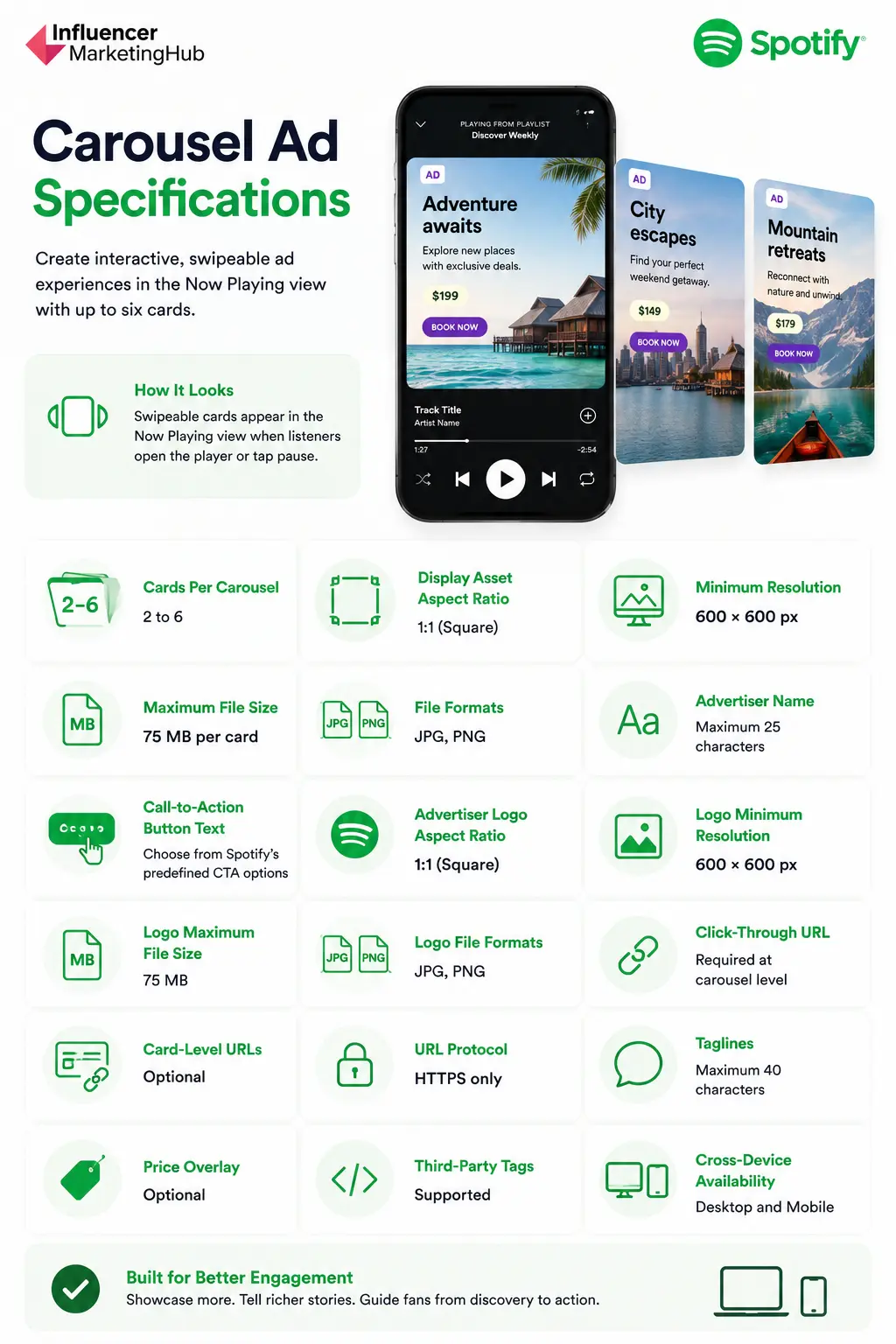
Carousel Ads allow you to add 2 to 6 static image ads, all 600 x 600 px (1:1) aspect ratio.
These ads provide more creative flexibility than standard display ads. Advertisers can showcase multiple products, tell sequential stories, highlight event lineups, or guide listeners through several stages of a campaign within a single ad experience.
One of the format's biggest advantages is flexibility. Each card can contain its own destination URL, tagline, and optional pricing information, allowing advertisers to create more dynamic experiences than a single-image display ad.
Spotify Ad Exchange Display Specifications
Spotify also offers display inventory through Spotify Ad Exchange, which is currently available through supported demand-side platforms (DSPs).
Ad Exchange inventory supports additional creative formats and specifications.
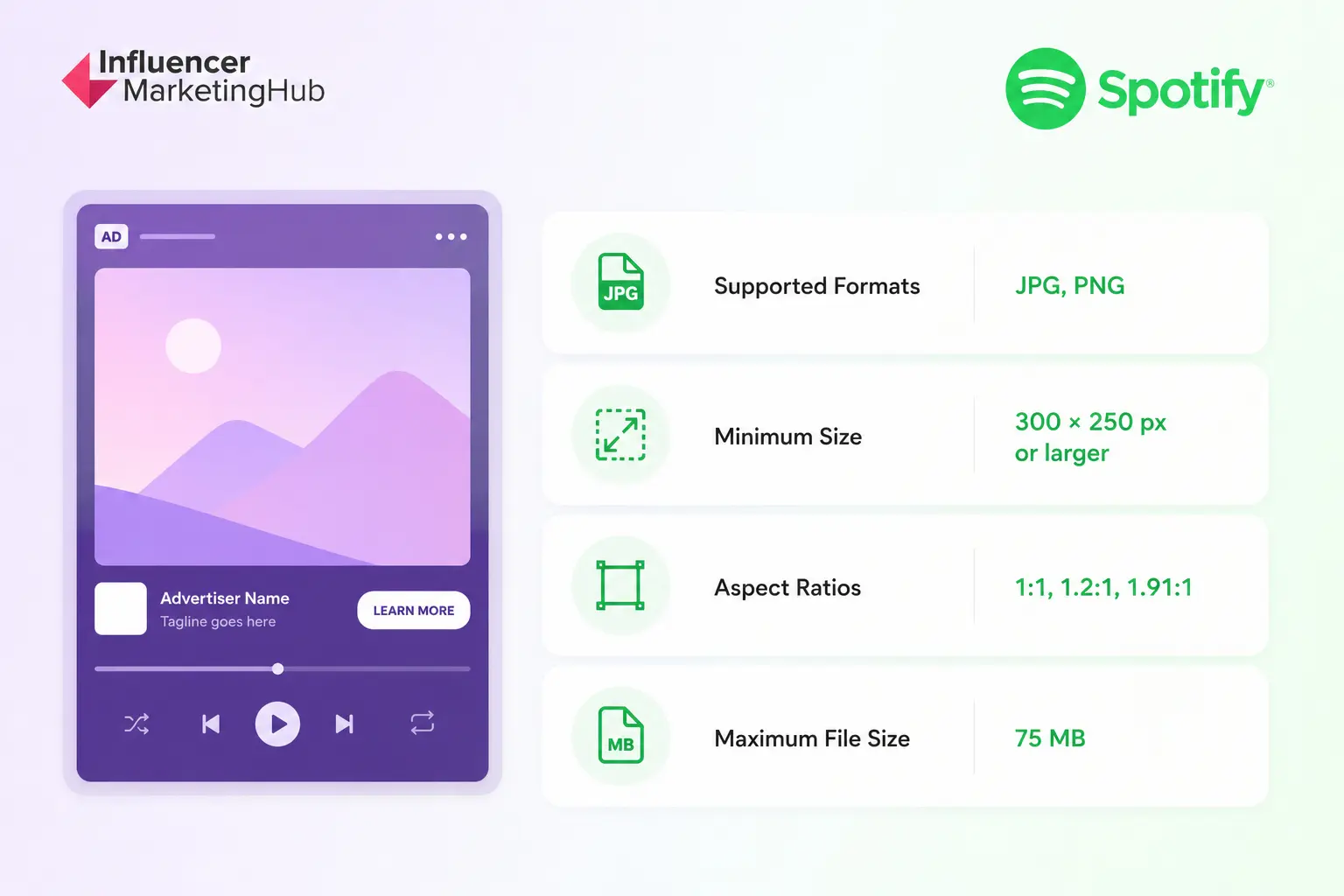
Spotify Ad Exchange inventory allows advertisers to access Spotify placements through supported demand-side platforms rather than through Spotify Ads Manager directly.
The format is often used by agencies and larger advertisers running programmatic campaigns across multiple channels.
Spotify Leaderboard Display Ad Specifications
Spotify Leaderboard Display Ads are a premium display format available through Spotify Ad Exchange. Unlike in-feed display ads, leaderboard placements occupy the advertising space exclusively for up to 30 seconds while the Spotify app is actively in focus.
Because of their visibility, leaderboard ads are often used for brand awareness campaigns, product launches, and other initiatives where maximum exposure is a priority.
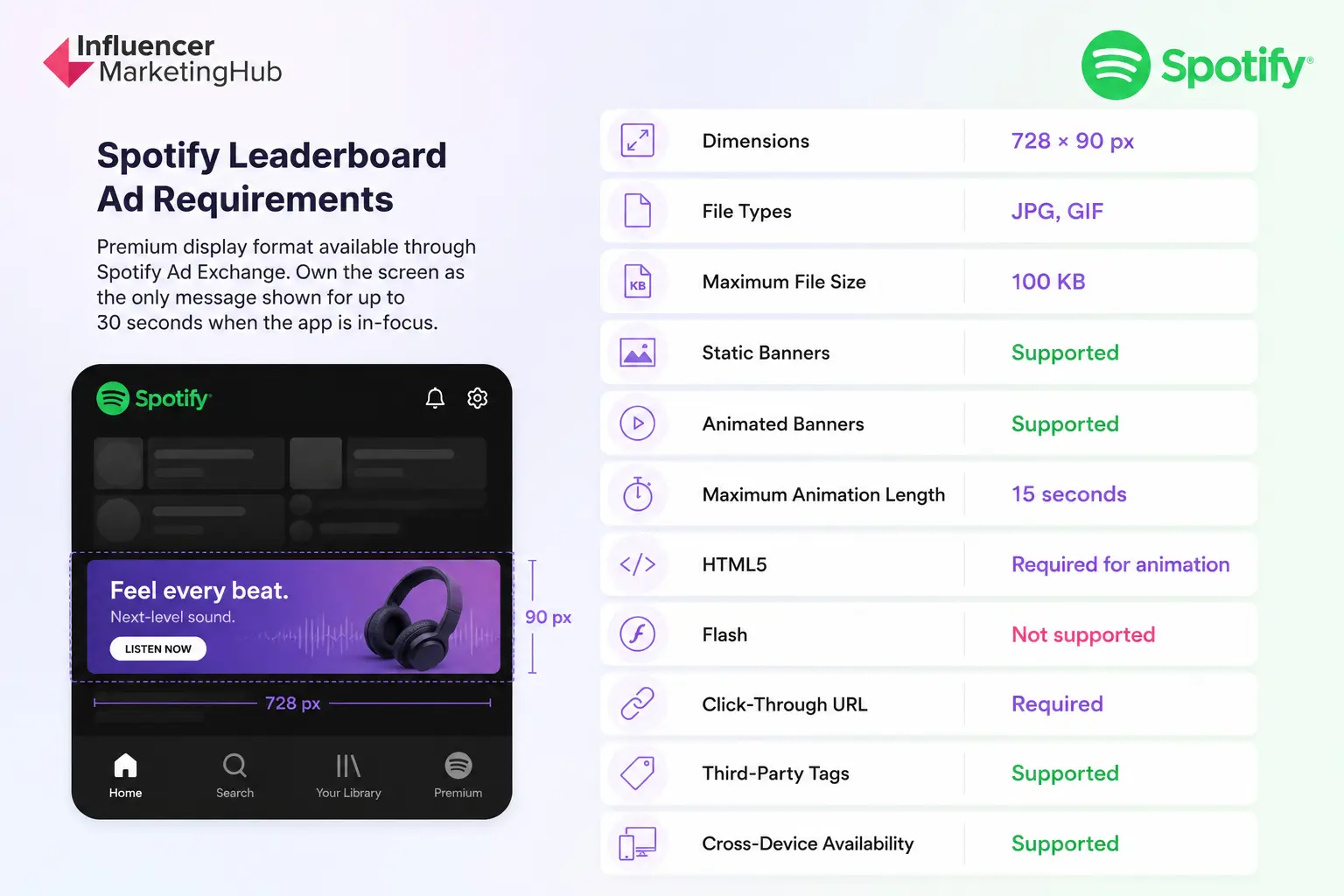
Leaderboard Ads are exclusive to Spotify Ad Exchange and currently appear on desktop Browse and Search screens.
Because leaderboard placements provide exclusive visibility within the advertising space, they are commonly used for product launches, seasonal promotions, major announcements, and large-scale awareness campaigns.
Advertisers using animation should pay close attention to Spotify's technical requirements. Animation is limited to 15 seconds and must use HTML5, while Flash-based creatives are not supported.
How to Create a Spotify Display Ad Campaign
Launching a Spotify display campaign is relatively straightforward, especially for advertisers already familiar with self-serve advertising platforms.
Spotify Ads Manager allows advertisers to create campaigns, define audiences, upload creatives, and manage budgets from a single dashboard. Most campaigns follow a similar setup process regardless of industry or objective.
1. Choose a Campaign Objective
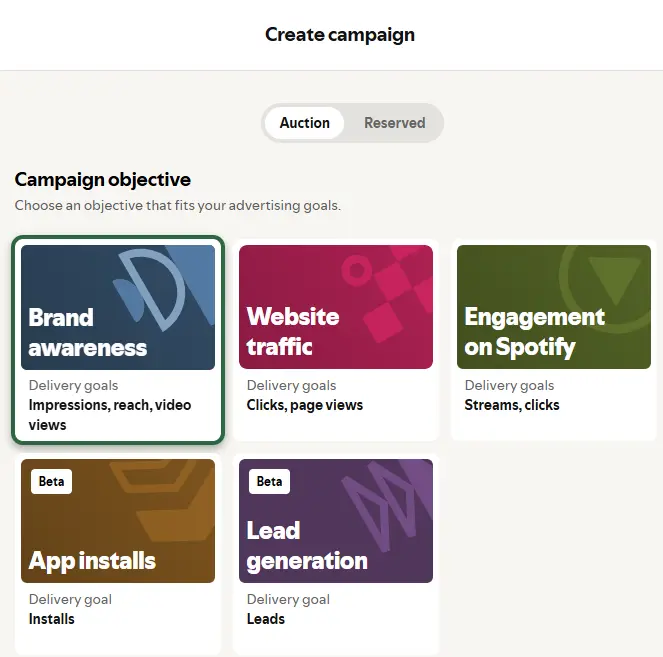
The first step is selecting a campaign objective.
Objectives influence how Spotify delivers ads and measures performance. Depending on availability and campaign goals, advertisers may focus on outcomes such as awareness, reach, website traffic, or engagement.
Starting with a clear objective makes it easier to evaluate performance later.
2. Define Your Audience
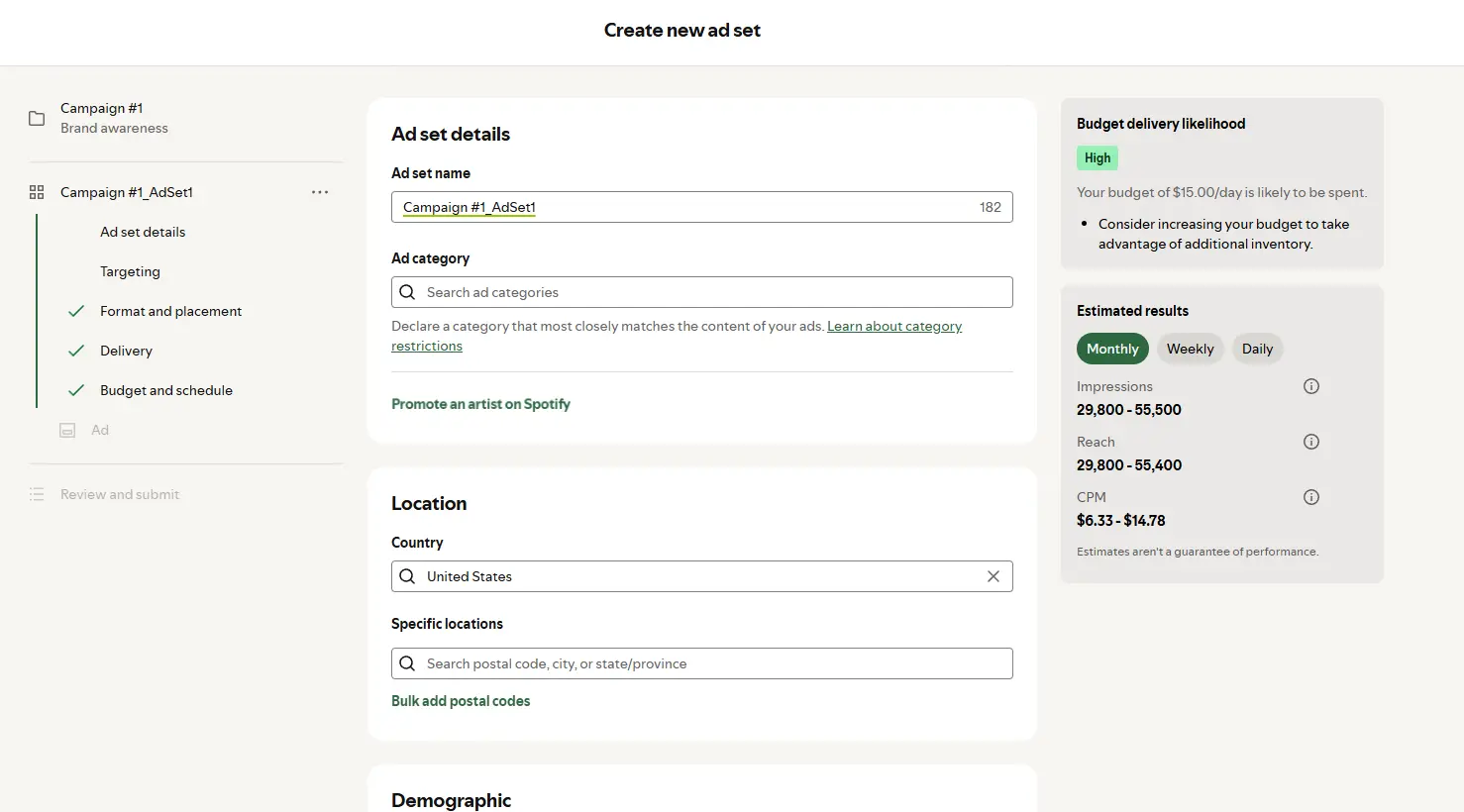
Spotify offers several audience targeting options that help advertisers reach specific listener groups.
Audience selections can include:
- Age
- Gender
- Location
- Language
- Device type
- Interests
- Listening behaviors
Audience size often affects both reach and campaign costs. Highly specific targeting can improve relevance but may reduce available inventory.
3. Set a Budget and Schedule
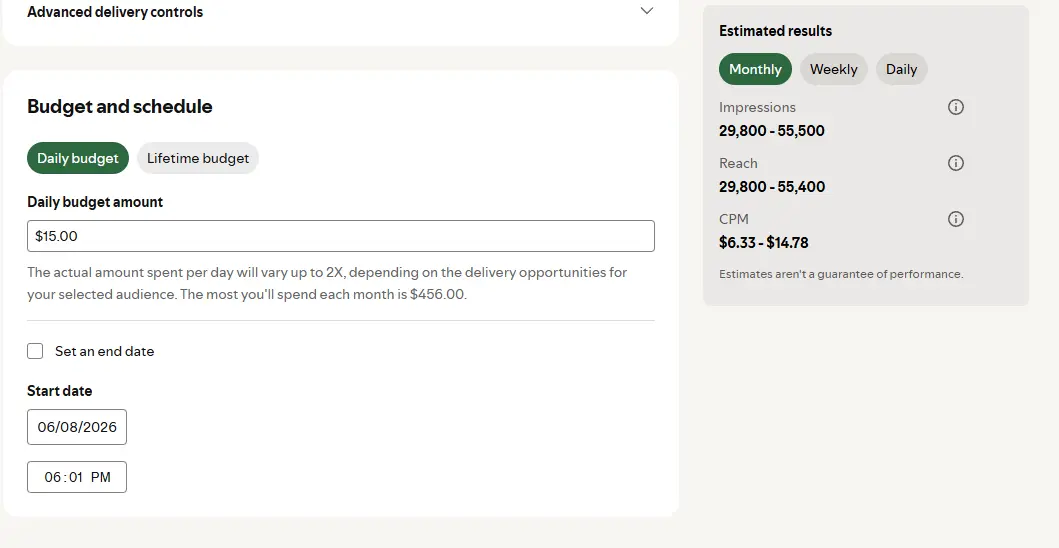
Spotify campaigns operate on an auction-based system.
Advertisers define campaign budgets, delivery dates, and pacing preferences before launch. Costs can vary based on audience competition, geography, inventory availability, and seasonality.
Many advertisers start with smaller test budgets before expanding spend based on performance data.
4. Upload Creative Assets
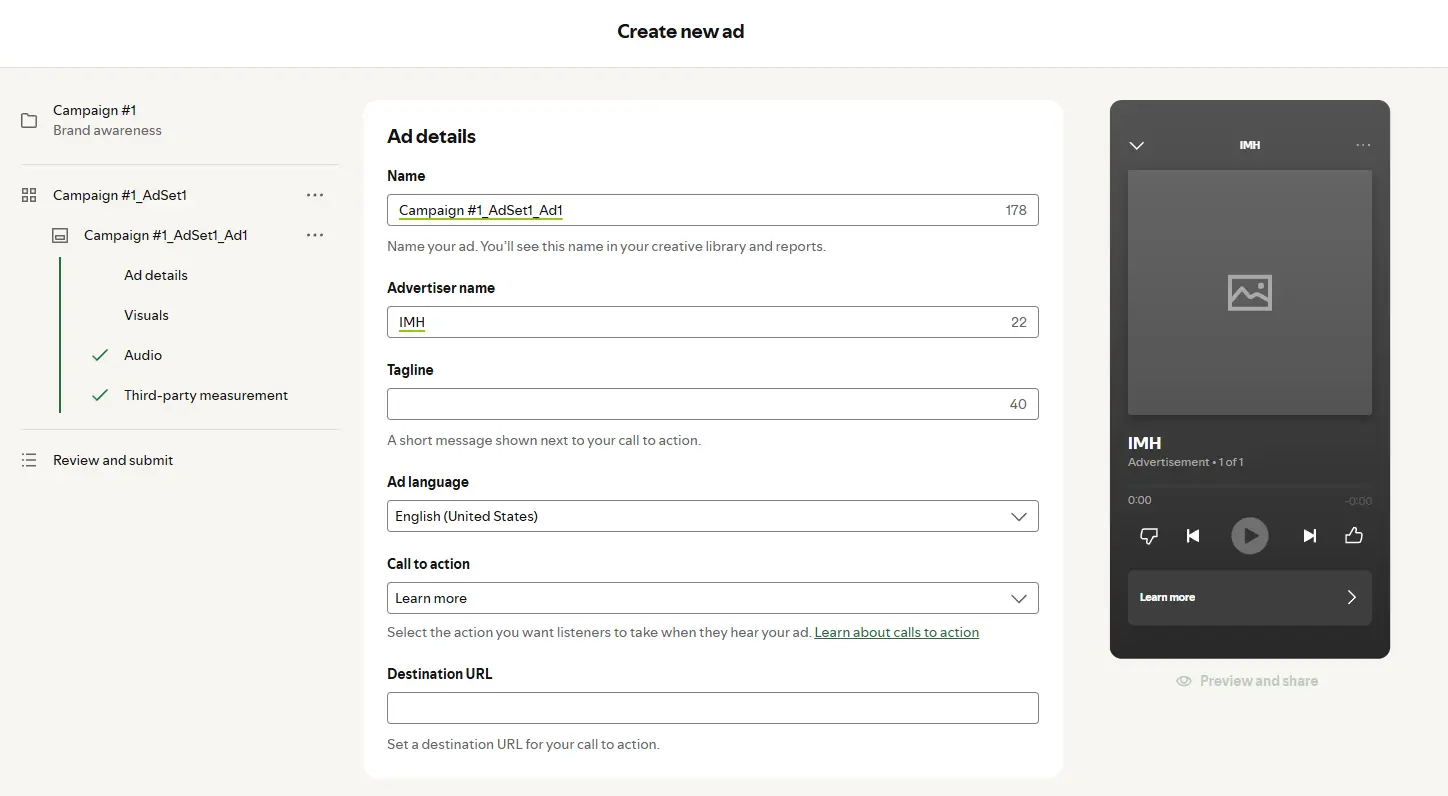
Display campaigns require approved creative assets that meet Spotify's display specifications.
Before uploading creatives, verify:
- Correct dimensions
- Supported file format
- Working destination URL
- Clear call-to-action
- Mobile-friendly design
Creative approval issues are often caused by technical requirements rather than campaign settings.
5. Review and Launch
After campaign settings and creative assets are finalized, Spotify reviews the advertisement before delivery begins.
Approval timelines can vary, so advertisers planning product launches, promotions, or seasonal campaigns should leave enough time for creative review.
Once approved, campaigns begin serving across eligible Spotify inventory based on audience targeting, bidding conditions, and available placements.
Spotify Display Ad Targeting Options
Spotify's audience data is one of the main reasons advertisers use the platform. Campaigns can reach listeners based on demographic information, location, device usage, interests, and listening behavior.
Rather than targeting people based solely on websites they visit, Spotify can use signals generated through music, podcast, and audio consumption habits.
| Targeting Type | Available |
| Age | Yes |
| Gender | Yes |
| Location | Yes |
| Language | Yes |
| Device | Yes |
| Interest Categories | Yes |
| Listening Context | Yes |
Demographic Targeting
Demographic targeting allows advertisers to narrow audiences based on age and gender.
A brand promoting products for young adults may focus delivery on listeners within specific age ranges, while broader awareness campaigns may use fewer restrictions to maximize reach.
Geographic Targeting
Location targeting can be particularly useful for regional campaigns.
Advertisers can focus delivery on specific countries, states, cities, or markets depending on campaign availability and objectives.
Local businesses, event organizers, and regional product launches often benefit from geographic targeting controls.
Interest-Based Targeting
Spotify categorizes audiences using interests and content consumption patterns.
For example, advertisers may be able to reach listeners interested in fitness, gaming, entertainment, technology, lifestyle content, and other audience segments depending on available targeting options.
Interest targeting often helps improve relevance without becoming overly restrictive.
Device Targeting
Campaigns can also be adjusted based on the devices listeners use to access Spotify.
Mobile targeting is particularly important for display advertising because a significant portion of Spotify consumption occurs on smartphones. Creative assets should always be reviewed on smaller screens before launch.
Balancing Reach and Precision
Many advertisers make the mistake of narrowing audiences too aggressively.
Extremely restrictive targeting can limit inventory and increase delivery challenges. Broader audience groups often provide better opportunities for optimization, especially during the early stages of a campaign.
Testing multiple audience segments is usually more effective than assuming a single audience definition will produce the best results from day one.
How Much Do Spotify Display Ads Cost?
Spotify display ads use an auction-based pricing model, which means there is no fixed cost for every campaign. With that said, advertisers launching campaigns through Spotify Ads Manager must meet a minimum budget requirement of $250 (in their local currency).
Spotify also does not publish standard display ad CPMs. Instead, campaigns compete for available inventory through Spotify Ads Manager or supported programmatic buying platforms.
One of the few public pricing details Spotify provides is its minimum campaign budget.
| Pricing Detail | Information |
| Pricing Model | Auction-Based |
| Fixed Display CPM | Not Published |
| Minimum Campaign Budget | $250 (Local Currency) |
| Buying Options | Spotify Ads Manager, Spotify Ad Exchange |
Several factors can influence campaign costs.
| Cost Factor | Potential Impact |
| Audience Competition | High |
| Geographic Targeting | High |
| Audience Size | Medium |
| Placement Type | Medium |
| Campaign Timing | Medium |
| Inventory Availability | Medium |
For example, targeting a broad audience across a large market may produce different costs than targeting a highly specific audience segment in a competitive region.
Most advertisers use the minimum budget as a starting point when testing creative, targeting strategies, and campaign objectives. Performance data from those initial campaigns can then help determine whether additional investment makes sense.
Rather than focusing on a specific CPM benchmark, it's usually more useful to focus on campaign goals, audience fit, and creative quality. Strong targeting and relevant creative often have a greater impact on campaign performance than small differences in media costs.
Spotify Display Ad Best Practices
Spotify display ads often appear while listeners are browsing playlists, searching for content, viewing the Now Playing screen, or interacting with the app between listening sessions. Creative has only a few moments to communicate its message, making simplicity one of the most important success factors.
Design for Mobile First
Many of Spotify's most prominent display placements are mobile experiences, including the Now Playing view, Browse, Search, and Carousel Ad inventory.
Spotify has 761 million monthly active users, making it one of the world's largest digital media platforms. Creative that looks great on a desktop monitor can become difficult to read on a smartphone screen, where many listeners interact with Spotify throughout the day.
Large typography, clear visual hierarchy, and minimal clutter can help ensure important information remains visible across devices.
Mobile-first creative is especially important for display campaigns because several of Spotify's highest-visibility placements appear directly within the app experience while listeners browse content, search for music, or interact with the Now Playing screen.
Focus on One Message
Display ads perform best when they communicate a single idea.
Trying to promote multiple products, offers, or calls-to-action within one creative can make the advertisement harder to understand. Research across advertising and consumer psychology consistently shows that increasing cognitive load makes it more difficult for people to process marketing messages effectively.
Spotify display placements are often viewed while listeners browse content, search for music, or interact with the app between listening sessions. A simple message is generally easier to absorb than a creative competing for attention with multiple headlines, offers, and calls-to-action.
If a campaign needs to showcase several products or messages, Carousel Ads are often a better fit than standard display ads. Spotify's carousel format supports between two and six cards, allowing advertisers to present multiple products, offers, or storylines without overcrowding a single creative.
One display ad should answer one question: what do you want the listener to do next?
Keep Branding Visible
Listeners should be able to identify the advertiser quickly.
Brand logos, colors, and visual identity elements should be easy to recognize without overwhelming the creative.
Branding plays an important role in advertising effectiveness because ads don't just communicate messages. They also help build and refresh memory structures that make a brand easier to recognize and recall later.
Research from the Ehrenberg-Bass Institute has consistently shown that distinctive brand assets such as logos, colors, and visual identifiers help strengthen brand recognition across advertising channels.
Spotify display placements are often viewed for only a brief moment while listeners browse content, search for music, or interact with the app. Clear branding helps ensure the advertiser remains identifiable even when users spend only a few seconds viewing the creative.
Spotify also requires advertiser identification within several display formats, making branding both a creative and technical consideration.
Use a Clear Call-to-Action
Every display ad should give users a clear next step.
Examples might include:
- Learn More
- Shop Now
- Book Today
- Get Tickets
- Download Now
The call-to-action should align closely with the landing page experience. Users who click an ad should immediately find the offer, product, or information that was promoted in the creative.
Match the Landing Page to the Ad
A strong display ad can still underperform if the landing page creates friction.
Someone clicking an ad for a specific product should not land on a generic homepage and be forced to search for it.
Message consistency between the creative and destination page often improves user experience and campaign effectiveness.
Use Carousel Ads When the Story Requires More Space
Standard display ads are designed to communicate one message.
Campaigns that need to showcase multiple products, features, destinations, or promotional offers may benefit from Carousel Ads instead.
Spotify's carousel format allows advertisers to use between two and six cards, each with its own destination URL, tagline, and optional pricing information.
Avoid Overcrowded Creative
Display ads are not landing pages.
Small text, excessive promotional language, and too many visual elements can make a creative difficult to process.
Many effective Spotify campaigns rely on a simple combination of:
- One primary visual
- One core message
- One call-to-action
Listeners should be able to understand the advertisement within seconds.
Test Multiple Creative Variations
Audience targeting is only one variable in campaign performance.
Testing different creative concepts, headlines, imagery, and calls-to-action can help identify which messages resonate most effectively with a target audience.
Creative deserves particular attention because research from Google has found that creative quality drives 70% of advertising effectiveness. In many cases, creative contributes more to campaign performance than targeting, placement, or bidding decisions.
Even small adjustments can influence how people respond to an ad. A different headline, image, call-to-action, or visual layout may produce different engagement patterns despite reaching the same audience.
Rather than relying on a single creative concept, advertisers should test multiple variations and use campaign data to identify what resonates most effectively with listeners over time.
More Than Just Banner Ads
Spotify display ads give advertisers several ways to reach listeners while they're actively engaging with the platform. From standard in-feed placements and Carousel Ads to programmatic Ad Exchange inventory and premium leaderboard formats, Spotify offers options for a wide range of campaign goals.
Success often comes down to matching the right format to the right objective. A simple display ad may be enough for driving traffic, while Carousel Ads can provide more room for product discovery and storytelling.
Before launching a campaign, pay close attention to specifications, creative requirements, targeting options, and user experience. The strongest Spotify display campaigns are usually the ones that communicate a clear message, maintain strong branding, and make it easy for listeners to take the next step.
Frequently Asked Questions
What are Spotify display ads?
Spotify display ads are visual advertisements that appear throughout Spotify's desktop and mobile experiences. Depending on the format, they can appear in the Now Playing view, Browse, Search, or other areas where listeners interact with content.
Where do Spotify display ads appear?
Spotify display ads primarily appear in the Now Playing view and Browse/Search screens. Additional placements are available through Spotify Ad Exchange, including leaderboard inventory on desktop devices.
What size should a Spotify display ad be?
Standard in-feed display ads support 1:1 and 6:5 aspect ratios. Spotify requires minimum dimensions of 600 × 600 pixels for square creatives and 600 × 500 pixels for 6:5 creatives.
What is the difference between Spotify display ads and Carousel Ads?
Standard display ads use a single image creative. Carousel Ads allow advertisers to use between two and six swipeable cards within one ad experience, making them better suited for showcasing multiple products, offers, or messages.
How much do Spotify display ads cost?
Spotify uses an auction-based pricing model, so costs vary by audience, geography, competition, and inventory availability. Spotify Ads Manager currently requires a minimum campaign budget of 250 in local currency.
Can I run Spotify display ads through Spotify Ads Manager?
Yes. Spotify Ads Manager supports in-feed display ads and Carousel Ads. Advertisers can create campaigns, upload creative assets, define audiences, and manage budgets directly within the platform.
What file formats does Spotify support for display ads?
Spotify supports JPG and PNG files for most display formats. Certain leaderboard placements also support GIF files, subject to Spotify's technical requirements.
Are Spotify display ads clickable?
Yes. Spotify display ads support click-through URLs that direct listeners to websites, landing pages, app stores, event pages, or other campaign destinations. Depending on the format, advertisers may also be able to use unique URLs for individual carousel cards.