
Are you still treating TikTok as just a traffic source, or are you starting to see it as a real commerce channel?
As in-app shopping accelerates and social platforms push harder into native checkout, the line between marketing and eCommerce is disappearing fast.
TikTok is no longer just where products go viral. It is where discovery, consideration, and purchase increasingly happen in one place.
In the US alone, more than 1 in 10 households have already completed a purchase through TikTok Shop, signaling a clear shift in how consumers are getting comfortable buying directly inside social platforms. That shift is especially visible in categories like beauty and personal care, which consistently generate the highest revenue on TikTok Shop and continue to set the pace for social commerce adoption.
At the same time, Shopify has become the operational backbone for brands that want to move quickly without sacrificing control. The question is no longer whether Shopify and TikTok should work together, but how tightly you should connect them to support your growth goals.
In this guide, you’ll learn how to integrate Shopify and TikTok in a way that fits your business model. You’ll see what the integration actually does, how to choose the right setup, and how to avoid the common mistakes that slow teams down once campaigns go live.
- What Integrating Shopify And TikTok Actually Means
- Choose Your Integration Path First
- Prerequisites To Complete Before Connecting Anything
- Step-By-Step Shopify And TikTok Marketing Integration
- Step-By-Step TikTok Shop Integration Via Shopify
- Launching Campaigns After Integration
- Measurement, Attribution, And Reporting Considerations
- Common Issues And How To Fix Them
- Turning Shopify And TikTok Into A Scalable Growth Engine
- Frequently Asked Questions
What Integrating Shopify And TikTok Actually Means
When you hear “integrating Shopify and TikTok,” it’s easy to assume this is a single switch you flip. In reality, you are connecting two platforms that serve very different roles in your commerce stack, and the value you get depends on how intentionally you connect them.
At a high level, Shopify remains your system of record. It is where your products live, inventory is tracked, prices are controlled, and orders are ultimately managed. TikTok, on the other hand, acts as a discovery, demand-generation, and in some cases, checkout layer.
The integration determines how cleanly those two systems talk to each other.
Shopify Is The Source Of Truth
Once the integration is in place, Shopify should remain the platform where you make changes. When you update a product title, price, SKU, inventory level, or fulfillment setting in Shopify, those changes are pushed to TikTok automatically.
This matters because TikTok moves fast. If you try to manage products natively inside TikTok, you introduce risk. Inventory mismatches, pricing errors, and rejected products almost always trace back to inconsistent data.
Treat Shopify as the single source of truth, and you avoid those issues.
TikTok Is A Distribution And Conversion Layer
TikTok’s role depends on how far you go with the integration.
In a marketing-only setup, TikTok uses your Shopify data to power:
- Conversion tracking through events
- Retargeting and lookalike audiences
- Product catalogs for dynamic ads
In a TikTok Shop setup, TikTok also becomes a checkout environment. Customers can discover your products through videos, ads, live shopping, or affiliate content, then purchase without ever leaving the app.
Shopify still handles inventory and order flow, but TikTok controls the front-end buying experience.
Two Integrations, Not One
This distinction is critical. You are not choosing between Shopify or TikTok. You are choosing how tightly you want them connected.
You can integrate Shopify with TikTok purely to drive traffic and track conversions back to your store. Or you can extend that integration to support in-app checkout through TikTok Shop. Each option has different operational, measurement, and scaling implications, which is why choosing the right path upfront matters before you start connecting accounts.
Choose Your Integration Path First
Now that you’ve made the distinction between Shopify as your system of record and TikTok as a distribution and conversion layer, the next step is deciding how tightly you want those two platforms connected.
This decision shapes everything that follows, from the accounts you need to set up to how you measure performance and scale.
There is no universally “better” option here. The right path depends on your growth stage, operational readiness, and how much control you want over the checkout experience.
Option 1: Shopify And TikTok For Advertising And Conversion Tracking
This is the lighter integration and the most common starting point for established eCommerce brands.
In this setup, TikTok is used to drive traffic to your Shopify store and optimize campaigns based on on-site behavior. You install the TikTok integration primarily to:
- Track key events like product views, add to cart, and purchases
- Build retargeting and prospecting audiences
- Run conversion-focused ad campaigns tied to your Shopify checkout
Customers still complete their purchases on your website. Shopify handles the entire checkout and fulfillment flow, and TikTok acts purely as a performance marketing channel.
This path makes sense if you already have a high-performing Shopify store, rely on custom checkout logic, or want tighter control over attribution and post-purchase experiences.
Option 2: Shopify And TikTok Shop For In-App Checkout
This is the deeper integration and the one TikTok is aggressively promoting.
Here, your Shopify catalog, inventory, and order data are synced into TikTok Shop. Customers can discover your products through organic videos, live streams, affiliate content, or ads, then purchase directly inside TikTok without being redirected to your site.
You still manage products and inventory in Shopify, but TikTok controls the checkout experience and introduces platform-level incentives such as coupons, shipping subsidies, and increased distribution for Shop-enabled content.
This path is ideal if you want to reduce friction, capitalize on TikTok’s native shopping behavior, or test in-app commerce without rebuilding your backend.
Start Simple And Expand
The important thing to understand is that these paths are not mutually exclusive. Many brands begin with advertising and tracking, then layer in TikTok Shop once the foundation is stable. Making this decision early prevents rework, account conflicts, and measurement headaches later on.
Prerequisites To Complete Before Connecting Anything
Now that you’ve chosen your integration path, it’s worth slowing down before you start clicking “connect.” Most Shopify and TikTok issues don’t come from the integration itself. They come from missing prerequisites that surface later as rejected products, stalled syncs, or blocked ad accounts.
Treat this section as a readiness check. Getting these pieces in place first saves you time and prevents having to undo work later.
Shopify Store Readiness Checklist
Before you integrate anything with TikTok, your Shopify store needs to be structurally sound.
You should already have:
- Live products with clear titles, descriptions, and images
- Unique SKUs for every variant you plan to sell
- Inventory tracking enabled
- Shipping rates and delivery zones configured
- A visible returns and refund policy
If you plan to use TikTok Shop, this becomes non-negotiable. TikTok reviews this information during seller and product approval, and gaps here are a common reason for delays.
TikTok Account And Business Setup
On the TikTok side, you’ll need more than just a profile.
At a minimum, you should have:
- A TikTok account converted to a Business account
- A TikTok for Business account to manage assets
- Access to a Business Center, which acts as the permission and ownership layer
If you plan to run ads, you should also create a TikTok Ads account in advance. This is especially important if you want to take advantage of promotional ad credits, which are often unavailable if an ad account is auto-created during the Shopify sync.
TikTok Shop Eligibility And Regional Constraints
TikTok Shop is not available in every country, and availability varies by seller type.
Before committing to an in-app checkout strategy, confirm:
- Your store country is supported
- Your business type and documentation meet TikTok’s requirements
- You can provide tax, identity, and business verification details
If TikTok Shop is unavailable in your region, you can still fully integrate Shopify with TikTok for advertising and tracking. You’ll simply route traffic back to your Shopify checkout instead.
Once these prerequisites are in place, you’re ready to connect Shopify and TikTok with far fewer surprises.
Step-By-Step Shopify And TikTok Marketing Integration
With your prerequisites in place, you can now move into the actual integration. This section focuses on the marketing and tracking setup, not TikTok Shop. Even if you plan to enable in-app checkout later, this is the foundation everything else builds on.
The goal here is simple. You want Shopify and TikTok to share clean, reliable data so you can measure performance, build audiences, and optimize campaigns with confidence.
Step 1: Add TikTok As A Shopify Sales Channel
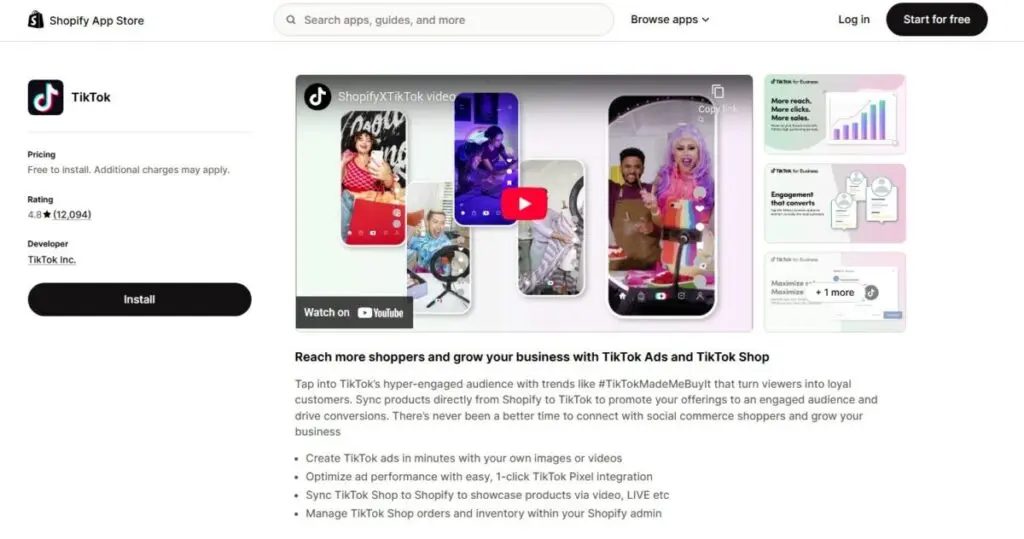
You start inside your Shopify admin by adding TikTok as a sales channel. This is Shopify’s native integration, not a third-party workaround.
Installing the TikTok sales channel does three important things:
- It creates a direct connection between Shopify and TikTok
- It gives TikTok permission to access your product catalog and order data
- It centralizes setup inside Shopify rather than splitting it across tools
This step alone does not run ads or track conversions. It simply opens the door for everything that follows.
Step 2: Connect Your TikTok Business Assets In The Correct Order
Once the sales channel is installed, you’ll be prompted to connect your TikTok assets. This is where many setups go wrong.
You should already have:
- A TikTok for Business account
- A Business Center that owns your assets
- An Ads account, ideally created manually beforehand
If you don't have any of these installed beforehand, you'll see something like this:
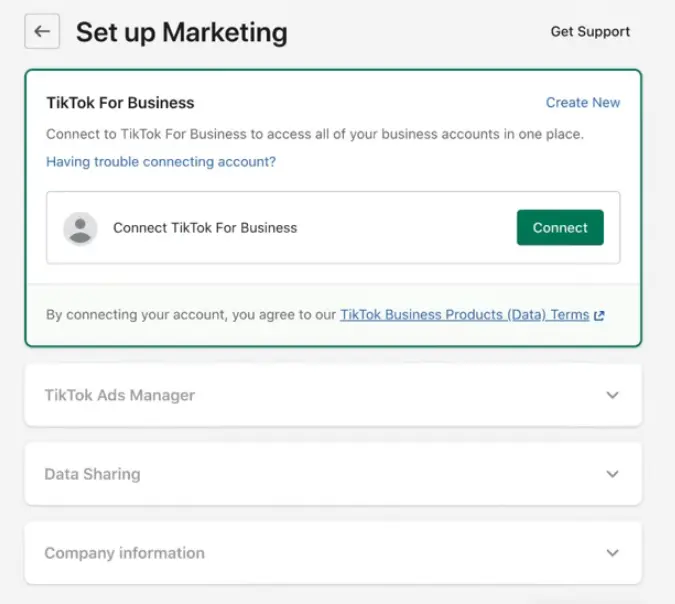
Just click on "Create New" (if you dont have a TikTok For Business Account) to initiat the process.
Connecting these in the right order ensures ownership is clear and prevents auto-created ad accounts that you cannot fully control later. TikTok approvals can take up to 24 hours, so it’s normal if parts of this step remain pending initially.
Step 3: Configure Data Sharing And Tracking
Next, you’ll choose a data sharing level and set up tracking.
This typically includes:
- Installing the TikTok Pixel through Shopify
- Enabling server-side tracking via Events API
- Selecting a data sharing level that balances measurement reliability and privacy requirements
Pixel-only setups often miss conversions due to browser limitations. Pairing the Pixel with the Events API significantly improves event accuracy, especially for purchases and checkout events.
Step 4: Verify Events And Catalog Sync
Before you launch any campaigns, verify that your data is flowing correctly.
You should confirm:
- Key events like view content, add to cart, and purchase are firing
- Events appear inside TikTok’s Events Manager
- Your product catalog is syncing and shows an active status
If you skip this validation step, you risk optimizing campaigns on incomplete or unreliable data.
- Once this marketing integration is stable, you’re ready to decide whether to layer in TikTok Shop or move straight into campaign execution.
Step-By-Step TikTok Shop Integration Via Shopify
Once your marketing integration is stable, you can extend the connection to support in-app checkout through TikTok Shop. This is where Shopify and TikTok move from simple data sharing into true commerce execution.
The key thing to keep in mind is that TikTok Shop introduces an approval layer. Unlike ads and tracking, this setup is gated by eligibility, documentation, and product review processes. Planning for that upfront prevents unnecessary delays.
Step 1: Create And Verify Your TikTok Seller Center Account
Your first step is setting up a TikTok Seller Center account. This is separate from your TikTok profile and your TikTok for Business account.
During setup, you’ll be asked to:
- Confirm your country and seller type
- Submit business or identity documentation
- Provide tax and payout information
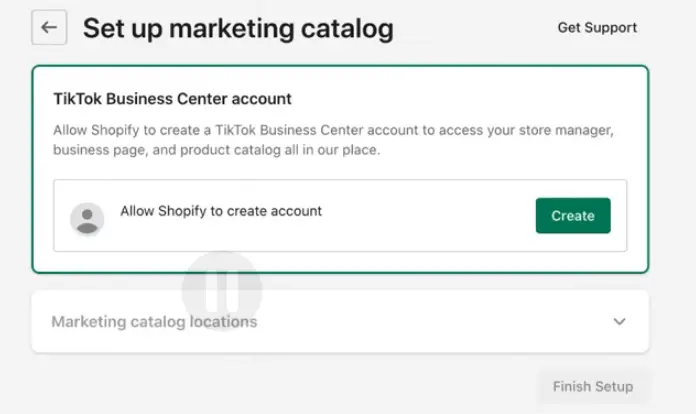
Approval is not instant. Reviews typically take 24 to 72 hours, and it’s common to be asked for additional documentation. This is normal and not a sign that something is wrong.
If TikTok Shop is not available in your region, you won’t be able to complete this step. In that case, you can continue using Shopify and TikTok strictly for advertising.
Step 2: Connect TikTok Shop Through Shopify
Once your Seller Center account is approved, you connect TikTok Shop directly from Shopify using the TikTok sales channel.
This connection allows Shopify to:
- Push your product catalog into TikTok Shop
- Sync inventory and pricing in near real time
- Pull TikTok Shop orders back into Shopify for fulfillment
This native connection is now the preferred method. It replaces older workflows that relied on manual uploads or third-party connectors and dramatically reduces sync errors.
Step 3: Sync Products And Resolve Approval Issues
After connecting, Shopify will attempt to sync your products automatically. Not all products will go live immediately.
Common blockers include:
- Missing or duplicate SKUs
- Incorrect or overly broad product categories
- Incomplete product attributes, such as weight or dimensions
- Brand ownership or trademark mismatches
TikTok will tell you why a product is rejected. Fix the issue in Shopify, then resubmit. Avoid editing products directly in TikTok, as this breaks the source-of-truth model.
Step 4: Link Your TikTok Account For Shoppable Content
The final step is linking your TikTok profile to your TikTok Shop.
This enables:
- Product tagging in organic videos
- Shoppable posts with in-app checkout
- Eligibility for affiliate and creator-driven sales
At this point, your Shopify backend and TikTok storefront are fully connected, and you can sell directly where discovery is happening.
Launching Campaigns After Integration
With Shopify and TikTok fully connected, you can shift your focus from setup to execution. This is where the integration starts paying off, because your campaigns can now use real product data, reliable conversion signals, and native shopping formats instead of sending traffic into a blind funnel.
How you launch campaigns depends directly on the integration path you chose earlier.
Choosing Campaign Objectives Based On Your Setup
If you are using Shopify as the checkout destination, your campaigns will typically optimize for website actions. That means driving users from TikTok to your product or collection pages and measuring success based on on-site behavior.
In this case, TikTok uses your event data to:
- Optimize toward purchases or lower-funnel actions
- Build retargeting audiences from site visitors
- Expand reach through lookalike modeling
If you have TikTok Shop enabled, you unlock a different set of objectives focused on in-app sales. These campaigns send users directly to a TikTok-hosted product page, removing the need to load your website at all. TikTok prioritizes these formats because they keep users inside the platform.
How TikTok Shop Campaigns Change The Equation
TikTok Shop campaigns behave differently from traditional conversion ads.
When checkout happens inside TikTok:
- Load times are faster and friction is reduced
- TikTok has more visibility into the full purchase journey
- The platform often provides additional distribution and incentives
From your perspective, Shopify still receives the order and manages fulfillment, but the conversion happens upstream. This can lead to higher reported performance in TikTok, while your Shopify analytics may show fewer sessions per order. That discrepancy is expected and should be accounted for in reporting.
Early Testing And Budgeting Considerations
At launch, your goal is validation, not scale.
You want to:
- Start with a small daily budget to confirm data accuracy
- Test a limited set of products rather than your full catalog
- Compare performance between website checkout and TikTok Shop if both are available
Because TikTok’s algorithm relies heavily on event volume, consistency matters more than aggressive spend early on. Once conversions stabilize and data quality is confirmed, you can begin expanding budgets, creative volume, and product coverage with confidence.
Measurement, Attribution, And Reporting Considerations
Once campaigns are live, the next challenge is making sense of the numbers. This is where many teams start questioning whether the integration is “working,” even when it is performing exactly as designed.
The key is understanding how Shopify and TikTok measure success differently and why discrepancies are normal.
Why Shopify And TikTok Numbers Rarely Match
You should not expect TikTok-reported conversions to line up perfectly with Shopify orders.
TikTok attributes conversions based on ad exposure and engagement within a defined attribution window. Shopify, on the other hand, records completed orders with no awareness of which ads influenced the purchase unless additional tracking is layered in.
If you are sending traffic to your Shopify checkout, some users will:
- Convert after the attribution window expires
- Switch devices before purchasing
- Block browser-based tracking entirely
If you are using TikTok Shop, the gap can look even larger. Purchases happen inside TikTok, so Shopify may show fewer sessions per order while still receiving the fulfillment data.
The Role Of Pixel And Events API In Attribution
Pixel-only tracking is no longer enough for reliable measurement.
Browser restrictions and privacy controls regularly interrupt client-side events, especially on mobile. This is why TikTok recommends pairing the Pixel with Events API, which sends purchase and checkout events directly from your server.
When both are enabled:
- Events are deduplicated to prevent double counting
- TikTok receives stronger conversion signals
- Optimization improves over time as data stabilizes
You should confirm that key events are firing consistently in TikTok’s Events Manager before making performance judgments.
Reporting Best Practices For Integrated Setups
Instead of chasing perfect alignment, focus on directional consistency.
A practical approach is to:
- Use TikTok reporting to evaluate creative, audiences, and campaign structure
- Use Shopify as the source of truth for revenue, margin, and fulfillment
- Compare trends over time rather than individual day performance
If you are running both website and TikTok Shop campaigns, segment your reporting accordingly. Blending these results without context can mask what is actually driving growth.
Once you align on how attribution works, the integration becomes far easier to manage and scale with confidence.
Common Issues And How To Fix Them
Even with a clean setup, issues can surface once real traffic and orders start flowing. Most problems fall into predictable patterns and can be resolved without reinstalling the integration or creating new accounts.
Understanding where to look first will save you hours of troubleshooting.
Issue #1: Products Not Syncing Or Getting Rejected
If products fail to sync or remain stuck in review, the issue almost always starts in Shopify.
Common causes include:
- Missing or duplicate SKUs
- Incorrect product categories that are too broad or mismatched
- Missing attributes such as weight, dimensions, or brand details
- Policy conflicts around restricted or branded goods
Fix the issue in Shopify, not inside TikTok. Once updated, resubmit the product and allow time for review. Editing products directly in TikTok breaks the source-of-truth model and often creates more problems later.
Issue #2: Ads Cannot See Your TikTok Shop Or Catalog
If you cannot select your TikTok Shop or products when building campaigns, this is usually a permissions issue.
Check that:
- Your Ads account is owned by or properly linked to your Business Center
- The Business Center owns the catalog and TikTok Shop
- The ad account has explicit access to those assets
Disconnecting and reconnecting accounts rarely helps if ownership is incorrect. Fix the permission structure first.
Issue #3: Events Are Missing Or Inconsistent
When conversions appear low or unstable, verify your tracking before changing budgets or creative.
You should confirm:
- Pixel events are firing on key pages
- Events API is active and deduplicating properly
- Purchase events are tied to the correct currency and value
If Events API is disabled or misconfigured, TikTok may optimize on partial data, leading to poor delivery and misleading results.
Issue #4: TikTok Shop Setup Is Blocked
If you cannot complete TikTok Shop onboarding, the issue is usually eligibility or documentation-related.
This often happens when:
- TikTok Shop is not supported in your country
- Business verification documents are incomplete
- Required policies, such as returns or shipping, are missing
In these cases, you can continue running TikTok ads that send traffic to your Shopify store while resolving Shop eligibility separately.
Most integration issues are structural, not technical. Once the underlying setup is corrected, performance and stability usually follow quickly.
Turning Shopify And TikTok Into A Scalable Growth Engine
Integrating Shopify and TikTok is not about chasing a trend. It is about meeting your customers where discovery is already happening and connecting that demand to a system you control.
When you approach the integration intentionally, Shopify stays your operational backbone while TikTok becomes a powerful driver of traffic, conversions, and in-app commerce. Whether you start with advertising and tracking or go all in with TikTok Shop, the key is choosing the right path, setting it up cleanly, and understanding how data flows between platforms.
If you get the foundation right, everything else becomes easier. Campaigns optimize faster, reporting makes more sense, and scaling feels deliberate instead of chaotic.
At that point, Shopify and TikTok stop being separate tools and start working together as a single, flexible growth engine for your business.
Frequently Asked Questions
How do you decide whether TikTok Shop fits your Shopify business model?
The decision usually comes down to how comfortable you are with in-app checkout and platform-led incentives. Many brands evaluate this by testing different TikTok Shop strategies that balance faster conversions with reduced control over the checkout experience.
What types of promotions can brands realistically use on TikTok Shop?
Beyond ads, TikTok frequently pushes platform-funded discounts and shipping incentives that brands can layer into campaigns. Understanding how TikTok Shop offers work helps you plan promotions without eroding margins.
Is setting up TikTok Shop complex if you already use Shopify?
The process is more structured than difficult, especially if your Shopify store is already compliant. Following a clear TikTok Shop setup process helps avoid delays related to verification, product approval, or shipping configuration.
When does it make sense to involve influencers in TikTok Shop sales?
Influencers become especially effective once your catalog and fulfillment are stable, since creators can tag products directly in content. Many brands accelerate growth by working with TikTok Shop influencer agencies that already understand platform rules and creator incentives.
How can you estimate profitability before scaling TikTok Shop campaigns?
Because TikTok Shop introduces platform fees and discounts, profitability modeling matters early. Brands often use a simple TikTok Shop profit calculation approach to pressure-test pricing before increasing spend.
What fees should you factor in when selling through TikTok Shop?
In addition to ad spend, TikTok Shop includes commissions and service fees that vary by region and category. Reviewing current TikTok Shop fees helps prevent surprises when reconciling payouts with Shopify revenue.
What makes a product listing perform well on TikTok Shop?
High-performing listings tend to prioritize clear visuals, accurate attributes, and compliance with platform rules. TikTok emphasizes high-quality product listings that reduce friction during impulse-driven purchases.
Why does TikTok Shop drive so many impulse purchases compared to traditional eCommerce?
The combination of short-form video, creator trust, and one-tap checkout encourages faster decisions. This dynamic is central to TikTok Shop impulse buying, which differs significantly from search-led ecommerce behavior.



