
Managing social content in 2025 raises a fundamental question for every brand:
- Why are we still designing in one tool, scheduling in another, and analyzing results somewhere else?
With short-form video output skyrocketing across TikTok, Instagram, and YouTube, and with feeds updating faster than teams can brief each other, the old multi-tool workflow is breaking down.
At the same time, two major trends are reshaping how marketers operate.
First, creative volume has surged as brands publish across six or more platforms every week, forcing teams to systemize design and maintain strict brand governance. Second, performance expectations have shifted. Marketers want to know which visuals, hooks, or formats worked before producing the next batch, not weeks later.
Adobe Express and Metricool now solve both challenges by bringing creation, scheduling, and analytics into a single connected stack. This article unpacks how to use that unified workflow to move faster and stay consistent across every channel.
- Why Consolidating Creative, Scheduling, and Analytics Matters in 2025
- Setting Up Adobe Express for Cross-Platform Publishing
- Designing High-Performance Branded Content in Adobe Express
- Scheduling Content Inside Adobe Express
- Using the Metricool Integration to Analyze Performance
- The New Creative Stack for 2025
- Frequently Asked Questions
Why Consolidating Creative, Scheduling, and Analytics Matters in 2025
Social teams are no longer designing in one place, scheduling in another, and reporting in a third. In 2025, that workflow is too slow, too fragmented, and too error-prone for the pace of TikTok, Reels, Shorts, and daily cross-platform publishing.
Adobe Express + Metricool solves this by turning creation, scheduling, and analytics into one continuous workflow.
Content Volume Has Exploded
Brands now publish across six major surfaces every week — TikTok, Instagram, Facebook, X, LinkedIn, and Pinterest — each with different aspect ratios, caption rules, and “format of the month” priorities.
When the Adobe Express scheduler plugs directly into every platform, teams no longer bounce between dashboards just to ship a single multi-platform campaign.
Brand Governance Became Non-Negotiable
Global brands like Sephora, Nike, and Starbucks rely on strict brand kit enforcement across regions. Without locked templates and controlled brand assets, inconsistencies creep in — outdated logos on Pinterest pins, off-brand fonts in LinkedIn banners, mismatched color palettes in TikTok covers.
Adobe Express fixes this through branded templates, brand kits, and role-based permissions, giving teams a shared creative source of truth that flows straight into the publishing calendar.
Reporting Needs to Sit Next to Creation
- The old model: design in one tool, publish in another, interpret analytics days later in another tab.
- The 2025 model: see what worked before you design the next thing.
That shift is powered by the metricool integration. Metricool brings:
- Cross-platform reporting (TikTok, Instagram, Facebook, X, LinkedIn, Pinterest)
- Post-level insights (views, retention, engagement, click-throughs)
- Optimal posting times
- Competitor benchmarking
- Multi-network reporting exports
With those insights appearing inside Adobe Express, creators can check:
- “Which Reel format performed best last month?”
- “Which TikTok hook retained viewers longest?”
- “What trend is driving competitor engagement this week?”
Then they immediately turn those learnings into new Express templates — no switching tools.
Teams Need Speed and a Single Source of Truth
Agencies, franchises, multi-location brands, and in-house teams all hit the same wall: too many tools, too many handoffs, too many chances for inconsistencies. A single workflow — design → schedule → analyze — removes friction and accelerates campaign velocity.
Setting Up Adobe Express for Cross-Platform Publishing
Before teams can take advantage of a unified design-to-publish workflow, Adobe Express must be configured as the central hub for every social channel. The setup is simple, but each step influences scheduling accuracy, permissions, and how your analytics flow through the system once Metricool is connected.
Connect TikTok, Instagram, Facebook, X, LinkedIn, and Pinterest
Adobe Express now supports native publishing to all major platforms, and the Adobe Express scheduler only appears once your accounts are authenticated. The process is identical across networks:
- Log in
- Grant publishing permissions
- Allow Express to read basic profile data
TikTok and Instagram require the most verification because of their publishing APIs. TikTok needs a Business Account connection, and Instagram requires a Professional or Creator profile linked to a Facebook Page.
Once connected, teams gain access to direct posting for Reels, TikToks, Instagram posts, carousels, and scheduled Stories. Pinterest, LinkedIn, Facebook, and X unlock immediately, enabling teams to schedule pins, updates, and long-form posts without leaving the Express dashboard.
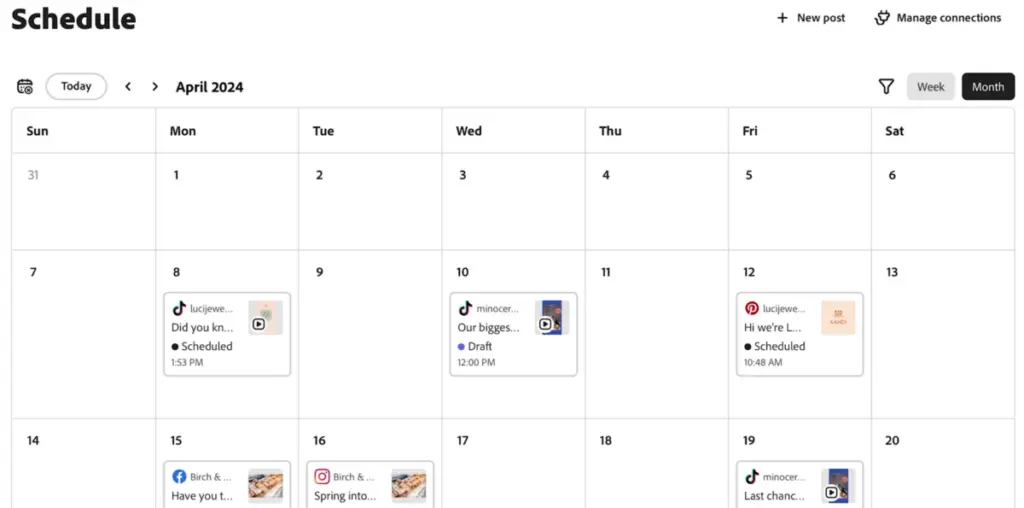
What matters operationally is that all channels sit in one calendar. Social managers no longer jump between Meta Business Suite, TikTok’s direct scheduler, LinkedIn’s admin panel, or third-party tools just to fill a weekly content plan. Express becomes the single command center for every format.
Build Brand Kits, Folders, and Governance Rules
The next step is governance. Without it, large teams drift off brand quickly. Adobe Express brand kits let you lock logos, upload color palettes, specify fonts, and define reusable graphic styles.
When creators start a design, these elements automatically populate, ensuring consistency across markets, agencies, or franchise locations.
Folders help maintain organizational structure for campaigns, lines of business, or geographic teams. A global group might maintain a locked “Master Brand Kit,” while regional teams clone it into localized kits with approved adaptations.
By tying brand kits and folders directly to scheduled posts, Express reduces the risk of mismatched visuals or outdated campaign assets being published.
Team permissions are equally important. Express supports view-only roles for junior teams, editor roles for designers and social managers, and admin-level controls for brand leaders.
These roles control not only who can design but who can schedule, publish, or modify templates. Combined with approval workflows, this prevents unauthorized scheduling and keeps the publishing calendar aligned with brand policy.
Why This Setup Matters
The value of Adobe Express increases exponentially once every channel is connected and brand governance is in place. Scheduling becomes cleaner, approvals become faster, and designers no longer export assets manually into external tools. And once Metricool analytics flow into the same environment, content creation and performance data finally live in one unified system.
Designing High-Performance Branded Content in Adobe Express
Designing content inside Adobe Express isn’t just about making assets look good. The goal is to build a repeatable, brand-safe, multi-format system that keeps pace with 2025’s publishing volume.
Express gives teams a structured foundation, templates, brand kits, resizing tools, and export options that let marketers produce consistent, on-brand, and platform-ready creative without relying on external tools.
Start with Templates and Branded Variants
Adobe Express has a robust template library for TikTok videos, Instagram Reels, Stories, Facebook posts, X images, LinkedIn banners, and Pinterest pins. These templates are customizable but immediately constrained by brand kits when they’re enabled. That means colors, fonts, and logos automatically snap into place, which helps global brands avoid drifting visuals across markets.
For high-velocity social teams, branded variants are particularly useful. A single master campaign template can be duplicated into multiple seasonal or promotional versions. For example, a core Black Friday layout adapted into Cyber Monday, Holiday Sale, and New Year variants.
Express makes these fast: drag in new photos, update the campaign message, and the design stays consistent because the brand kit governs it.
Express’s auto-resize feature is another essential part of multi-platform design. A TikTok vertical video can be reformatted into an Instagram Reel or a Pinterest Idea Pin in minutes. Carousels for LinkedIn and Instagram can be exported in correct dimensions without needing Photoshop or Illustrator.
These efficiency gains matter because short-form production cycles have compressed dramatically as TikTok and Instagram accelerate trend turnover.
Build Modular Template Systems for Campaigns
Modular design is one of the most underrated advantages of Adobe Express. Instead of creating every asset from scratch, teams build reusable design blocks — consistent headers, lower thirds, product frames, callouts, or UGC overlays. These blocks can be swapped in and out depending on platform needs or campaign goals.
For example, a recurring “Tips and Tricks” series might use a set of interchangeable intro panels and text overlays, allowing teams to produce weeks of content from a single design system. UGC-heavy brands can import creator footage, apply branded title cards and captions, and format everything inside Express before scheduling.
Series-based templates are especially effective for TikTok and Reels, where creators often use consistent hooks or visual motifs to build familiarity. Express helps create this consistency without manual layout replication.
Use Brand Kits to Maintain Global Consistency
Brand kits are the guardrails that protect creative integrity. Teams upload approved logos, hex colors, typefaces, and graphic elements once, and they cascade into all new designs. Express also allows locked templates, which ensure that markets, franchises, or agency partners can only edit approved sections while protected layers remain unchanged.
This is critical for brands operating across multiple regions, contributing creators, or many internal stakeholders. Inconsistent fonts or off-palette colors are easy to introduce when assets are made across tools — Express removes that risk and links governance directly to production.
Scheduling Content Inside Adobe Express
Once the creative system is in place, Adobe Express becomes more than a design tool. It's built-in scheduler turns your workspace into a full publishing hub, allowing teams to plan, refine, and deploy content across TikTok, Instagram, Facebook, X, LinkedIn, and Pinterest without switching apps.
This is where the real workflow efficiency appears, because the same assets you design are now slotted directly into a multi-platform calendar.
Calendar View, Queues, and Multi-Platform Drafts
The Content Scheduler inside Adobe Express provides a unified calendar that displays every upcoming post across all connected channels. This solves one of the biggest coordination problems for brands: having TikTok drafts in one system, LinkedIn posts waiting in another, and Instagram Reels stored separately.
In Express, everything sits side by side so teams can balance pacing, avoid accidental content clusters, and visualize campaign arcs.
Drag-and-drop scheduling makes adjustments simple. If a TikTok needs to move from Wednesday to Friday, or if Instagram and Pinterest need staggered publishing times, the entire shift happens inside one interface. The Adobe Express scheduler supports platform-specific fields too — captions, hashtags, link previews, alt text, thumbnails — so teams can tailor each version without recreating assets.
Draft posts are especially useful for agencies and multi-team environments. Designers can upload final visuals and leave scheduling fields empty; social managers then complete captions, set times, and secure approvals before publishing. This division of responsibility keeps workloads cleaner and improves accuracy.
Collaboration and Approval Flows
Adobe Express offers commenting, version history, and shared project access, which allows creators, strategists, and brand managers to work within the same publishing flow. A team member can review a scheduled post, annotate a design change, request a copy edit, and tag collaborators — all without exporting screens into Slack or email.
Approval flows typically follow a predictable pattern:
- Designer creates the asset.
- Social manager adds captions and platform variants.
- Brand lead reviews and approves.
- The post is locked and scheduled.
Express also supports user roles, allowing admins to restrict who can publish, who can schedule drafts, and who can only comment. This governance layer prevents accidental publishing and helps large organizations keep campaigns tightly controlled.
Why Native Scheduling Inside Express Matters
Scheduling directly inside Adobe Express eliminates the constant tool switching that slows teams down. Designers no longer export assets into cloud folders; social managers no longer upload them into third-party schedulers; analytics no longer live in a separate environment once Metricool is connected.
Everything flows: create → schedule → analyze.
For brands increasing output across short-form video, this single-hub model reduces publishing errors, maintains brand consistency, and dramatically accelerates turnaround time. And with the Metricool integration feeding performance data back into Express, scheduling is no longer the end of the workflow — it becomes the bridge into analysis and iteration.
Using the Metricool Integration to Analyze Performance
The Metricool integration is what transforms Adobe Express from a creation and scheduling tool into a full performance workspace. Instead of exporting assets, switching to a separate analytics dashboard, and circling back with new creative ideas, teams can now review post-level results, competitor benchmarks, and multi-platform insights directly inside Express.
This closes the feedback loop that social teams have historically struggled with.
How Metricool Integrates with Adobe Express
Metricool is available as an official add-on within Adobe Express. Once connected, it pulls in performance data from the same accounts you’ve linked to the Adobe Express scheduler. Supported platforms include TikTok, Instagram, Facebook, X, LinkedIn, Pinterest, and YouTube, along with Google Business Profile in certain setups.
The data connection is continuous, meaning your social metrics update inside Express without the need to export spreadsheets or log in elsewhere.
Metricool’s permissions allow Express to display analytics such as impressions, reach, engagement, video views, click-throughs, follower evolution, and posting performance by format. Because the integration is native, the analytics interface loads inside
Express without opening a separate browser tab. This is particularly valuable during design reviews and content planning sessions because insights stay directly adjacent to your templates and scheduled posts.
View Analytics and Competitor Insights Inside Express
Once enabled, the Metricool panel inside Adobe Express provides a combined analytics view that spans every connected platform. This includes post-by-post breakdowns, performance tables, engagement charts, and format-specific stats for video-heavy channels like TikTok and Instagram.
One of Metricool’s strongest features — competitor tracking — also carries over. Teams can benchmark against rival brands, creators, or accounts in their category, reviewing data such as post frequency, average engagement, and high-performing content patterns.
These insights are especially useful for reactive content planning. For example, if competitors see a sudden spike in engagement from a new TikTok sound or content format, Express users can identify it early and adapt templates for rapid deployment.
Trend insights also surface inside Express. By looking at which posts received the highest retention or engagement, designers can refine future creative choices such as pacing, hook structure, framing, text overlays, or visual style. Social managers can then update the content calendar accordingly without leaving the interface.
Build Cross-Platform Reports and Export for Clients
Metricool’s reporting engine integrates into Adobe Express workflows as well. Teams can generate weekly, monthly, or campaign-specific summaries directly from the connected accounts. The reports combine multi-platform insights into a single layout, making it easier for agencies to present holistic performance to clients or for in-house teams to brief leadership.
Reports typically include:
- Engagement summaries across platforms
- Top-performing posts for each channel
- Posting-time effectiveness
- Follower or reach evolution
- Competitive benchmarks
- Format-level performance (Reels, TikToks, carousels, pins)
Because reporting happens inside Express, teams can create or update designs, templates, and scheduled posts based on real measurements — not assumptions. This makes campaign iteration faster and more data-informed than using separate analytics tools.
The New Creative Stack for 2025
Adobe Express and Metricool together give marketers something they’ve needed for years: one place to design, schedule, and analyze content without platform switching or disconnected workflows.
Express centralizes brand kits, templates, and multi-format creation, while the integration with Metricool ensures every post feeds real performance data back into the same workspace. Instead of guessing which designs work or juggling multiple tools, teams can build, publish, and refine content in a single loop.
For brands managing fast-moving short-form content or multi-platform campaigns, this unified stack cuts friction, strengthens brand consistency, and accelerates iteration. It turns social publishing from a fragmented process into a streamlined system built for the pace of 2025.
Frequently Asked Questions
How can brands keep their content mix varied when using a unified tool like Adobe Express?
A consistent publishing workflow still needs creative diversity, which is why many teams pull social post inspiration to rotate formats and avoid repetitive feeds.
What should marketers consider when planning weekly calendars inside Adobe Express?
Structuring a schedule works best when paired with strong ideation frameworks such as social media ideas that help teams map themes across platforms.
Can AI help speed up content creation before assets move into Adobe Express?
Many teams use AI to jumpstart scripts, hooks and visual prompts, applying guidance from AI social media content creation before finalizing designs.
How does Metricool data support long-term social planning?
Performance insights become more actionable when aligned with a broader social media marketing strategy helping teams translate analytics into next-month priorities.
Do marketers still need an external scheduler if Adobe Express handles publishing?
Some brands keep parallel tools for redundancy or multi-brand management, features offered by top multi social media posting tools.
How do teams generate fresh concepts for high-volume short form workflows?
Campaign planning sessions often draw from structured social media post ideas to keep producing platform-relevant concepts at scale.
When should a brand consider outsourcing parts of the creative workflow?
If internal teams hit production bottlenecks, they sometimes supplement Express workflows with specialized social media content creation services for overflow tasks.

