
What if your TikTok storefront could update inventory, process orders, and manage refunds without a single manual upload? That’s the promise behind Shopify × TikTok integration, a 2026 evolution that unifies social commerce and backend operations.
As TikTok Shop expands across the U.S., U.K., and Southeast Asia, adoption is accelerating. Already, 11% of U.S. households have made a purchase on TikTok Shop, signaling a clear shift from discovery to in-app buying behavior.
More Shopify merchants are now connecting catalogs directly into the platform’s shopping ecosystem.
The result is a live, two-way sync where product listings, order statuses, and fulfillment updates flow automatically between Shopify and TikTok. This shift reflects a broader trend: the move from social discovery to social checkout.
In 2026, that shift is driven by technical upgrades, faster catalog APIs, unified ad and shop data, and new refund automation tools.
For brands, it means fewer sync errors, better attribution, and a true connected checkout experience where every tap, ad view, and shipment stays in perfect alignment.
Catalog Sync and Product Data Hygiene
Getting your catalog to sync cleanly between Shopify and TikTok Shop is foundational. If your product data is messy, listings won’t publish, ads won’t match, and your ops team will spend all day firefighting mismatches.
Below is how to build a reliable catalog sync and keep it pristine.
Connecting via TikTok Sales Channel in Shopify
Shopify’s official documentation states that merchants must install the TikTok sales channel from their Shopify admin. This connection enables catalog, inventory, fulfillment, and order sync between Shopify and TikTok Shop.
When you set this up, Shopify will import your product listings into TikTok with the required attributes. As part of onboarding, some fields (like weight, dimensions) may be auto-prefilled to get your feed past minimum requirements.
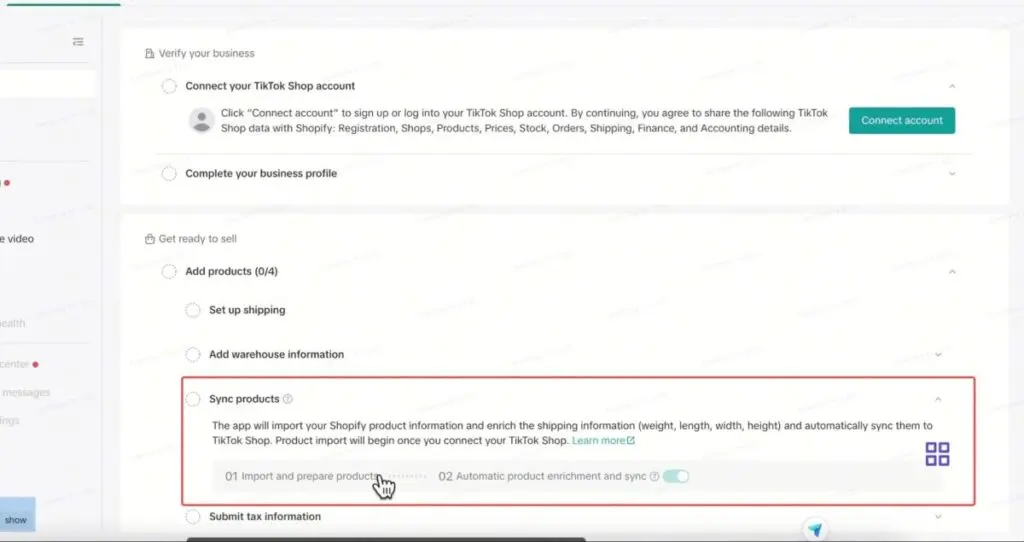
Be aware: Not every product will auto-sync perfectly. Sellers often run into issues where only a “primary market” shows up in TikTok’s product catalog despite having multiple markets configured in Shopify. One merchant on Shopify’s community forums reported that, though they had three active markets, TikTok only showed the primary.
Ensuring Clean, High-Quality Product Data
To avoid sync failures or listing rejections, brands must enforce strict standards on product metadata:
- Titles & Descriptions: Follow TikTok’s character limits and avoid disallowed keywords or formats.
- Images: Use high-resolution images that meet TikTok’s specs; avoid watermarks or overlays that TikTok may reject.
- Variants & SKUs: Make sure SKU logic matches across Shopify and TikTok. Variant combinations (size, color) should be consistent.
- Dimensions & Weight: TikTok requires these to calculate shipping. Missing or zero values often cause products to hold in “draft” status.
- Pricing & Inventory: Use synchronized stock levels. Any mismatch (Shopify says “in stock,” TikTok sees zero) will cause failed product approvals or canceled orders.
Best Practices
- Start small: sync a limited collection initially. Validate that syncs work before rolling out your full catalog.
- Version control metadata: maintain hidden “TikTok-only” fields (e.g., adjusted titles) to avoid overwriting Shopify SEO assets.
- Monitor sync logs: check Shopify’s TikTok app logs and TikTok’s Catalog health dashboard daily.
- Conflict resolution: if fields diverge (title, price), build logic to prefer Shopify as the source of truth and overwrite TikTok.
- Fallback manual mode: for non-critical SKUs, allow manual publish to TikTok Seller Center if sync fails.
Getting catalog sync right is the backbone of a stable Shopify × TikTok Shop integration. Once your data is clean and reliable, downstream order flows, ad matching, and returns logic all function on a dependable foundation.
Order, Fulfillment, and Return Flows
Once your catalog is synced, the next critical area is handling orders flowing from TikTok Shop into Shopify—managing fulfillment, inventory updates, returns, and cancellation logic reliably across both platforms. Flaws in this stage can break trust or incur financial loss.
How Orders Sync from TikTok to Shopify
In many integrations, TikTok Shop orders appear first in Seller Center with an “on-hold” status for a short window—typically up to one hour—during which buyers can cancel without penalty.

- Source: KnowledgeBase
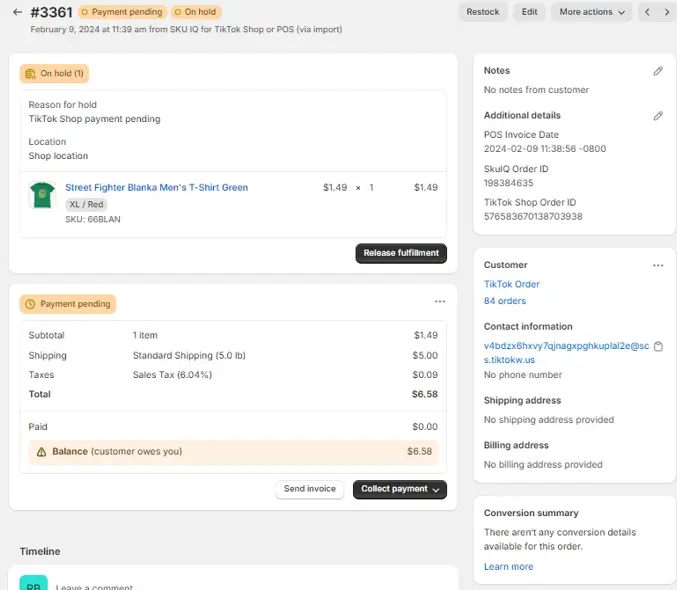
After that buffer, the order transitions to “to ship” and is pushed into Shopify, often via an app or connector. The app may create a Shopify order marked “on hold” until payment and shipping info are confirmed.
During syncing, payment processing is handled by TikTok (not Shopify), so Shopify sees the order as a “fake” payment to maintain order records.
Fulfillment and Tracking Updates
Once Shopify receives the order, your fulfillment logic begins.
You assign a warehouse or dropship provider, generate a tracking number, and mark the order as shipped. That tracking information needs to feed back into TikTok Shop so the buyer can monitor delivery. Many integrators (or the native TikTok-Shopify connector) support bi-directional updates: Shopify’s shipping status updates TikTok so that the order status changes to “delivered” or “completed.”
TikTok has also pushed support for Fulfilled by TikTok (FBT) in some markets. With this model, TikTok itself handles warehousing, picking, packing, and shipping for sellers, reducing complexity on the merchant side.
Returns, Cancellations & Inventory Logic
Returns add nuance to the flow: when a buyer returns an item via TikTok Shop, the return must trigger a refund or exchange in Shopify, and inventory must be restored. If this linkage fails, you can end up with negative inventory or lost stock.
Good architecture includes:
- Cancel logic in the on-hold window: automatically cancel both TikTok and Shopify if the buyer cancels before the hold period ends.
- Return sync: when TikTok registers a return, push a return order or credit memo into Shopify so that stock is regained and refund requests route properly.
- Inventory reconciliation: since sales also occur off-channel (web, physical stores), integrate a central inventory engine so that stock changes in Shopify flow into TikTok and vice versa.
- Chargeback handling: if TikTok issues a chargeback or refund penalty, you need to reconcile the difference in Shopify accounting.
Connecting TikTok Ads Manager and TikTok Shop
A clean Ads–Shop connection is what turns your synced catalog into promotable inventory with measurable conversion signals. Keep this layer simple: use the official TikTok sales channel in Shopify, connect the right business assets, and verify events before you scale spend.
Link the Right Assets (Admin-Level Setup)
From your Shopify admin, install the TikTok sales channel, then connect your TikTok for Business account (and Business Center) so Shopify can manage pixel, catalog, and permissions for campaigns tied to your TikTok Shop.
This connection is initiated from Settings → Apps and sales channels → TikTok in Shopify, then finished via TikTok’s setup flow.
Region Rules and Account Mapping
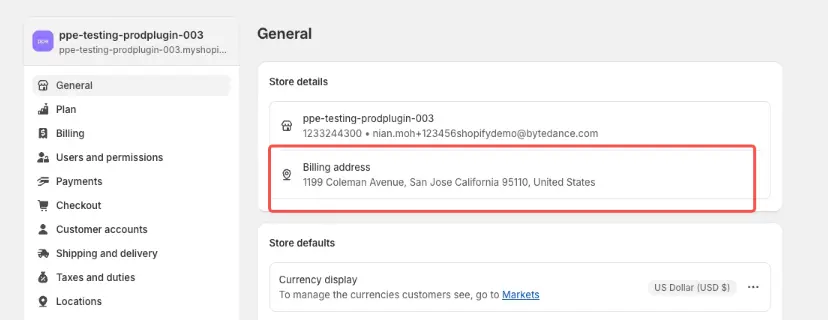
TikTok restricts one Shopify store to one TikTok Shop account at a time, and the connection is region-specific (e.g., a UK Shopify store connects to TikTok Shop UK, not the US). Plan account structure and market rollouts accordingly.
Catalog Availability in Ads
Once the TikTok sales channel is connected, your synced Shopify catalog becomes usable in TikTok Ads Manager through your connected Business Center account.
Here’s how to do it directly — no external clicking required:
- In Shopify:
- Go to Settings → Apps and sales channels → TikTok.
- Under Sales Channel Settings, connect your TikTok for Business account.
- Approve all requested permissions so Shopify can share catalog and conversion data.
- In TikTok Ads Manager:
- Log in to your TikTok for Business account linked to the same Business Center.
- Go to Assets → Catalogs, then select the catalog automatically created from your Shopify store.
- Confirm that each product is “Approved” and linked to an active TikTok Shop listing.
- In Business Center:
- Navigate to Assets → Shops and verify that your TikTok Shop is listed as connected.
- Under Data Sources, confirm that your TikTok Pixel and Conversions API are active and linked to the catalog.
- Create Ads from Synced Catalog:
- Choose Product Sales as your campaign objective in Ads Manager.
- Select your synced catalog under Ad Group → Product Source.
- TikTok’s Dynamic Showcase Ads (DSA) automatically pull product details, price, and stock directly from this feed, ensuring only available SKUs are promoted.
With these steps, your Shopify TikTok Shop integration ensures all catalog items are synced, visible, and measurable within Ads Manager, letting you run shopping campaigns with live product and inventory data rather than static uploads.
Warehouse & SKU Mapping Considerations
If you onboard from Shopify, TikTok Shop auto-syncs warehouses from Shopify; confirm mappings before running ads to avoid promoting items that can’t ship from the expected location. For existing Seller Center products, use Shop Management to map SKUs to Shopify products so inventory, price, and orders sync correctly.
Beauty brand Glow Recipe offers one of the clearest examples of how Shopify-connected catalogs can power real TikTok Shop performance. The company integrated its Shopify store with TikTok Shop to sync products and inventory directly into shoppable video placements, allowing customers to purchase without leaving the app.
Its team combined paid TikTok campaigns with organic creator collaborations. Creators showcased Glow Recipe’s viral Watermelon Glow line, linking directly to in-app listings synced from Shopify.
@melisekrem Trying the @Glow Recipe Watermelon Dew Drops for the first time💧 have you tried this viral product? What do you think? ✨ #glowrecipe #glowrecipewatermelonglow #dewdrop #skincare #productreview
This hybrid strategy drove higher engagement and repeat purchases by uniting catalog data, creator content, and checkout under one ecosystem—proof that seamless integration fuels measurable sales growth.
Bottom line: Connect assets through Shopify’s TikTok channel, respect one-store/one-Shop regional rules, map warehouses/SKUs, and enable pixel+CAPI. This ensures your Ads Manager sees accurate products and events before you scale spend.
Refunds, Disputes, and Chargebacks
When Shopify and TikTok Shop are linked, payments and post-purchase events must stay synchronized across two systems. TikTok handles transactions and payouts through its own payment gateway, while Shopify records the operational side—orders, inventory, and refunds—for reconciliation. Mismanaging either end can cause inventory mismatches, negative balances, or double refunds.
How Refunds Work Between TikTok Shop and Shopify
Refunds that originate inside TikTok Shop—either from a customer request or a TikTok-approved return—are processed by TikTok Shop Payments. Shopify simply receives a status update through the TikTok sales-channel connector. Refunds for TikTok Shop orders can’t be issued from Shopify Payments; merchants must manage them within Seller Center, where TikTok automatically returns funds to the buyer.
TikTok’s own return-and-refund policy specifies that sellers normally have up to five calendar days to approve or reject refund requests before TikTok automatically issues the refund to protect the buyer.
If a merchant initiates a refund in Shopify instead of TikTok Shop, the buyer will not actually receive the money. Always process the refund in Seller Center first—Shopify will then update order status automatically.
Disputes and Chargeback Handling
When buyers file complaints such as “item not received” or “not as described,” TikTok opens a dispute case in Seller Center. Sellers have five days to upload tracking or photographic proof before TikTok issues a final decision.
Chargebacks raised through a customer’s bank are handled solely by TikTok Shop Payments. The platform investigates and, if the claim is upheld, deducts the refund plus any processing fee from the seller’s TikTok balance. Shopify only mirrors the result for accounting—it doesn’t participate in the bank dispute.
Inventory and Reconciliation
After a refund or return is finalized, TikTok Shop pushes a “refund completed” event back to Shopify, restocking inventory automatically. If network errors interrupt the webhook, Shopify may still show the item as sold. To prevent discrepancies, merchants should regularly review the Order Sync Status panel in the TikTok sales-channel dashboard.
Shopify advises reconciling TikTok payouts weekly by comparing the Seller Center payout report—listing all refunds, deductions, and transaction fees—against Shopify’s financial reports.
Best Practices for Clean Refund Ops
- Approve or decline refund requests promptly within Seller Center; expired requests auto-approve.
- Never issue refunds from Shopify Payments for TikTok orders.
- Reconcile payouts weekly using TikTok’s payout reports.
- Document disputes and deliveries with time-stamped evidence to avoid lost appeals.
- Maintain audit logs of every refund and dispute communication for financial accuracy.
Mastering these refund, dispute, and chargeback processes keeps your Shopify TikTok Shop integration financially consistent and compliant—ensuring both platforms reflect the same transaction reality from checkout to final settlement.
Closing the Loop on TikTok × Shopify Commerce
The gap between discovery and delivery is finally closing. The Shopify × TikTok Shop integration now lets brands manage every part of the customer journey—from catalog sync to refund resolution—inside two tightly linked dashboards. The payoff is operational control without platform chaos.
By unifying inventory, fulfillment, and performance tracking, marketers can turn viral TikTok moments into measurable sales without juggling multiple systems.
The 2025 updates to TikTok Shop’s seller tools and Shopify’s embedded app make setup simpler and far less error-prone, turning what was once an experimental channel into a core commerce workflow.
For brands ready to expand beyond “link-in-bio” sales, this integration represents the next stage of social retail: one where creators, ads, and checkout live inside the same ecosystem—and every order, refund, and conversion flows in sync.
Frequently Asked Questions
How does TikTok Shop differ from other social commerce platforms?
Unlike platforms that rely solely on external links, TikTok integrates checkout directly within the app, creating a fully in-platform purchase experience similar to other leading TikTok shopping ecosystems emerging in 2026.
What product categories perform best on TikTok Shop?
Fashion, beauty, and lifestyle brands lead conversions because they align with TikTok’s short-form storytelling and influencer culture.
What’s required to set up TikTok Shop through Shopify?
Merchants need an active Shopify store, a TikTok for Business account, and a connected catalog—following the verified TikTok Shop setup process to meet product listing and fulfillment requirements.
Can creators earn affiliate income through TikTok Shop integrations?
Yes, TikTok’s affiliate tools let creators link to merchant products and earn commissions per sale, forming a major part of modern TikTok affiliate marketing strategies for brands and influencers alike.
How can brands use promo codes to increase conversion rates?
TikTok allows brands to issue platform-native discounts and time-limited offers through TikTok Shop promo codes, helping campaigns align with creator content and seasonal demand spikes.
What Shopify tools improve operations for TikTok-integrated stores?
Merchants can streamline analytics, customer support, and product feeds using several of the top Shopify apps that specialize in multi-channel inventory and social commerce management.
Should brands consider external agencies for managing TikTok and Shopify together?
Partnering with experienced Shopify marketing agencies can help brands unify their TikTok ad spend, catalog feeds, and conversion tracking across channels without operational silos.
How can Shopify affiliates take advantage of TikTok-driven traffic?
By combining creator-driven campaigns with referral automation via Shopify affiliate marketing apps, brands can track influencer sales more accurately and scale performance-based partnerships.


