

Black Friday and Cyber Monday bring enormous sales opportunities for Shopify merchants, but attracting shoppers is only half the challenge. Turning that traffic into profitable orders requires compelling offers, a smooth shopping experience, and a marketing strategy that reaches customers at the right moment.
The opportunity is significant. Shopify merchants generated $14.6 billion in sales during last year’s BFCM, representing a 27% increase over the previous year. Meanwhile, our Black Friday statistics report highlights another important shift, with 55.2% of US online Black Friday spending in 2025 coming from mobile devices.
For merchants, getting customers to their stores is one challenge. Making it easy for them to complete a purchase is another.
So what does success come down to? In simple terms, you need to make the right decisions before, during, and after the sales weekend.
From choosing which products to discount and optimizing checkout to recovering abandoned carts and converting new customers into repeat buyers, we'll explore practical strategies, supported by real examples and research, to help you increase Shopify Black Friday and Cyber Monday sales without sacrificing profitability.
- Start With the Problem That's Costing Your Shopify Store Sales
- Build Black Friday Offers That Increase Sales Without Sacrificing Profit
- Get Shoppers From the Campaign to Checkout
- Bring Shoppers Back With Email and SMS Campaigns
- Attract More Shoppers With Creator Content and Paid Social Campaigns
- Make Sure Your Shopify Store Can Handle Black Friday Demand
- Monitor Black Friday Sales and Adjust Your Campaigns in Real Time
- Turn Black Friday Shoppers Into Repeat Customers
- What to Prioritize if Black Friday Is Only 7 Days Away
- Make Every Black Friday Sale Count
Start With the Problem That's Costing Your Shopify Store Sales
Before launching another promotion or increasing your advertising budget, identify where your Shopify store is losing potential sales. More traffic won't accomplish much if shoppers struggle to find products, abandon their carts, or encounter unexpected costs at checkout.
Shopify makes it relatively easy to investigate these problems. Under “Analytics” > “Reports”, the Conversion Rate Breakdown report shows how visitors progress from browsing to adding products to their carts, reaching checkout, and completing a purchase.
Use those insights to identify what deserves attention first.
| What You're Seeing | What It Could Mean | What to Do First |
| Traffic is low | Campaigns aren't reaching enough qualified shoppers | Revisit audience targeting and reactivate interested subscribers |
| Product views are high, but add-to-carts are low | Offers, pricing, or product information aren't convincing shoppers | Improve product pages and make promotional savings clearer |
| Shoppers add items but rarely reach checkout | Shipping uncertainty or cart friction may be discouraging purchases | Check delivery information, cart functionality, and promotional terms |
| Checkout abandonment is high | Unexpected costs, payment issues, or technical problems may be interfering | Test the entire checkout experience on mobile |
| Sales increase, but profitability falls | Discounts, acquisition costs, or fulfillment expenses are too high | Review contribution margin before increasing promotions |
| Popular products sell out too quickly | Inventory planning isn't aligned with demand | Adjust featured products and stock allocation |
Avoid treating every conversion problem as a reason to offer a bigger discount. Sometimes a clearer product description, visible delivery estimate, or functioning checkout makes more sense.
Our eCommerce conversion rate optimization guide explores the broader improvements merchants can make to product pages, navigation, and the shopping experience.
One important consideration for 2026 is that Shopify updated how it measures sessions and conversion rates in September. Changes in reported conversion rates may partly reflect the new measurement method rather than actual changes in customer behavior. Compare sales and order counts alongside session-based metrics when evaluating performance.
The goal is to identify your biggest revenue opportunity before deciding where to invest your time and budget. Once you know what's holding sales back, you can prioritize the changes most likely to make a difference during Black Friday and Cyber Monday.
Build Black Friday Offers That Increase Sales Without Sacrificing Profit
A bigger discount doesn't automatically mean more sales. Shopify merchants need offers that attract shoppers while leaving enough margin to cover acquisition, fulfillment, and other operating costs.
Shoppers are also becoming more selective. As we explored in our Black Friday consumer behavior report, only 54% of consumers surveyed by BCG in 2026 trusted advertised sale prices to be genuinely lower than usual. A compelling offer needs to communicate real value, not simply display an impressive percentage.
Choose the Right Products and Promotions
Rather than discounting everything equally, evaluate your products based on demand, available inventory, and profitability.
Consider 3 promotional approaches depending on what you're trying to achieve.
- Discount popular products to attract shoppers. Use recognizable bestsellers as promotional anchors, but avoid aggressive markdowns on products that already sell well at full price.
- Create bundles to increase order value. Combine complementary products into gift sets, starter kits, or routines that offer customers a better overall deal.
- Use purchase thresholds to encourage larger baskets. Offer free shipping, a gift, or an additional discount when customers reach a profitable minimum order value.
Bundles are particularly interesting. In a 2025 Black Friday study of 267 Shopify stores, MBC Bundles found that bundles accounted for 22% of orders during BFCM, compared with 14% during a typical week. Average bundle orders were also 21% larger.
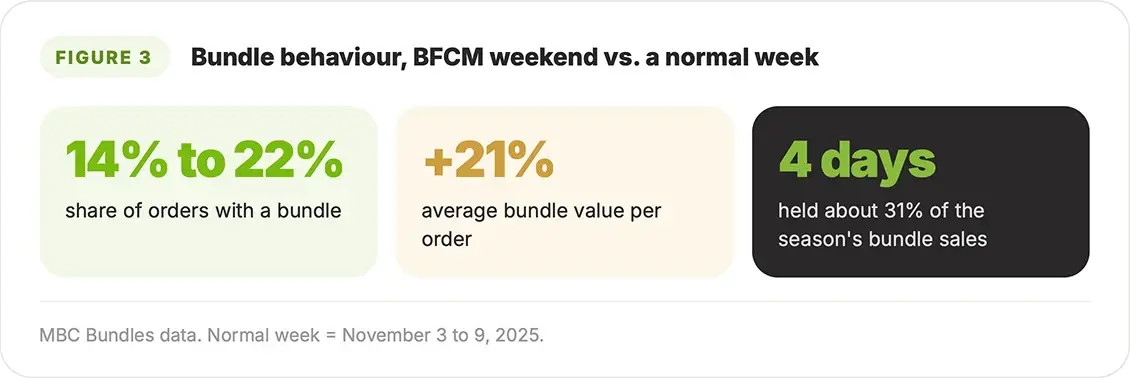
The findings reflect stores using MBC Bundles rather than Shopify merchants overall, but they demonstrate why merchants should test offers beyond standard percentage discounts.
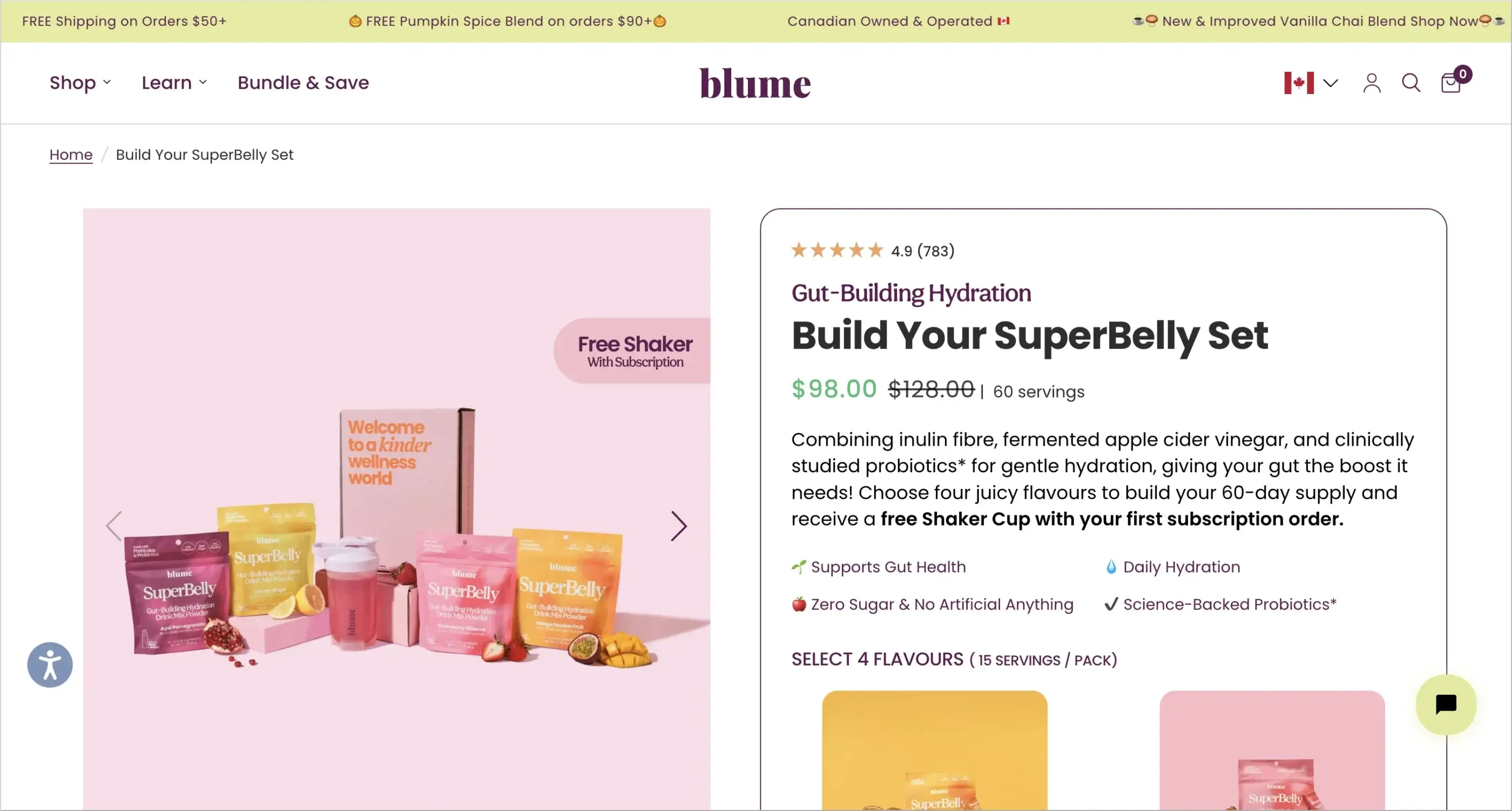
For a practical brand example, Blume's Black Friday approach has included bundles and starter kits that combine savings with free shipping eligibility. Customers receive a clearer reason to purchase multiple products together.
Calculate Your Discount Before Launching It
A promotion can increase revenue while reducing the profit earned on every order.
Consider a hypothetical product selling for $80, with $32 in product costs, $8 in fulfillment expenses, and $10 in customer acquisition costs.
Before discounts, the order contributes $30. A 25% discount reduces the selling price to $60, leaving just $10 before other operating expenses.
The sale might still make commercial sense if it brings in enough additional profitable orders or valuable returning customers. However, increasing the discount without understanding those economics creates unnecessary risk.
Set Up and Test Your Offers in Shopify
Shopify's Discounts section supports percentage discounts, fixed-amount discounts, free shipping, and Buy X Get Y promotions. Merchants can also use the free Shopify Bundles app to create fixed bundles and multipacks.
Before launching, review your discount combination settings. Product, order, and shipping discounts may stack when configured to combine, potentially reducing margins more than intended.
Test your promotions with realistic shopping carts, including multiple discounted products, existing customer codes, and shipping thresholds.
The strongest Black Friday offer isn't necessarily the deepest discount. It's one that gives shoppers a convincing reason to buy while protecting the profitability of each order.
Get Shoppers From the Campaign to Checkout
A compelling Black Friday offer means little if customers struggle to purchase it. Once shoppers click an email, social ad, or influencer link, every step should make completing the purchase easier.
Focus on creating a direct path from the promotion to the product, removing unnecessary distractions, and making costs and delivery expectations clear before checkout.
Make It Easy to Find the Actual Deal
Imagine a customer clicking an Instagram ad promoting a 30% discount on a skincare bundle. Instead of reaching the advertised products, they land on the store's homepage and have to search for the offer.
Every additional step creates another opportunity to lose the sale.
Direct campaign traffic to the most relevant Shopify product or collection page. For larger sales, organize products into clear collections such as bestsellers, gifts under $50, and limited-time offers.
Use Shopify's theme editor to feature promotional collections and display important information, including eligible products, promotional prices, offer deadlines, and delivery expectations.
Keep the messaging consistent across every touchpoint. A customer clicking an advertised 30% discount should immediately understand which products qualify and how the savings are applied.
Remove the Obstacles That Make Shoppers Abandon Checkout
Unexpected costs and complicated checkout processes can undermine even the most attractive promotions.
Baymard Institute's 2026 checkout research found that among surveyed US shoppers who abandoned purchases for reasons other than browsing, 40% cited excessive additional costs, 20% cited slow delivery, and 18% cited mandatory account creation.
For Shopify merchants, those findings point to several priorities.
- Display shipping costs and delivery estimates as early as practical.
- Make return conditions and promotional exclusions easy to find.
- Offer guest checkout where available.
- Enable relevant accelerated payment methods, such as Shop Pay.
- Check that product variations, discount codes, and checkout buttons work correctly on mobile.
British jewelry brand Abbott Lyon provides a useful example. In Shopify's case study, the brand reported strong checkout conversion after introducing one-page checkout alongside more accurate delivery-date information. Abbott Lyon also reported 30%–40% growth during November and December 2025, largely supported by its broader marketing activity.
Test the Shopping Experience Before the Sale Goes Live
Don't rely entirely on how your storefront looks in the Shopify editor. Complete the purchasing journey on an actual mobile device.
Follow a promotional link, select a product variation, add an item to the cart, apply an eligible discount, and review the final checkout total.
Test different basket values and delivery destinations to catch shipping or discount problems before customers encounter them. Shopify's test order functionality can help verify payment processing, shipping calculations, and notifications. Avoid leaving a live store in payment test mode, which prevents customers from completing live transactions.
For improvements beyond the immediate BFCM campaign, our eCommerce conversion optimization guide covers mobile usability, page speed, product photography, navigation, and checkout design.
Your objective is simple. Once customers decide they want the offer, make completing the purchase the easiest part of their shopping experience.
Bring Shoppers Back With Email and SMS Campaigns
Black Friday shoppers rarely make every purchase during their first visit. Some compare offers across multiple stores, others wait for better deals, and many leave products in their carts before completing checkout.
Email and SMS give Shopify merchants an opportunity to reconnect with these customers without paying to acquire their attention again. The key is making each message relevant to where the customer is in their purchasing journey.
Segment Customers Before Sending Promotions
Sending the same Black Friday announcement to your entire subscriber list overlooks the differences between first-time shoppers, loyal customers, and people who haven't purchased in months.
Start with 3 useful customer segments.
- Loyal customers can receive early access to Black Friday offers, exclusive bundles, or a reward for their continued business.
- Recent browsers and interested shoppers can receive reminders featuring products they've explored, relevant reviews, and clear promotional savings.
- Inactive customers can receive a personalized reactivation offer featuring products related to their previous purchases.
Shopify's customer segmentation tools let merchants group customers using purchase history, spending, and other available customer data. These segments can then be used to create targeted email campaigns through Shopify Messaging.
For larger stores, previous Black Friday purchasing behavior can also help identify customers likely to respond to seasonal promotions.
Recover Abandoned Carts Without Automatically Offering Bigger Discounts
A customer who abandons checkout has already demonstrated purchasing intent. Often, a well-timed reminder is more useful than another discount.
Luxury streetwear brand Represent offers a compelling example. During Black Friday, the brand used automated cart recovery emails without additional promotional discounts and achieved an 8.3% purchase rate.
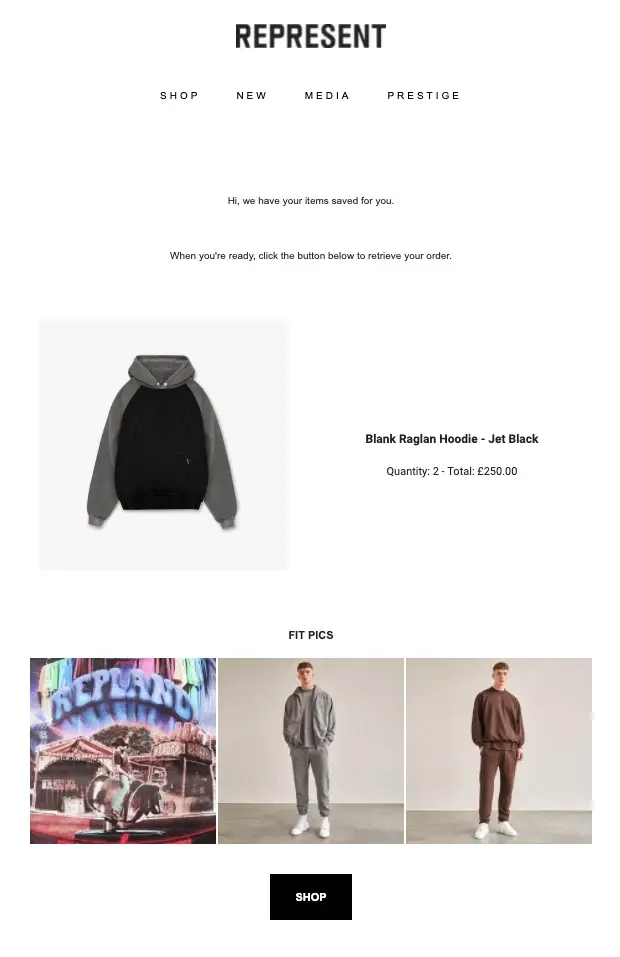
Rather than reducing prices further, Represent reminded shoppers about the products they had already considered.
Shopify merchants can apply a similar approach using a simple recovery sequence.
- First reminder brings customers back to their unfinished checkout with a direct link to complete their purchase.
- Second reminder addresses common purchase concerns, such as delivery dates, return conditions, or product suitability.
- Final reminder communicates the genuine promotional deadline and reinforces the offer's value.
Avoid automatically stacking additional discounts onto an existing Black Friday promotion. Customers may complete their orders after a reminder alone.
Our cart abandonment email examples provide further inspiration for subject lines, product reminders, email design, and recovery messages.
Automate Campaigns Through Shopify Messaging
Shopify Messaging supports email and, in eligible regions, SMS marketing. Merchants can create automated messages triggered by abandoned browsing sessions, abandoned carts, and incomplete checkouts.
To configure recovery messages, navigate to “Apps” > “Messaging” > “Automations” and select the appropriate recovery template. Shopify provides separate workflows for abandoned product browsing, abandoned carts, and abandoned checkouts.
Review each automation's audience, timing, and message before activating it. For SMS, ensure recipients have provided the required marketing consent.
During BFCM, track completed orders and revenue generated by these automations rather than focusing exclusively on open and click rates.
The goal is to recover interested shoppers with relevant reminders, not overwhelm them with additional promotions.
Attract More Shoppers With Creator Content and Paid Social Campaigns
Email and SMS help you reach people already familiar with your store. To grow Black Friday sales beyond your existing customer base, you also need to reach new shoppers who are actively discovering products and comparing offers.
Creator content and paid social advertising work particularly well together. Creators can demonstrate why a product is worth buying, while paid campaigns help distribute that message to relevant audiences and bring interested shoppers directly to your Shopify store.
Make Creator Content About the Product, Not Just the Discount
Black Friday feeds are crowded with promotional announcements. Another video displaying 30% off gives shoppers little reason to choose your brand over a competitor.
Instead, ask creators to show products in action, explain what makes them useful, and demonstrate what customers receive for their money.
LOOKFANTASTIC provides a useful example. During a TikTok Cyber Weekend campaign, the beauty retailer worked with 5 creators who reviewed their favorite products while highlighting a TikTok-exclusive promotional offer.
The campaign combined creator videos with TopView and TopFeed advertising, generating 13 million impressions and reaching 7.7 million unique users. The results reflect the combined campaign rather than creator content alone.
For Shopify merchants, the takeaway is to make product demonstrations part of the promotional strategy instead of relying entirely on discount announcements.
Our holiday UGC ad creative guide provides 10 production-ready shotlists, including product unboxings, bundle demonstrations, customer reviews, and last-minute shopping messages.
Turn Successful Creator Content Into Paid Ads
Organic creator posts can introduce your products to new audiences, but their reach depends on the creator's existing following and platform distribution.
Paid amplification gives merchants greater control over who sees the content and when.
Start with creator videos that already demonstrate strong engagement or attract qualified website visits. Test them against existing branded advertisements, keeping the promotional offer and landing page consistent.
Consider separating campaigns by purchasing intent.
- New audiences receive product demonstrations, comparisons, and introductory offers.
- Engaged audiences see customer reviews, product benefits, and reminders about relevant promotions.
- Previous visitors receive messages addressing purchase hesitation or highlighting genuine offer deadlines.
Track completed orders, customer acquisition costs, and return on ad spend rather than selecting winners based entirely on video views or engagement.
Track Creator Sales Through Shopify Collabs
Without proper tracking, it's difficult to know which creators actually contribute to Black Friday revenue.
Shopify Collabs allows eligible merchants to manage creator partnerships, distribute affiliate links and discount codes, and track attributed sales.
For example, a skincare merchant could give participating creators individual links to a Black Friday bundle collection. Shopify Collabs can then report visits, orders, sales, and conversions associated with those creators.
Merchants can invite creators directly, although Shopify Collabs is currently not accepting general new creator account signups.
Before launching, confirm promotional codes, commission rates, content usage rights, and the products each creator will feature. Compare attributed sales against creator fees, commissions, and advertising costs to evaluate profitability.
The objective is to turn creator attention into measurable Shopify sales, using content that helps shoppers make purchasing decisions rather than simply announcing another discount.
Make Sure Your Shopify Store Can Handle Black Friday Demand
Increasing sales is only valuable if your store can fulfill those orders. Running out of advertised products, missing delivery deadlines, or dealing with unexpected fulfillment costs can quickly undermine a successful Black Friday campaign.
Before increasing promotional spending, make sure your inventory, shipping capacity, and return policies can support the demand you're trying to generate.
Prioritize Inventory Based on Expected Demand
Not every product deserves the same inventory allocation. Bestsellers, promotional bundles, and products featured in paid campaigns should receive particular attention because demand can increase quickly once promotions go live.
Start by reviewing previous Black Friday sales, recent product performance, and available stock. Compare those figures against your planned promotions to identify products at risk of selling out.
Shopify's inventory management tools allow merchants to track stock by product variant and fulfillment location, manage transfers, and configure what happens when inventory reaches zero.
Pay particular attention to your highest-demand products.
- Confirm available stock before committing promotional budgets.
- Check whether bundled products have sufficient component inventory.
- Disable overselling unless you're intentionally accepting preorders with clear delivery expectations.
- Prepare alternative products to promote when bestsellers sell out.
Keep inventory and marketing teams aligned throughout the weekend. Continuing to advertise unavailable products wastes budget and frustrates shoppers.
Match Delivery Promises to Fulfillment Capacity
Fast shipping can encourage purchases, but promising delivery dates your business cannot meet creates unnecessary problems.
Shopify's estimated delivery date settings allow eligible merchants to display arrival estimates at checkout. Depending on the store's location and configuration, estimates can be calculated automatically from fulfillment performance or manually using processing and transit times.
Review how many orders your team or fulfillment partner can realistically process each day. Account for potential Black Friday backlogs before advertising expedited delivery.
Delivery messaging also becomes increasingly important as the holiday season progresses.
Our holiday shipping and fulfillment playbook explains how to coordinate shipping deadlines with social campaigns, creator content, and last-minute promotional messaging. Verify current carrier deadlines before publishing specific delivery promises.
Make Return Conditions Clear Before Customers Buy
Returns are another important consideration, particularly for customers purchasing gifts.
The National Retail Federation's 2025 Retail Returns Landscape report estimated that 19.3% of online sales would be returned in 2025. It also found that 82% of consumers considered free returns important when shopping online.
Free returns aren't financially practical for every merchant, but customers should understand their options before purchasing.
Shopify lets merchants configure return windows, shipping fees, restocking fees, and final-sale exclusions through “Settings” > “Policies”.
Consider whether holiday purchases need an extended return window, especially when customers buy gifts in November that won't be opened until December.
Communicate any Black Friday-specific exceptions clearly on product pages and in order confirmations.
A successful BFCM campaign should generate orders your business can fulfill profitably, with delivery and return expectations that customers understand from the beginning.
Monitor Black Friday Sales and Adjust Your Campaigns in Real Time
Black Friday performance can change quickly. A product might sell faster than expected, a creator campaign could generate a sudden surge in traffic, or an advertising campaign might attract plenty of visitors without producing enough orders.
Rather than waiting until Cyber Monday to evaluate results, Shopify merchants should monitor performance throughout the weekend and make adjustments while there's still time to improve sales.
Use Shopify Live View to Spot Changes in Customer Activity
Shopify's Live View dashboard, available under “Analytics” > “Live View”, provides a real-time overview of store activity.
Merchants can monitor active visitors, orders, sales, top-performing products, and recent customer behavior, including cart additions and checkout activity.
The dashboard is particularly useful for identifying sudden changes after launching an email campaign, activating creator content, or increasing advertising spend.
For example, if a product starts attracting unusually high traffic, check whether inventory levels can support the additional demand. If visitors are reaching checkout but purchases remain low, test the purchasing experience before increasing traffic further.
Avoid making major decisions based on a few minutes of activity. Short-term fluctuations don't always reflect a campaign's overall performance.
Identify Which Campaigns Are Generating Sales
Traffic and engagement tell you whether customers are interested. Completed purchases and acquisition costs reveal whether your marketing is producing commercial results.
Shopify's “Growth” > “Attribution” dashboard and marketing performance reports help merchants compare channels using sales, orders, average order value, conversion rates, and, where available, advertising spend and return on ad spend.
Use these reports to guide adjustments throughout the sales weekend.
| Performance Signal | Recommended Action |
| Strong sales and acceptable acquisition costs | Consider increasing the campaign budget gradually |
| High traffic but disappointing conversions | Check landing pages, promotional messaging, and checkout |
| Popular products approaching stock limits | Reduce promotion of affected products and feature available alternatives |
| High revenue but declining margins | Review discount levels, shipping subsidies, and advertising costs |
Keep reporting delays in mind. Shopify notes that some marketing metrics can take up to 24 hours to update, so avoid treating incomplete attribution data as definitive evidence that a campaign is underperforming.
Our Shopify Analytics guide explores the platform's reporting capabilities, key metrics, and how to interpret performance across different marketing channels.
Measure Profitability Alongside Revenue
A record-breaking sales day can still disappoint financially if discounts and acquisition expenses consume most of the revenue.
Shopify's profit reports help merchants evaluate gross profit and product margins when cost-per-item information is available.
However, gross profit alone doesn't account for every expense associated with a sale. Advertising costs, creator commissions, payment processing, packaging, and shipping subsidies may need to be calculated separately.
Compare these expenses against revenue before scaling promotional campaigns.
The objective is to use performance data to make better decisions while BFCM is happening, not simply produce a report once the sales weekend ends.
Turn Black Friday Shoppers Into Repeat Customers
Black Friday might bring thousands of first-time customers to your Shopify store, but their value shouldn't end with a single discounted purchase.
The real opportunity comes after the sale. Merchants who keep customers engaged, provide a positive post-purchase experience, and encourage relevant repeat purchases can generate additional revenue without continually paying to acquire new shoppers.
Make the First Purchase Worth Remembering
Customers who discover your brand through a Black Friday promotion may know very little about it beyond the discount they received.
Use the period after their purchase to build familiarity and demonstrate the value of your products.
Start with reliable order updates and delivery communication. Once an order arrives, send helpful content based on what the customer purchased. A skincare retailer might share product usage tips, while a homeware brand could provide care instructions or styling inspiration.
Once customers have had time to experience their purchase, invite them to leave a review or share their experience.
These interactions help establish a relationship beyond the original promotion and can also generate useful customer feedback and authentic content for future marketing campaigns.
Give Customers a Relevant Reason to Buy Again
A second purchase shouldn't depend entirely on another discount.
Use purchase history to recommend complementary products, suggest replenishments, or introduce customers to a loyalty program.
Fitness brand NOBULL demonstrates how this approach can work at scale. In a Shopify case study, the brand reported a 46% increase in known repeat buyers after using Shopify Plus and personalization partner Bluecore to improve customer segmentation and automate more relevant campaigns.
Shopify Messaging offers post-purchase automation templates for thanking customers, recommending additional products after a first purchase, and reconnecting with inactive shoppers.
For stores considering a more structured rewards program, our customer loyalty software guide explores tools for managing loyalty points, referrals, and customer rewards.
Measure Whether Black Friday Customers Return
Once the sales weekend ends, evaluate more than total revenue and order volume.
Shopify's Customer Cohort Analysis report, available under “Analytics” > “Reports”, helps merchants track customers based on when they first purchased and whether they return.
Use the report to compare customers acquired during Black Friday with those acquired during other periods. Monitor repeat purchase rates, average order value, and spending per customer over the following months.
Pay attention to which promotions, products, and acquisition channels bring in customers who continue purchasing.
A campaign that attracts fewer customers but generates stronger long-term purchasing behavior may ultimately be more valuable than one that produces a large number of one-time bargain hunters.
Black Friday should introduce customers to your brand. Your post-purchase experience determines whether they have a reason to come back.
What to Prioritize if Black Friday Is Only 7 Days Away
With Black Friday approaching, there's little value in introducing complicated new systems or rebuilding your Shopify storefront. Focus on the improvements that can directly influence sales and prevent costly problems.
A shorter preparation window calls for a clear order of priorities.
| When | Priority | What to Do |
| 7–5 days before | Finalize your offers | Confirm featured products, inventory, discount levels, bundles, and profit margins |
| 4–2 days before | Test the shopping experience | Check mobile product pages, promotional links, discount codes, shipping costs, and checkout |
| Final 24 hours | Prepare your campaigns | Schedule emails, confirm creator content, verify tracking links, and prepare customer support responses |
| During BFCM | Monitor and adjust | Watch sales, conversion rates, stock levels, and advertising costs. Fix problems before increasing spending |
| After Cyber Monday | Evaluate and follow up | Review profitability, identify new customers, and activate relevant post-purchase campaigns |
If your store is already prepared, avoid unnecessary last-minute changes. A new app, unfamiliar checkout feature, or untested discount combination can introduce problems when you're expecting your highest traffic.
Instead, focus on the biggest remaining opportunity. Stores with limited traffic should prioritize reaching existing subscribers and qualified audiences. Stores with strong traffic but disappointing sales should investigate conversion problems. Merchants experiencing unexpected demand should concentrate on inventory and fulfillment.
Keep a shared launch document with your featured products, promotional URLs, discount codes, campaign owners, and delivery commitments. Assign responsibility for approving changes during the weekend so your team can respond quickly without creating conflicting offers.
The goal isn't to execute every possible Black Friday strategy. It's to make the improvements most likely to generate additional profitable orders with the time and resources available.
Make Every Black Friday Sale Count
Black Friday success isn't determined by how much traffic your Shopify store attracts or how deeply you discount your products. What matters is how effectively you turn that interest into profitable purchases.
Start with your biggest opportunity, whether that's improving checkout, creating stronger offers, recovering abandoned carts, or reaching new shoppers through creator campaigns. Use Shopify's analytics to understand what's working and adjust your strategy as the weekend progresses.
Most importantly, think beyond Cyber Monday. The customers you acquire during BFCM can become a valuable source of repeat business when you deliver a positive shopping experience and give them reasons to return.
A successful Black Friday campaign should do more than generate a temporary sales spike. It should leave your business in a stronger position for the months ahead.

SUGGESTED

10 Black Friday Buying Trends for 2026
Explore 10 Black Friday buying trends for 2026 with real campaign results and practical...

Black Friday Statistics 2026: Sales, Shoppers & Trends
See Black Friday 2026 statistics including $12.9B in forecast US online spending shopper...

How to Build a Profitable BFCM Strategy in 2026
Learn how to build a profitable BFCM strategy for 2026 with practical steps for offers...