
Content marketing has evolved from a supporting tactic into a core growth engine for brands, agencies, and businesses. As teams publish across more channels, work with more contributors, and face greater pressure to prove ROI, managing content with spreadsheets and disconnected tools quickly breaks down.
That is where content marketing platforms enter the picture.
But choosing the right CMP vendor is not straightforward. With dozens of platforms claiming to streamline planning, collaboration, distribution, and measurement, it can be hard to separate real operational value from polished sales messaging. From this, two questions arise:
- Do you need a lightweight planning tool or an enterprise-grade system?
- And how do you know whether a platform will actually be adopted by your team?
This guide walks you through what content marketing platforms really do, when you need one, and how to evaluate vendors confidently, so your investment supports both short-term execution and long-term growth.
How to Choose the Right Content Marketing Platform For Your Business
- How to Choose the Right Content Marketing Platform For Your Business
- What a Content Marketing Platform Actually Is (and Is Not)
- Do You Actually Need a Content Marketing Platform?
- Core Features to Evaluate When Comparing CMP Vendors
- Matching CMP Capabilities to Your Business Type
- Pricing, Implementation, and Total Cost of Ownership
- How to Research, Shortlist, and Vet CMP Vendors
- Choosing a CMP That Actually Supports How You Work
- Frequently Asked Questions
What a Content Marketing Platform Actually Is (and Is Not)
Before you start comparing vendors or booking demos, it is important to get clear on what a content marketing platform is designed to do and, just as importantly, what it is not. Many buyers end up frustrated simply because they expect CMPs to solve problems they were never built to handle.
What a Content Marketing Platform Does
A content marketing platform is designed to help you manage the upstream side of content marketing. That includes planning, collaboration, creation workflows, approvals, and performance analysis, all before content is pushed into distribution channels.
In practical terms, CMPs help you answer questions like:
- What content are we producing, and why?
- Who is responsible for each piece?
- Where is content in the production pipeline?
- How does published content contribute to leads, pipeline, or revenue?
Platforms such as Kapost and Brandwatch are good examples of CMPs built to centralize editorial planning, manage contributors, and connect content efforts to business outcomes.
These tools are often used by teams producing content at scale and across multiple channels.
At their best, CMPs give you a single source of truth for your content operations. Instead of juggling spreadsheets, email threads, and disconnected tools, you can manage the entire content lifecycle in one place and make decisions based on data rather than guesswork.
What a Content Marketing Platform Is Not
CMPs are often confused with other marketing tools, which can lead to unrealistic expectations.
A CMP is not a content management system (CMS). CMS platforms like WordPress or Wix focus on publishing and maintaining websites. While CMPs often integrate with CMSs, they do not replace them. You still need a CMS to host and publish your content.
A CMP is also not a project management tool. Tools like Trello or Asana are excellent for task tracking, but they are not built specifically for content strategy, editorial workflows, or performance measurement. CMPs are purpose-built for content teams, with features tailored to editorial calendars, approvals, and content analytics.
Finally, a CMP is not a marketing automation platform (MAP). Marketing automation tools focus on executing campaigns, sending emails, and nurturing leads. CMPs operate earlier in the process, helping you plan, produce, and evaluate the content that feeds those campaigns.
Understanding these distinctions helps you evaluate vendors more accurately. When you know what CMPs are designed to do, you can assess platforms based on how well they support your content strategy, rather than expecting them to replace every other tool in your marketing stack.
Do You Actually Need a Content Marketing Platform?
Not every business needs a content marketing platform, and adopting one too early can be just as problematic as adopting one too late. Before you start evaluating vendors, it helps to step back and assess whether a CMP will genuinely improve how your team works.
Signs You Have Outgrown Spreadsheets and Email
If your content operation relies heavily on spreadsheets, shared documents, and long email threads, it may already be showing strain. These tools work well when content volume is low, but they rarely scale.
Common signals include:
- Multiple stakeholders involved in content creation and approvals
- Difficulty tracking where content sits in the production pipeline
- Missed deadlines or duplicated work
- Limited visibility into how content supports business goals
When these issues become recurring, a CMP can help restore structure and clarity by centralizing workflows and accountability.
When a CMP Makes Sense for Your Business
CMPs are especially valuable when content becomes a strategic growth driver rather than a supporting tactic.
They tend to make sense if you:
- Produce content regularly across multiple channels
- Work with internal teams, freelancers, or agencies
- Need clearer alignment between content, leads, and revenue
- Require governance, approvals, or brand consistency at scale
Platforms like Kapost are often adopted by organizations that need to connect editorial planning with measurable business outcomes, while tools such as Brandwatch are commonly used when managing a mix of internal teams and external contributors.
When a CMP May Be Overkill
If your content operation is still small, a CMP might add unnecessary complexity.
You may not need a CMP if:
- Your team produces content infrequently
- Workflows are simple and approvals minimal
- Content performance can be tracked easily through existing tools
In these cases, lighter solutions such as basic project management tools or CMS plugins may be more cost-effective until your content program matures.
Taking the time to answer this question honestly can save you from investing in a platform that your team is not ready to fully adopt. In the next section, you will explore the different types of content marketing platforms and how vendors typically position their solutions.
Types of Content Marketing Platforms
Once you have decided that a CMP makes sense for your business, the next challenge is understanding what type of platform you actually need. Not all CMPs are built the same, and many vendors specialize in one part of the content lifecycle more than others.
Thinking in categories helps you avoid comparing tools that solve very different problems.
Editorial Planning and Workflow Platforms
These platforms focus on helping teams plan, coordinate, and execute content efficiently. They are especially useful when multiple stakeholders are involved and visibility is a priority.
Typical capabilities include:
- Editorial calendars and content roadmaps
- Custom workflows and approval processes
- Task ownership and deadlines
- Collaboration across teams
A common example is CoSchedule, which focuses on centralized editorial calendars and task-based workflows that tie planning directly to execution.
These platforms are best suited for teams struggling with coordination, approvals, and keeping content production on track.
Content Creation and Asset Management Platforms
Some CMPs lean heavily into content creation and asset organization. They are designed to help teams produce content faster and reuse it more effectively.
These platforms often emphasize:
- Centralized asset libraries
- Version control and governance
- Content templates and modular content blocks
- Easy access for distributed teams
A common example is Bynder, which centers on centralized asset libraries, version control, and brand governance for large content teams. Another example is Brandfolder, which helps teams store, distribute, and track branded content across departments and external partners.
If your content lives across multiple tools and folders, this category can significantly reduce friction.
Distribution and Experience Platforms
Distribution-focused CMPs help you turn content into interactive experiences and publish it across owned channels.
They typically support:
- Web-based content experiences
- Embeddable assets and landing pages
- Content updates without republishing
- Performance tracking tied to engagement
A common example is Ceros, which enables marketers to create interactive, web-based content experiences without relying heavily on developers. Another example is Uberflip, which organizes content into curated experiences designed around buyer journeys and engagement.
These platforms work well when content presentation and engagement are central to your strategy.
Analytics and Performance-Driven Platforms
Analytics-driven CMPs prioritize measurement and insight. Their goal is to show how content contributes to pipeline, revenue, or broader business objectives.
They often include:
- Content performance dashboards
- Attribution and funnel analysis
- Predictive or real-time insights
- Integration with analytics and CRM tools
Ion Interactive is an example of a platform that combines content operations with analytics designed to optimize performance over time.
This category is particularly valuable if leadership expects content results to be tied directly to business outcomes.
Most organizations end up using platforms that blend features from more than one category. The key is to prioritize the category that addresses your biggest bottleneck today. In the next section, you will look at the core features to evaluate when comparing CMP vendors within the same category.
Core Features to Evaluate When Comparing CMP Vendors
Once you are comparing CMP vendors within the same category, feature lists start to look very similar. This is where you need to move beyond what a platform offers and focus on how those features actually support your workflow and goals.
Below are the core areas that matter most when evaluating CMPs, along with practical guidance on what to look for.
Editorial Calendar and Planning Capabilities
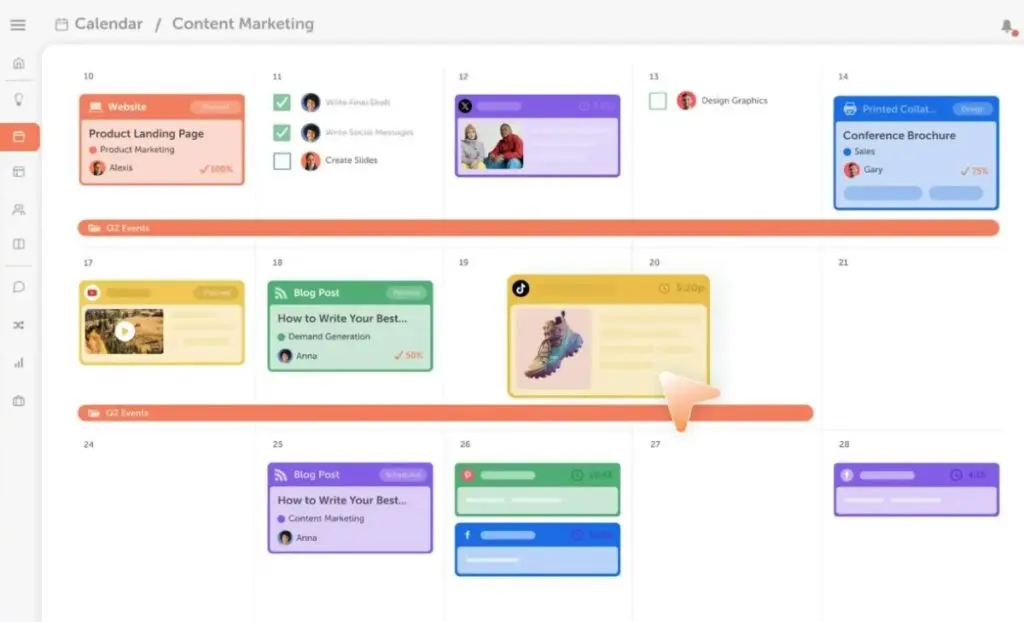
At the heart of any CMP is the editorial calendar. This is where strategy turns into execution.
A strong editorial planning feature should give you:
- A clear view of all planned, in-progress, and published content
- The ability to plan across channels and formats
- Flexible filtering by campaign, team, or content type
- Visibility into dependencies and deadlines
The calendar should support how your team thinks about content, not force you into a rigid structure. A common example is CoSchedule, which centers its platform around a unified editorial calendar that connects content ideas directly to tasks, timelines, and campaign goals. This makes it easier to manage content at scale without relying on spreadsheets.
Pro Tip:
Evaluate whether the calendar supports how you plan content strategically, not just when it publishes. Platforms that allow campaign-level planning make downstream reporting far more useful.
Collaboration and Internal Communication
Content creation involves feedback from multiple teams, and unmanaged collaboration is one of the biggest sources of delays.
Effective CMPs support:
- In-context comments tied to specific assets
- Structured approval workflows
- Clear ownership at each stage
- Reduced reliance on email
Kapost is a standout in this category. The tool is built around configurable workflows and approval stages that allow teams to collaborate, review, and approve content within a single system rather than across disconnected tools.
Pro Tip:
Ask vendors to show how legal or executive approvals work in practice. Bottlenecks usually appear at approval stages, not during creation.
Creator and Contributor Management
If you work with freelancers, agencies, or subject-matter experts, contributor management becomes a critical CMP feature.
Key capabilities include:
- Controlled access for external contributors
- Clear briefs and deadlines
- Centralized content submission
- Visibility into contributor activity
A great suggestion here is StoryChief, which supports contributor roles, collaborative writing, and content submission workflows designed for teams working with both internal and external creators.
Pro Tip:
Confirm whether contributors require paid seats. Platforms that offer limited external access can significantly reduce costs as your contributor network grows.
Content Distribution and Channel Support
CMPs should support how content moves from creation to publication, even if they are not the final publishing destination.
This often includes:
- CMS and social integrations
- Channel-level publishing status
- Support for repurposing content
- Metadata and tagging for reuse
For example, Ceros supports content distribution by allowing teams to publish interactive assets as standalone web experiences and manage updates centrally across owned channels.
Pro Tip:
Pay attention to how updates are handled after publishing. Platforms that let you update content without re-publishing reduce risk and maintenance effort.
Analytics, Attribution, and Measurement
Analytics is where CMP value becomes visible to leadership.
Strong measurement capabilities include:
- Content-level performance insights
- Campaign or objective-based reporting
- Integration with analytics and CRM tools
- Insight into how content supports business goals
A common example is BrightEdge, which connects content performance to search demand and engagement data, helping teams optimize content based on real audience behavior rather than vanity metrics.

Pro Tip:
Ask how analytics influence planning decisions. If insights cannot be fed back into the editorial calendar, they rarely change outcomes.
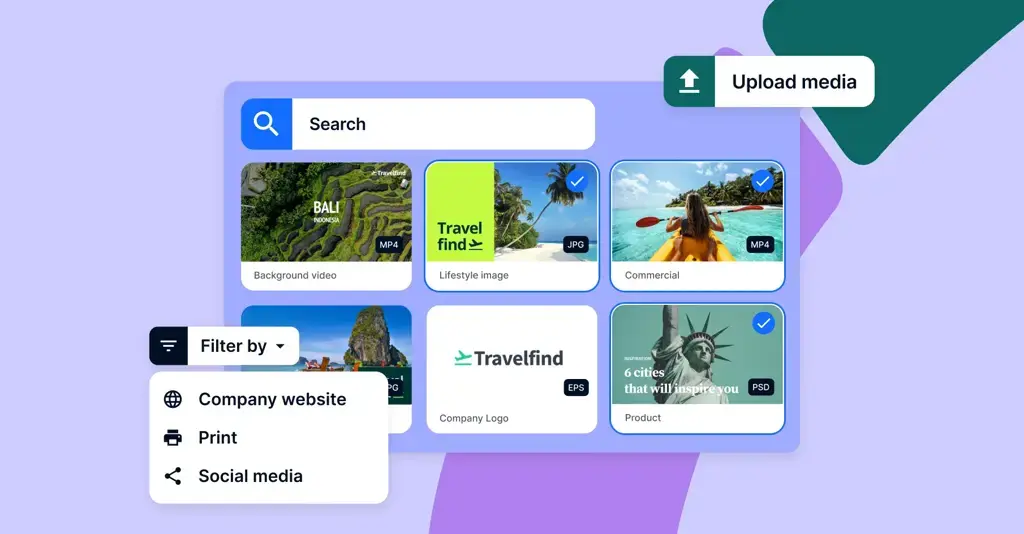
Asset Management and Content Reuse
As content libraries grow, reuse and governance become efficiency multipliers.
Effective CMPs support:
- Centralized asset storage
- Version control and permissions
- Easy discovery and reuse
- Brand and usage governance
Bynder provides centralized asset libraries with versioning and brand controls, helping teams avoid duplication and maintain consistency across channels.
Pro Tip:
Test asset search using real filenames and tags. Poor search leads teams to recreate content they already have, driving unnecessary costs.
When you evaluate CMPs through these feature lenses, patterns emerge quickly. The strongest platforms are not the ones with the longest feature lists, but the ones where features work together to support how your team actually operates.
Next, you will look at how these features map to different business types and team structures, helping you avoid choosing a platform that is either too basic or unnecessarily complex.
Matching CMP Capabilities to Your Business Type
Even the most powerful CMP can be the wrong choice if it does not align with how your business operates. This section helps you map platform capabilities to real-world organizational needs, so you avoid paying for complexity you do not need or outgrowing a tool too quickly.
Small and Growing Marketing Teams
If you are working with a lean team, your priority is usually clarity and speed rather than deep customization.
Smaller teams tend to benefit from CMPs that offer:
- Simple editorial planning and collaboration
- Minimal setup and onboarding
- Clear visibility into content status
- Predictable pricing
A common example is StoryChief, which supports collaborative writing, planning, and publishing without the operational overhead typically found in enterprise CMPs.
Suggestion:
If your team is small, prioritize usability over feature depth. Platforms that require heavy configuration often slow adoption and reduce ROI early on.
B2B and SaaS Organizations
B2B content marketing is often focused on thought leadership, lead influence, and long buying cycles rather than immediate conversions.
CMPs that work well for B2B teams typically emphasize:
- Content planning by funnel stage or buyer journey
- Performance tracking beyond vanity metrics
- Integration with CRM and analytics tools
- Governance and approvals
Kapost, yet again, is frequently used by B2B teams to connect editorial workflows with measurable business outcomes such as pipeline influence.
Suggestion:
When evaluating CMPs for B2B use, ask how content performance is measured across the buyer journey, not just at the point of publication.
Agencies and Multi-Client Teams
Agencies face unique challenges because they manage content across multiple brands, clients, and stakeholders simultaneously.
Agency-friendly CMPs usually support:
- Multi-brand or multi-workspace setups
- Clear permission and access controls
- Client-ready reporting
- Repeatable workflows
CoSchedule allows agencies to manage multiple calendars and campaigns while maintaining separation between clients. Their agency tier explicitly outlines the benefits for managing multiple clients, such as unlimited calendars, a social inbox for all networks, and white-label features, among others.
Suggestion:
Confirm how pricing scales with additional clients or users. Per-workspace or per-seat pricing can significantly affect margins as you grow.
Enterprise and Global Brands
Large organizations often operate across regions, business units, and compliance environments, making governance a top priority.
Enterprise CMPs typically provide:
- Role-based permissions and approvals
- Centralized governance with local flexibility
- Integration with broader marketing and data stacks
- Dedicated onboarding and support
A common example is Bynder, which is widely used by global brands to manage content assets with strict brand and usage controls across teams and markets. Their testimonials serve as proof.

Suggestion:
Involve IT, legal, and procurement early in the evaluation process. Enterprise CMPs often succeed or fail based on security, compliance, and integration requirements rather than marketing features alone.
Matching CMP capabilities to your business type helps narrow your shortlist quickly. In the next section, you will look at pricing models, implementation considerations, and the total cost of ownership, which often become the final deciding factors.
Pricing, Implementation, and Total Cost of Ownership
Once you have a shortlist of CMP vendors, pricing and rollout considerations often become the deciding factors. This is also where many teams underestimate the true cost of adopting a platform, focusing on license fees while overlooking implementation and adoption.
Common CMP Pricing Models
Most CMPs use subscription-based pricing, but how those subscriptions are structured varies widely.
Some platforms price based on users or seats, while others scale by content volume, features, or workspaces. Enterprise-focused platforms often bundle advanced workflows, analytics, and support into higher-tier plans, whereas lighter tools may offer more accessible entry points with fewer capabilities.
Pro Tip:
Ask vendors which features are locked behind higher tiers. Editorial planning might be included, but analytics or integrations are often upsells.
Implementation and Onboarding Effort
CMPs touch many parts of your organization, which makes implementation more than a simple software install.
You should evaluate:
- How long onboarding typically takes
- Whether implementation support is included
- If workflows require customization
- How existing content and assets are migrated
Popular platforms typically include structured onboarding because asset migration and governance setup are critical to brand success.
Pro Tip:
Request a realistic implementation timeline based on teams similar to yours, not best-case scenarios shown in sales decks.
Training, Adoption, and Change Management
Even the best CMP delivers no value if your team does not use it consistently.
Important adoption factors include:
- Quality of training resources
- Role-based onboarding for different users
- Ongoing customer support availability
- Ease of daily use
Many content marketing platforms tend to emphasize usability and self-serve learning, which can speed adoption for lean teams.
Pro Tip:
During demos, ask vendors to show the platform from the perspective of a non-admin user. Ease of day-to-day use matters more than configuration depth.
Understanding Total Cost of Ownership
The license fee is only part of the cost equation. Over time, the total cost of ownership includes:
- Additional user seats
- Integration or API fees
- Support or premium services
- Time spent managing the platform
Enterprise CMPs can deliver strong ROI, but only if they are fully adopted and aligned with your workflows.
Consider This:
Map expected usage over the next 12 to 18 months. A platform that seems affordable today may become expensive as content volume and users increase.
By understanding pricing models and implementation realities upfront, you can avoid surprises and choose a CMP that delivers value long after launch. Next, you will learn how to research, shortlist, and vet CMP vendors effectively before making a final decision.
How to Research, Shortlist, and Vet CMP Vendors
Once you understand what you need from a CMP, the next step is turning that clarity into a confident buying decision. A structured evaluation process helps you avoid shiny-feature bias and keeps the focus on fit.
Where to Research CMP Vendors
Start broad, then narrow quickly. Vendor websites are useful for understanding positioning and core capabilities, but they are only one input.
Balance vendor messaging with:
- Independent review platforms
- Public case studies that match your industry or team size
- Peer recommendations from marketers facing similar challenges
Case studies are especially valuable because they show how a CMP performs under real operational pressure.
For example, CoSchedule highlights how Amp My Brand, a small agency managing 16 franchise clients and 37 social profiles, centralized planning and approvals to streamline production. By consolidating workflows into one platform, the team was able to plan content further ahead, improve client review cycles, and manage high-volume social publishing more efficiently.
Pro Tip:
Look for patterns in reviews, not isolated complaints. Repeated mentions of poor onboarding or limited analytics usually signal real friction.
How to Build a Shortlist That Makes Sense
Your shortlist should be small enough to compare meaningfully, ideally 3 to 5 vendors.
Filter candidates by:
- Platform category that matches your primary need
- Integrations with your existing stack
- Team size and content volume fit
- Budget range and pricing model
Eliminate tools that require major workarounds early. If a vendor cannot support your core workflow out of the box, it is unlikely to improve with time.
Pro Tip:
Exclude platforms that solve problems you do not have yet. Overbuying creates adoption risk and slows teams down.
Questions to Ask Before Booking a Demo
Demos are time-intensive. Make sure the platform is a realistic fit before scheduling one.
Key questions to ask upfront include:
- Which features are standard vs premium?
- How does the platform scale with users and content volume?
- What are the typical onboarding timelines?
- What support options are available?
This helps you avoid demos that are impressive but misaligned.
Pro Tip:
Ask vendors to confirm limitations in writing before the demo. Transparency early is a strong signal of long-term partnership quality.
What to Test During a Demo or Trial
Treat demos as practical tests, not presentations.
Ask vendors to show:
- A real editorial workflow from idea to publication
- How approvals and feedback work with multiple stakeholders
- How analytics connect back to planning decisions
- What day-to-day use looks like for non-admin users
Avoid generic walkthroughs that only show ideal scenarios.
Pro Tip:
Bring a real campaign or content workflow to the demo. Vendors who can map their platform to your reality usually deliver better post-sale outcomes.
Red Flags to Watch for During Evaluation
Some warning signs only appear during evaluation.
Be cautious if you see:
- Vague answers about analytics methodology
- Heavy reliance on custom implementations
- Opaque pricing or contract terms
- Demos that avoid showing limitations
A CMP should simplify your operations, not introduce new dependencies.
A disciplined research and vetting process reduces risk and improves adoption.
Choosing a CMP That Actually Supports How You Work
Selecting the right content marketing platform is not about chasing the most features or the biggest brand name. It is about choosing a tool that fits how your team plans, creates, collaborates, and measures content today, while still supporting where you want to go next.
A well-chosen CMP brings structure to your content operations, reduces friction between teams, and helps you connect content efforts to meaningful business outcomes. A poorly chosen one adds complexity, slows adoption, and becomes shelfware. That difference almost always comes down to alignment, not capability.
Before making a final decision, be honest about your workflows, content volume, and internal constraints. Use demos to test real scenarios, not ideal ones. Pay close attention to onboarding, usability, and how insights flow back into planning.
When a CMP supports your strategy instead of dictating it, content becomes easier to scale, easier to manage, and far easier to justify as a long-term investment.
Frequently Asked Questions
How should a CMP support your overall content marketing strategy?
A CMP works best when it operationalizes your broader plan, helping you turn ideas into execution, which is especially important when applying proven content marketing strategy examples across multiple channels and teams.
Do SaaS companies need different CMP capabilities than other businesses?
Yes, SaaS teams often prioritize long-form education, lead influence, and lifecycle content, which is why many pair CMPs with insights from experienced SaaS content marketing agencies to support complex buyer journeys.
How is a content marketing platform different from branded content tools?
CMPs manage planning, workflows, and measurement, while branded content software tools focus more narrowly on creating and distributing brand-led storytelling assets.
When should a brand consider using a dedicated branded content platform?
If your focus is immersive storytelling and brand-led experiences, branded content platforms are often layered alongside CMPs to enhance presentation and engagement rather than replace planning workflows.
Can a CMP support different content formats and channels?
Yes, strong platforms are designed to manage diverse workflows, making it easier to plan and execute different types of content marketing materials, such as blogs, video, social, and interactive assets.
How do content marketing trends influence CMP selection?
Shifts toward AI, personalization, and content repurposing mean CMPs must adapt quickly, which is why keeping an eye on emerging content marketing trends helps guide smarter platform decisions.
Why are content maps important when using a CMP?
Content maps help align assets to buyer stages and goals, and many teams use structured content map templates to ensure CMP planning supports the full customer journey.
Should a CMP help showcase content performance internally or externally?
Yes, CMPs often play a role in organizing proof of work, making it easier to reference content marketing portfolio examples when reporting results or pitching stakeholders.


