
Learning how to use TikTok can feel overwhelming at first, but once you understand how the platform works, it quickly becomes one of the easiest and most engaging social apps to navigate. What started as a short-form video platform for entertainment has evolved into a powerful space for discovery, creativity, and even shopping.
With more than 1.5 billion monthly active users worldwide and some of the highest daily engagement rates of any social platform, TikTok isn’t just popular, it’s where people actively spend their time. In fact, users in the U.S. spend nearly an hour per day on the app on average, making it one of the most attention-rich platforms available today.
So, what is TikTok used for? From learning new skills and following trends to promoting businesses and building communities, TikTok serves as both a content platform and a search engine for real-world recommendations.
In this beginner’s online guide, you’ll learn exactly how to use TikTok step by step, from setting up your account and navigating the app to creating videos, using filters, hashtags, and emojis, and understanding how TikTok works for both personal and business use.

TikTok Followers Growth
⭐Planning to Use TikTok for Business?
As you learn your way around TikTok, its advertising tools can help you reach new customers and pursue goals ranging from brand awareness to sales. Create your TikTok Ads account and claim up to $6,000 in ad credits for your first campaigns through this limited-time offer.
What Is TikTok and What Is It Used For
TikTok is a short-form video platform where users create, watch, and share videos that typically range from a few seconds to several minutes. What makes TikTok different from other social media apps is how quickly it learns what you like and delivers highly personalized content through your “For You Page” (FYP).
Instead of relying only on who you follow, TikTok’s algorithm recommends videos based on your behavior, including what you watch, like, comment on, or skip. This means even brand-new users can discover relevant content almost instantly.
So, what is TikTok used for in practice? Today, people use TikTok for far more than entertainment. Common use cases include:
- Learning and discovery: tutorials, product reviews, and how-to content
- Entertainment: trends, challenges, humor, and storytelling
- Search and recommendations: finding restaurants, travel tips, or product suggestions
- Content creation: building a personal brand or growing an audience
- Business and marketing: promoting products, running ads, and driving sales
For beginners, the key thing to understand is that TikTok is both a content platform and a discovery engine. You don’t need followers to start seeing engaging content or to have your videos reach others.
Once you understand how TikTok surfaces content, learning how to use TikTok becomes much more intuitive.
Key TikTok Features Every Beginner Should Know
Before learning how to use TikTok step by step, it helps to understand the features that make the platform so powerful and easy to use.
- A highly personalized For You Page (FYP): TikTok’s algorithm quickly learns what you like and delivers a tailored stream of videos, even if you’re not following anyone yet.
- Built-in video editing tools: You can record, trim, combine clips, add transitions, and edit your videos directly in the app without needing external software.
- A massive library of sounds and music: TikTok offers thousands of songs, trending audio clips, and voice effects you can use to enhance your content.
- Filters, effects, and AR tools: If you’re wondering how to use TikTok filters, the app includes everything from simple color filters to advanced augmented reality effects that transform your videos.
- Text, emojis, stickers, animated stickers, and visual effects: You can easily add text overlays, TikTok emojis, stickers, and animated elements to make your content more engaging and easier to follow.
- Hashtags that boost discoverability: Hashtags on TikTok help categorize your content, but TikTok’s algorithm also relies heavily on video content, captions, and user behavior.
- Duets, stitches, and collaborative content tools: TikTok makes it easy to interact with other creators by responding to their videos or building on existing content.
- TikTok Shop and in-app discovery: Users can now discover products, watch reviews, and make purchases directly within the app, making TikTok a powerful platform for both users and businesses.
- A global, trend-driven community: TikTok operates across dozens of languages and regions, making it one of the most culturally dynamic platforms for sharing and discovering content.
How to Set Up a TikTok Account
Setting up your TikTok account only takes a few minutes, and you don’t need any prior experience to get started. Follow these steps to create your account and begin exploring the platform.
1. Download the TikTok app
Go to the App Store (iPhone) or Google Play Store (Android) and search for TikTok. Download and install the app on your device.
2. Open the app and sign up
Once installed, open TikTok. First, you'll need to choose your interests so the app can get better video recommendations. You can also skip this part, but we recommend against it.
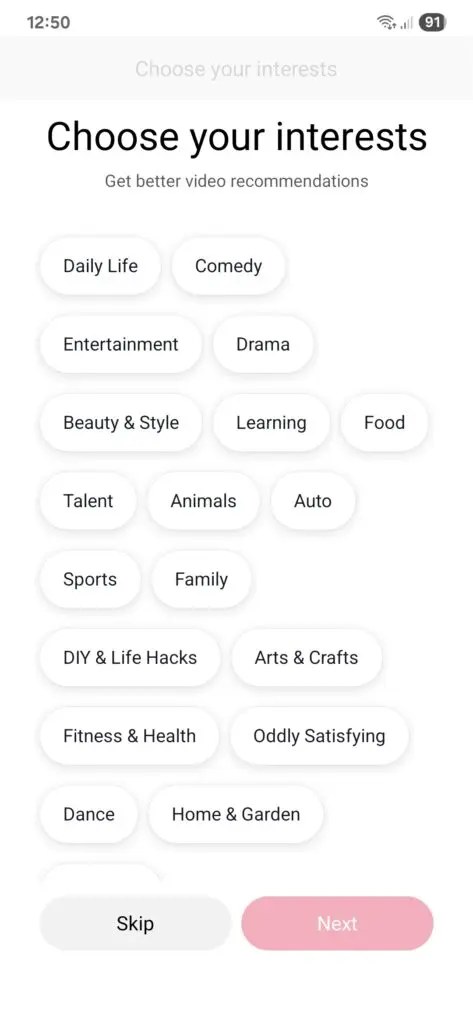
Then, tap “Profile” in the bottom-right corner.
You’ll be prompted to sign up using one of the following options:
- Phone number or email
- Google account
- Apple ID
- Facebook or other linked platforms
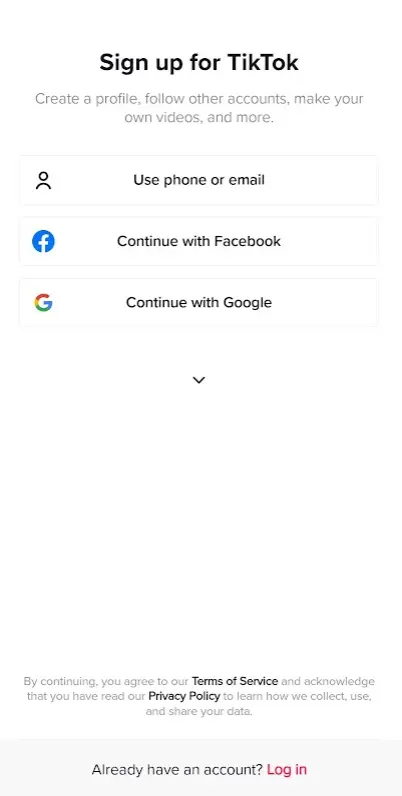
Choose the method that’s easiest for you and follow the on-screen instructions.
3. Set your age and basic preferences
TikTok will ask for your date of birth to ensure age-appropriate features.
You must be at least 13 years old to use TikTok, although some features may be limited for younger users.
4. Create your username and password
Pick a username that reflects your identity or brand. This can be changed later, but it’s best to choose something recognizable and easy to remember.
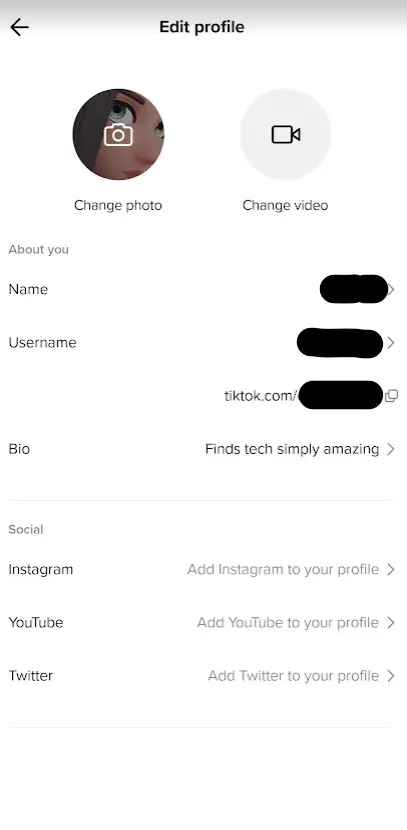
5. Customize your profile
Once your account is created, tap “Edit profile” to add:
- A profile photo or video
- A short bio
- Links to other platforms (like Instagram or YouTube)
This step is important if you plan to use TikTok for business or personal branding.
6. Start exploring your feed
After setup, you’ll be taken to your For You Page (FYP).
This is where TikTok begins recommending videos based on your activity, even if you haven’t followed anyone yet.
How to Navigate TikTok
Once your account is set up, the next step in learning how to use TikTok is understanding how to navigate the app. TikTok’s interface is simple, but knowing what each tab does will help you find content faster and get more out of the platform.
The Home Feed (For You and Following)
When you open TikTok, you’ll land on the Home tab.
Here, you’ll see two main feeds:
- For You Page (FYP): This is TikTok’s main feed, where videos are recommended based on your activity. The more you watch, like, and interact, the better TikTok gets at showing content you enjoy.
- Following: This feed shows videos only from accounts you follow, giving you more control over what you see.
For beginners, most of your time will be spent on the For You Page, since it helps you discover new content quickly.
The Main Navigation Tabs
At the bottom of your screen, you’ll see TikTok’s main navigation bar:
- Home: Your personalized video feed.
- Search (Discover): Use this to find videos, creators, sounds, or hashtags. This is especially important if you want to learn how to use hashtags on TikTok or explore trending topics.
- Create (+ button): Tap this to record or upload your own videos. This is where you’ll start creating content, applying filters, and adding effects.
- Inbox: View notifications, messages, comments, and updates from other users.
- Profile: Access your profile, edit your information, and view your posted videos.

How to Interact With Videos
On the right-hand side of each video, you’ll see several icons:
- Heart icon: Like a video. This also helps train TikTok’s algorithm to show you similar content.
- Comment icon: Leave a comment or read what others are saying.
- Bookmark icon: Save videos to watch later or organize into collections.
- Share arrow: Share the video, send it to friends, or create a duet or stitch.
- Sound icon (spinning record): Tap this to explore the audio used in the video and find similar content.

Interacting with videos is one of the fastest ways to personalize your TikTok experience.
How to Search on TikTok
TikTok is increasingly used as a search engine, not just a social media app.
To search:
- Tap the Search icon (magnifying glass)
- Enter keywords, topics, or phrases
- Browse results across videos, users, sounds, and hashtags
For example, you can search for tutorials, product reviews, or trends just like you would on Google.
How to Follow and Discover Creators
If you find a creator you enjoy:
- Tap their profile picture
- Then tap Follow
Following creators helps you build a more curated feed over time.
How to Create and Post Your First TikTok
Now that you understand how to navigate the app, the next step in learning how to use TikTok is creating your first video. TikTok makes this process simple with built-in tools for recording, editing, and publishing content.
Creating Your First TikTok
1. Open the TikTok camera
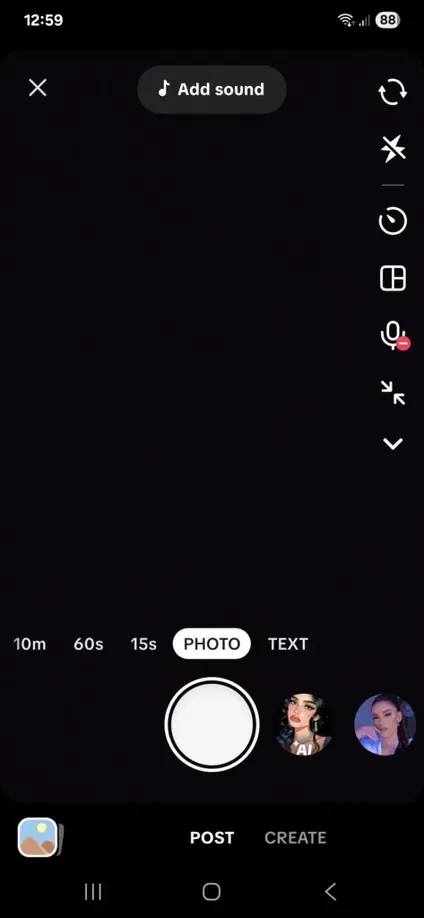
Tap the “+” (Create) button at the bottom of your screen. This opens your camera, where you can:
- Record a video directly in the app
'Upload existing videos or photos from your device
2. Choose your recording mode or video length
At the bottom of the screen, you’ll see options such as:
- Photo
- Text
- 15s, 60s, or up to 10m video recording
These options control how long your video can be or the type of content you’re creating. If you’re just starting out, shorter videos (15–60 seconds) are usually easier to manage.
3. Add sound or music
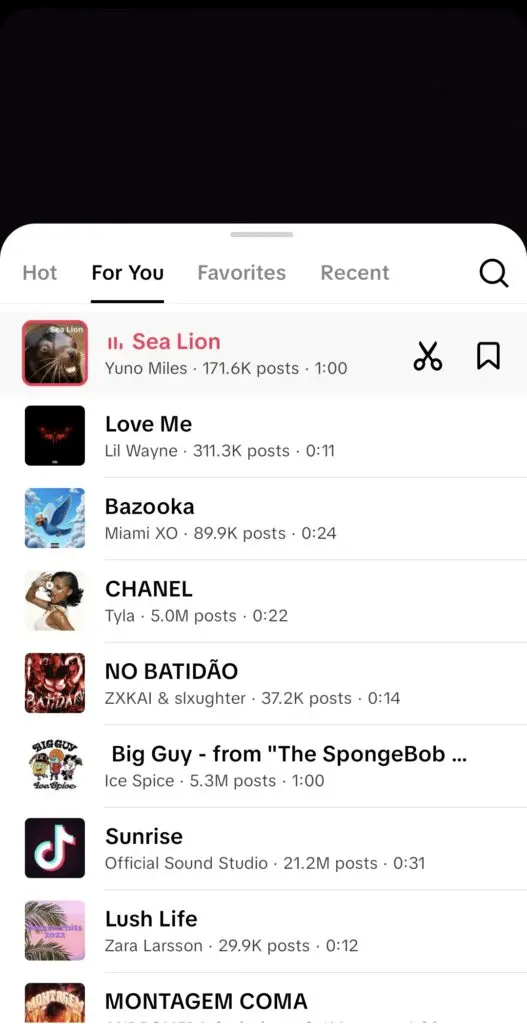
Tap “Add sound” at the top of the screen to browse TikTok’s audio library.
You can:
- Use trending sounds
- Search for specific music
- Save audio for later
Using relevant or trending sounds can help your content reach a wider audience.
4. Record your video
Press and hold the record button to start filming.
You can:
- Record in one continuous take
- Record multiple clips
- Use the timer for hands-free recording
Recording in short clips can make your video more dynamic and easier to edit.
5. Use filters and effects
To enhance your video, use TikTok’s built-in visual tools:
- Tap “Effects” to explore AR effects, transformations, and interactive visuals
- Tap “Filters” to adjust color, lighting, and overall look
If you’re learning how to use TikTok filters, start with simple adjustments before experimenting with more advanced effects.
6. Edit your video and add visual elements
After recording, tap “Next” to enter the editing screen.
Here, you can:
- Trim clips and adjust timing
- Add text overlays
- Insert emojis and stickers
- Add captions or voiceovers
Using text and visual elements helps make your content clearer and more engaging, especially for viewers watching without sound.
7. Write your caption and add hashtags
Before posting, you’ll add a caption to your video.
This is where you learn how to use hashtags on TikTok effectively:
- Add relevant hashtags that describe your content
- Use a mix of broad and specific keywords
- Avoid overloading your caption with too many hashtags
Hashtags help categorize your video, but TikTok’s algorithm also relies heavily on watch time, engagement, and content relevance.
8. Adjust your video settings
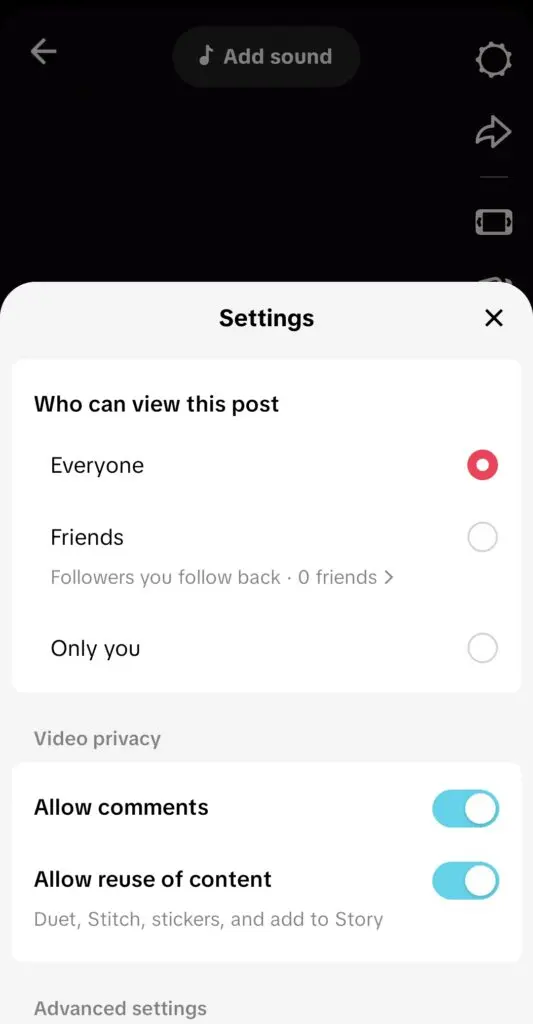
Before publishing, you can control:
- Who can view your video (public, friends, or private)
- Whether comments are enabled
- Whether others can duet or stitch your video
9. Post your video
Tap “Post” to publish your TikTok.
If you’re not ready, you can save it as a draft and post it later.
How to Use TikTok for Business
TikTok isn’t just for entertainment, it’s also one of the most effective platforms for reaching new audiences and driving real business results. Even if you’re just getting started, there are simple ways to use TikTok for business without needing a large budget or advanced skills.
One of the biggest reasons for this shift is the rise of influencer-led content.
Brands are now investing heavily in TikTok, with budgets growing by 85% compared to other platforms, as marketers double down on creator partnerships and native content.
This isn’t surprising when you consider how users behave on the platform. As much as 64% of TikTok users say ads influence their purchasing decisions at a much higher rate than the general population, and nearly 47% of U.S. users trust recommendations from influencers and creators.
This combination of high engagement and strong creator trust has made TikTok a central channel for influencer marketing, where content feels less like advertising and more like authentic recommendations.
1. Switch to a business account
If you plan to promote a brand, product, or service, consider switching to a business account.
To do this:
- Go to your profile
- Tap the menu (top-right corner)
- Select Settings and privacy → Account → Switch to Business Account
A business account gives you access to analytics, advertising tools, and a commercial sound library. Keep in mind that some trending sounds may be restricted for commercial use.
2. Define your content focus
Before posting, decide what kind of content you want to create.
Common content types for businesses include:
- Educational or how-to videos
- Product demonstrations or reviews
- Behind-the-scenes content
- User-generated content (UGC)
- Trend-based or entertaining videos
The goal is to create content that feels native to TikTok rather than overly promotional.
3. Create content that fits the platform
TikTok rewards content that:
- Feels authentic and relatable
- Grabs attention in the first few seconds
- Encourages engagement (likes, comments, shares)
Instead of polished ads, focus on storytelling, quick tips, or visually engaging moments.
4. Use hashtags and keywords strategically
Understanding how to use hashtags on TikTok is important for business visibility.
- Use relevant hashtags to describe your content
- Include keywords in your captions (not just hashtags)
- Focus on clarity over quantity
TikTok’s algorithm uses both hashtags and on-screen content to understand what your video is about.
5. Leverage trends and sounds
Participating in trends is one of the fastest ways to increase visibility.
You can:
- Use trending sounds
- Join challenges
- Adapt popular formats to your niche
For businesses, the key is to adapt trends in a way that aligns with your brand, rather than copying them exactly.
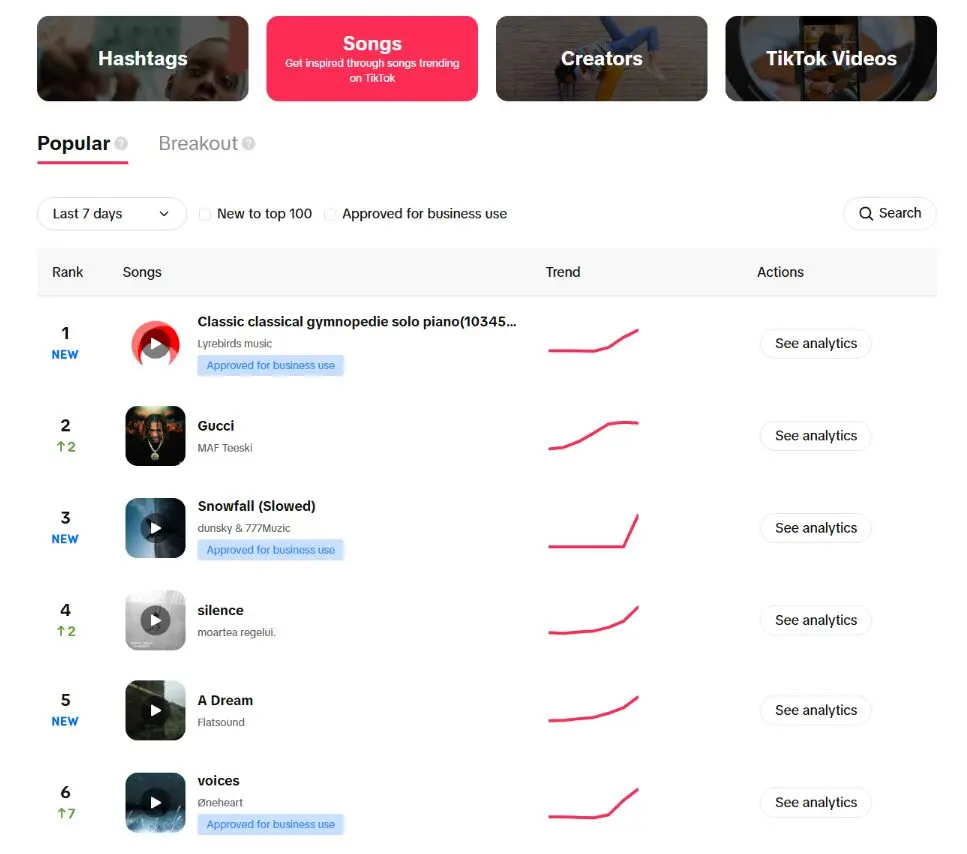
If you're curious as to which trends are currently popular on TikTok, the TikTok Creative Center is a wonderful resource. There, you can browse trends by hashtags, songs, creators, and even see which TikTok videos are trending.
6. Engage with your audience
TikTok is a highly interactive platform.
Make sure to:
- Reply to comments
- Engage with other creators
- Encourage interaction in your videos
Engagement signals help improve your content’s reach and build a stronger connection with your audience.
7. Track performance with analytics
TikTok provides built-in analytics tools to help you understand what’s working.
You can track:
- Video views
- Watch time
- Engagement (likes, comments, shares)
- Audience demographics
Reviewing your analytics regularly helps you refine your content strategy over time.
8. Explore TikTok Shop and monetization features
Depending on your region, you may have access to features like:
- TikTok Shop
- Affiliate links
- Creator partnerships
These tools allow businesses and creators to turn content into direct revenue opportunities.
⭐ Ready to Go From Posting to Promoting?
Once your profile, content strategy, and analytics are in place, TikTok Ads Manager lets you choose an objective, set your budget, target an audience, and launch your first campaign. Create your account and claim up to $6,000 in TikTok ad credits through this limited-time offer.
How to Grow Your TikTok Audience
Once you understand how to use TikTok, growth comes down to one thing: creating content that resonates with the right audience. TikTok’s algorithm doesn’t prioritize follower count in the same way as other platforms.
Instead, it focuses on how people respond to each individual video.
Understand Who Your Content Is For
If you take anything from this section, it should be this: growth on TikTok starts with relevance.
The more your content aligns with a specific audience, the more likely it is to be picked up and distributed. This is largely driven by how TikTok’s algorithm works. Content that resonates with a defined group tends to generate stronger engagement signals, which the platform then uses to push videos to similar viewers.
There’s also a clear audience pattern behind this behavior. TikTok’s user base is heavily concentrated among younger audiences, particularly those aged 18 to 34, who actively engage with niche content and trends. This makes it easier for highly specific content to find traction quickly.
This is where many beginners go wrong. They try to create content for everyone, which usually results in content that connects with no one. On TikTok, it’s far more effective to focus on a clear niche or content style and build from there.
Brands approach this in the same way. In fact, around 50% of businesses say they create content specifically tailored to defined audience segments on TikTok, rather than using broad messaging. The clearer the audience, the stronger the engagement and the better the performance.
TikTok also reinforces this behavior through discovery. Users are 1.8× more likely to say the platform introduces them to new topics they didn’t previously know they were interested in, which means niche content doesn’t just reach existing audiences; it helps create new ones.
The more specific your content is, the easier it is for TikTok to understand who it’s for, and the more likely it is to reach the right people.
Build Around Content, Not Just Posting Frequency
Posting regularly helps, but growth on TikTok isn’t just about volume. It’s about how each piece of content performs.
The platform looks closely at signals like watch time, replays, and engagement. If people watch your video all the way through or interact with it, TikTok is more likely to show it to a wider audience.
In fact, marketers consistently rank video views as the most important success metric on TikTok, with 62.2% identifying it as their top KPI, far ahead of likes, comments, or shares.
This emphasis on performance is also reflected in engagement rates. TikTok content generates significantly higher engagement than other platforms, with accounts seeing engagement rates above 10% at scale and even higher for smaller creators. This means that when a video resonates, it has a much greater chance of being amplified.
The platform is designed to reward strong individual posts. A single video that holds attention and drives interaction can quickly reach a much wider audience, regardless of how often you post.
Instead of focusing only on consistency, it’s more effective to focus on creating content that people actually want to watch, engage with, and revisit.
Use Trends Strategically, Not Passively
Trends are one of the fastest ways to gain visibility on TikTok, but they only work if you adapt them to your content.
Simply copying a trend rarely leads to strong results. The content that performs best usually takes a familiar format and applies it to a specific niche or idea. This makes the video feel both relevant and original, rather than repetitive.
A strong example of this is Chipotle’s #GuacDance challenge. Instead of jumping on an existing trend, Chipotle created its own by encouraging users to share videos celebrating their love for guacamole. The campaign tapped into a simple, repeatable format while still leaving room for creativity across different creators and audiences.
@brentrivera When guacamole is free @chipotle when you order online/in-app on July 31st😍 #GuacDance ad
The result was massive engagement. The #GuacDance challenge generated over 250,000 video submissions in just six days, becoming one of TikTok’s highest-performing branded challenges at the time. It also led to a significant spike in guacamole orders, showing how trend participation can translate into real-world impact.
What made this work wasn’t just the trend itself, but how adaptable it was. Each participant could interpret it differently, whether through humor, dance, or storytelling, while still aligning with the core idea.
TikTok trends aren’t about copying what’s already popular. They’re about using familiar formats as a foundation and making them your own.
⭐Turn a TikTok Idea Into a Campaign
Found a format that fits your brand? TikTok Ads can help you bring that creative to a larger, more relevant audience while keeping control of your targeting, bidding, and spend. Unlock up to $6,000 in TikTok ad credits and start testing your first campaign.
Leverage Influencers and Creators
One of the most effective ways to grow on TikTok, especially for businesses, is through creator partnerships.
Creators already understand how the platform works and have built trust with their audiences. When they feature a product or brand, it often feels more like a recommendation than an ad, which significantly increases its impact.
That shift is already happening at scale. According to our data, 65% of marketers are already working with TikTok influencers, with another 25% planning to invest in creator partnerships.
You can see how this plays out in real campaigns. For example, Walmart’s #DealDropDance campaign partnered with multiple TikTok influencers to promote Black Friday deals. Instead of running traditional ads, the brand worked with creators to produce dance-style content that encouraged users to participate and recreate the format.
@montanatucker This is how I’ll be shopping for Black Friday deals... @walmart this year! #dealdropdance #contest #sponsored
The campaign reached over 17 million followers through influencer content alone, while also driving widespread user participation as people joined the trend and created their own videos.
What made this effective wasn’t just reach, but format. The campaign relied on creators to translate the message into content that felt native to TikTok, blending seamlessly into users’ feeds rather than interrupting them.
That’s the key difference with influencer marketing on TikTok. Creators don’t just promote products; they shape how those products are experienced on the platform. And because of that, their content is more likely to be watched, trusted, and acted on.
Collaborate to Expand Your Reach
Growth on TikTok doesn’t have to happen in isolation. One of the easiest ways to reach new audiences is by building on content that already exists.
Features like Duet and Stitch are designed specifically for this. They allow you to interact directly with another creator’s video, either by recording alongside it (Duet) or by using part of it in your own content (Stitch). This turns collaboration into something that’s built into the platform, not something that requires formal partnerships.
In practice, this lowers the barrier to entry. You don’t need to coordinate with another creator to collaborate. You can respond to trending videos, add your perspective, or build on an existing idea in a way that feels natural.
@donnalyn #duet with @staceyryanmusic and this is why I don’t drink 🥲
This is how many creators grow quickly. Instead of starting from scratch, they plug into content that’s already gaining traction and make it their own. A well-timed Duet or Stitch can place your content directly in front of an engaged audience that’s already interested in that topic.
Some of the most recognizable TikTok creators have built their presence this way. Khaby Lame, for example, gained massive visibility by stitching and reacting to viral videos, adding a simple but distinct perspective that audiences instantly understood.
@khaby.lame 🤷🏿♂️🤲🏿🤣🧒🏻 #learnfromkhaby #learnwithtiktok @tiktok
The key is relevance. When your content aligns with the original video and adds something new, whether that’s humor, insight, or commentary, it feels like a natural extension rather than an interruption. And that’s what makes it perform.
Focus on Engagement, Not Just Views
Views are important, but they’re not the only metric that matters. TikTok pays close attention to how people interact with your content.
Comments, shares, and even rewatching a video all signal that your content is valuable. Over time, this kind of interaction helps build both reach and community.
Responding to comments and engaging with viewers can also extend the life of your content and create more opportunities for visibility.
Keep Learning From What Works
As you continue posting, patterns will start to emerge. Some videos will perform better than others, and those differences are worth paying attention to.
Instead of guessing what might work, you can use your past content as a guide. Look at what held attention, what sparked interaction, and what led to shares.
Growth on TikTok is rarely about one viral moment. It’s about gradually improving your content based on what your audience responds to.
⭐What Works to Power Your First Ads
Your strongest organic videos can reveal which hooks, messages, and formats connect with your audience. Use those insights to shape paid campaigns and monitor the results through TikTok Ads Manager. Claim up to $6,000 in TikTok ad credits through TikTok’s limited-time offer.
Additional Tips to Get More Out of TikTok
Once you’re comfortable with the basics, there are a few features and shortcuts that can make using TikTok more efficient and flexible.
Upload videos from your device
You don’t have to record everything inside TikTok. If you prefer to film or edit content using your phone or external apps, you can upload it directly.
To do this, tap the “+” (Create) button, then select “Upload” from the bottom-right corner. From there, you can choose one or multiple clips from your device and continue editing them inside TikTok.
This is especially useful if you’re using editing tools outside the app or repurposing content from other platforms.
Create photo-based videos with templates
TikTok also allows you to turn photos into videos using built-in templates.
From the camera screen, switch to Templates, choose a style, and select the photos you want to include. TikTok will automatically arrange them into a slideshow with transitions and music.
This is a quick way to create content without recording new footage, especially for storytelling, product highlights, or recap-style videos.
Manage and delete your videos
If you’ve posted something by mistake or want to clean up your profile, you can remove videos at any time.
Go to your profile, open the video, tap the three-dot menu, and select Delete. The video will be permanently removed from your account.
Share your profile with a QR code
Each TikTok account comes with a unique QR code that makes it easy for others to find and follow you.
To access it, go to your profile, open the menu, and select QR code. You can download or share it across other platforms.
You can also scan someone else’s code using the scan option in the app, which is useful for connecting quickly in person.
Mastering TikTok Starts With One Video
Learning how to use TikTok doesn’t require experience, just a clear understanding of how the platform works. Once you get familiar with how content is created, discovered, and shared, everything starts to feel more intuitive.
From setting up your account and navigating the app to creating videos and understanding what drives growth, TikTok rewards content that is clear, relevant, and engaging. Whether you’re using it for personal content or business, the key is to stay consistent, experiment with different formats, and pay attention to what resonates.
The more you use TikTok, the easier it becomes to create content that connects, performs, and reaches the right audience.
Frequently Asked Questions
How do you use tiktok for beginners?
To use TikTok as a beginner, create an account, explore the For You Page, interact with videos, and start posting your own content using built-in tools.
What is tiktok used for?
TikTok is used for creating and discovering short-form videos, including entertainment, tutorials, product reviews, and social commerce content.
How do you post a video on tiktok?
Tap the “+” button, record or upload a video, edit it with sounds and effects, add a caption and hashtags, then tap “Post.”
How do you use hashtags on tiktok?
Use hashtags in your caption to describe your content and improve discoverability, combining broad and niche keywords relevant to your video.
How do you use tiktok filters?
Tap “Filters” for color adjustments or “Effects” for visual transformations before or after recording your video.
How do you use tiktok emojis and stickers?
After recording, tap the editing tools to add emojis, stickers, and text overlays to make your content more engaging and easier to follow.
How old do you have to be to use tiktok?
You must be at least 13 years old to use TikTok, with additional restrictions applied to younger users depending on their region.
How do you use tiktok for business?
Switch to a business account, create content tailored to your audience, use trends strategically, and track performance using analytics tools.


