
What if every product demo, review, or tutorial your brand uploads could instantly turn into a storefront?
That’s the promise of YouTube Shopping in 2026, a feature set once built for creators, now fully optimized for brands.
With product tagging across Shorts, long-form videos, and Live streams, YouTube has evolved into a true end-to-end shopping ecosystem. Shoppers no longer just watch; they buy directly from the same video that inspired them.
And as consumer behavior shifts, 63% of global viewers say they’ve purchased something they discovered on YouTube — marketers are racing to turn engagement into conversion.
This guide breaks down exactly how brands can set up YouTube Shopping, connect their merchant feeds, and interpret analytics to drive measurable results.
Because today, YouTube isn’t just where audiences are entertained — it’s where shopping begins.
Connecting Your Merchant Feed and Eligibility Setup
Getting YouTube Shopping right starts with a clean foundation: linking your product catalog to YouTube via Google Merchant Center and confirming your channel’s eligibility. Do this well, and every later tactic, YouTube Shopping setup, YouTube product tagging, and analytics, work as intended.
Eligibility: What Brands Actually Need
YouTube outlines Shopping onboarding, permissions, and where analytics live in its “Get started with Shopping on YouTube” help guide. In short, eligible channels can:
- Connect a store
- Tag products (their own or partners’)
- Read Shopping analytics in YouTube Analytics
Start here to confirm availability on your channel and region.
If you plan to run affiliate alongside owned inventory, note that the YouTube Shopping Affiliate Program has separate eligibility (e.g., YPP status, subscriber/location thresholds) and policies—use this only if you’ll let creators tag your SKUs for commission.
Linking Merchant Center → YouTube
You’ll manage SKUs and feed quality in Google Merchant Center (GMC) and then link that data to your channel. Google’s Merchant Center documentation explains the YouTube store data source, onboarding steps, and how the feed is set to the [YouTube_Shopping] destination after approval.
This is the canonical path for surfacing your catalog on YouTube.
For Shopify brands, the Google & YouTube app streamlines the process: it syncs products and store info to Merchant Center and enables YouTube Shopping so customers can shop directly from videos. Shopify’s listing and guide detail features, sync behavior, and eligibility notes.
Common Setup Pitfalls (and Fixes)
- Unverified or mismatched domains: Your website must be verified/claimed in GMC under the same Google identity linked to your YouTube channel; otherwise, products won’t surface.
- Identifier & policy issues: Missing GTINs/MPNs, low-quality images, or restricted products will stall approvals. Review Google’s Shopping content policies and fix disapprovals at the feed level.
- Feed freshness & availability mismatches: Out-of-stock items lingering on tagged videos degrade shopper trust. Use automatic item updates and ensure your e-commerce platform pushes inventory changes promptly via your GMC data source/app.
While you’re completing setup, study how commerce appears to viewers.
In 2022, Glossier ran YouTube’s first Shoppable Shorts challenge to launch its No. 1 Pencil, allowing viewers to purchase directly from Shorts, providing early public proof that shopping primitives on YouTube can drive product sales.
For 2026, Shorts shopping has matured with product stickers, but Glossier’s campaign remains a useful reference for how discovery and checkout can compress on-platform.
Why This Matters:
Once your catalog is approved and linked, YouTube shopping setup unlocks frictionless YouTube product tagging across long-form, Shorts, and Live—and exposes purchase data in Analytics so you can scale what sells. We’ll cover tagging mechanics and the new Shorts product stickers next, including the exact behavior and analytics surfaces brands can see.
Tagging Products Across Long-Form, Shorts, and Live
Once your store is connected and eligible, the next core lever is product tagging, turning content into commerce-ready opportunities. The rules and behaviors differ by format (long-form, Shorts, live), especially now with Shorts shopping stickers and enhanced pinning capabilities.
Long-Form Video (Standard YouTube Videos)
In long-form videos, tagging is relatively stable and predictable:
- You use the “Tag Products” option during upload or via edit in YouTube Studio’s Video Elements section. You can select from SKUs in your connected Merchant Center feed. YouTube’s help docs allow up to 60 product tags per video (subject to eligibility), but best practice is to keep the list focused.
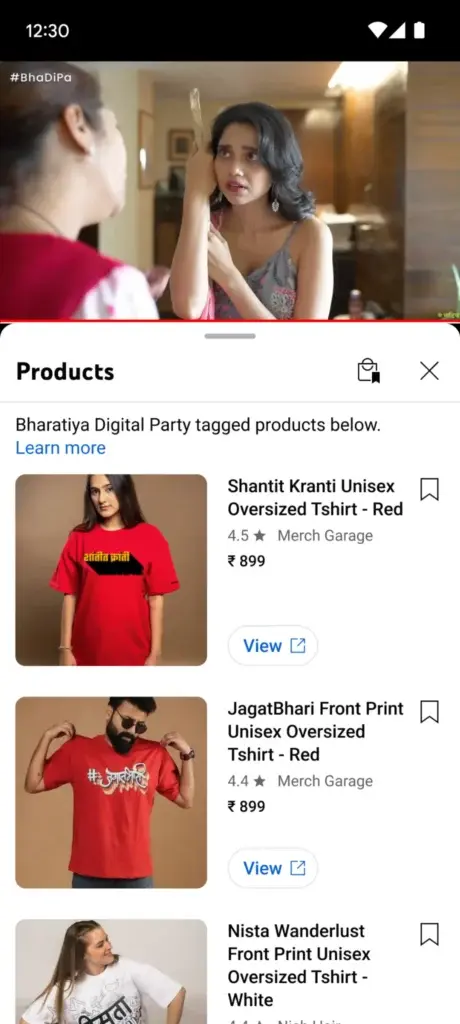
- Once tagged, viewers see a Shopping button overlay on the video (often in a corner), indicating the video has shoppable items. Clicking opens a panel with the tagged products.
- You can also include product listings in the product shelf below the video or in the description, giving extra access points to your catalog.
- Because viewers may want to jump directly to the exact moment a product is shown or referenced, timestamped product tagging is useful: you can map tags to moments in the video to reduce friction (so viewers don’t need to scrub manually).
For example, a beauty brand releasing a “skin-care routine” video might tag cleanser, serum, and moisturizer — with tags aligned to the timestamp when each item is introduced — so a viewer can click precisely when the product is mentioned.
Shorts and the New Shopping Stickers
Shorts are a rapidly evolving frontier for shopping. YouTube recently upgraded how product tags appear in Shorts, replacing the older bottom banner with an interactive product sticker that’s more visible and flexible.
- The sticker appears overlaid on the Short (not just in a banner), and tapping it opens the product link. If multiple products are tagged, a small downward arrow reveals the full list.
- Importantly, the sticker applies to the first product in your tagged list. If you want a specific SKU to “own” the sticker, reorder your list accordingly.
- You can also adjust sticker size and placement via the YouTube mobile app (not via desktop). This ensures it doesn’t clash with visuals.
One experiment in the U.S. reportedly showed Shorts with shopping stickers drove over 40% more product clicks than Shorts using the older shopping button format.
Because Shorts are often consumed rapidly and in discovery environments, this sticker-first design is critical: it inserts commerce into the viewing moment without requiring users to scroll or pause.
Live Streams: Tagging, Pinning, and Real-Time Control
Live is the most dynamic environment for product experiences, blending urgency, engagement, and real-time calls to action.
- Before a stream, creators can tag up to 30 products in the planning interface (“Plan ahead” → Tag products).
- You can tag products during the stream, but late additions might not appear to viewers who have already joined; it’s better to finalize tags ~30 minutes prior.
- Live also supports pinning one product; this locks that item into stronger visibility (e.g., pinned icon) to drive focus.
- Viewers tap a Shopping bag icon overlay in live mode to open a product panel with your tagged items.
- Tagged products remain visible in the replay version of the live video.
For example, a fashion brand can host a “live drop” of a new shoe release. During the stream, the host shows the product in hand, mentions features, and pins that SKU so that it remains top-of-mind, letting viewers click to purchase instantly — even afterward in the replay.
Summarizing Best Practices Across Formats
- Limit tags to 3–10 high-priority SKUs rather than flooding with dozens — quality over quantity matters for engagement and relevance.
- Align tag order with narrative flow — the first tagged product may own the sticker in Shorts, so that should be strategic.
- Speak to the product — verbally referencing or visually spotlighting tagged items helps viewers connect the link with what they see. YouTube’s guidelines require that tagged items be identifiable and meaningfully related.
- Test placement in Shorts — some creators move the sticker during upload to avoid covering faces or key visuals.
- Plan live pinning with pacing — pin your hero SKU for ~10–15 minutes at key selling moments, then unpin or rotate if multiple products deserve attention.
Once tagging is configured properly, brands can push products natively across formats: a viewer may click from a Short, drop into a long-form demo, or catch a live drop — all with a consistent shopping path.
Owned Inventory vs Affiliate Tagging Decisions
Once you’ve mastered tagging mechanics, the next question is whose inventory you should tag—your own or someone else’s. YouTube Shopping now supports two paths: direct Merchant Center integration for brands selling their own products, and affiliate tagging through the YouTube Shopping Affiliate Program for commission-based partnerships with creators.
Understanding how and when to use each is critical for profitability and attribution.
Owned Inventory: Direct Sales and Full Control
With owned inventory, your brand uses your Merchant Center feed directly, tags the SKUs you sell, and handles fulfillment, pricing, returns, and conversion tracking end-to-end. This is often the default for DTC brands aiming for maximum control.
- In YouTube Studio under “Earn → Shopping,” you can link your store(s) and manage product visibility. YouTube’s documentation states: “You can connect your official store with YouTube to sell your own products on YouTube.”
- On Shopify, the Google & YouTube channel automates feed syncing from Shopify into Merchant Center and keeps product data up to date for use in YouTube.
- Using owned inventory ensures that all conversion revenue and data flow into your systems. You retain ownership of customers and can integrate this data with your other channels and attribution models.
Pros
- You keep 100% of margins (no commission cuts).
- You maintain full control over pricing, promotions, and fulfillment.
- You capture all user-level and conversion data for deeper insights.
Challenges
- Requires reliable logistics and inventory accuracy—if stock errors or feed mismatches occur, product tags may fail or disappear.
- Upfront infrastructure burden (returns, fulfillment, etc.).
- The burden of optimizing Creative + CPG → commerce falls entirely on your team.
Some brands start with affiliate and eventually migrate to majority-owned inventory once operational scale allows.
Affiliate Tagging: Leverage Creator Reach with Lower Risk
YouTube’s Shopping Affiliate Program (merchant-side) lets brands enable eligible creators to tag their products, for which creators earn commission. It allows expansion without the brand needing to manage every single creator relationship manually.
- In Merchant Center under “YouTube affiliate,” brands can enable creator tagging of their catalogs, define commission rates, and manage creators.
- Creators eligible under the program (e.g., belonging to the YouTube Partner Program, meeting subscriber thresholds, available in countries) can tag SKUs in their content.
- Brands pay commissions only when creators drive a purchase, and YouTube handles attribution, payout processing, and click tracking.
Pros
- Rapid scale via creators without needing direct media buys.
- Lower upfront risk: you don’t pay unless a sale occurs.
- Boosts brand visibility in creator content that already resonates with target audiences.
Cons
- You sacrifice a share of margin via commission.
- You depend on creators’ storytelling and adherence to brand guidelines.
- Attribution windows, channel conflicts, or commission disputes can blur control.
In last year's shopping expansion, YouTube rolled out its affiliate program in India by partnering with Flipkart and Myntra, allowing creators to tag items sold by those platforms.
Hybrid Strategies & When to Use Which
Many brands adopt a hybrid approach, running owned inventory tagging for core SKUs while enabling affiliate tagging for new launches or limited drops. This dual approach balances control and reach.
Consider these decision criteria:
| Factor | Favor Owned Inventory | Favor Affiliate Tagging |
|---|---|---|
| Margins/commission tolerance | You need full product margins | You can accept commission in exchange for amplification |
| Fulfillment infrastructure | You have reliable logistics | You prefer to focus on marketing, not operations |
| Catalog complexity | Simple or curated catalog | Broad catalog with many SKUs and long-tail potential |
| Growth stage | Mature brand with capital | Emerging brand prioritizing reach and validation |
As your operation scales, you might shift more of your catalog into owned inventory, leaving affiliate tagging for secondary or influencer-driven lines.
Reading and Using YouTube Shopping Analytics
Once your feed is connected and products are tagged, the final step is understanding what’s working — and where your shoppable content is leaving money on the table. YouTube’s Shopping analytics surface data across formats (long-form, Shorts, and Live), helping brands see the real impact of tagged products.
Where to Find Shopping Analytics
Eligible creators and brands can track performance from the YouTube Studio → Earn → Shopping tab. Here, you’ll find product-level metrics such as:
- Impressions — how often tagged products appeared across videos.
- Clicks — how many viewers tapped a tagged product.
- Viewers who clicked to shop — the percentage of your total viewers who interacted with product tags.
- Revenue — total sales attributed to YouTube Shopping activity.
These analytics integrate with your Google Merchant Center (GMC) account. If you’re running ads through Google Ads or Performance Max, this connection allows unified reporting under the same Merchant ID — aligning organic video conversions with paid media results.
Format-Specific Reporting: Shorts, Live, and Long-Form
- Shorts: YouTube confirmed that product stickers are now individually trackable within Shopping Analytics. The metric “Sticker taps → product clicks → checkout views” measures how well a sticker converts short-form views into shopping intent.
- Long-form videos: You’ll see click-through and revenue data aggregated per video in your Channel Analytics → Revenue tab. Pair this with timestamps in your video chapters to link sales to exact moments.
- Live Streams: Live analytics add two key metrics — pinned-product clicks and live checkout value. Post-stream, replay performance continues to accrue under the same video ID, letting you measure tail conversions long after the broadcast.
For deeper insight, brands can link YouTube Analytics → Google Analytics 4 (GA4). This allows comparison of YouTube Shopping revenue to other traffic sources, like Search or Display.
Benchmarking and Decision-Making
To convert YouTube Shopping into a performance channel (not just experimentation), brands should anchor decisions in real benchmarks and use those as ongoing calibration tools.
- Interactive or shoppable videos have been shown to increase conversion rates by up to 70% versus static videos, according to Storyly’s 2024 analysis.
- Brands that attach product feeds to their Video Action campaigns report 60% higher conversions at lower cost, compared to video campaigns without shopping integration.
- On more extreme end-cases, boutique tests report conversion increases of 80% for video formats relative to static media.
These data points offer directional guidance—not guarantees. The actual uplift you see will depend on vertical, creative execution, funnel alignment, and product complexity.
Turning Data into Next-Step Strategy
Analytics shouldn’t be an afterthought — they should drive your creative calibration. 63% of viewers globally say they bought something online after seeing it in a YouTube video, per a Think with Google consumer survey — a strong signal that video-driven discovery does convert.
From that starting point:
- Let your highest-CTR formats (e.g. Shorts) inform where to invest for reach, even if their average order value (AOV) lags.
- Use product-level splits to see which SKUs perform best in which format — then reallocate tagging or creative focus accordingly.
- Monitor funnel latency (click → cart → checkout). If tacking on product tags introduces drag, that’s a friction channel you can debug quickly (page loads, mismatches, mobile UX).
- Run periodic “control vs tagged” experiments to ensure that your viewer → shopper gap remains consistent or improves over time.
From Discovery to Checkout: Making YouTube Shopping Work for Your Brand
YouTube has officially evolved from a storytelling platform into a full-funnel commerce engine. By connecting your Merchant Center feed, activating product tagging across Shorts, long-form, and Live, and analyzing performance in Shopping Analytics, brands can now turn attention into measurable revenue without ever leaving the platform.
The opportunity isn’t limited to creators anymore — YouTube Shopping is a brand tool for discovery, conversion, and attribution. Whether you’re selling through your own inventory or leveraging affiliate tagging to scale reach through creators, every tagged video becomes a storefront powered by intent.
In 2026, success on YouTube isn’t just about views; it’s about merchandising your content. The brands that treat video as a dynamic catalog — optimizing tags, feeds, and analytics in real time — will own the shopper journey from “watch” to “want” to “buy.”
Frequently Asked Questions
How can brands prepare their YouTube Shopping strategy for Black Friday and Cyber Monday?
Brands planning seasonal campaigns should align upload schedules, tagging, and ad pacing with commerce windows to capture peak purchase intent during those weeks.
What’s the difference between affiliate marketing on YouTube and traditional sponsorships?
Unlike static brand deals, YouTube affiliate marketing programs allow creators to tag SKUs and earn on actual conversions.
Which revenue streams can brands and creators combine under one channel?
Beyond shopping, channels can layer monetization from ads, memberships, and Super Chats that help diversify income sources around commerce content.
Can YouTube Shopping coexist with memberships and paid communities?
Yes. Brands that nurture communities can cross-promote exclusive drops or perks to paying fans through YouTube memberships and Supers, which integrate seamlessly with tagged merch or digital offers.
How are live shopping streams changing influencer marketing on YouTube?
The rise of creators hosting product demos in real time has fueled a new wave of live shopping influencers who blend entertainment with social proof and instant conversion pathways.
What types of content formats work best for driving sales through YouTube Shopping?
Tutorials, product comparisons, and event-based livestreams tend to outperform standard uploads, aligning with the types of YouTube content that generate sustained watch time and purchase intent.
How can brands monetize live broadcasts beyond tagged products?
By combining in-stream promotions with Super Chats, ticketed streams, and affiliate tagging, brands can leverage YouTube Live monetization tools to create layered revenue opportunities during launches or events.
What makes a successful live shopping event on YouTube?
High-performing streams blend urgency, storytelling, and pinned products. These live shopping events emphasize pacing, host energy, and audience engagement to maximize conversions.

