
YouTube monetization is no longer just about turning on ads once your channel reaches a certain size.
Creators can now build revenue through watch-page ads, Shorts revenue sharing, YouTube Premium, channel memberships, Supers, Gifts, Shopping, affiliate commissions, and brand partnerships. Some of those opportunities become available before a channel qualifies for advertising revenue, which makes understanding the YouTube Partner Program much more important than simply watching your subscriber count.
The scale of that creator economy is substantial. More than 3 million channels are now part of the YouTube Partner Program, and more than $100 billion has been paid to creators, artists, and media companies over the past four years.
But there is an important distinction to understand from the start. Namely, you do not need to reach 1,000 subscribers before you can start unlocking YouTube monetization features.
In countries where the expanded YouTube Partner Program is available, the first monetization tier begins at 500 subscribers. Advertising and YouTube Premium revenue require the higher 1,000-subscriber threshold.
In this guide, we’ll break down exactly what you need to qualify, what monetization features unlock at each stage, how YouTube revenue sharing works, and how creators can combine platform earnings with sponsorships, affiliate marketing, commerce, products, and other revenue streams.
⭐ See Your Next YouTube Monetization Milestone
YouTube monetization now unlocks in stages, and the right next step depends on your subscriber count, watch time, Shorts views, and revenue model.
Download our free 2026 YouTube Monetization Roadmap to see what unlocks at 500 and 1,000 subscribers, how YouTube’s main revenue shares work, which monetization methods fit different channel types, and what to prioritize as your channel grows.

 Video total
 Most recent video
 Subscribers growth
 Avg engagements per video
 Reactions
 Comments

 Estim. earnings per video
- YouTube Monetization Requirements in 2026
- YouTube Monetization Requirements Are Changing in February 2027
- How YouTube Monetization Works
- How to Make Money on YouTube
- How Much Does YouTube Pay Creators?
- How to Increase Your YouTube Monetization Revenue
- Make Every YouTube View Count
- Frequently Asked Questions
YouTube Monetization Requirements in 2026
YouTube currently has two important monetization milestones. The first gives eligible creators earlier access to fan funding and Shopping. The second unlocks advertising and YouTube Premium revenue.
Here is the current structure:
| Monetization level | 2026 requirements | What can unlock |
| Early YPP access | 500 subscribers + 3 public uploads in the previous 90 days + either 3,000 qualified watch hours in the previous 12 months or 3 million qualified Shorts views in 90 days | Channel memberships, Super Chat, Super Stickers, Super Thanks, YouTube Shopping |
| Ads + Premium revenue | 1,000 subscribers + either 4,000 qualified watch hours in the previous 12 months or 10 million qualified Shorts views in 90 days | Watch-page ads, Shorts Feed ads, YouTube Premium revenue, plus eligible earlier-tier features |
The 500-subscriber pathway is part of the expanded YouTube Partner Program, so availability depends on whether that version of YPP has launched in your country or region. Individual monetization features can also carry their own eligibility requirements.
YouTube Monetization at 500 Subscribers
Reaching 500 subscribers can open the first layer of YouTube monetization.
To apply through this route, your channel also needs at least three valid public uploads within the previous 90 days and must meet one of these performance thresholds:
- 3,000 qualified public watch hours from long-form content during the previous 12 months, or
- 3 million qualified public Shorts views during the previous 90 days.
If your application is approved and you meet the requirements for the individual features, this tier can give you access to channel memberships, Super Chat, Super Stickers, Super Thanks, and YouTube Shopping.
That matters because a smaller channel with an engaged audience does not necessarily need to wait for ad revenue before monetizing.
A creator with 600 subscribers and a highly engaged niche community, for example, may be able to build recurring revenue through memberships or earn directly from viewers through Supers before reaching the full advertising threshold.
YouTube Ad Monetization at 1,000 Subscribers
The higher threshold unlocks YouTube's main advertising and Premium revenue streams.
You currently need:
1,000 subscribers, plus either:
- 4,000 qualified public watch hours from long-form videos during the previous 12 months, or
- 10 million qualified public Shorts views during the previous 90 days.
Once eligible and approved, creators can access Watch Page Ads, Shorts Feed Ads, and YouTube Premium revenue, alongside any earlier monetization features for which the channel qualifies.
The long-form and Shorts routes are separate.
Watch time generated from videos viewed in the Shorts Feed does not count toward the 4,000-hour long-form threshold. Likewise, reaching the watch-hour target does not remove the requirement to reach 1,000 subscribers.
Meeting the Numbers Does Not Guarantee Approval
Subscriber and viewing thresholds make you eligible to apply. They do not automatically monetize the channel.
A channel also needs to:
- follow YouTube channel monetization policies;
- be based in a country or region where YPP is available;
- have no active Community Guidelines strikes;
- have 2-Step Verification enabled;
- have access to YouTube's advanced features;
- link an active AdSense for YouTube account, or create one through YouTube Studio during the application process.
The channel then goes through a review before being accepted into YPP, and monetized channels remain subject to ongoing policy checks.
This is particularly important for channels built around compilations, reused footage, highly repetitive formats, or large volumes of AI-assisted content. Hitting the numeric threshold does not override YouTube's originality and monetization requirements, which we'll cover later in the guide.
What Counts Toward the YouTube Monetization Thresholds?
Not every view or hour of watch time contributes toward YPP eligibility.
For the long-form pathway, the relevant metric is qualified public watch time from long-form videos. Watch time generated from Shorts in the Shorts Feed does not count toward the 3,000- or 4,000-hour thresholds.
Paid promotion also does not provide a shortcut into YPP. Views and watch time generated directly through paid advertising campaigns do not count toward the eligibility thresholds. Organic viewing that happens afterward can still qualify where applicable.
That makes the monetization thresholds a measure of organic channel activity, rather than something creators can simply buy through media spend.
YouTube Monetization Requirements Are Changing in February 2027
Creators planning beyond 2026 should be aware of an already-announced change.
Starting February 1, 2027, new applicants seeking advertising and YouTube Premium revenue will need:
1,000 subscribers, plus either:
- 8,000 qualified watch hours during the previous 365 days, or
- 20 million qualified Shorts views during the previous 90 days.
Creators already in YPP will not lose their existing status simply because the entry thresholds increase.
The earlier monetization pathway is staying at its current level. Fan-funding features, YouTube Shopping, and Creator Partnerships will continue to use the 500 subscribers + 3,000 qualified watch hours or 3 million qualified Shorts views pathway.
For creators who are close to the current 1,000-subscriber monetization threshold, that makes the rest of 2026 an important window to qualify under the existing requirements.
How YouTube Monetization Works
Joining the YouTube Partner Program does not automatically switch on every way to earn.
Once your channel is in YPP, monetization is organized around different contract modules and individual features. You choose the revenue streams that make sense for your channel, accept the relevant terms, and then enable the features you are eligible to use inside YouTube Studio → Earn.
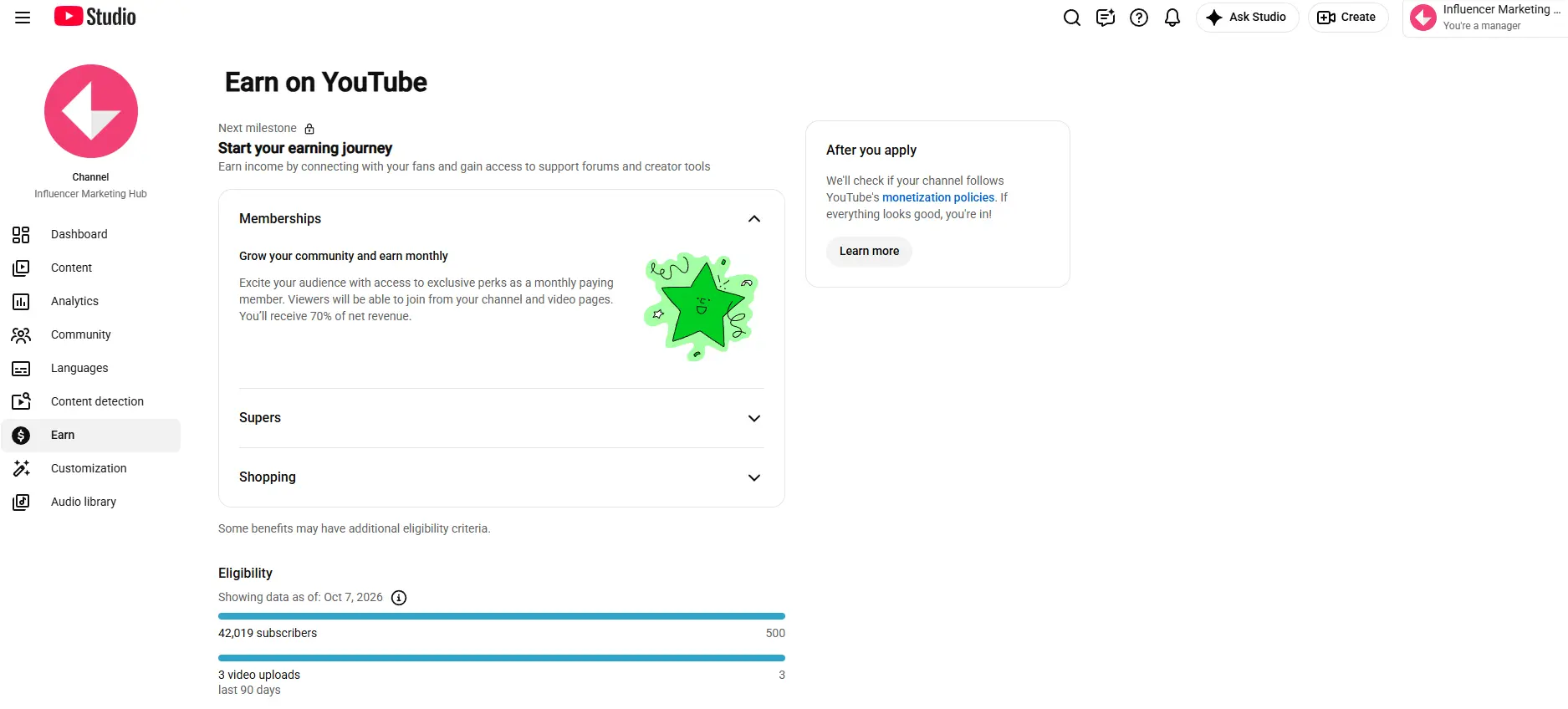
A creator focused on long-form video may rely heavily on watch-page advertising, while a Shorts-first creator needs the Shorts monetization setup. A community-led channel may get more value from memberships and Supers before advertising becomes a meaningful part of the business.
The Main YouTube Monetization Modules
| Monetization module | What it covers |
| Watch Page Monetization Module | Ads and YouTube Premium revenue from eligible long-form videos and livestreams watched on the YouTube watch page or through embedded YouTube players |
| Shorts Monetization Module | Revenue sharing from ads shown between videos in the Shorts Feed |
| Commerce Product Module | Fan-funding features including channel memberships, Super Chat, Super Stickers, and Super Thanks |
Creators can accept the modules they are eligible for individually, which makes it possible to build a monetization setup around the formats and audience behaviors that actually matter to the channel.
Watch Page Monetization Covers Long-Form Video and Live Streams
If long-form videos or livestreams are central to your channel, the Watch Page Monetization Module is the important one.
It allows eligible creators to earn from ads displayed before, during, after, and around videos on the watch page. It also covers the share of YouTube Premium revenue generated when Premium subscribers watch eligible long-form or live content.
Accepting the module does not mean every video will automatically serve ads.
Each video still needs to meet advertiser-friendly requirements, and you need the necessary rights to the audio and visual material used in the content. Ad availability also depends on factors such as advertiser demand and the viewer.
For creators, this is why monetized views and total views are not the same thing. A video can generate a large audience without every view producing an ad impression.
We will come back to that distinction when we look at CPM, RPM, and how much creators actually earn.
Shorts Use a Separate Revenue-Sharing System
Shorts monetization works differently from traditional watch-page advertising.
To earn from ads displayed between videos in the Shorts Feed, eligible creators need to accept the Shorts Monetization Module. Revenue sharing begins from the date the module is accepted rather than being applied retrospectively to earlier Shorts views.
Shorts advertising revenue is pooled before being allocated to creators based on their share of eligible Shorts views. Creators currently receive 45% of the revenue allocated to them from that Creator Pool.
That is fundamentally different from watch-page advertising, where eligible creators receive 55% of net ad revenue generated from their public content on the watch page.
So when comparing the earning potential of Shorts and long-form video, do not treat one million views as though it has the same monetization mechanics across both formats.
Fan Funding Uses the Commerce Product Module
The Commerce Product Module covers YouTube's main fan-funding features, including Channel memberships, Super Chat, Super Stickers, and Super Thanks.
These tools allow viewers to support creators more directly.
Channel memberships generate recurring monthly payments in exchange for creator-defined benefits. Super Chat and Super Stickers let viewers pay for additional visibility during eligible livestreams and Premieres, while Super Thanks lets viewers support creators through eligible long-form videos and Shorts.
For these fan-funding products, creators currently receive 70% of net revenue after accepting the relevant Commerce Product terms and enabling the individual feature.
This can make fan funding particularly valuable for channels with a smaller but highly engaged audience. A creator does not necessarily need millions of monthly views if a meaningful portion of the audience is willing to join a membership, support a livestream, or purchase a Super Thanks.
YouTube Premium Revenue Follows the Content Format
YouTube Premium revenue is often described as though it is one completely separate monetization system, but the setup depends on where the content is watched.
For long-form videos and livestreams, creators need the Watch Page Monetization Module. For Shorts, creators need the Shorts Monetization Module.
When a Premium subscriber watches eligible content, part of the subscription revenue is distributed to creators based on viewing activity.
That gives creators another revenue stream from viewers who are not seeing traditional ads.
Monetization Features Still Have Their Own Eligibility Rules
Getting into YPP does not guarantee that every feature on the Earn tab will immediately become available.
Individual products can have additional requirements based on factors such as:
- creator age;
- country or region;
- channel type;
- content eligibility;
- whether the relevant monetization module has been accepted.
For example, Super Chat, Super Stickers, and Super Thanks currently require creators to be at least 18 years old and live in a supported country or region.
That is why the YPP thresholds should be viewed as the entry point into YouTube's monetization system, rather than a switch that activates every revenue stream at once.
Check out the YouTube’s Latest Ad Innovations from BrandCast 2025: Peak Points, Shoppable TV, and More
How to Make Money on YouTube
Once your channel is in YPP and the relevant monetization modules are active, the next question is which revenue streams are actually worth prioritizing.
The answer usually depends on your content mix.
A long-form channel may earn most of its platform revenue from watch-page ads and Premium viewing. A Shorts-heavy channel works under a different revenue-sharing model. Creators with highly engaged communities may find memberships, Supers, Shopping, or brand deals more valuable than advertising alone.
The strongest YouTube businesses usually combine several of these rather than relying on one.
1. Watch-Page Ads
Watch-page advertising is still the most familiar form of YouTube monetization.
Eligible creators can earn from ads displayed before, during, after, and around long-form videos and livestreams viewed on the YouTube watch page or through embedded YouTube players. Creators currently receive 55% of net revenue from those ads.
The actual amount earned per video can vary considerably.
Two videos with the same number of views can produce very different revenue depending on factors such as:
- audience location;
- advertiser demand;
- niche;
- video length;
- seasonality;
- how many views are monetized;
- the types of ads served.
That is why total views alone are a poor way to estimate earnings.
Inside YouTube Studio, creators can compare revenue by video, geography, content type, and other breakdowns. The redesigned Analytics interface also makes it easier to save custom views and compare performance across videos or date ranges.
For longer videos, mid-roll opportunities can also increase the amount of ad inventory available, although inserting more ads does not automatically translate into better overall revenue if it damages the viewing experience.
The goal is not simply to maximize the number of ad breaks. It is to create videos people actually stay to watch.
2. YouTube Shorts Ad Revenue
Shorts use a completely different monetization model.
Ads appear between videos in the Shorts Feed, rather than being attached directly to one creator's Short. Revenue from those ads is pooled, music-licensing costs are accounted for, and the remaining Creator Pool is allocated based on each monetizing creator's share of eligible engaged Shorts views in each country.
Creators then receive 45% of the revenue allocated to them.
One important clarification is that using music in an individual Short does not reduce that creator's 45% revenue-share rate or their allocation based on eligible views. Music licensing is handled earlier in the pool calculation.
That corrects a common misconception that creators automatically keep less simply because their Short contains music.
Shorts scale is enormous. Our recent analysis of YouTube's monetization changes noted that Shorts now generate more than 200 billion daily views, but that reach does not mean Shorts and long-form videos monetize at the same rate.
RPMs for Shorts can be substantially lower than long-form video, which is why Shorts are often more useful as part of a wider revenue strategy rather than as the only income source.
Creators can monitor Shorts earnings inside YouTube Analytics and compare them with other revenue sources to see whether the format is primarily driving income, discovery, or both.
3. YouTube Premium Revenue
YouTube Premium gives creators another way to earn from people who are not seeing traditional ads.
When a Premium subscriber watches eligible content, part of that subscription revenue is distributed to creators based on viewing activity.
The setup depends on the format:
- Long-form videos and livestreams require the Watch Page Monetization Module.
- Shorts require the Shorts Monetization Module.
Premium viewing therefore sits alongside advertising rather than replacing it.
It can be especially valuable for channels with loyal audiences because downloaded viewing and background playback can still contribute to watch time once that activity is synchronized.
Creators do not need to price or sell a Premium subscription themselves. The important part is making sure the correct monetization module is active for the format being published.
Taken together, these three revenue streams show why it is useful to separate long-form, Shorts, and Premium earnings rather than treating all YouTube views as financially equivalent.
4. Channel Memberships
Channel memberships give creators a way to turn a loyal audience into recurring monthly revenue. Eligible viewers pay a monthly fee in exchange for creator-defined perks such as:
- members-only videos or livestreams;
- loyalty badges;
- custom emoji;
- members-only posts;
- early access to content;
- private community benefits.
In countries where the expanded YouTube Partner Program is available, memberships can become accessible from the 500-subscriber YPP tier, provided the channel also meets the relevant feature requirements.
Creators currently receive 70% of net revenue from channel memberships after accepting the Commerce Product Module. Memberships tend to work best when the audience has a reason to stay connected beyond individual uploads.
That might be a creator who publishes regular tutorials, a gaming channel with a strong live community, or a specialist channel where viewers value access, recognition, or additional content.
The biggest mistake is treating memberships as a paywall for everything. A stronger approach is to keep the public channel valuable while using memberships to add extra access, recognition, or depth for the viewers who want more.
5. Super Chat, Super Stickers, and Super Thanks
YouTube’s Supers let viewers support creators directly without committing to a recurring membership.
- Super Chat lets viewers pay to highlight a message during eligible livestreams and Premieres.
- Super Stickers provide a more visual way to support the creator during live chat.
- Super Thanks works on eligible long-form videos and Shorts, allowing viewers to purchase a highlighted comment after watching. Creators can also reply to a Super Thanks comment with a Short, which creates another opportunity to recognize paying supporters publicly.
Creators receive 70% of recognized Supers revenue, after applicable sales taxes and iOS App Store fees are deducted.
These features are especially valuable for channels with strong interaction. A livestream with 5,000 highly engaged viewers can sometimes create more meaningful fan-funding revenue than a much larger audience that watches passively and never interacts.
That is why Supers should be thought of as an engagement monetization model, not simply another payment button.
6. Gifts, Jewels, and Rubies
Gifts add another live-monetization layer.
During eligible vertical and horizontal livestreams, viewers can buy Jewels and use them to send Gifts on screen. Creators then earn Rubies based on the Gifts they receive.
The visual format makes Gifts feel more interactive than a standard payment. Depending on the Gift, viewers may trigger animated overlays or effects during the livestream, which can make the monetization mechanic part of the entertainment itself.
To enable Gifts, eligible creators need to accept the Virtual Items Module. Availability currently depends on creator location and other eligibility requirements, and individual streams must also qualify. Gifts are not available on streams that are private, unlisted, age-restricted, made for kids, associated with YouTube Giving fundraisers, or running without live chat/comments.
Creators also need to be at least 18 years old and complete the required AdSense identity verification to earn from Gifts.
For creators who livestream regularly, Gifts can complement Super Chat rather than replace it.
The important point is that YouTube now gives audiences several ways to support a creator depending on how they prefer to participate.
7. YouTube Shopping
For creators whose content naturally leads to product discovery, YouTube Shopping can turn videos, Shorts, and livestreams into shoppable content.
Eligible creators can use Shopping in two main ways:
- connect their own store and tag their own products;
- tag products from participating brands and earn affiliate commissions.
Products can appear through a creator’s channel store, product shelf, video descriptions, tagged products in videos and Shorts, and eligible livestreams. That makes Shopping especially relevant for channels built around reviews, beauty, fashion, tech, home, fitness, food, tutorials, and product comparisons.
If you sell your own products, YouTube can connect with supported commerce platforms such as Shopify and other approved retailers. Once the store is connected, eligible products can be featured directly across the channel and tagged inside content.
For affiliate creators, the model is different. Rather than fulfilling the order yourself, you tag products from participating retailers and earn a commission when qualifying purchases are attributed to your content.
The affiliate program is currently available only in selected markets and requires the channel to be in YPP and meet the relevant subscriber threshold, alongside additional channel eligibility requirements.
The key advantage is that the shopping experience sits much closer to the content.
A viewer watching a product review does not need to search manually for the item afterward. The creator can place the relevant product directly alongside the video. For commerce-focused channels, that can make Shopping more valuable than simply adding a generic affiliate link to the description.
8. Brand Deals and YouTube Creator Partnerships
Brand sponsorships remain one of the most important ways larger YouTube creators earn, and they sit outside the standard ad-revenue model.
A brand may pay a creator for:
- an integrated sponsorship;
- a dedicated video;
- a Shorts partnership;
- a product demonstration;
- a livestream;
- ongoing ambassador work.
The fee is negotiated directly rather than calculated through a fixed YouTube revenue-share percentage.
Creators can find partnerships independently, through influencer agencies and influencer platforms, or through YouTube Creator Partnerships.
Eligible YPP creators in supported markets can use the Creator Partnerships tab inside YouTube Studio to manage brand inquiries, create a media kit, set desired rates for long-form and Shorts partnerships, and add a business contact or talent representative.
That makes sponsorship management much more integrated into the creator workflow than it used to be.
Creator Partnerships currently requires creators to be at least 18 years old, belong to YPP, be based in a supported market, and have no active Community Guidelines strikes.
For creators, the important point is that sponsorship revenue can behave very differently from ad revenue. A niche channel with 50,000 highly relevant subscribers may be commercially attractive to a specialist brand even if its total monthly views are much lower than a broad entertainment channel.
That is why sponsorship pricing should consider audience fit, recent views, content format, integration depth, usage rights, exclusivity, and campaign deliverables, not follower count alone.
9. Affiliate Marketing
Affiliate marketing lets creators earn a commission when viewers purchase through tracked links or tagged products.
YouTube Shopping gives eligible creators a native affiliate route, but creators can also work with external affiliate programs and networks.
The model works particularly well when the content already helps viewers make a buying decision.
Examples include:
- software tutorials;
- product comparisons;
- camera and equipment reviews;
- beauty routines;
- home improvement guides;
- travel recommendations;
- business-tool walkthroughs.
The strongest affiliate content usually answers a genuine purchase question rather than inserting unrelated links into every description.
A video titled "Best Microphones for YouTube Interviews" naturally creates more commercial intent than a general creator update.
Creators can use YouTube Shopping where available or work with external affiliate programs, retailer schemes, or commerce platforms such as MyyShop when those tools fit the products and markets being promoted.
MyyShop combines product discovery, affiliate promotion, paid brand opportunities, and exposure-based earnings in one creator-commerce workflow.
Its AI matching is trained on 33M+ SKUs and 1.66M creators, helping YouTubers identify products that fit their niche instead of manually chasing scattered affiliate programs. Creators can also start with 0 followers, keep 100% of their platform earnings, and monetize through content creation, product promotion, affiliate promotion, referrals, and MyyFinds.
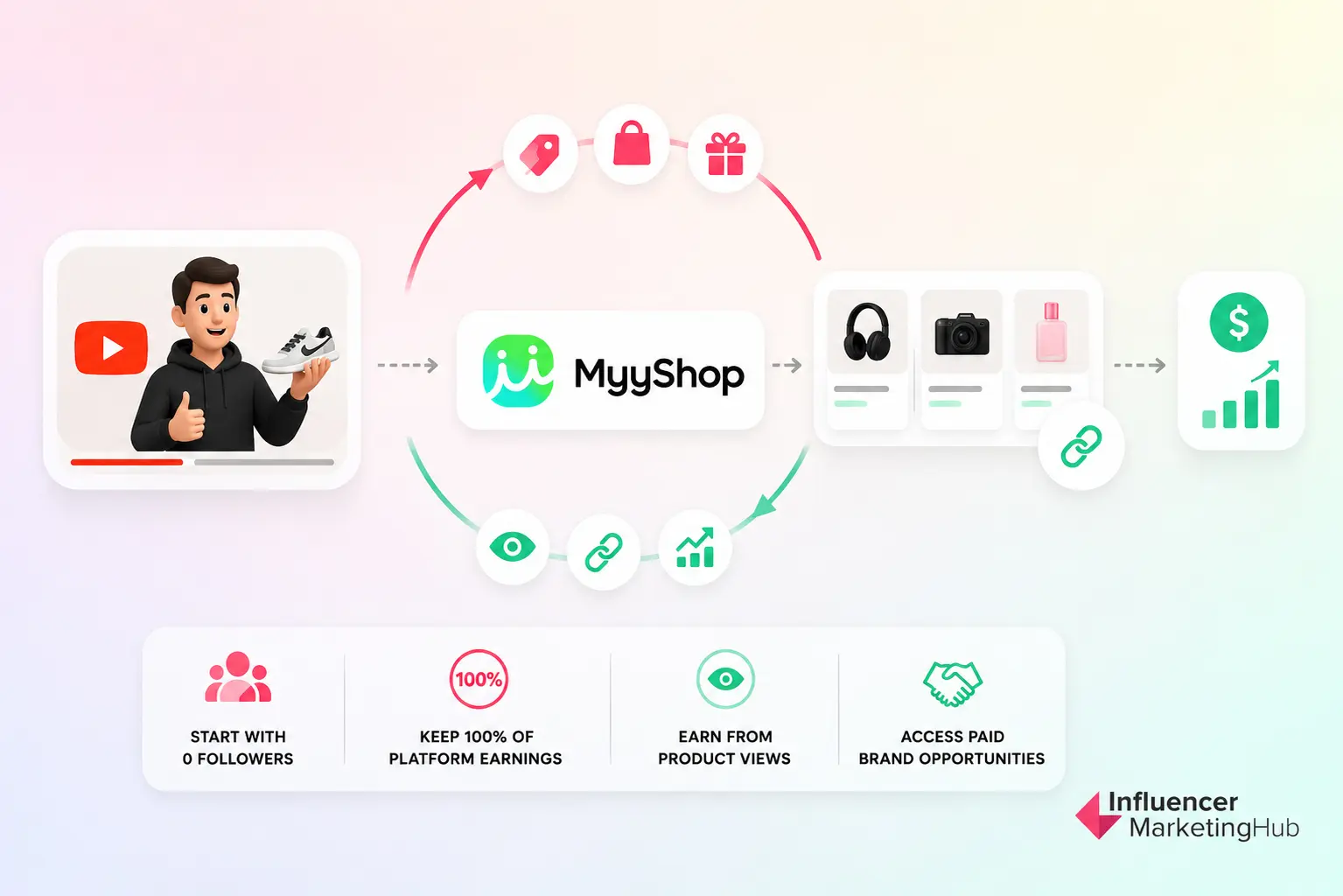
The practical value of MyyFinds is that creators can earn from product discovery before an affiliate sale even happens. MyyShop pays a minimum of $0.001 per product view on a creator’s MyyFinds page, but since MyyFinds launched, the average brand bid has been around $0.025 per product view.
So if a MyyFinds page features 10 products and each product gets 100 views, that is 1,000 total product views, which can generate about $25 in exposure-based revenue before affiliate commissions or paid campaign fees are added. For creators, that creates a measurable floor for product discovery traffic, which most affiliate setups do not provide.
For YouTubers, the takeaway is that affiliate monetization should work like a shoppable content loop: test products, create reviews or tutorials around real use cases, send viewers to a curated product destination, measure product views and conversions, then use those signals to qualify for better brand deals.
Platforms like MyyShop show how YouTube monetization is moving from earning only on views to earning from the commercial intent behind those views.
10. Merchandise and Ecommerce
Creators with a recognizable brand or loyal audience can also monetize through their own products.
That might include apparel, accessories, physical products, books, templates, digital downloads, or creator-branded merchandise.
Eligible creators can connect supported stores to YouTube Shopping and feature products across videos, Shorts, livestreams, and the channel itself. More than one store can be connected where needed.
Platforms such as Shopify can handle the storefront and commerce infrastructure while YouTube becomes the discovery and content layer. The advantage over generic merchandise links is context.
A fitness creator can feature their training product during a workout video. An educator can mention a workbook during a tutorial. A creator launching merchandise can demonstrate or wear the product inside the content. The product becomes part of the viewing experience rather than a separate sales message.
11. Courses, Digital Products, and Services
YouTube can also monetize expertise.
Creators in education, business, fitness, marketing, design, finance, software, and other specialist niches may find that the most valuable revenue is generated after viewers leave YouTube.
That could include:
- online courses;
- paid communities;
- consulting;
- coaching;
- templates;
- ebooks;
- workshops;
- software;
- professional services.
In this model, the channel becomes an acquisition engine.
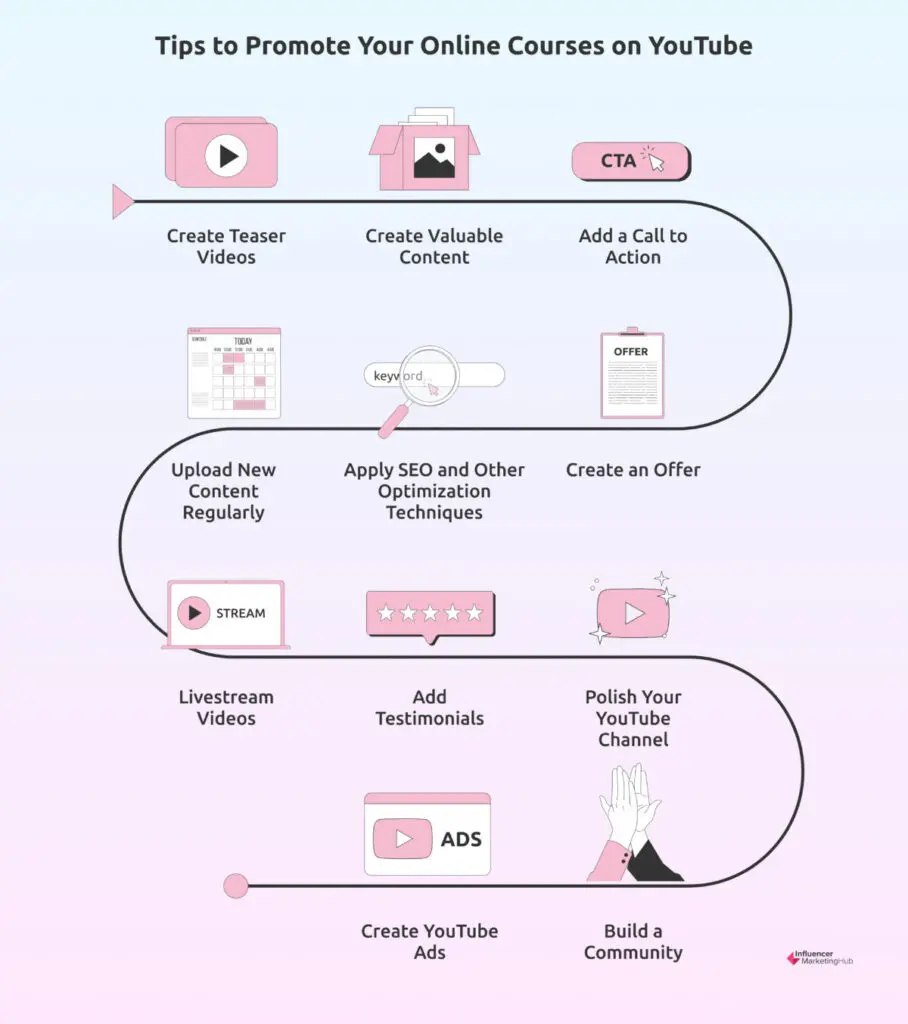
A detailed tutorial can demonstrate expertise, answer part of the audience's problem, and then direct viewers toward a deeper paid solution.
This can be especially valuable for smaller specialist channels because revenue does not depend entirely on reaching massive view counts. A channel attracting the right 10,000 viewers can sometimes be commercially stronger than one attracting 500,000 people with little purchase intent.
12. Content Licensing
Finally, creators can earn by licensing footage they have already produced.
This is most relevant when a video captures something that other publishers, broadcasters, brands, or media companies want to reuse, such as newsworthy moments, unusual events, viral footage, original demonstrations, travel footage, or distinctive creator content.
Licensing fees depend on factors such as:
- where the content will appear;
- how long it can be used;
- whether usage is exclusive;
- the territory;
- whether the content will be edited;
- whether it will appear in advertising or editorial media.
If a third party wants to reuse your video, do not assume that attribution alone is enough compensation. Clarify the rights being requested and what the license actually covers before granting permission.
For creators with a large archive, licensing can turn older content into an additional revenue stream without requiring another upload.
How Much Does YouTube Pay Creators?
There is no fixed amount YouTube pays per 1,000 views. Earnings can vary substantially based on content format, niche, audience location, advertiser demand, seasonality, and how many views are actually monetized.
The underlying revenue model also changes by format. Creators currently receive 55% of net watch-page ad revenue, while Shorts creators receive 45% of the revenue allocated to them from the Shorts Creator Pool. Memberships and the main Supers products use a 70% net revenue share.
When evaluating your own channel, RPM is generally more useful than CPM because RPM reflects what you actually earn per 1,000 views after YouTube's share and can incorporate multiple eligible revenue sources.
For detailed RPM benchmarks, earnings examples by view count and an interactive calculator, see our How Much Do YouTubers Make Guide.
How to Increase Your YouTube Monetization Revenue
Getting a significant number of views on your videos is necessary to get consistent revenue from your YouTube channel. Here are eleven tips on how to boost your YouTube views.
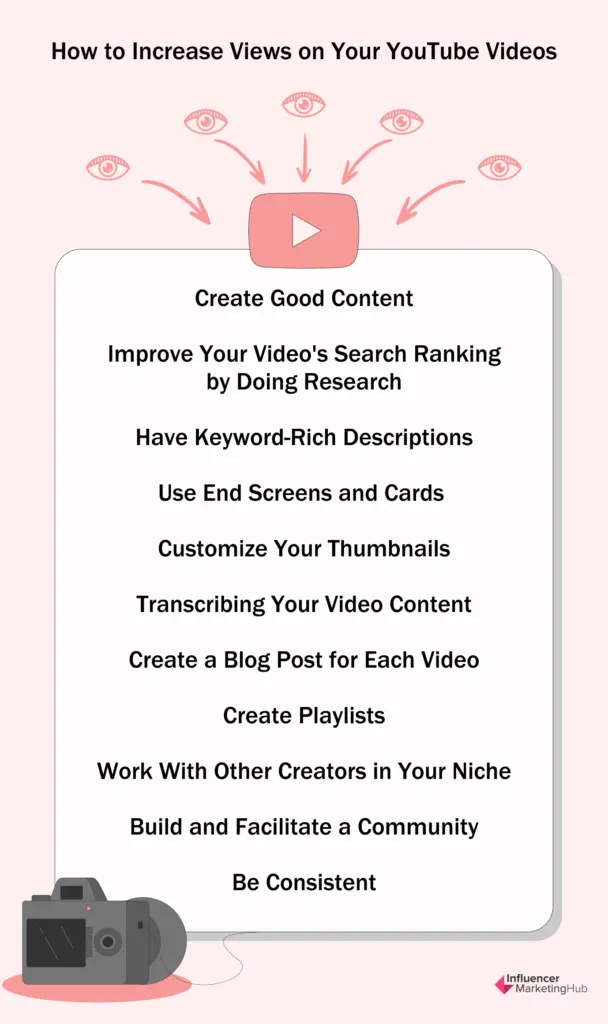
Create Good Content
It doesn't matter how many strategies and advertising campaigns you employ for video creation. To achieve success on YouTube, you must create videos that people want to watch and watch all the way through.
In the end, it all boils down to the quality of your content. If you're unwilling to provide value to your audience, you won't make your content marketing effective. First, determine what information your potential customers want to know before creating videos that can solve their problems.
Improve Your Video's Search Ranking by Doing Research
Apart from being a social media platform, YouTube also serves as a search engine, like Google. YouTube SEO, or optimizing your videos for search, is a proven way to increase views on your videos.
YouTube SEO is a powerful way to rank your videos. It is important to research and use keywords related to your content when uploading or editing a video on YouTube.
Businesses, bloggers, and video marketers use this method to get their videos to rank higher in YouTube search results. This strategy involves understanding YouTube's algorithm and optimizing your video with those specific requirements.
YouTube SEO can be done by adding keywords and tags in the video description, title, and tags section. You should also include keywords in the video’s title, description, tags and thumbnail.
YouTube's algorithm considers several factors in determining which videos appear in search results. You can use tools like vidIQ or TubeBuddy for your SEO research.
Have Keyword-Rich Descriptions
The description of your video may convey your message more effectively to both search engines and your visitors. Having the ability to catch the attention of your viewers is essential for the ranking of long-tail keywords.
Use End Screens and Cards
The length of time spent watching a video is a good indicator of how interested viewers are in the subject. The greater the number of individuals who view your YouTube video, the greater their interest in what you have to say. Another advantage of having a solid relationship with the audience is that they are more inclined to view additional content from you in the future.
YouTube cards are banner-like alerts that appear in the top right corner of your video and direct your viewers to a piece of content. An end screen, similar to a card, is intended to direct your most engaged viewers to a related piece of content. When your video is ready to come to a close, an end screen appears.
Customize Your Thumbnails
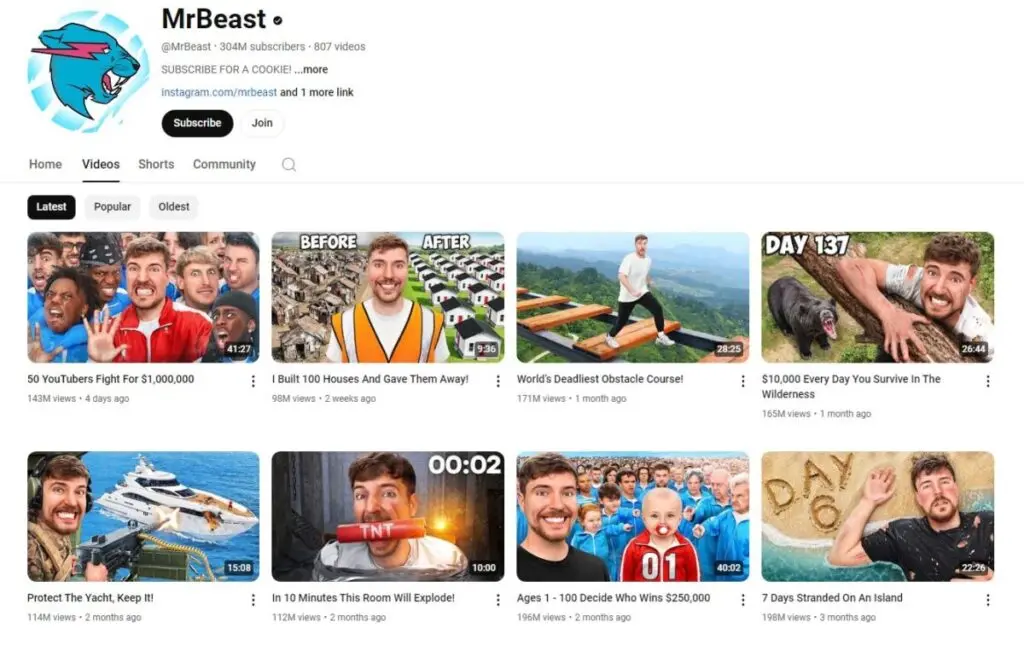
One of the most effective techniques to get your YouTube channel recognized is to create your own YouTube thumbnails. A good title and thumbnail can work together to attract a viewer's interest. It is essential to create thumbnails for your videos since it makes them more appealing and helps to project a much more professional look.
No research is required for the creation of a compelling thumbnail. Using the same font and style across the template will make it more unified and consistent with the channel's branding. For example, you can see that the most popular YouTubers all have a unified style for their video thumbnails.

- Source: MrBeast
You can also use basic graphic design tools like Canva to achieve this.
Transcribing Your Video Content
When it comes to YouTube videos, there has been a lot of debate over whether including subtitles or transcripts can help you rank higher in search engines. Closed captions can enhance YouTube views by making content more accessible to global audiences and viewers with hearing impairments. For SEO benefits, be sure to upload your own transcript or use manually edited captions, as YouTube’s auto-captions aren’t indexed the same way.
To receive the most number of views possible from YouTube's organic results, you must appear high in the search results on Google. Most YouTubers are tempted to go the quick route and buy views. But this is not a long-term solution because YouTube’s algorithm prioritizes behavioral signals like watch time, average view duration, click-through rate (CTR), and returning viewers — not just raw view counts.
Create a Blog Post for Each Video
Blogging is one way you can make money off YouTube through traffic. You can drive traffic from your blog to your YouTube channel. It takes a little more work to convert your videos to blogs, but with time, it yields results.
Posting videos is a tried-and-true method of improving the quality of the user experience of those prospects who like to watch rather than read. You can embed your YouTube video into your blog post and watch your views increase.
Create Playlists
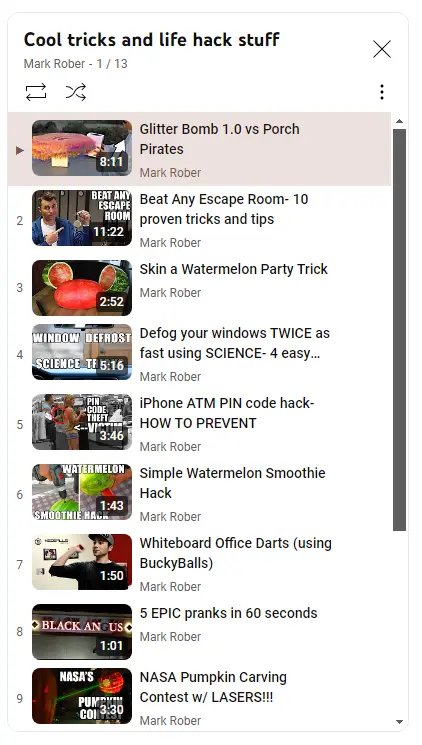
The playlists you create should allow people to see your content in the order it was created. The remainder of your videos will begin to play whenever the first video ends, increasing the number of views for each one as the series progresses.
You may increase the number of people who view a playlist by publishing it on your channel, embedding it, or asking your subscribers to share it with their friends. Each one should be unique from the others, and the order in which they are played should add to the overall flow and relevance of the set. Below is an example of how these playlists look.

- Source: Mark Rober
Work With Other Creators in Your Niche
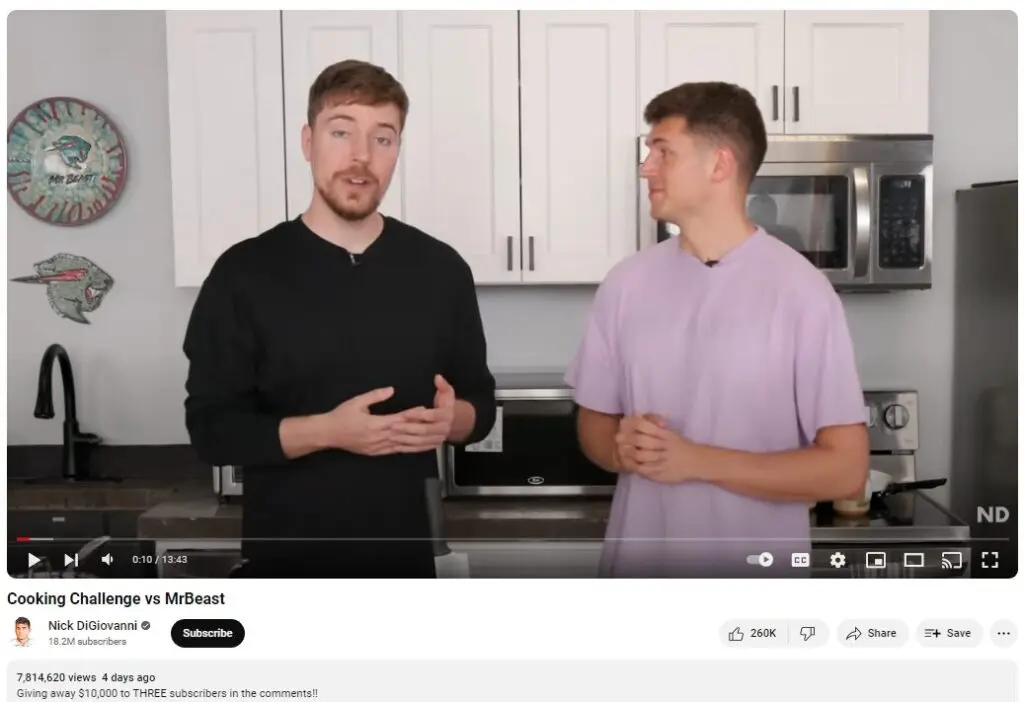
Some of YouTube's most popular creators have benefited from cooperating with other users to reach a broader audience. With each video you collaborate on, you will get new subscribers. Furthermore, if you collaborate with a well-known and renowned content creator, their viewers are more likely to become subscribers.
To have a successful YouTube collaboration, finding the right partner is critical. You should collaborate with creators who share your industry's interests for your video to look more professional. Sticking on the subject of popular YouTubers, here's an example of two popular faces on the platform collaborating.

- Source: Nick DiGiovanni
Build and Facilitate a Community
Apart from being a video-sharing platform, YouTube also allows engagement between creators and subscribers. So if you want to obtain more views on YouTube, you'll need to treat it like any other social media platform. Additionally, you need to actively engage your audience for them to keep coming back for more of your videos.
If someone asks a question, take time to give a helpful answer to encourage other viewers to leave comments. It will be easier for you to create your brand in a niche of devoted subscribers if you participate fully.
Be Consistent
Obtaining a large number of YouTube views takes time. The platform has its own set of regulations to guarantee that high-quality video content is delivered to its viewers consistently and frequently.
Try to establish many active subscribers using the tips mentioned above, and you'll find that they account for the vast majority of your views, which in turn generate more money for you when you monetize your YouTube channel.
Make Every YouTube View Count
YouTube monetization in 2026 is much broader than earning a share of advertising revenue.
Creators can start unlocking revenue opportunities from 500 subscribers, then expand into watch-page ads, Shorts revenue, and YouTube Premium once they reach the higher YPP threshold. From there, memberships, Supers, Gifts, Shopping, affiliate marketing, sponsorships, products, and services can turn the channel into a much more diversified creator business.
The important part is not simply reaching the monetization threshold.
Look at how your audience actually interacts with your content and build the revenue streams around that behavior. A Shorts-heavy channel, an educational long-form channel, and a livestream-focused creator may all make money in very different ways.
The strongest channels eventually move beyond asking, “How much will YouTube pay me?” and start asking:
Which combination of revenue streams makes this audience most valuable over the long term?
That is where YouTube monetization becomes less about qualifying for YPP and more about building a sustainable creator business.
Frequently Asked Questions
How many subscribers do you need to monetize YouTube?
You can begin unlocking some YouTube monetization features at 500 subscribers through the expanded YouTube Partner Program, provided you also have at least three public uploads in the previous 90 days and either 3,000 qualified public watch hours in 12 months or 3 million qualified Shorts views in 90 days.
For watch-page ads, Shorts Feed ads, and YouTube Premium revenue in 2026, you currently need 1,000 subscribers plus either 4,000 qualified watch hours or 10 million qualified Shorts views.
Can you monetize YouTube with 500 subscribers?
Yes, although 500 subscribers does not unlock every monetization feature. Eligible creators can gain earlier access to features such as channel memberships, Super Chat, Super Stickers, Super Thanks, YouTube Shopping, and Creator Partnerships, depending on the individual feature and market. Ad and Premium revenue still require the higher threshold in 2026.
How many watch hours do you need to monetize YouTube?
In 2026, the early YPP pathway requires 3,000 qualified public watch hours during the previous 12 months.
To qualify for watch-page advertising and YouTube Premium revenue through the long-form route, you need 4,000 qualified public watch hours during the previous 12 months, along with 1,000 subscribers.
How many Shorts views do you need for YouTube monetization?
The early YPP pathway requires 3 million qualified public Shorts views within 90 days, together with 500 subscribers and the other eligibility requirements. For Shorts ad and Premium revenue in 2026, the current threshold is 10 million qualified Shorts views in 90 days plus 1,000 subscribers.
Does Shorts watch time count toward the 4,000 watch hours?
No. Watch time generated from views in the Shorts Feed does not count toward the 4,000-hour long-form requirement. Shorts have their own eligibility route based on qualified Shorts views, so creators should track the two pathways separately inside YouTube Studio.
Can you make money on YouTube without ad revenue?
Yes. Advertising is only one part of YouTube monetization. Depending on eligibility, creators can earn through memberships, Super Chat, Super Stickers, Super Thanks, Gifts, Shopping, affiliate commissions, sponsorships, products, services, and other creator-business revenue streams.
That is also why reaching the 500-subscriber YPP tier can matter even before a channel qualifies for ads.
How much does YouTube pay per 1,000 views?
There is no fixed YouTube payment per 1,000 views. Revenue varies based on factors including content format, audience location, niche, advertiser demand, seasonality, Premium viewing, and how many views are actually monetized.
How long does YouTube monetization approval take?
After you complete the application steps and your channel enters review, a decision typically takes around one month. Some applications can take longer if review volumes are high or a channel requires additional review.
Can YouTube remove monetization after you join YPP?
Yes. Approval is not permanent regardless of what happens on the channel afterward. Channels need to continue meeting YPP policies and activity requirements. Monetization can be limited or removed when a channel no longer satisfies the program's requirements or repeatedly violates applicable policies.
What changes to YouTube monetization in 2027?
Starting February 1, 2027, new applicants seeking ad and Premium revenue will need 1,000 subscribers plus either 8,000 qualified watch hours in the previous 365 days or 20 million qualified Shorts views in the previous 90 days.
The earlier pathway for fan funding, YouTube Shopping, and Creator Partnerships remains at 500 subscribers plus either 3,000 qualified watch hours or 3 million qualified Shorts views. Creators already in YPP will not lose their status simply because the entry requirements increase.

SUGGESTED

YouTube Is Raising the Bar for Monetization While Expanding How Creators Can Earn
YouTube raises YPP monetization thresholds while expanding creator earnings through...

How Much do YouTubers Make? + YouTube Earnings Calculator
How much do YouTubers make in 2026? Explore real earnings RPM ranges top creator incomes...

How to Make Money on YouTube: Advanced Strategies for Maximizing Views and Revenue in 2024
Maximize your YouTube revenue in 2024 with advanced strategies. Boost views engage...