
Are you still treating Instagram as a branding channel only, or are you actively using it to move people closer to purchase? And if your products already live in Shopify, are you sure Instagram is actually set up to support commerce, not just engagement?
Instagram has evolved into a discovery-first shopping environment where product tags, catalogs, and social proof influence buying decisions long before a customer reaches your site. At the same time, Shopify has become the central system most brands rely on to manage products, inventory, and checkout.
When these two platforms are properly connected, they can work together to turn attention into measurable demand.
In this guide, you will learn how to integrate Instagram with Shopify in a way that reflects how the platforms actually function today. We will break down what the integration does, what it requires, and how to avoid the setup mistakes that slow teams down after launch.
Start Selling on Instagram With Shopify
Shopify lets you manage products, inventory, and checkout while Instagram drives discovery through product tags and shopping features. Connect the two platforms to turn engagement into measurable ecommerce demand.
- What Integrating Instagram With Shopify Actually Does
- What You Need Before You Start
- How The Shopify And Instagram Integration Works
- Step-By-Step Setup Using The Facebook And Instagram Channel
- Syncing Products And Getting Approved
- Enabling Instagram Shopping And Product Tagging
- Operational Considerations For Marketers And Ecommerce Teams
- Turning Instagram Into A Scalable Extension Of Your Shopify Store
- Frequently Asked Questions
What Integrating Instagram With Shopify Actually Does
Before you touch any settings, it’s important to understand what this integration actually changes and what it does not.
Many teams assume that connecting Instagram and Shopify creates a new storefront or a separate sales system. In reality, the integration is about distribution, visibility, and data flow, not replacing your eCommerce backend.
At its core, Shopify remains your system of record. Your products, inventory, pricing, shipping rules, and checkout all continue to live in Shopify. Instagram does not store or manage this information independently. Instead, it pulls approved product data from a catalog that Shopify syncs through Meta’s commerce infrastructure.
How Instagram Uses Your Shopify Data
When the integration is complete, your Shopify product catalog is synced into a Meta catalog. Instagram then uses that catalog to enable commerce-related features across the app.
This allows you to:
- Tag products in posts, reels, and stories
- Surface product details when someone taps a tag
- Send shoppers directly to your Shopify product pages
Instagram acts as a discovery and intent layer. It helps people find products and express interest, but for most merchants, the actual purchase still happens on your Shopify site.
What The Integration Does Not Do
This setup does not automatically mean you are selling natively inside Instagram. While Meta has supported on-platform checkout in the past, most brands today route traffic back to their own website to complete the purchase.
That distinction matters for measurement, attribution, and expectations. Instagram can influence the sale, but Shopify is where the order is finalized, fulfilled, and recorded.
Why This Distinction Matters For Teams
Understanding this upfront prevents common misalignment later. When something breaks, the issue is usually not Instagram itself, but:
- Missing or incorrect product data in Shopify
- Permission issues inside Meta Business assets
- Commerce eligibility or policy constraints
Once you view the integration as a structured data connection rather than a new sales channel, the rest of the setup becomes much easier to reason about and manage.
What You Need Before You Start
Now that you understand what the integration actually does, the next step is making sure your foundation is solid. Most failed Instagram and Shopify setups do not fail because of technical bugs. They fail because one of these prerequisites is missing or misconfigured.
Taking the time to confirm these upfront will save you from approval delays, broken connections, and permission dead ends later.
Shopify Store Readiness
Your Shopify store must be fully operational before you connect anything to Instagram.
At a minimum, you should have:
- An active Shopify plan with the store publicly accessible, not password-protected
- Products published and marked as active
- Shipping rates and delivery regions configured
- A visible refund and return policy
- A valid business email associated with the store
If any of these are missing, Meta will often flag your store during commerce review, even if the technical connection succeeds.
Meta Business Portfolio And Asset Ownership
This is the most common blocker for brands and agencies.
You need a Meta Business Portfolio that:
- Owns your Facebook Page
- Has your Instagram Professional Account connected
- Has full control permissions for the person completing the Shopify setup
If your assets are scattered across multiple business portfolios or owned by personal accounts, Shopify will not be able to complete the connection cleanly. While Shopify can create assets during onboarding, you will have far fewer issues if everything is organized inside Meta Business Suite first.
Instagram Professional Account Requirements
Your Instagram account must be set to a Professional account, either Business or Creator, and linked to a Facebook Page owned by your Meta Business Portfolio.
This connection is what allows Instagram to access the product catalog later. Without it, product tagging and shopping features will not be available, even if your catalog syncs successfully.
Once these three areas are confirmed, you are ready to connect Shopify and Instagram without running into avoidable setup friction.
Launch Your Store and Connect Instagram
Shopify makes it easy to manage your product catalog, sync inventory, and enable Instagram Shopping through the official Facebook and Instagram sales channel.
How The Shopify And Instagram Integration Works
With your prerequisites in place, it helps to understand how data and permissions flow once you connect the two platforms. This integration is not a direct Shopify-to-Instagram connection. It runs through Meta’s commerce infrastructure, which is why asset ownership and permissions matter so much.
Seeing the full picture makes the setup steps that follow feel far more logical.
Shopify Connects To Meta First, Not Instagram
When you install the Facebook and Instagram sales channel in Shopify, you are actually connecting Shopify to Meta. During onboarding, Shopify asks you to sign in with your Facebook account and select a Meta Business Portfolio.
That portfolio becomes the central hub. It owns or connects:
- Your Facebook Page
- Your Instagram Professional Account
- Your Meta product catalog
- Your Meta pixel and data sources
Instagram then inherits access to the catalog and commerce features through that portfolio. If Instagram is not properly connected at the Meta level, Shopify cannot enable shopping features later.
Product Data Flows One Way
Once connected, Shopify pushes product data into a Meta catalog. This includes:
- Titles and descriptions
- Images and variants
- Pricing and availability
Edits should always be made in Shopify. Meta and Instagram consume that data but do not replace it. If a product is missing, incorrect, or rejected, the fix almost always happens back in Shopify or in the catalog configuration inside Meta.
Approvals Sit Outside Shopify
Even though the setup starts in Shopify, commerce approval does not happen there. Meta reviews your business, domain, and products against commerce policies.
This is why a setup can appear technically complete in Shopify but still be “pending” for shopping features. Until Meta approves your shop and catalog, Instagram will not allow product tagging or shop visibility.
Understanding this layered flow helps you diagnose issues quickly and keeps expectations realistic as you move into the actual setup steps.
Step-By-Step Setup Using The Facebook And Instagram Channel
Now that you understand how the integration flows through Meta, you can move into the actual setup. This process happens inside Shopify, but every step depends on the Meta assets you prepared earlier. Moving slowly and intentionally here prevents most downstream issues.
Step 1: Install The Facebook And Instagram Sales Channel
You start in your Shopify admin by adding the Facebook and Instagram sales channels. This is the official integration built and maintained by Meta and Shopify.
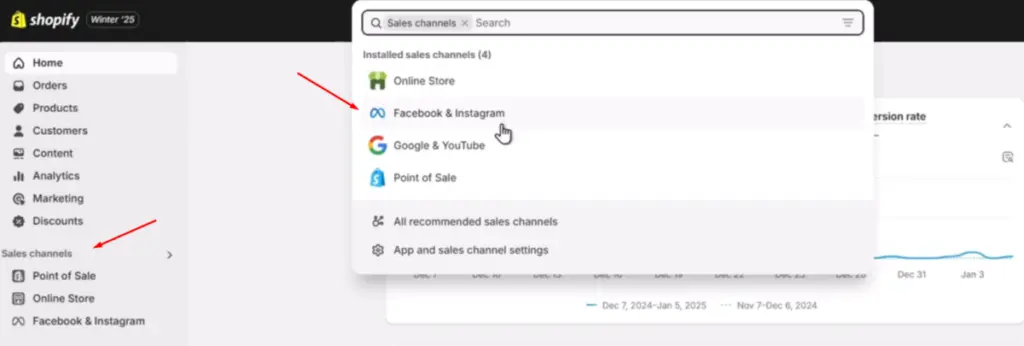
Once installed, the channel becomes the control panel for everything related to Instagram Shopping, Facebook Shop, and Meta marketing features. This is the only supported path. Third-party apps are not required for basic integration and often introduce unnecessary complexity.
Step 2: Connect The Correct Meta Assets
During onboarding, Shopify prompts you to sign in with your Facebook account and select a Meta Business Portfolio.
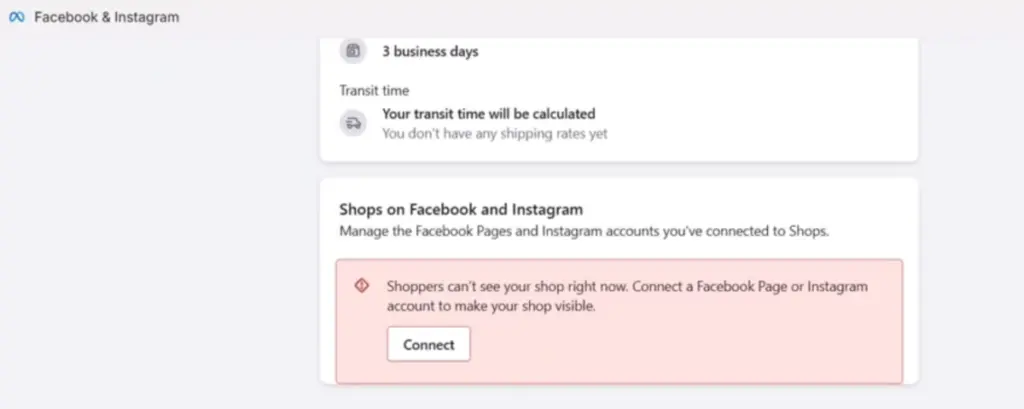
At this stage, you must:
- Select the business portfolio that owns your Facebook Page
- Confirm that the same portfolio has your Instagram Professional Account connected
- Grant Shopify permission to manage catalog and commerce features
If you choose the wrong portfolio or lack full control permissions, the setup may appear to complete but break later when you try to enable shopping or tag products.
Step 3: Configure Data Sharing And Pixel Settings
Next, Shopify asks you to configure data sharing preferences and connect a Meta pixel.
This step affects:
- How customer behavior is tracked
- How ads optimize over time
- How accurately conversions are attributed
Most brands select an enhanced data sharing option unless legal or compliance constraints require otherwise. While pixel setup is not mandatory for organic product tagging, it becomes essential if you plan to run ads.
Step 4: Submit For Commerce Review
Once assets and settings are confirmed, Shopify submits your store for Meta Commerce review.
At this point:
- Products begin syncing into the Meta catalog
- Your business and domain are reviewed for policy compliance
- Shopping features remain inactive until approval
This review typically takes 24 to 48 hours. During that time, the channel may show a pending or limited status, which is expected.
Syncing Products And Getting Approved
Once the channel setup is complete, the next phase is product synchronization and commerce approval. This is where many teams assume something is broken when, in reality, the process is working as designed.
Meta treats commerce as a gated feature. Your products are not immediately eligible for Instagram Shopping just because the integration exists.
Making Products Available To Facebook And Instagram
After onboarding, Shopify begins syncing your eligible products into the Meta catalog. This does not automatically make every product available.
You need to confirm that:
- Products are active in Shopify
- Products are marked as available to the Facebook and Instagram sales channel
- Variants, pricing, and inventory are complete
If a product is missing from the catalog, the issue usually starts with availability settings in Shopify, not Instagram.
Understanding Commerce Review And Approval
Once products are synced, Meta reviews:
- Your business information and domain
- Your product catalog
- Your compliance with commerce policies
This review typically takes between 24 and 48 hours, but it can take longer depending on category or region. Until approval is granted, Instagram Shopping features such as product tagging remain disabled.
Importantly, approval happens at the Meta level. Shopify will show setup progress, but it cannot override Meta’s decision.
Common Reasons Approval Is Delayed
Most delays fall into a few predictable categories:
- Missing or unclear shipping and return policies
- Incomplete business information
- Products in restricted or sensitive categories
- Mismatches between product data and website content
When a product or store is rejected, Meta usually provides a reason. Fix the issue in Shopify or Meta Commerce Manager, then resubmit for review rather than restarting the integration.
Once approval is granted, Instagram Shopping features unlock automatically, and you can move from setup into execution.
Enabling Instagram Shopping And Product Tagging
With commerce approval complete, you can now turn the integration into something visible and actionable on Instagram. This is the point where your catalog becomes usable inside content, not just synced in the background.
The goal here is to confirm that Instagram has access to your catalog and that product tags behave as expected.
Confirm Instagram Shopping Status
Before tagging anything, verify that Instagram Shopping is enabled on your account.
You should confirm:
- Your Instagram account is set to Professional and linked to the correct Facebook Page
- The connected Meta Business Portfolio owns the approved catalog
- Shopping features appear as enabled inside the Facebook and Instagram sales channel in Shopify
If tagging options do not appear in Instagram, it usually means approval has not fully propagated or the Instagram account is linked to the wrong Page or portfolio.
Tag Products In Posts, Reels, And Stories
Once enabled, you can tag products directly when creating content.
Product tagging allows you to:
- Attach one or more products to posts and reels
- Add product stickers to stories
- Surface product details when users tap the tag
Tags pull directly from your synced catalog, so availability, pricing, and images reflect what exists in Shopify. If a product cannot be tagged, check its catalog status and channel availability rather than editing content.
Understand Where Checkout Happens
For most merchants, tapping a product tag opens a product detail view and then sends shoppers to your Shopify product page to complete checkout.
This means:
- Shopify handles payment, tax, and fulfillment
- Instagram influences discovery and intent
- Orders appear in Shopify like any other website purchase
Because checkout happens off Instagram, you should expect attribution differences between Instagram insights and Shopify analytics. This is normal and should be accounted for in reporting.
Once tagging is live and verified, Instagram becomes a powerful discovery surface that feeds directly into your existing Shopify sales flow.
Operational Considerations For Marketers And Ecommerce Teams
Once Instagram Shopping is live, the work shifts from setup to operations. This is where teams often discover gaps between expectations and reality, especially around measurement, ownership, and day-to-day management.
Addressing these considerations early keeps the integration stable as spend, content volume, and team size grow.
Measurement And Attribution Implications
Because checkout typically happens on your Shopify site, Instagram does not own the full purchase journey.
In practice, this means:
- Instagram insights show engagement and product interaction, not finalized revenue
- Shopify records the actual order and customer data
- Conversions may not align perfectly across platforms
If you are running ads, accurate attribution depends on your Meta pixel and data sharing configuration. Without it, Instagram may underreport performance even when content is driving real sales. Focus on directional trends and blended reporting rather than expecting a one-to-one match.
Governance And Access Control
Access issues are one of the most common causes of broken integrations over time.
To avoid problems:
- Ensure the Meta Business Portfolio owns all critical assets
- Grant partners or agencies access through the portfolio, not personal accounts
- Avoid transferring ownership mid-campaign
When permissions are misaligned, product tagging can break, ads can lose access to catalogs, and approvals may need to be repeated. Clear ownership and role management reduce risk as your operation scales.
Ongoing Catalog And Content Hygiene
Operational success also depends on consistency.
Regularly review:
- Product availability settings in Shopify
- Catalog health and error warnings in Meta Commerce Manager
- Tagged content to ensure products are still active
Treat Instagram Shopping as a living system, not a one-time setup. With consistent oversight, it becomes a reliable extension of your Shopify storefront rather than a fragile add-on.
Turning Instagram Into A Scalable Extension Of Your Shopify Store
Integrating Instagram with Shopify is not about creating a separate storefront. It is about extending your existing commerce infrastructure into one of the most influential discovery platforms available today.
When the setup is done correctly, Shopify remains your operational backbone while Instagram becomes a high-intent touchpoint where products are discovered, explored, and acted on. The key is understanding how Meta sits between the two, preparing your assets properly, and setting realistic expectations around approval, checkout, and attribution.
Once everything is aligned, the integration stops feeling technical and starts feeling strategic. Product tagging becomes routine, content connects directly to revenue, and teams spend less time fixing issues and more time improving performance.
Done right, Instagram and Shopify work together as a cohesive, scalable system that supports both marketing and ecommerce growth.
Frequently Asked Questions
How does Instagram shopping fit into broader social buying behavior?
Instagram Shopping is part of a larger shift where discovery and purchase increasingly happen in the same environment, a pattern clearly reflected in current social shopping trends shaping how consumers interact with brands.
Do you need a different Instagram strategy once Shopify is integrated?
Yes, because product tagging and shopping features change how content should be planned, which is why many brands revisit their Instagram marketing strategy after enabling commerce features.
How does Instagram Shopping compare to other social commerce channels?
Instagram plays a discovery-led role within a much wider ecosystem that includes multiple platforms, each contributing differently to conversion paths across the social commerce landscape.
Is Instagram Shopping relevant for premium or luxury brands?
Absolutely, as high-end brands increasingly use social platforms to showcase products and storytelling, reflecting how luxury shopping goes social without relying solely on traditional ecommerce experiences.
Can you run Instagram ads without fully enabling shopping features?
Yes, advertising and shopping are separate capabilities, and many brands begin by testing paid campaigns through advertising on Instagram before activating product tagging.
Does the Instagram integration change for larger or enterprise Shopify stores?
While the core setup is similar, higher-volume merchants often manage more complex catalogs and governance, which is common among Shopify Plus stores operating at scale.
Why do some brands choose Shopify over other ecommerce platforms for Instagram integration?
Catalog control, ecosystem depth, and native integrations are major factors, especially when comparing options like BigCommerce vs Shopify for social commerce readiness.
Do Shopify themes affect how Instagram traffic converts?
Yes, because once users click through from Instagram, site speed and layout matter, making the choice of Shopify themes an important part of the overall conversion experience.


