Top 10 Social Media Planners for Optimal Performance Tracking

Advertising Disclosure

Managing multiple social accounts, campaigns, and content formats has become increasingly complex for marketers and businesses. The question most teams are asking is simple. How do you plan, schedule, and scale social content without losing consistency or control?

Social media planners solve this by centralizing content planning, scheduling, and collaboration into a single workflow. Instead of relying on spreadsheets or manual posting, teams can map out campaigns, automate publishing, and maintain visibility across every platform they manage.

The scale of social media usage reinforces why structured planning is no longer optional. In the United States alone, there are over 320 million social media users, while globally, individuals spend an average of 2 hours and 24 minutes per day on social platforms.

This level of activity creates constant demand for fresh, timely content, making consistent publishing and coordination critical for brands.

In this guide, we break down how social media planners work, what features matter most, and how to evaluate the leading tools based on your specific needs.


What Is a Social Media Planner?

A social media planner is a tool that helps marketers, brands, and businesses organize, schedule, and manage content across multiple social platforms from a centralized system.

At its core, social media planners combines three key functions:

  • Content planning
  • Scheduling
  • Workflow management

It allows teams to map out posts in advance, align content with campaigns, and automate publishing at specific times.

A social media scheduler is typically one component of this system. It focuses on automating when posts go live. A content planner, on the other hand, provides a broader structure by helping teams organize messaging, themes, and campaigns over longer periods.

Modern social media planners extend beyond basic scheduling. Many include collaboration tools, approval workflows, and performance tracking features. This makes them especially valuable for teams managing multiple stakeholders, regions, or client accounts.

In practice, these tools act as the operational layer of a social media strategy. They connect planning with execution, ensuring that content is not only created but also delivered consistently and on time across all relevant channels.


Benefits of Using Social Media Planners

Social media planners address both operational inefficiencies and strategic challenges that marketers and businesses face as content demands increase.

One of the most immediate benefits is improved consistency. With audiences spending an average of 2 hours and 24 minutes per day on social media, maintaining a steady publishing cadence is critical for staying visible. Planning tools ensure that content is scheduled in advance, reducing the risk of gaps or last-minute posting.

Efficiency is another key advantage. Managing multiple platforms manually requires significant time and coordination. Social media planners automate scheduling and centralize workflows, allowing teams to focus more on content quality and campaign strategy rather than execution.

Collaboration becomes more structured with shared calendars and approval systems. Teams can assign roles, review content before it goes live, and maintain accountability across stakeholders. This is particularly important for agencies and larger organizations managing multiple clients or departments.

Scalability is also a major factor. As brands expand across platforms or increase content output, planners help manage that growth without introducing operational complexity. Instead of adding more manual processes, teams can scale within a controlled system.

Finally, better visibility into performance supports more informed decision-making. Many social media planners include analytics and reporting features that help identify what content resonates, when audiences are most active, and where adjustments are needed.

Together, these benefits make social media planners a foundational tool for any team looking to maintain consistency, improve efficiency, and scale their social media efforts effectively.


Key Features to Look for in a Social Media Planner

Not all social media planners offer the same capabilities. The right choice depends on how your team operates, the number of platforms you manage, and the level of control you need over content workflows.

  • Content calendar visualization: A visual calendar provides a clear overview of scheduled posts across platforms and timeframes. This helps teams identify gaps, avoid overlap, and align content with campaigns.
  • Automated scheduling: Scheduling functionality allows posts to be published automatically at predefined times. This reduces manual effort and ensures consistency, especially across different time zones.
  • Multi-platform publishing: The ability to manage multiple social networks from a single interface simplifies execution. It also reduces the need to switch between native platform tools.
  • Collaboration and approval workflows: Features such as role-based permissions, internal comments, and approval steps are essential for teams. They ensure content is reviewed and aligned before going live.
  • Content library or asset management: A centralized library for storing images, videos, captions, and templates helps teams reuse assets and maintain brand consistency.
  • Analytics and reporting: Built-in analytics provide insights into engagement, reach, and performance trends. This helps teams refine content strategies based on actual data.
  • Bulk scheduling and automation rules: Bulk upload features and automation rules allow teams to schedule large volumes of content efficiently. This is particularly useful for campaigns or recurring posts.
  • Platform-specific optimization: Some tools offer features tailored to individual platforms, such as hashtag suggestions or format previews. These help ensure content is optimized before publishing.
  • Integration with other tools: Connections with CRM systems, design tools, or marketing platforms improve workflow continuity and reduce manual data transfer.
  • Mobile accessibility: Mobile apps or responsive dashboards allow teams to manage and approve content on the go, which is useful for fast-moving campaigns.

Understanding these features helps narrow down which social media planner aligns best with your operational needs and long-term strategy.


Types of Social Media Planners and How They Differ

Social media planners vary based on their core functionality, level of complexity, and intended use case. Understanding these differences helps you identify which category aligns with your workflow before evaluating individual tools.

Type of Social Media Planner Description Best Suited For
All-in-one social media management platforms Combine planning, scheduling, analytics, engagement, and often social listening in one system Enterprises and larger teams managing multiple workflows
Dedicated scheduling and planning tools Focus primarily on content calendars and automated publishing with a simpler interface Small teams and businesses that need straightforward scheduling
Visual-first planners for content-driven platforms Emphasize visual layout, grid previews, and media organization for platforms like Instagram and TikTok Brands and creators focused on visual consistency
Collaboration-focused planners Prioritize approvals, team workflows, and client collaboration features Agencies and teams working with multiple stakeholders
Automation-driven scheduling tools Offer queue-based posting, content recycling, and rule-based automation Teams looking to scale content output with minimal manual input

How To Choose A Social Media Planner

Selecting the right social media planner depends on your team structure, content volume, and long-term marketing goals. Rather than focusing on feature lists alone, it is more effective to evaluate how a tool fits into your existing workflow and where it can reduce friction.

Define Your Primary Use Case

Start by identifying what you need most. If your focus is scheduling, a simpler tool may be sufficient. If you require analytics, collaboration, and multi-channel management, a more comprehensive platform is likely necessary.

Assess Team Size And Collaboration Needs

Solo marketers and small teams may prioritize ease of use, while agencies and larger organizations need approval workflows, role permissions, and shared calendars to manage multiple contributors.

Evaluate Platform Coverage

Not all tools support every social network equally. Ensure the planner integrates with the platforms that are most important to your strategy, especially if you rely heavily on specific channels.

Consider Scalability

Choose a tool that can grow with your needs. As content volume increases or new platforms are added, the planner should support expansion without requiring a complete workflow change.

Review Analytics Capabilities

If performance tracking is important, look for tools that provide clear reporting on engagement, reach, and content performance. This helps guide future planning decisions.

Compare Pricing Against Value

Pricing structures vary widely. Some tools charge per user, while others scale based on features or number of accounts. Evaluate whether the features provided align with your budget and expected usage.

Test Usability And Onboarding

Ease of use directly impacts adoption. Tools with intuitive interfaces and clear onboarding processes reduce the learning curve and help teams become productive more quickly.


Top 10 Social Media Planners to Schedule Posts Efficiently

Top
social media planner
2026

1. Brandwatch Social Media Management

Brandwatch Social Media Management

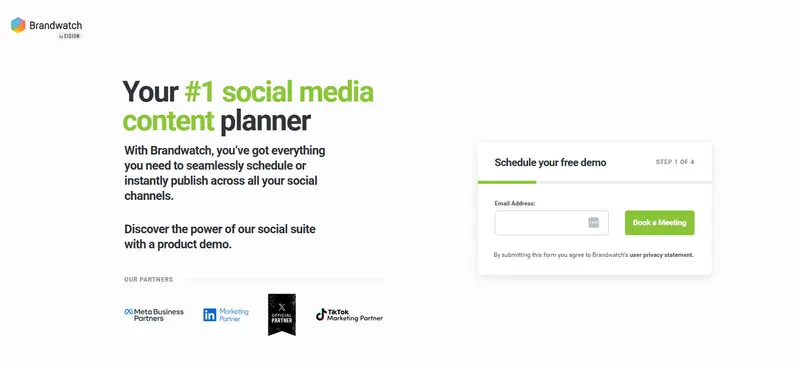
Brandwatch is a comprehensive, enterprise-grade social media planner designed for teams that need integrated publishing, analytics, and social listening in one platform.

Brandwatch combines content planning, scheduling, engagement, and analytics into a single social media management suite. Its publishing tools allow users to schedule and publish content across major platforms such as Facebook, Instagram, LinkedIn, and X, supported by a visual content calendar and cross-channel posting capabilities.

The platform also includes a centralized social inbox that consolidates messages, mentions, and interactions, enabling teams to manage engagement without switching between accounts.

A key differentiator is its integration of social listening and analytics. Users can track performance metrics such as engagement, reach, and share of voice through customizable dashboards and automated reporting. This makes Brandwatch particularly relevant for teams that need both execution and strategic insight in one system.

User feedback highlights its ease of use, centralized management, and reporting capabilities, though some reviewers note limitations in scheduling flexibility and occasional platform reliability issues.

Top Features

  • Cross-channel content scheduling and publishing across major social platforms
  • Visual content calendar for campaign planning and organization
  • Unified social inbox for managing messages, mentions, and interactions
  • Advanced analytics dashboards with performance tracking and benchmarking
  • Social listening capabilities for monitoring brand mentions and trends
  • Built-in asset optimization and media management tools

Pricing

Custom pricing based on business needs

Best For

Mid to Large-sized Businesses that require integrated social planning, analytics, and listening in one platform

Limitations Or Considerations

Some users report that scheduling workflows can be less flexible, including limitations with cross-posting and manual setup requirements. Additionally, reviews mention occasional bugs, connectivity issues, and inconsistencies in reporting data that may impact reliability.

4.8 out of 5 stars
A consumer intelligence platform, a social media marketing platform, and an influencer marketing platform were all acquired and forced to play well with each other—and they do!
Ratings
Features & Pricing
Pros and Cons
Ratings
Features
5.0
Ease of Use
4.5
Support
5.0
Overall Score
4.8
Features & Pricing
Analytics
Automated Publishing
Content Management
Keyword Filtering
Multi-Account Management
Post Scheduling
Brand Tracking
Social Media Monitoring
Hashtag Tracking
Sentiment Analysis
Reputation Management
Social Media Management
Price on request
Pros and Cons
Consumer Intelligence product uses social listening to help brands understand what people want
Audience tools give deep insights into the aggregate AND individuals
Newly added TikTok support goes further than you’d expect
Confusing array of products and services from three different companies
You can't post on multiple networks at once, but you can choose multiple channels within the same network for posting
Best for: Mid to Large-sized Businesses
4.8 out of 5 stars
A consumer intelligence platform, a social media marketing platform, and an influencer marketing platform were all acquired and forced to play well with each other—and they do!
Visit Website View Profile

2. Iconosquare

Iconosquare

Iconosquare is an analytics-focused, multi-platform social media planner designed for marketers and agencies that prioritize performance tracking alongside scheduling.

Iconosquare combines content planning, scheduling, analytics, and collaboration into a single platform built to streamline social media workflows.

Its scheduling capabilities allow users to create, plan, and auto-publish content across platforms, including Instagram, Facebook, TikTok, LinkedIn, Pinterest, and X from a centralized dashboard. The visual content calendar supports campaign planning with features such as drag-and-drop scheduling, draft management, and cross-platform visibility.

A key strength of Iconosquare is its analytics layer. The platform provides detailed reporting, best-time-to-post recommendations, and performance insights that help teams refine their strategies over time. AI-powered tools also support caption generation and content ideation, reducing manual effort during planning.

User feedback consistently highlights its intuitive interface, strong reporting capabilities, and cross-posting efficiency. However, some reviewers note limitations around integrations, data refresh speed, and occasional inconsistencies in analytics depending on platform data sources.

Top Features

  • Cross-platform scheduling and auto-publishing from a single dashboard
  • Visual content calendar with drag-and-drop planning and campaign organization
  • Advanced analytics with performance tracking and best-time-to-post insights
  • AI-powered tools for caption generation and content ideation
  • Collaboration workflows with approvals and shared calendars
  • Centralized media library with asset management and editing tools

Pricing

Starts with a 2-week free trial, with paid plans available from $38 per month.

Best For

Brands and Agencies that need strong analytics and performance insights alongside content scheduling

Limitations Or Considerations

Some users report that certain integrations and platform-specific features can be limited depending on account setup. Others note delays in data refresh and occasional discrepancies in analytics, particularly when relying on external platform APIs.

Iconosquare Social Media Management Platform
4.5 out of 5 stars
Manage your social media and your analytics all in one place with Iconosquare. Businesses and agencies can easily manage the performance of their content as well as analytics, posting, and more. The platform supports Instagram, Facebook, TikTok, LinkedIn, and Pinterest.
Ratings
Features & Pricing
Pros and Cons
Ratings
Features
4.6
Ease of Use
4.4
Support
4.4
Overall Score
4.5
Features & Pricing
Analytics
Automated Publishing
Contact Management
Keyword Filtering
Multi-Account Management
Post Scheduling
Social Media Management
Price starting at:$49
Pros and Cons
Evolving functionality
Industry benchmarks
Competitive analysis features
Excellent automated posts
Customer support may not be helpful
Some features may glitch
Some platforms are not included
Best for: Brands and Agencies
Iconosquare Social Media Management Platform
4.5 out of 5 stars
Manage your social media and your analytics all in one place with Iconosquare. Businesses and agencies can easily manage the performance of their content as well as analytics, posting, and more. The platform supports Instagram, Facebook, TikTok, LinkedIn, and Pinterest.
Visit Website View Profile

3. Planable

Planable

Planable is a collaboration-first, visual social media planner designed for teams and agencies that need structured content approval workflows and centralized planning.

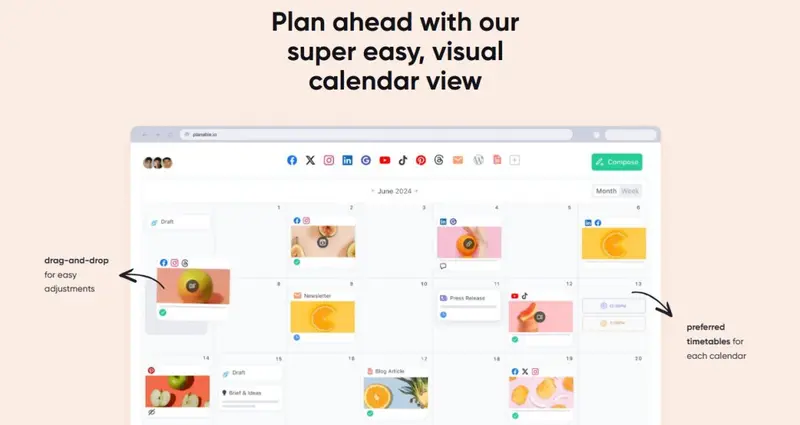
Planable focuses on streamlining the content creation, approval, and scheduling process within a single platform. It enables teams to create, plan, and organize posts across multiple social networks while maintaining visibility through a visual content calendar and grid-based previews.

Workspaces allow teams to manage multiple brands or clients separately, while role-based permissions ensure that stakeholders can review and approve content without accessing the full system.

A core strength of Planable is its collaboration layer. Teams can leave internal or client-facing comments, annotate posts, and manage approvals directly within the platform, reducing the need for external communication tools. The platform also includes features such as version history, media libraries, and integrations with tools like Canva to support content production workflows.

User feedback highlights its ease of use, visual planning capabilities, and strong approval workflows. However, some reviewers note limitations in platform integrations, feature depth, and occasional reliability issues related to publishing and performance.

Top Features

  • Visual content calendar with grid, feed, and list views for planning
  • Built-in collaboration tools, including comments, approvals, and annotations
  • Workspaces and role-based permissions for managing multiple clients or brands
  • Media library and Canva integration for streamlined content creation
  • AI-assisted caption generation and content suggestions
  • Multi-platform scheduling with support for posts, reels, stories, and more

Pricing

Planable offers a free plan. Paid plans start from $33 per month. 

Best For

Any size brand or agency that prioritizes client collaboration, approvals, and visual content planning workflows

Limitations Or Considerations

Some users report that the platform can experience bugs or inconsistencies in publishing, including posts failing to go live or mobile scheduling issues.

Others note that pricing may feel high relative to feature depth and that integrations and automation capabilities are more limited compared to broader social media management platforms.

4.7 out of 5 stars
Planable is a social media management tool for agencies and brands. It helps teams plan, collaborate, and approve social media content in one place, making it ideal for managing multiple clients or stakeholders.
Ratings
Features & Pricing
Pros and Cons
Ratings
Features
5.0
Ease of Use
5.0
Reporting
4.0
Overall Score
4.7
Features & Pricing
Analytics
Post Scheduling
Scheduling
Social Media Management
Team Workflow & Collaboration
Content Planning
Marketing Calendar
Price starting at:$33
Pros and Cons
Best-in-class collaboration for social media teams
Highly customizable approval workflows
Built for agencies and multi-brand teams
Advanced features like analytics and engagement cost extra
Less focused on full-stack social media management
Best for: Marketing agencies, multi-location brands, multi-brand companies
4.7 out of 5 stars
Planable is a social media management tool for agencies and brands. It helps teams plan, collaborate, and approve social media content in one place, making it ideal for managing multiple clients or stakeholders.
Visit Website View Profile

4. Plann by LinkTree

Plann by LinkTree

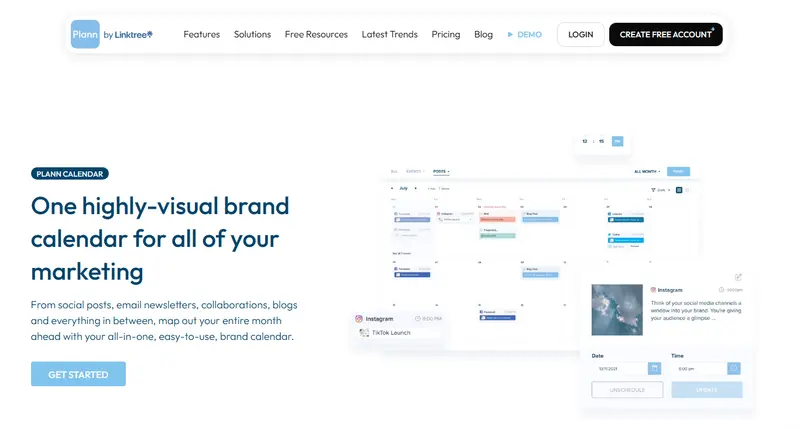
Plann is a visual-first, content-focused social media planner designed for small teams, creators, and brands that prioritize calendar-based planning and content ideation.

Plann centers its functionality around a highly visual brand calendar that allows users to plan, organize, and schedule content across multiple channels in one place. The platform supports drag-and-drop scheduling, multi-platform organization, and the ability to map out broader marketing activities such as blogs, campaigns, and newsletters alongside social posts.

In addition to scheduling, Plann includes content ideation tools such as daily prompts, caption suggestions, and access to royalty-free media assets. These features are designed to support content creation workflows, particularly for teams that need inspiration and structure during planning.

The interface emphasizes simplicity and visual clarity, with large previews and calendar-based navigation to help users maintain consistency across posts.

However, user feedback indicates mixed experiences. While some find the concept and visual planning approach useful, others report issues related to usability, scheduling reliability, and customer support responsiveness.

Concerns around billing practices and account management are also mentioned in reviews, which may be important for teams evaluating long-term use.

Top Features

  • Visual content calendar with drag-and-drop scheduling
  • Multi-channel planning across social posts, blogs, and campaigns
  • Content ideation tools including prompts, captions, and hashtags
  • Built-in media library with royalty-free assets
  • Ability to manage multiple brands and switch between workspaces
  • Calendar-based organization for broader marketing activities

Pricing

Plans  start at $12.5 per month, with a free plan available

Best For

Small teams and creators looking for a visual planning tool with built-in content ideation support

Limitations Or Considerations

User reviews highlight recurring concerns around platform reliability, including scheduling issues and bugs that affect posting workflows. Some users also report challenges with customer support responsiveness and billing processes, including subscription management and renewal handling.


5. Planoly

Planoly

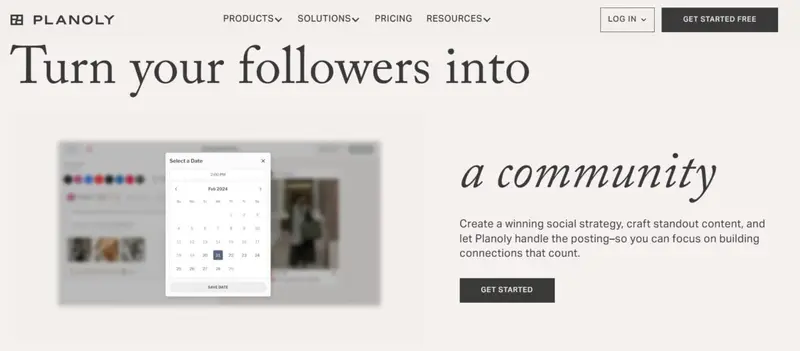
Planoly is a visual, creator-focused social media planner designed for individuals and small teams that prioritize content organization and automated publishing across multiple platforms.

Planoly centers its functionality around visual planning and streamlined scheduling. Users can organize content through calendar, grid, or list views, allowing them to preview posts and maintain consistency across channels.

The platform supports auto-posting to a wide range of networks, including Instagram, TikTok, Facebook, LinkedIn, Pinterest, and more, enabling users to manage multiple accounts from a single dashboard.

In addition to scheduling, Planoly includes tools for content creation and organization. Features such as hashtag management, AI caption writing, placeholders, and access to stock media help users plan and execute content strategies more efficiently. The platform is designed to simplify workflows by combining planning, previewing, and publishing into one system.

User feedback highlights its ease of use, visual interface, and ability to simplify scheduling. However, some reviewers note limitations in analytics depth, platform-specific features, and occasional reliability issues with auto-posting or account connections.

Top Features

  • Multi-platform auto-posting across major social networks
  • Visual planning with calendar, grid, and list views
  • AI caption writer and hashtag management tools
  • Content previews and placeholders for structured planning
  • Built-in access to stock media and creative assets
  • Ability to schedule and manage multiple accounts from one dashboard

Pricing

Plans start from $16 per month.

Best For

Creators and small teams that need a simple, visual planner with built-in scheduling and content support tools

Limitations Or Considerations

Some users report limited analytics capabilities and gaps in support for certain content formats or platform features, particularly for more advanced use cases. Others note occasional issues with auto-post reliability and account disconnections, which may require manual intervention.


6. Agorapulse

Agorapulse

Agorapulse is an all-in-one, workflow-driven social media planner designed for agencies and businesses that need centralized publishing, engagement, and reporting capabilities.

Agorapulse combines scheduling, collaboration, inbox management, and analytics into a single platform aimed at simplifying multi-account social media management.

Its publishing tools support scheduling and auto-posting across major platforms, including Instagram, Facebook, LinkedIn, TikTok, and more, with a visual calendar that helps teams plan and organize content efficiently.

A key component of the platform is its unified inbox, which consolidates messages, comments, and interactions from different channels into one dashboard. This allows teams to manage engagement alongside publishing without switching tools.

Collaboration features such as approval workflows, shared calendars, and task assignments also support team-based workflows.

Agorapulse also emphasizes reporting and performance tracking, offering customizable dashboards and campaign analysis tools.

User feedback frequently highlights its centralized interface, scheduling capabilities, and reporting features, while noting some limitations in customization, occasional technical issues, and variability in customer support experiences.

Top Features

  • Multi-platform scheduling and auto-publishing across major social networks
  • Visual content calendar for planning and organizing posts
  • Unified social inbox for managing messages, comments, and mentions
  • Customizable reporting and analytics dashboards
  • Collaboration tools, including approval workflows and shared calendars
  • Bulk scheduling and queue-based publishing for high-volume content

Pricing

Pricing typically starts with a free trial, with paid plans from $79 per month. 

Best For

Agencies and businesses managing multiple accounts that require centralized workflows and reporting

Limitations Or Considerations

Some users report limitations in reporting customization and occasional publishing or synchronization issues that affect reliability. There are also mentions of bugs, delayed support responses, and billing concerns in certain cases, which may impact user experience depending on usage.

4.5 out of 5 stars
Agorapulse is a social media management platform stocked full of features for individuals, businesses, and enterprises. Their added listening tool helps users monitor brand mentions. Features include a variety of ways to publish content, reporting, analytics, and more.
Ratings
Features & Pricing
Pros and Cons
Ratings
Features
4.0
Ease of Use
4.6
Support
4.8
Overall Score
4.5
Features & Pricing
Analytics
Automated Publishing
Contact Management
Content Management
Conversion Tracking
Keyword Filtering
Multi-Account Management
Post Scheduling
Reporting/Analytics
Social Media Monitoring
Competitive Analysis
Scheduling
Social Media Calendar
Social Media Management
Team Workflow & Collaboration
Social Media Listening
Price starting at:$49
Pros and Cons
Easy social media management
Simple platform
Makes it easy not to double reply etc
Lack of post editing features
Limited third party integrations
Engagement platform can be difficult to use
Best for: Mid-sized agencies, mid-sized businesses and some enterprise brands.
4.5 out of 5 stars
Agorapulse is a social media management platform stocked full of features for individuals, businesses, and enterprises. Their added listening tool helps users monitor brand mentions. Features include a variety of ways to publish content, reporting, analytics, and more.
Visit Website View Profile

7. Loomly

Loomly

Loomly is a structured, collaboration-driven social media planner designed for marketing teams, agencies, and brands that need organized workflows and guided content creation.

Loomly focuses on simplifying content planning, collaboration, and scheduling through a centralized calendar-based system. Users can create, organize, and schedule posts across multiple platforms while maintaining visibility through a visual content calendar.

The platform supports a wide range of content formats, including posts, Reels, Stories, and videos, with previews that mirror native platform layouts.

A key aspect of Loomly is its guided workflow. The platform provides content suggestions, optimization tips, and post ideas to help teams maintain consistency and improve engagement.

Collaboration features such as approval workflows, commenting, and version tracking make it suitable for teams working across multiple stakeholders. Additionally, integrations with tools like Canva, Google Drive, and media libraries support content creation and asset management.

User feedback highlights its intuitive interface, structured planning environment, and ease of use for managing multiple accounts. However, some reviewers note limitations in analytics depth, occasional performance issues, and constraints in customization compared to more advanced platforms.

Top Features

Visual content calendar with drag-and-drop scheduling
Multi-platform publishing with support for various content formats
Built-in content ideas, optimization tips, and hashtag suggestions
Collaboration workflows with approvals, comments, and version tracking
Post previews that match native platform layouts
Integrations with tools like Canva, Google Drive, and media libraries

Pricing

Offers multiple pricing tiers with a free trial available. Plans start from $49 per month.

Best For

Marketing teams and agencies that need structured workflows, approvals, and guided content planning

Limitations Or Considerations

Some users report that analytics and reporting capabilities are less customizable compared to more advanced tools, particularly for deeper performance analysis. Others note occasional glitches, limitations in certain platform features, and inconsistencies in publishing behavior that may require manual adjustments.

4.8 out of 5 stars
One of the social media management platforms we’ve seen is also the easiest to use and designed to meet any sized marketing need.
Ratings
Features & Pricing
Pros and Cons
Ratings
Features
4.8
Ease of Use
5.0
Reporting
4.5
Overall Score
4.8
Features & Pricing
Analytics
Automated Publishing
Contact Management
Customer Targeting
Keyword Filtering
Multi-Account Management
Post Scheduling
Customer Engagement
Multi-User Collaboration
Reporting/Analytics
Price starting at:$32
Pros and Cons
Post creation process leaves nothing to chance: every aspect is well thought out
Multiple social calendars eliminate confusion/accidental postings
Workflow templates are suitable for large teams and one-person operations
Reporting could use more audience insights
Best for: Literally everyone: Creators, Brands, Agencies, Marketing teams and solo freelancers, Franchises
4.8 out of 5 stars
One of the social media management platforms we’ve seen is also the easiest to use and designed to meet any sized marketing need.
Visit Website View Profile

8. Pallyy

Pallyy

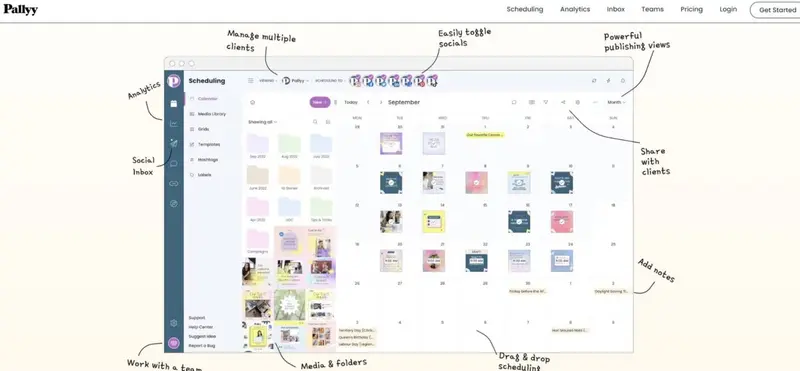
Pallyy is a streamlined, affordability-focused social media planner designed for small teams, agencies, and solo marketers that need efficient scheduling and content management without enterprise-level complexity.

Pallyy provides a centralized platform for drafting, scheduling, and publishing content across multiple social networks, including Instagram, Facebook, LinkedIn, TikTok, Pinterest, and more.

Its interface emphasizes simplicity, allowing users to manage posts through a shared calendar, organize assets in a media library, and schedule content using queues or time slots.

The platform includes practical workflow features such as approvals, post comments, and labeling systems, making it suitable for collaborative environments. Visual planning is also supported through Instagram grid previews and calendar-based organization. Additional tools, such as best time to post insights and basic analytics, help guide publishing decisions.

User feedback consistently highlights ease of use, strong value for money, and efficient multi-account management. However, some reviewers note limitations in advanced features, mobile experience, and support responsiveness in certain cases.

Top Features

  • Multi-platform scheduling and publishing from a single dashboard
  • Shared calendar with approvals, comments, and collaboration tools
  • Instagram grid preview for visual content planning
  • Media library with asset organization and labeling features
  • Queue-based scheduling and time slot automation
  • Best time to post insights for optimizing publishing timing

Pricing

Known for competitive pricing, with plans generally positioned as more affordable than many alternatives

Best For

Small teams, agencies, and solo marketers looking for a cost-effective and easy-to-use scheduling tool

Limitations Or Considerations

Some users report limitations in advanced functionality, including automation flexibility and feature depth for more complex workflows. Others mention occasional issues with mobile usability, platform integrations, or customer support responsiveness depending on use case.


9. SmarterQueue

SmarterQueue

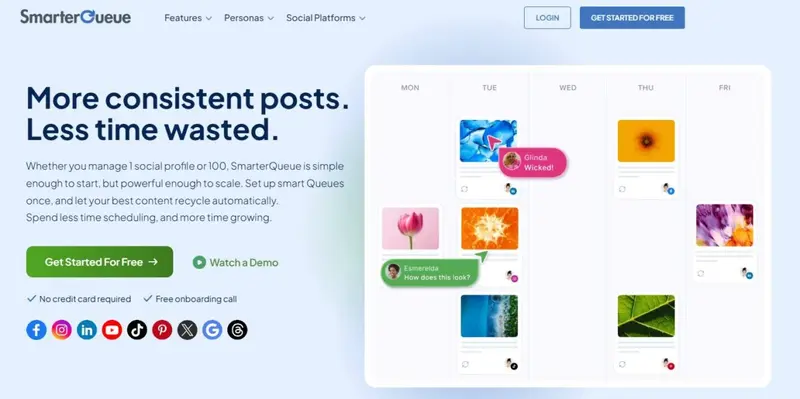
SmarterQueue is an automation-focused social media planner designed for businesses, creators, and agencies that want to maintain consistent posting through content recycling and queue-based scheduling.

SmarterQueue centers its functionality around automated scheduling and content categorization. Its queue-based system allows users to organize posts into categories and recycle evergreen content automatically, reducing the need for constant manual scheduling.

This makes it particularly useful for maintaining a steady publishing cadence over time.

The platform supports multi-platform publishing across networks such as Facebook, Instagram, LinkedIn, TikTok, Pinterest, and more, all managed from a centralized dashboard.

Additional features include AI-assisted caption generation, content curation from RSS feeds, and analytics for tracking engagement and performance. Teams can also collaborate through shared workspaces and role-based access.

User feedback highlights its ability to save time, automate workflows, and simplify recurring content strategies. However, some reviewers note limitations in media handling, lack of a traditional content calendar, and occasional usability issues depending on workflow preferences.

Top Features

  • Queue-based scheduling with automated content recycling
  • Content categorization for structured and balanced posting
  • Multi-platform publishing from a centralized dashboard
  • AI caption generation and content optimization tools
  • Content curation from RSS feeds and external sources
  • Analytics and reporting for performance tracking

Pricing

Starts at approximately $24.99 per month, with scalable plans based on usage

Best For

Businesses and creators that rely on evergreen content and want to automate posting workflows

Limitations Or Considerations

Some users report that the platform lacks a traditional visual content calendar, which may limit planning visibility for certain workflows. Others note occasional issues with media handling, including formatting or publishing limitations depending on platform requirements.


10. Publer

Publer

Publer is a flexible, calendar-based social media planner designed for marketers, agencies, and businesses that need bulk scheduling and multi-platform management in a single interface.

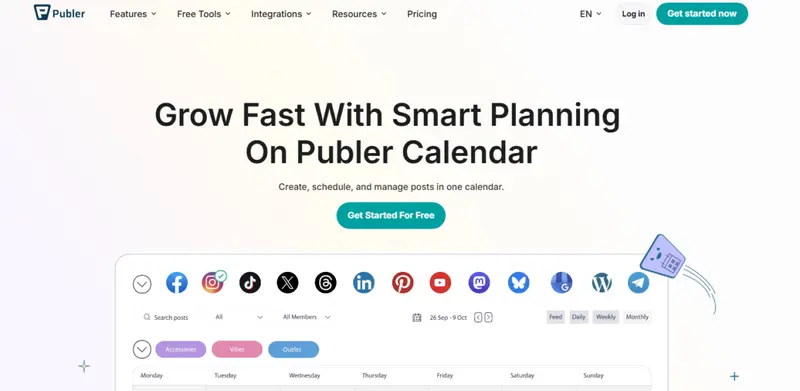
Publer provides a centralized content calendar where users can create, schedule, and manage posts across platforms such as Facebook, Instagram, LinkedIn, TikTok, Pinterest, YouTube, and more. The platform emphasizes visual planning, allowing users to organize content by date, account, or status while maintaining a clear overview of their strategy.

A key strength of Publer is its bulk scheduling functionality. Users can upload large volumes of content via CSV files and schedule posts in batches, which is particularly useful for agencies or teams managing high content output.

Additional features include AI-assisted caption generation, hashtag suggestions, content recycling, and integration with tools like Canva to streamline content creation workflows.

User feedback highlights its intuitive interface, efficient scheduling capabilities, and ability to manage multiple accounts from one dashboard. However, some reviewers note limitations in analytics depth, media library organization, and advanced collaboration features compared to more complex platforms.

Top Features

  • Visual content calendar with filtering and organization tools
  • Bulk scheduling with CSV upload for high-volume posting
  • Multi-platform publishing from a unified dashboard
  • AI caption generation and hashtag suggestions
  • Content recycling and automation for evergreen posts
  • Integration with tools like Canva for content creation

Pricing

Offers free and paid plans, with pricing varying based on features and usage.

Best For

Agencies, marketers, and businesses that need bulk scheduling and efficient multi-account management

Limitations Or Considerations

Some users report that analytics and reporting capabilities are relatively basic, which may limit deeper performance analysis. Others note that the mobile experience and collaboration features may not match the depth of more advanced enterprise tools, particularly for larger teams.


How To Choose The Right Social Media Planner

Before committing to a tool, it’s important to evaluate how well it fits your workflow, team structure, and long-term goals. The table below helps you assess whether a platform aligns with your specific requirements.

Question

What To Look For

Why It Matters

Is it suitable for your use case? Visual planning, automation, analytics, or collaboration features Different tools prioritize different workflows
Does it support your platforms? Coverage for Instagram, TikTok, LinkedIn, Pinterest, and others Gaps in platform support can limit execution
Does it scale with your needs? Ability to add users, accounts, and workflows Prevents the need to switch tools later
Does it fit your budget? Pricing structure based on users, features, or accounts Ensures long-term sustainability
Does it support collaboration? Approval workflows, comments, permissions Essential for teams and agencies
Does it provide useful analytics? Reporting depth and performance insights Helps guide content strategy decisions

Role-Based Guidance

For Small Teams And Solo Marketers: Prioritize ease of use, affordability, and core scheduling features. Tools with visual calendars and simple workflows are often sufficient.

For Agencies: Look for collaboration features, client workspaces, approval workflows, and the ability to manage multiple accounts efficiently.

For Enterprises: Focus on advanced analytics, integrations, scalability, and centralized management across multiple teams or regions.


Implementation Considerations

Choosing a social media planner often involves trade-offs between simplicity and functionality.

Tools that are easier to use may lack advanced analytics or automation features. On the other hand, more comprehensive platforms can introduce complexity and require onboarding time.

Pricing models also vary. Some platforms charge per user, while others scale based on the number of social profiles or features. This can significantly impact costs as your team grows.

Finally, consider how the tool fits into your existing stack. Integration with design tools, CRM systems, or analytics platforms can improve efficiency and reduce manual work.


Social Media Planners That Fit Your Workflow And Goals

Social media planners play a critical role in helping teams stay consistent, organized, and efficient as content demands continue to grow. The right tool depends on your specific workflow, whether that prioritizes visual planning, automation, analytics, or collaboration.

By understanding the differences between platforms and evaluating them against your needs, you can make a more informed decision that supports both your short-term execution and long-term strategy.

We hope this guide helped you find the right solution for your needs.

About the Author
Geri Mileva, an experienced IP network engineer and distinguished writer at Influencer Marketing Hub, specializes in the realms of the Creator Economy, AI, blockchain, and the Metaverse. Her articles, featured in The Huffington Post, Ravishly, and various other respected newspapers and magazines, offer in-depth analysis and insights into these cutting-edge technology domains. Geri's technological background enriches her writing, providing a unique perspective that bridges complex technical concepts with accessible, engaging content for diverse audiences.