

Getting social media image sizes right sounds like a small production detail until a platform crops your headline, cuts a logo in half, or turns a carefully designed graphic into a blurry preview.
The challenge is that there is no single social media image size. Instagram now supports taller 3:4 Feed images, Pinterest still favors its distinctive 2:3 vertical format, X supports several different in-feed ratios, and profile, banner, Story, thumbnail, and Feed images can all require completely different dimensions.
And static imagery still matters. In our State of Social Media Marketing Report, image-based posts accounted for 25.3% of the content formats associated with the highest engagement. Video may dominate much of the conversation around social content, but brands still rely heavily on images for product launches, announcements, educational graphics, carousels, link previews, brand assets, and everyday social posts.
The good news is that you do not need to memorize dozens of dimensions.
This guide brings together the most important social media image sizes for 2026 across Facebook, Instagram, TikTok, X, LinkedIn, YouTube, Pinterest, Threads, Snapchat, and Bluesky.
We’ll focus on the dimensions marketers and creators actually need most often, explain where cropping and safe zones matter, and point you toward our platform-specific guides when you need the full specification set.
Start with the quick-reference table below. Then jump to the platform you are designing for.
⭐ Download the 2026 Social Media Image Size Cheat Sheet
Instead of coming back to this guide every time you design a new asset, download our 2026 Social Media Image Size & Safe Zone Cheat Sheet.
It gives you the essential dimensions, aspect ratios, and crop-safe guidance for Facebook, Instagram, TikTok, X, LinkedIn, YouTube, Pinterest, Threads, Snapchat, and Bluesky in one quick-reference PDF.
- Social Media Image Sizes at a Glance
- The Social Media Image Sizes You’ll Use Most Often
- Facebook Image Sizes
- Instagram Image Sizes
- TikTok Image Sizes
- X (Twitter) Image Sizes
- LinkedIn Image Sizes
- YouTube Image Sizes
- Pinterest Image Sizes
- Threads Image Sizes
- Snapchat Image Sizes
- Bluesky Image Sizes
- Social Media Safe Zones and Cropping
- Try our Free Social media Image Resizer Tool
- Final Thoughts
- Frequently Asked Questions
Social Media Image Sizes at a Glance
The table below gives you the recommended working sizes for the most common social media images in 2026.
Platform | Image Type | Recommended Size | Aspect Size |
Profile Picture Cover Photo Portrait Feed Image Square Feed Image Landscape/Link Image Story | 320 x 320 px 852 x 315 px 1080 x 1350 px 1080 x 1080 px 1200 x 630 px 1080 x 1920 px | 1:1 ~2.7:1 4:5 1:1 1.91:1 9:16 | |
Profile Picture Portrait Feed Image Square Feed Image Landscape Feed Image Stories / Reels | 320 x 320 px 1080 x 1440 px 1080 x 1080 px 1080 x 566 px 1080 x 1920 px | 1:1 3:4 1:1 1.91:1 9:16 | |
TikTok | Profile Picture Vertical Photo Post | 200 x 200 px 1080 x 1920 px | 1:1 9:16 |
X / Twitter | Profile Picture Header Portrait Post Square Post Landscape Post | 400 x 400 px 1584 x 396 px 400 x 400 px 1512 x 256 px 1200 x 678 px | 1:1 4:1 1:1 ~5.9:1 1.91:1 |
YouTube | Channel Banner Video Thumbnail Shorts Thumbnail | 2560 x 1440 px 3840 x 2160 px 2160 x 3840 px | 16:9 16:9 9:16 |
Standard Pin Square Pin Profile Cover | 1080 x 1500 px 1000 x 1000 px 800 x 450 px | 2:3 1:1 16:9 | |
Threads | Square Post Portrait Post | 1080 x 1080 px 1080 x 1350 px | 1:1 4:5 |
Snapchat | Full-Screen Image | 1080 x 1920 px | 9:16 |
Bluesky | Post Image | Up to 4000 x 4000 px | Flexible |
- One distinction is important: Not every platform publishes an official pixel recommendation for every image format. Where an official specification exists, we use it. Where a platform supports flexible image dimensions, we recommend a practical high-resolution canvas and explain the platform-specific behavior later in the guide rather than pretending there is a hard limit where none exists.
A few of these deserve additional context.
- Instagram's dedicated 2026 guide now recommends 1080 × 1440 pixels at 3:4 for portrait Feed photos, reflecting Instagram's newer native support for the taller format. That makes the 1080 × 1350 recommendation still usable, but no longer the only portrait option brands should design around.
- X remains flexible across square, portrait, and landscape images. Our current X guide recommends 1080 × 1350 for portrait posts, 1080 × 1080 for square, and either 1200 × 675 or 1600 × 900 for 16:9 landscape creative.
- LinkedIn has also changed materially. Its current documentation recommends 400 × 400 pixels for a Page logo and 1512 × 256 pixels for the Page cover image. Personal profile backgrounds remain 1584 × 396 pixels.
- YouTube is another important update. The platform currently recommends a 2560 × 1440 channel banner, while its newer thumbnail guidance recommends going much larger than the long-standing 1280 × 720 convention: 3840 × 2160 for standard video thumbnails and 2160 × 3840 for Shorts thumbnails.
- Pinterest remains refreshingly straightforward for its core format. Pinterest recommends a 2:3 Pin at 1000 × 1500 pixels and warns that images taller than 2:3 can be cut off in the Feed.
- Threads is different because Meta does not currently publish one universal pixel specification for organic Threads images. Rather than present a third-party recommendation as an official rule, we’ll use 1080-pixel-wide square and portrait canvases as practical design starting points and explain the flexibility in the Threads section.
- Bluesky is similarly flexible. In April 2026, Bluesky increased post-image support to 2 MB per image and resolutions up to 4000 × 4000 pixels, so there is no reason to pretend every post needs one prescribed canvas.
One Important Note About Ads
These dimensions are primarily intended for organic social content and core profile assets.
Paid placements can have different specifications, safe zones, and higher recommended resolutions. Where we already have dedicated IMH ad-size guides, such as for Instagram, Facebook, LinkedIn, and TikTok, we should link readers there rather than turning this guide into an advertising-specification manual. Check them out:
The Social Media Image Sizes You’ll Use Most Often
You do not need a separate design canvas for every social network.
Across most organic social workflows, a handful of image sizes cover the majority of what marketers publish. The platform-specific sections below will give you the exact specifications, but these are the dimensions worth keeping close at hand.
| Working size | Aspect ratio | Best used for |
| 1080 × 1080 px | 1:1 | Square posts, carousels, reusable cross-platform graphics |
| 1080 × 1350 px | 4:5 | Portrait social posts across multiple platforms |
| 1080 × 1440 px | 3:4 | Instagram-first portrait Feed images |
| 1080 × 1920 px | 9:16 | Stories, Reels, TikTok and other full-screen vertical creative |
| 1200 × 630 px | 1.91:1 | Link previews and horizontal social graphics |
| 1000 × 1500 px | 2:3 | Pinterest Pins |
Facebook Image Sizes
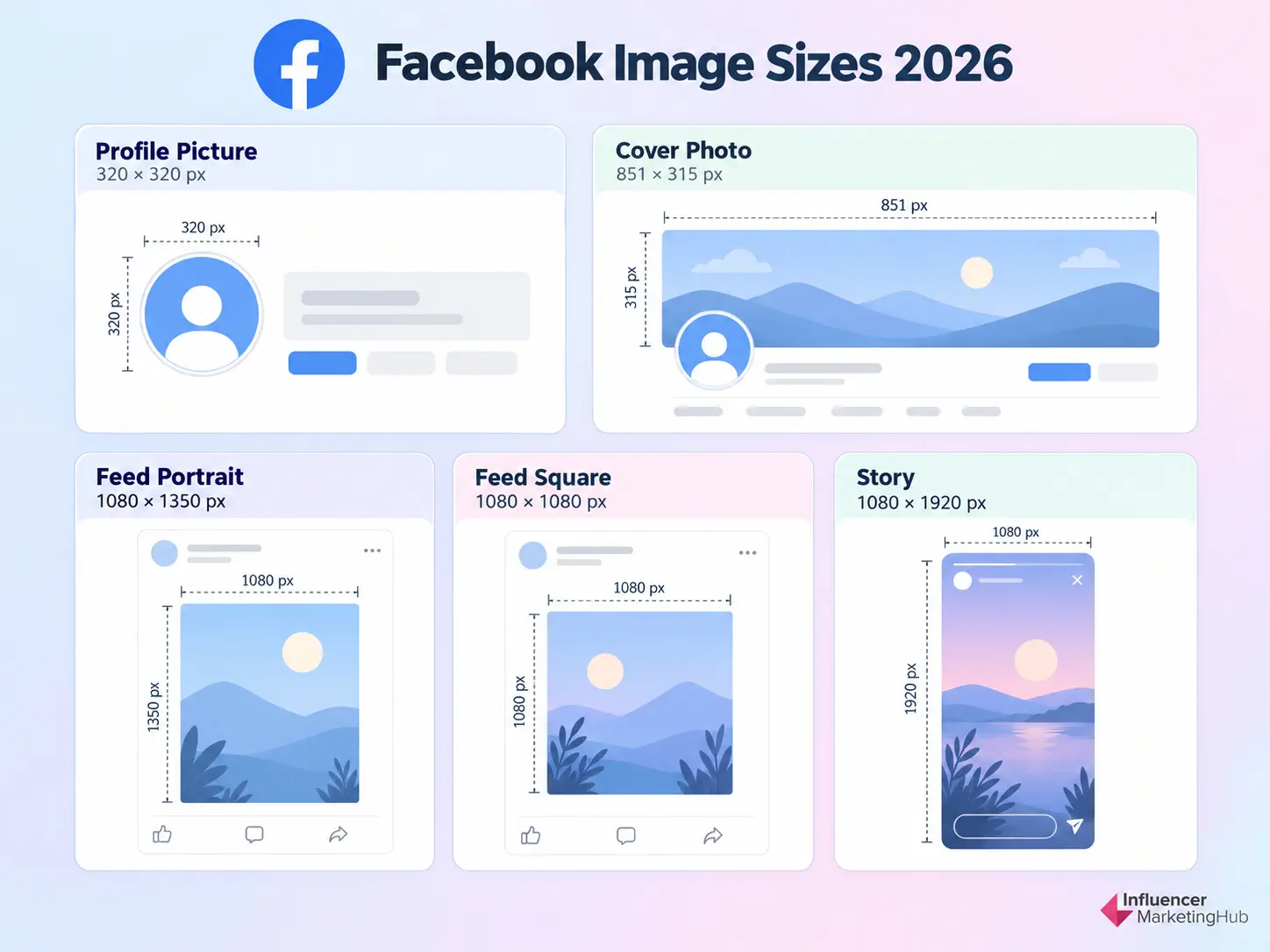
Facebook still gives marketers a lot of visual real estate to work with, from profile and cover images to Feed posts, Stories, links, and event graphics. Our latest social media statistics roundup puts Facebook at roughly 3.07 billion monthly active users, making it one of the largest social platforms in the world.
The main challenge is that Facebook does not treat every image the same way. A profile image is cropped into a circle, cover photos display differently across desktop and mobile, and Feed images can appear in square, portrait, or landscape formats.
For most organic Facebook content, these are the sizes worth working from:
| Facebook image type | Recommended size | Aspect ratio |
| Profile picture | 320 × 320 px or larger | 1:1 |
| Cover photo | 851 × 315 px | ~2.7:1 |
| Portrait Feed image | 1080 × 1350 px | 4:5 |
| Square Feed image | 1080 × 1080 px | 1:1 |
| Landscape Feed image | 1200 × 630 px | 1.91:1 |
| Link preview image | 1200 × 630 px | 1.91:1 |
| Story | 1080 × 1920 px | 9:16 |
| Event cover | 1920 × 1005 px | ~1.91:1 |
Facebook Profile Picture Size
For the best quality, Facebook currently recommends uploading a profile picture that is at least 320 × 320 pixels.
Because Facebook displays profile pictures inside a circular frame in many parts of the interface, keep important elements such as faces, logos, or lettering close to the center.
A square source file gives Facebook enough room to apply the circular crop without cutting into the most important part of the design.
Facebook Cover Photo Size
A practical working size for a Facebook cover photo is 851 × 315 pixels.
The important issue here is not simply resolution. Facebook cover images can crop differently depending on the device and placement, so avoid placing logos, headlines, or other essential elements too close to the edges.
Think of the middle of the image as your safest working area.
If you are designing a cover for a business Page, preview it on both desktop and mobile before publishing rather than assuming one crop will look identical everywhere.
Facebook Feed Image Size
Facebook supports several Feed-image shapes, so there is no single correct size.
For a square post, 1080 × 1080 pixels remains a dependable option.
For portrait content, 1080 × 1350 pixels at 4:5 gives the image more vertical space in the mobile Feed and works well for product photography, infographics, creator content, and branded graphics.
For landscape images and shared links, 1200 × 630 pixels at approximately 1.91:1 remains one of the most useful horizontal formats.
Facebook also optimizes uploaded photos for visual quality, so starting with a high-resolution source gives the platform more to work with than uploading an already-small image. Facebook
Facebook Link Preview Image Size
If you share articles, landing pages, or other URLs on Facebook, use a 1200 × 630-pixel Open Graph image.
This is the image Facebook may pull when the URL is shared, so it deserves the same design attention as the post itself.
Keep the headline readable, avoid tiny text, and make sure the graphic still makes sense when displayed at a smaller size.
Facebook Story Size
Facebook Stories use the same full-screen vertical format that has become standard across many mobile-first placements:
1080 × 1920 pixels at 9:16.
Keep key text, logos, and product details away from the extreme top and bottom of the canvas because Facebook overlays interface elements in these areas.
We will cover safe zones in more detail later in this guide.
Facebook Event Cover Size
For Facebook Event covers, 1920 × 1005 pixels is a useful high-resolution working size at approximately 1.91:1.
Event graphics often contain more text than standard social posts, so keep the most important details toward the center and make sure they remain readable when the image is reduced in previews.
What About Facebook Ad Sizes?
Organic Facebook images and paid Meta placements should not be treated as the same specification set.
Ads can appear across Feed, Stories, Reels, Marketplace, Audience Network, and other placements, each with its own creative considerations.
For paid campaigns, use our dedicated Facebook Ad Sizes Guide rather than relying on the organic dimensions above.
Instagram Image Sizes
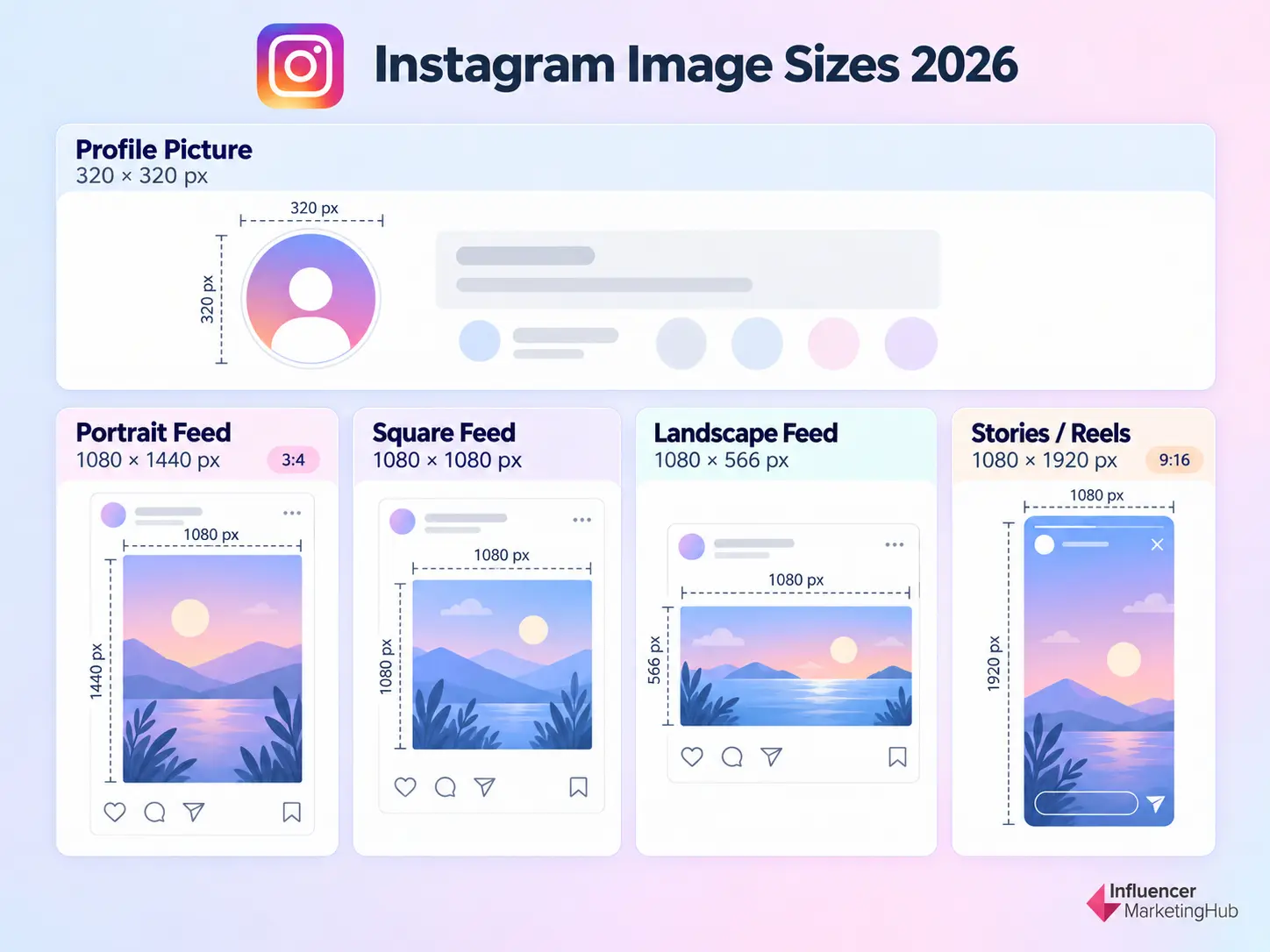
Instagram gives marketers more flexibility than it used to. Square posts are still supported, but portrait content now has more room to work with, and 3:4 has become our preferred starting point for new portrait Feed creative in 2026.
For most teams, these are the Instagram dimensions worth keeping on hand:
| Instagram image type | Recommended size | Aspect ratio |
| Profile picture | 320 × 320 px | 1:1 |
| Portrait Feed post | 1080 × 1440 px | 3:4 |
| Classic portrait post | 1080 × 1350 px | 4:5 |
| Square Feed post | 1080 × 1080 px | 1:1 |
| Landscape Feed post | 1080 × 566 px | 1.91:1 |
| Stories | 1080 × 1920 px | 9:16 |
| Reel cover working master | 1080 × 1920 px | 9:16 |
Instagram Feed Image Size
If you are creating a new portrait Feed asset from scratch, start with 1080 × 1440 pixels at 3:4.
Instagram introduced native 3:4 photo support in 2025, and the format now works for both single-image posts and carousels. It also aligns naturally with Instagram's taller profile-grid presentation, which makes it particularly useful for brands that care about how individual posts look when viewed as part of the full profile.
The older 1080 × 1350 / 4:5 format is not obsolete. It remains fully supported and is still useful if your brand already has an established 4:5 design system or if that composition works better for the asset.
Instagram Square and Landscape Posts
Square posts remain useful at 1080 × 1080 pixels, particularly for centered graphics, product imagery, and assets that need to travel easily between several social networks.
For landscape content, use approximately 1080 × 566 pixels at 1.91:1.
Landscape is best reserved for images that genuinely need horizontal space. Portrait formats generally make better use of a mobile Feed when the subject and design allow for them.
Instagram Stories and Reel Covers
Instagram Stories use a full-screen 1080 × 1920-pixel, 9:16 canvas.
We recommend using the same 1080 × 1920 working master when designing Reel covers. The important difference is that Reel artwork can appear differently in the Feed and profile grid, so keep the primary subject, headline, and branding toward the center rather than designing important elements right against the edges.
What About Instagram Carousels?
For a new portrait carousel, 1080 × 1440 / 3:4 is our preferred starting point.
Instagram also supports carousels at:
1080 × 1350 / 4:5, 1080 × 1080 / 1:1, and 1080 × 566 / 1.91:1. Influencer Marketing Hub
Whichever format you choose, keep the carousel consistent. Designing every slide on the same canvas makes the sequence feel intentional and reduces unexpected cropping.
📚 Need the Full Instagram Sizing Breakdown?
We are deliberately keeping this section focused on the dimensions marketers need most often.
For profile-grid cropping, carousel sizing, Reel-cover previews, Story safe areas, supported aspect ratios, export guidance, and crop calculations, see our complete Instagram Image Sizes in 2026 Guide.
TikTok Image Sizes
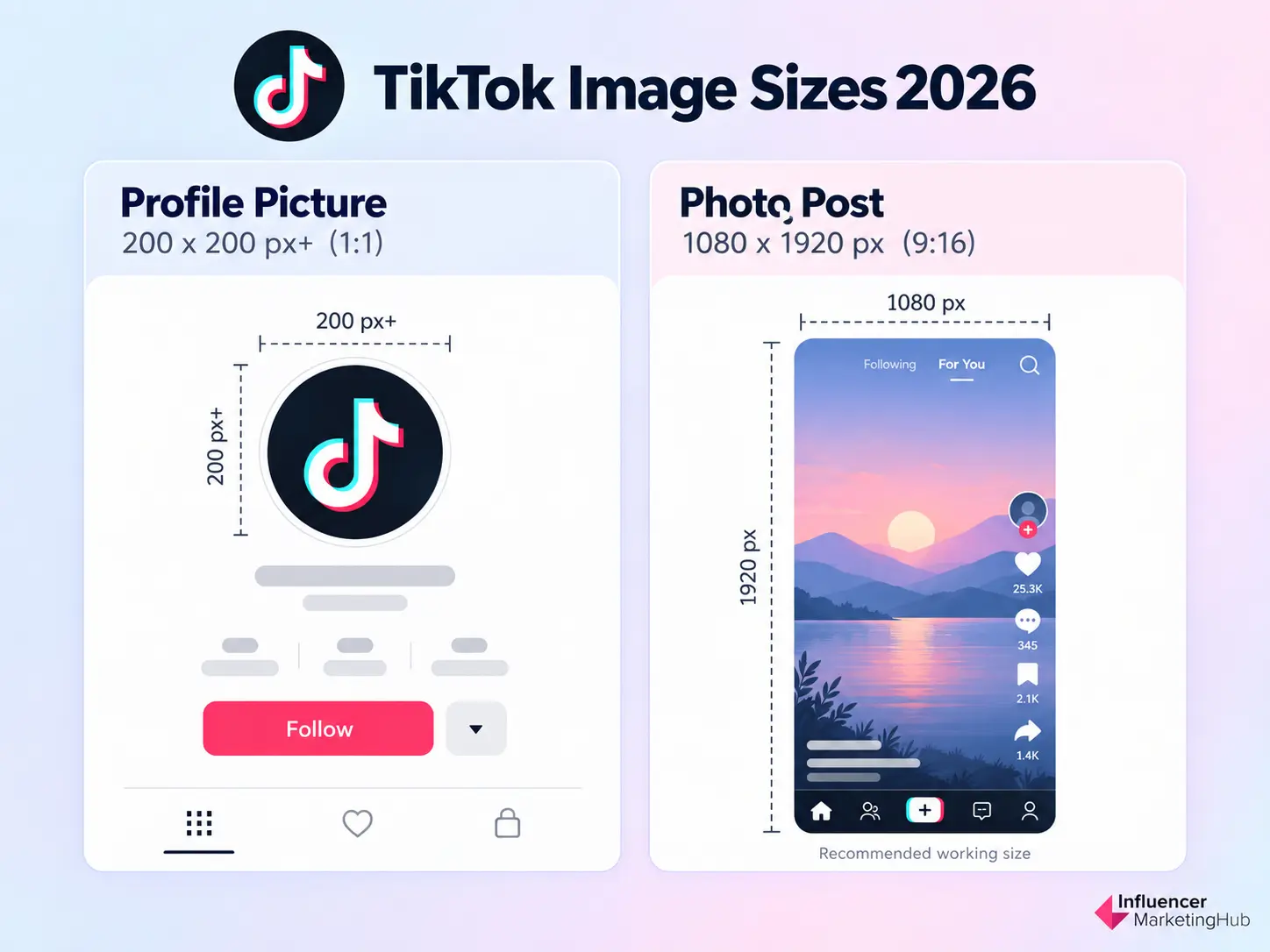
TikTok is still built around a vertical, mobile-first experience, but static imagery now plays a larger role through profile images and Photo Mode posts.
Unlike some platforms, TikTok does not publish a fixed pixel requirement for every organic image format. For that reason, we recommend a practical high-resolution working size rather than presenting an unofficial dimension as a hard platform rule.
| TikTok image type | Recommended working size | Aspect ratio |
| Profile picture | 200 × 200 px or larger | 1:1 |
| Photo post | 1080 × 1920 px | 9:16 |
TikTok Profile Picture Size
TikTok's minimum upload requirement for a profile photo is very small, but for a clean result we recommend starting with a square image at 200 × 200 pixels or larger.
Because TikTok displays profile images inside a circular crop, keep faces, logos, and other important elements centered with some space around the edges.
TikTok Photo Post Size
For TikTok Photo Mode, 1080 × 1920 pixels at 9:16 is our recommended working canvas.
TikTok does not require every organic photo to use those exact pixel dimensions, but 9:16 makes the best use of the platform's vertical mobile interface and creates a more native full-screen experience.
The same canvas works well for multi-image photo posts. If you're building a carousel-style sequence, keep each image at the same dimensions so users get a consistent experience as they swipe.
As with TikTok video, avoid placing essential text, logos, or product details too close to the top, bottom, or right-hand edges, where interface elements can compete with the creative.
📚 What About TikTok Video Sizes?
Video should stay separate from this image-size guide.
For video dimensions, aspect ratios, file requirements, and platform-specific specifications, see our complete TikTok Video Size Guide.
X (Twitter) Image Sizes
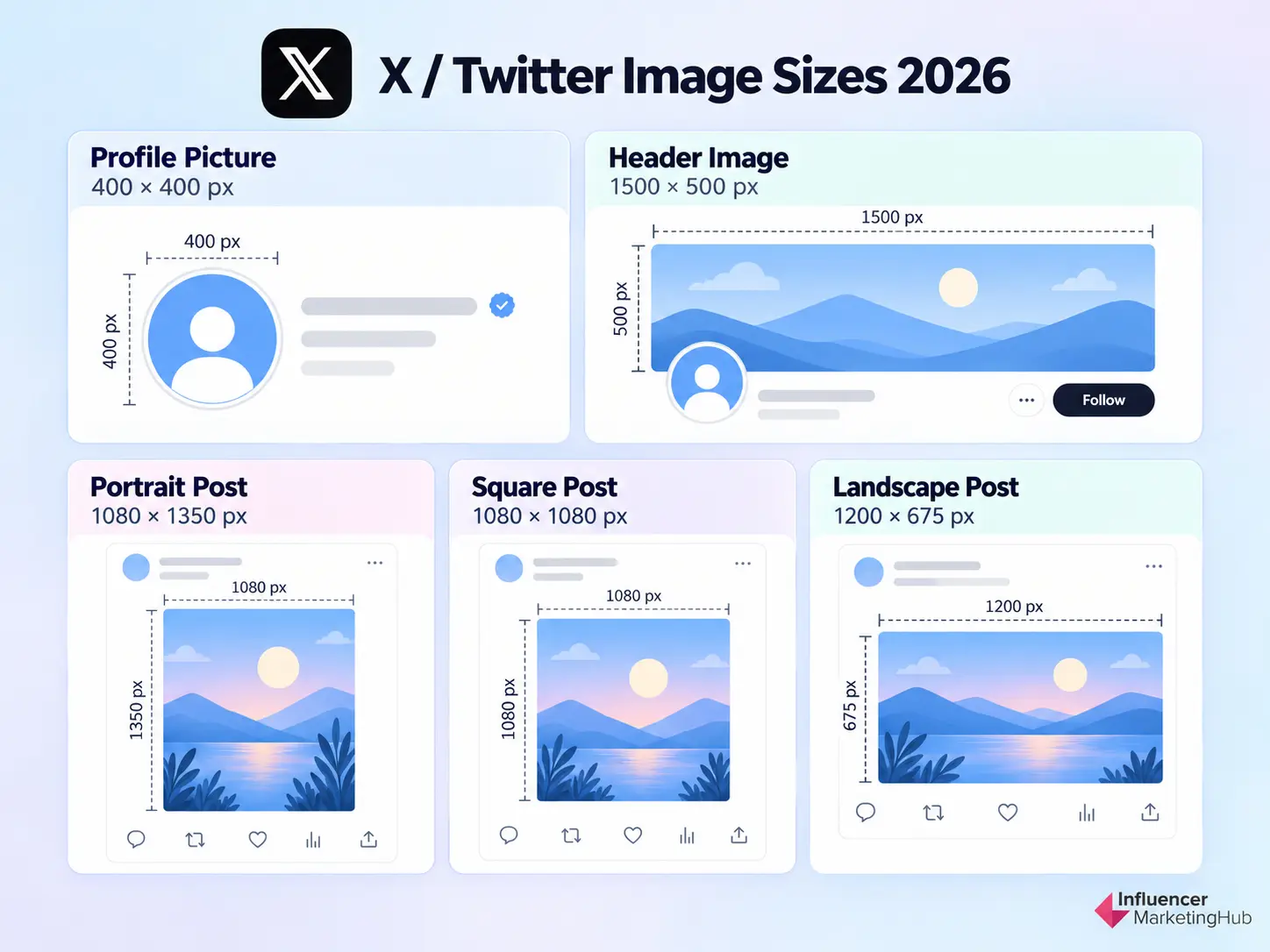
X supports a fairly flexible mix of image formats, which is useful if you are repurposing creative from other social platforms. For most brands, you only need to keep track of the profile image, header, and three core post orientations: portrait, square, and landscape.
| X image type | Recommended size | Aspect ratio |
| Profile picture | 400 × 400 px | 1:1 |
| Header image | 1500 × 500 px | 3:1 |
| Portrait post | 1080 × 1350 px | 4:5 |
| Square post | 1080 × 1080 px | 1:1 |
| Landscape post | 1200 × 675 or 1600 × 900 px | 16:9 |
X Profile Picture Size
X officially recommends 400 × 400 pixels for profile images. The platform displays them as circles, so logos, faces, and other important elements should stay comfortably inside the center of the square canvas.
X Header Image Size
The recommended X header size is 1500 × 500 pixels, giving you a 3:1 canvas.
Be careful with important text and branding around the outer edges. X notes that approximately 60 pixels at the top and bottom can be cropped depending on browser and display size, so the center of the banner is the safest place for anything essential.
X Post Image Sizes
For organic posts, our current X Image Sizes guide recommends three practical formats:
- Portrait: 1080 × 1350 px at 4:5
- Square: 1080 × 1080 px at 1:1
- Landscape: 1200 × 675 or 1600 × 900 px at 16:9
Portrait images are particularly useful when you want more mobile Feed real estate, while square remains a strong cross-platform option. Landscape works well for screenshots, photography, blog graphics, and visuals originally designed around a 16:9 canvas.
Keep Important Elements Away From the Edges
X can display the same image differently depending on device, orientation, and whether it appears alone or as part of a multi-image post.
For that reason, keep headlines, logos, faces, product details, and calls to action toward the center rather than designing tightly against the outer edges.
If you are publishing several images in one post, this becomes even more important because X automatically arranges them into predefined layouts.
📚 Need the Full X Sizing Breakdown?
We are deliberately keeping this section to the formats most marketers use day to day.
For multi-image layouts, X Cards, mobile cropping, safe areas, file-size limits, export formats, and paid creative, see our complete X (Twitter) Image Sizes for 2026 Guide.
LinkedIn Image Sizes
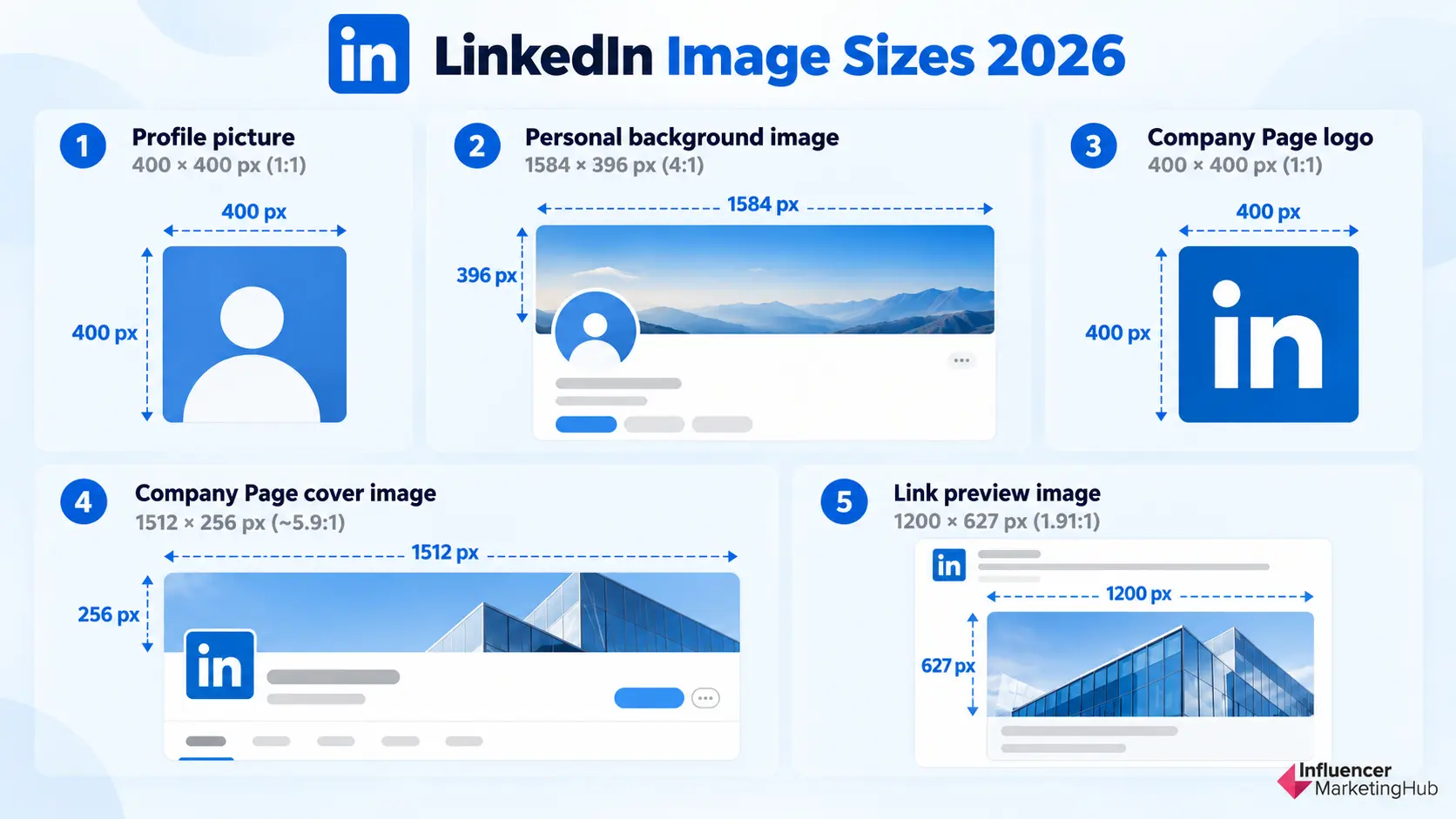
LinkedIn uses different image specifications depending on whether you're designing for a personal profile, a company Page, or a shared link. That distinction matters because the two banner formats, in particular, are very different shapes.
For this cross-platform guide, these are the LinkedIn dimensions worth keeping on hand:
| LinkedIn image type | Recommended size | Aspect ratio |
| Profile picture | 400 × 400 px | 1:1 |
| Personal background image | 1584 × 396 px | 4:1 |
| Company Page logo | 400 × 400 px | 1:1 |
| Company Page cover image | 1512 × 256 px | ~5.9:1 |
| Link preview image | 1200 × 627 px | 1.91:1 |
LinkedIn Profile Picture Size
For personal profiles, LinkedIn accepts profile images starting at 400 × 400 pixels, making that a good working size for a clear, high-quality headshot. LinkedIn supports much larger uploads too, so you can start with a higher-resolution source if you have one.
As with most social profile images, LinkedIn displays the photo within a circular frame. Keep the face or main subject comfortably centered rather than tightly cropped against the edges.
LinkedIn Personal Background Image Size
The recommended LinkedIn background image is 1584 × 396 pixels.
This gives you a very wide 4:1 canvas behind the profile photo.
Because LinkedIn can display that banner differently depending on browser size and screen resolution, avoid placing important headlines or branding at the extreme edges. The profile photo also occupies part of the lower-left area of the banner, so keep essential information away from that overlap.
LinkedIn Company Page Logo Size
For LinkedIn Company Pages, the recommended logo size is now 400 × 400 pixels. LinkedIn lists 268 × 268 pixels as the minimum, but 400 × 400 is the recommended upload size.
That is an important update from older guidance that commonly recommended 300 × 300 pixels.
LinkedIn may show the logo against both light and dark interfaces, so check that transparent logos remain readable in either environment. LinkedIn specifically recommends testing the logo on both backgrounds.
LinkedIn Company Page Cover Image Size
Company Pages use a much wider banner than personal profiles.
LinkedIn currently recommends 1512 × 256 pixels for a Page cover image.
That is a major change from older LinkedIn sizing recommendations, and it is one of the dimensions we definitely need to correct in the existing IMH article.
LinkedIn also warns that Page covers can be trimmed horizontally or vertically depending on device and screen size. Keep important elements toward the center and, in particular, avoid putting critical information in the lower-right corner.
LinkedIn Link Preview Image Size
When sharing a URL through a LinkedIn Page post, use a 1.91:1 image at 1200 × 627 pixels.
LinkedIn explicitly recommends this size for custom images attached to posts with URLs. Images narrower than 200 pixels can instead appear as small thumbnails, so using a proper high-resolution Open Graph image gives the link a much stronger presentation in the Feed.
For ordinary image-only posts, LinkedIn gives you more flexibility. We do not need to manufacture another "official" dimension for this table when the platform does not require one.
📚 Need the Full LinkedIn Image Breakdown?
We are keeping this hub focused on LinkedIn's core visual assets.
For more detail on Page imagery, Career Pages, post images, document content, and LinkedIn-specific design considerations, see our dedicated LinkedIn Image Size Recommendations Guide.
YouTube Image Sizes
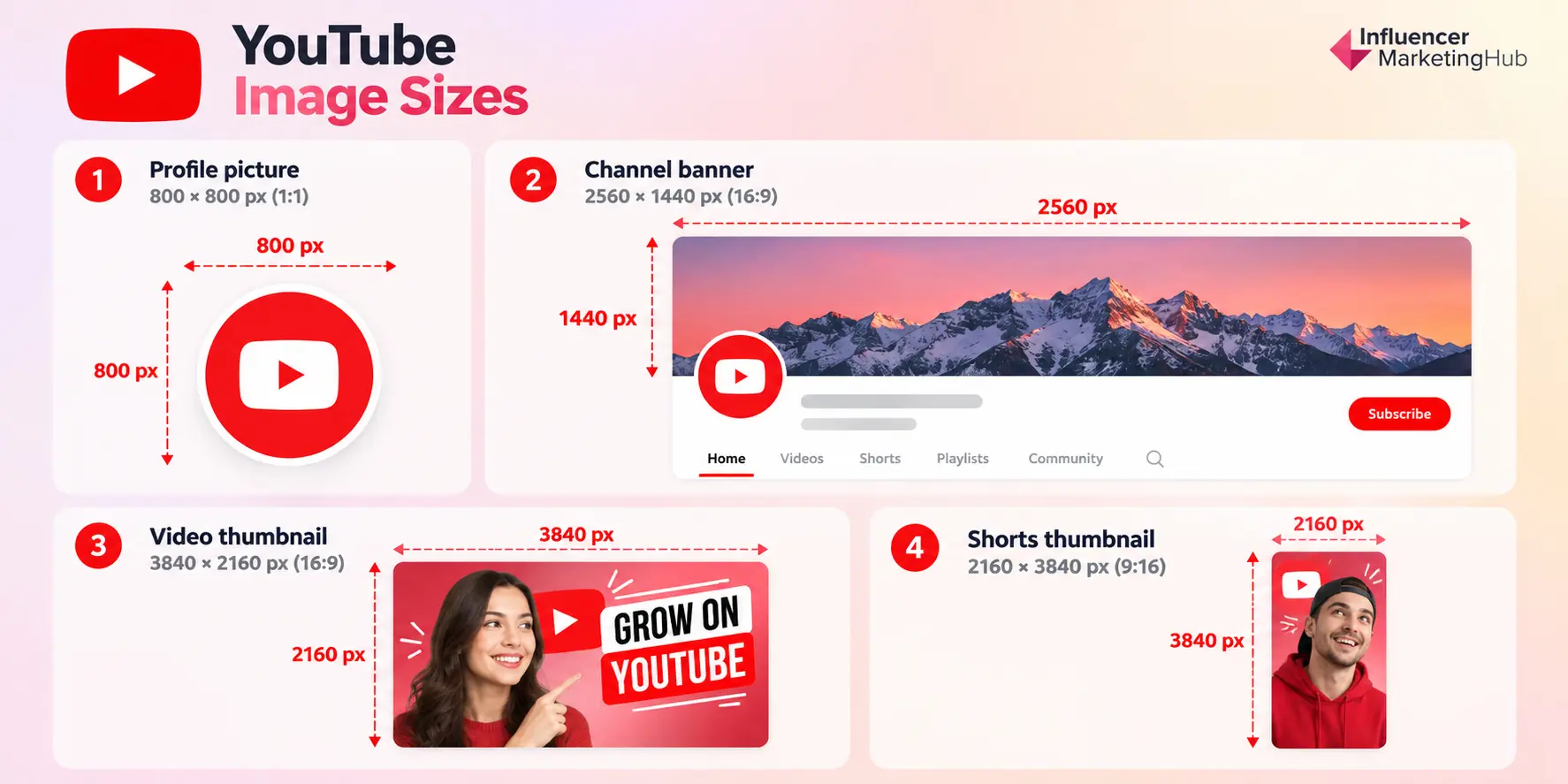
YouTube is a little different from the other platforms in this guide. Most of its visual assets are not traditional Feed images. Instead, marketers and creators need to think about channel branding and thumbnails.
For most YouTube workflows, these are the image sizes that matter:
| YouTube image type | Recommended size | Aspect ratio |
| Profile picture | 800 × 800 px working size | 1:1 |
| Channel banner | 2560 × 1440 px | 16:9 |
| Standard video thumbnail | 3840 × 2160 px | 16:9 |
| Shorts thumbnail | 2160 × 3840 px | 9:16 |
YouTube Profile Picture Size
YouTube displays channel profile pictures at relatively small sizes, including 98 × 98 pixels in parts of the interface. The platform recommends starting with a square or round source image.
For practical design work, a square 800 × 800-pixel source gives you plenty of resolution while keeping the asset reusable elsewhere.
Keep logos, faces, and other important elements centered. Like several other social networks, YouTube presents the profile image inside a circular crop.
YouTube Channel Banner Size
YouTube currently recommends a channel banner of 2560 × 1440 pixels at 16:9.
The minimum upload size is 2048 × 1152 pixels, but YouTube specifically recommends the larger 2560 × 1440 canvas for the best display across devices, particularly TVs. The maximum file size is 6 MB.
The tricky part is cropping.
YouTube uses the same banner across desktop, mobile, and television, but viewers do not necessarily see the same portion of the artwork on every device. YouTube identifies a 1235 × 338-pixel safe area at the minimum 2048 × 1152 canvas for text and logos.
The practical rule is simple: design the full banner at 2560 × 1440, but keep the channel name, upload schedule, logo, tagline, and other essential information concentrated around the center.
YouTube Thumbnail Size
This is one of the biggest changes worth highlighting in the 2026 version of this article.
For years, 1280 × 720 pixels was widely repeated as the standard YouTube thumbnail recommendation. YouTube's current guidance now recommends a much larger:
3840 × 2160-pixel thumbnail at 16:9.
That gives the platform a higher-resolution source to work with across larger displays and embedded players.
YouTube still requires a minimum width of 640 pixels, but there is little reason to design at the minimum when the platform now explicitly recommends 4K-resolution thumbnail artwork.
For brands and creators, that means thumbnails should be designed as proper visual assets rather than small preview graphics. Use large subjects, strong contrast, and text that remains readable when the thumbnail is reduced considerably in the interface.
YouTube Shorts Thumbnail Size
Shorts use a different thumbnail orientation.
YouTube currently recommends 2160 × 3840 pixels at 9:16.
That matches the vertical nature of Shorts rather than forcing a traditional 16:9 thumbnail into a mobile-first placement.
There is one important caveat: YouTube notes that thumbnail display can vary depending on where vertical content appears. So, as with Stories and Reels, keep the most important subject and text away from the extreme edges.
📚 What About YouTube Video Sizes?
We should keep video resolution out of this section.
The existing article currently spends significant space listing 240p, 360p, 480p, 720p, 1080p, 1440p, and 2160p video resolutions. That belongs in our dedicated YouTube Video Size Guide, not in an article focused on social media images.
Pinterest Image Sizes
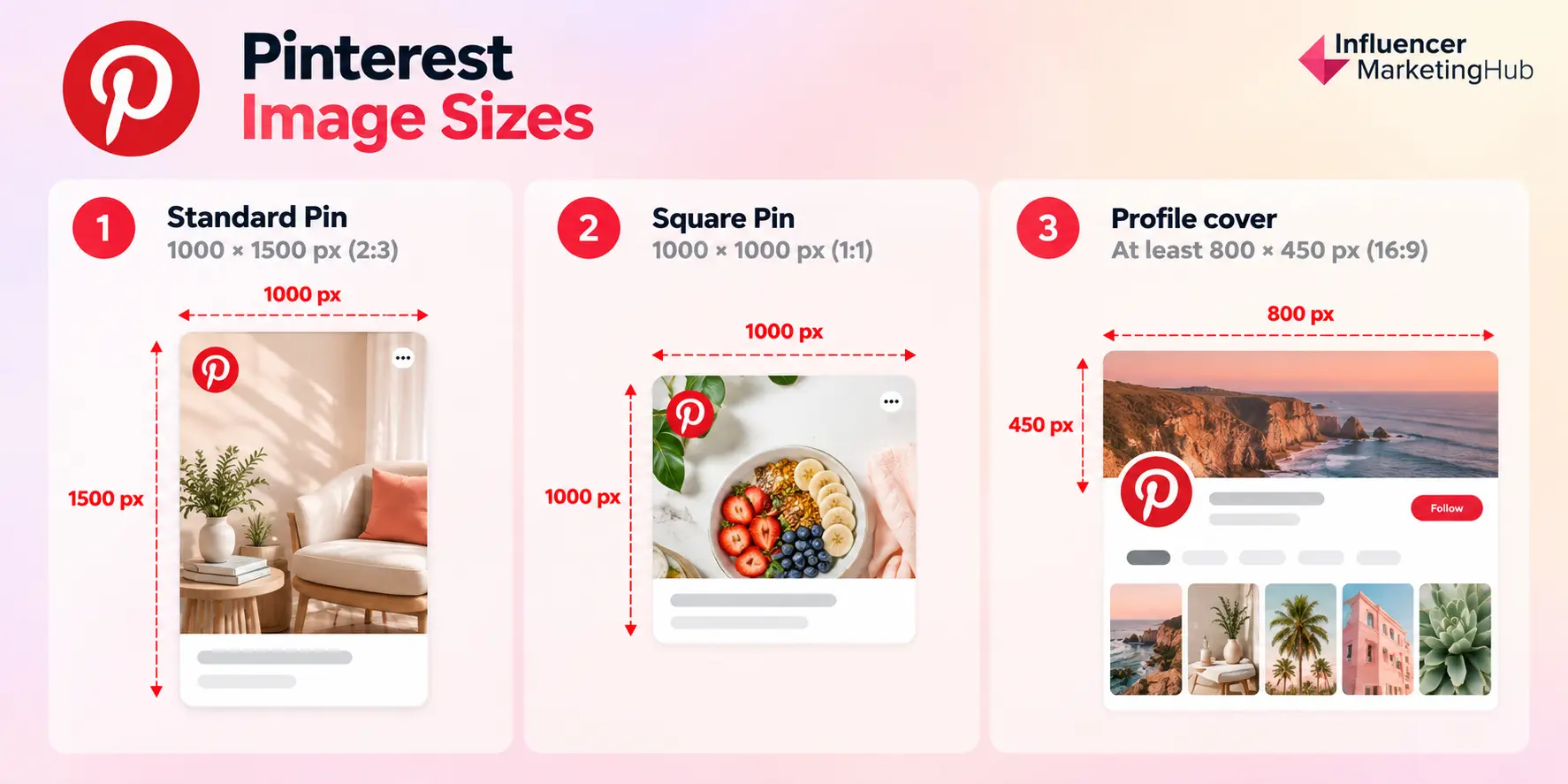
Pinterest is the main platform in this guide where the ideal image format looks noticeably different from the rest of the social landscape.
While Instagram, Facebook, X, and LinkedIn all make heavy use of square, 4:5, or 16:9 creative, Pinterest still strongly favors a tall 2:3 canvas. That is why simply reposting a Story-sized 9:16 graphic is not always the best approach.
For most marketers, these are the Pinterest image sizes worth keeping on hand:
| Pinterest image type | Recommended size | Aspect ratio |
| Standard Pin | 1000 × 1500 px | 2:3 |
| Square Pin | 1000 × 1000 px working size | 1:1 |
| Profile cover | At least 800 × 450 px | 16:9 |
Pinterest Standard Pin Size
Pinterest recommends a 2:3 aspect ratio, with 1000 × 1500 pixels as the standard working size for image Pins. Pinterest also warns that taller images can be cut off in people's feeds.
That makes 1000 × 1500 a much safer starting point than importing a 1080 × 1920 Story design directly from Instagram or TikTok.
The taller shape works particularly well for product photography, recipes, how-to graphics, infographics, step-by-step content, mood boards, and other visually led posts.
Because Pinterest is designed around discovery, the image should communicate the idea quickly even before someone reads the title or description.
Pinterest Square Pin Size
Pinterest supports 1:1 creative, so a 1000 × 1000-pixel square can be useful when you are adapting an existing asset from Instagram, Facebook, or another platform. Pinterest's own product specifications support both 1:1 and 2:3 ratios in several image-based formats.
But square should be treated as a practical alternative rather than the default.
If Pinterest is an important channel for the campaign, the 2:3 vertical version should usually be the priority because it makes better use of the feed's vertical layout.
Pinterest Profile Cover Size
Pinterest Business accounts can also add a cover image to the top of their profile.
Pinterest requires the cover to be at least 800 × 450 pixels and recommends a 16:9 horizontal image.
Because users can view that profile on different screens, start with a higher-resolution 16:9 source where possible and keep important branding away from the outer edges.
Why 2:3 Matters on Pinterest
Pinterest is much less forgiving of overly tall images than some full-screen social formats.
The platform specifically notes that images with an aspect ratio taller than 2:3 may be cut off in the feed.
So if your team already produces 9:16 Stories or TikTok creative, do not automatically reuse those files unchanged.
Instead, create a Pinterest-specific version at 1000 × 1500 and reposition the headline, product, or focal point for the shorter vertical frame.
This is one of those cases where a small adaptation can make the creative feel much more native to the platform.
Threads Image Sizes
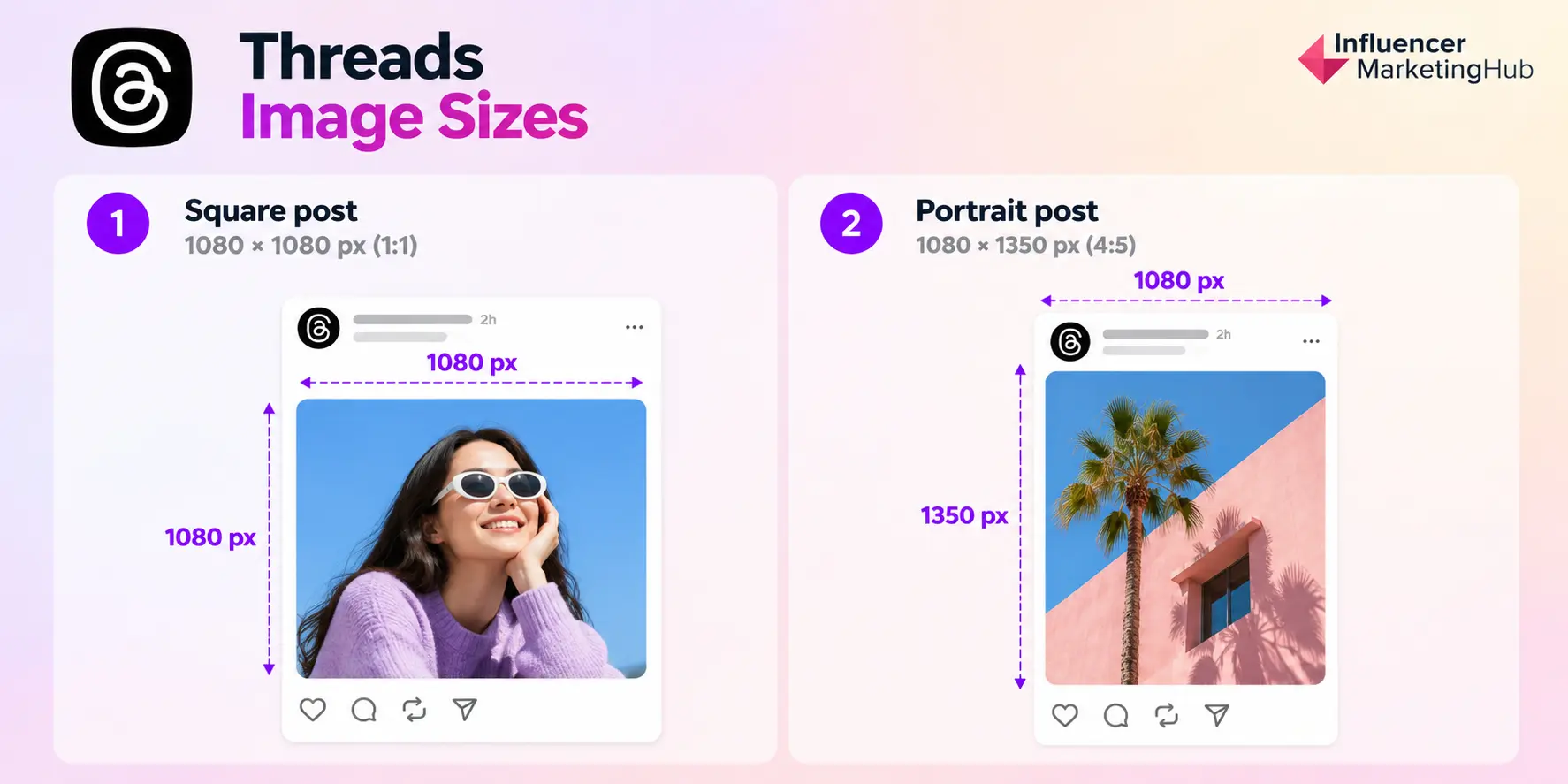
Threads is much less prescriptive about image dimensions than platforms such as Pinterest or YouTube. Meta does not currently publish one fixed organic-image size that every Threads post has to use, so the most useful approach is to work from practical high-resolution canvases that display well in the feed.
For most marketers, these are the two formats worth keeping on hand:
| Threads image type | Recommended working size | Aspect ratio |
| Square post | 1080 × 1080 px | 1:1 |
| Portrait post | 1080 × 1350 px | 4:5 |
Threads Square Image Size
A 1080 × 1080-pixel square is the safest reusable option if you want a graphic that can move easily between Threads, Instagram, Facebook, and other social platforms.
It works well for product images, quote graphics, announcements, simple educational posts, and branded visuals.
Because Threads does not require a square format, treat this as a practical design recommendation rather than an official platform specification.
Threads Portrait Image Size
For more Feed real estate, use a 1080 × 1350-pixel portrait image at 4:5.
That taller format is a stronger choice for mobile-first visual content because it occupies more vertical space without becoming as aggressive as a full-screen 9:16 asset.
It is particularly useful for editorial graphics, product photography, creator imagery, infographics, and campaign visuals.
Again, Threads supports flexible image dimensions, so 1080 × 1350 should be understood as a working canvas, not a hard upload rule.
Images Still Benefit From Context on Threads
Threads may be built around conversation, but visuals can still help a post stand out.
Meta's own creator guidance found that video, photo, and carousel posts that include text average more views than media posts without text, which is a useful reminder that the visual itself is only part of the post. Adding a clear caption or point of view gives people more context and more reason to engage.
That matters even more now that Threads has grown considerably. Meta announced in June 2026 that the platform had reached 500 million monthly active users.
📚 Need More Than Image Sizes?
Our existing Guide to Threads covers the broader platform, including posting, profiles, discovery, and how Threads fits into a social strategy.
Snapchat Image Sizes
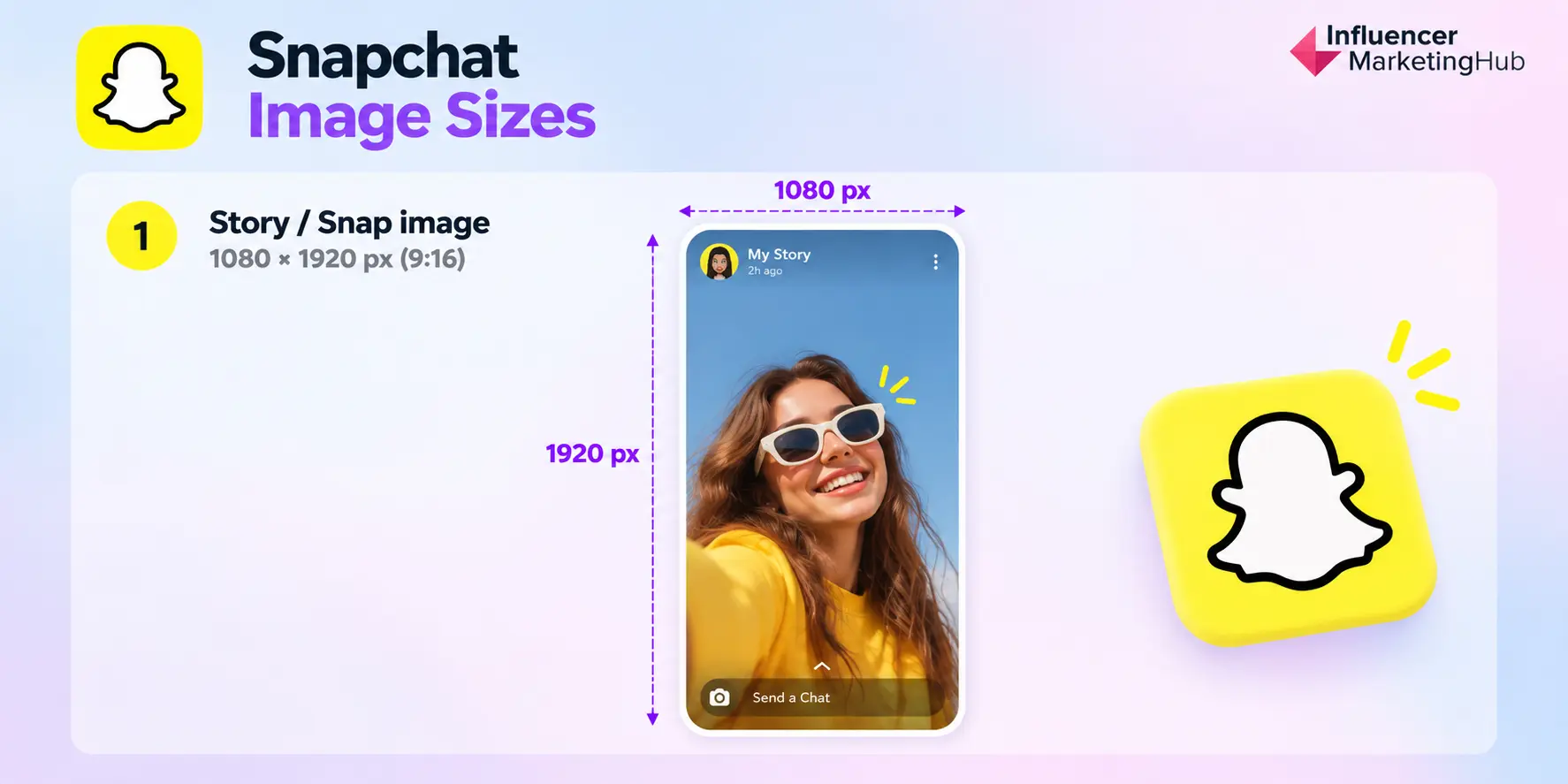
Snapchat is one of the simpler platforms in this guide because most visual content is built around a full-screen vertical canvas.
For organic Stories and Snaps, the main working format is:
| Snapchat image type | Recommended working size | Aspect ratio |
| Story / Snap image | 1080 × 1920 px | 9:16 |
Snapchat Story and Snap Image Size
Use 1080 × 1920 pixels at 9:16 for full-screen Snapchat creative.
Snapchat's own publishing guidance confirms that its content experience is built around a 9:16 aspect ratio, and the platform automatically crops uploaded media to fit that vertical format.
That makes the same canvas useful for:
Stories, creator-style image content, product shots, announcements, and branded full-screen graphics.
As with Instagram Stories and TikTok, avoid placing important text, logos, or calls to action too close to the top and bottom edges. Snapchat's interface can overlap those areas, so the safest approach is to keep the most important information concentrated toward the center.
What About Snapchat Profile Images?
Snapchat now allows people with Public Profiles to add both a profile photo and background image, but it does not currently publish a fixed pixel specification for those assets in its public support documentation. Instead, users upload an image and reposition or scale it inside the profile interface.
Because there is no clear official requirement, I would not invent a recommended profile-image dimension for the main table.
If you are creating a Public Profile asset, start with a high-resolution source and keep the subject centered so it can be repositioned safely inside Snapchat's crop.
Keep Snapchat Simple
There is no need to turn this into a long specification section.
For most marketers, 1080 × 1920 at 9:16 is the only Snapchat image canvas they really need to remember.
That is particularly relevant given Snapchat's continued scale. Snapchat reached 971 million monthly active users in Q2 2026, reinforcing that it remains a significant visual platform even as other networks dominate more of the broader social conversation.
📚 What About Snapchat Ads?
As with the other platforms in this guide, paid creative should remain separate.
Snapchat supports a much wider range of advertising formats, but those specifications belong in our dedicated Snapchat Advertising Guide, not in this organic image-size reference.
Bluesky Image Sizes
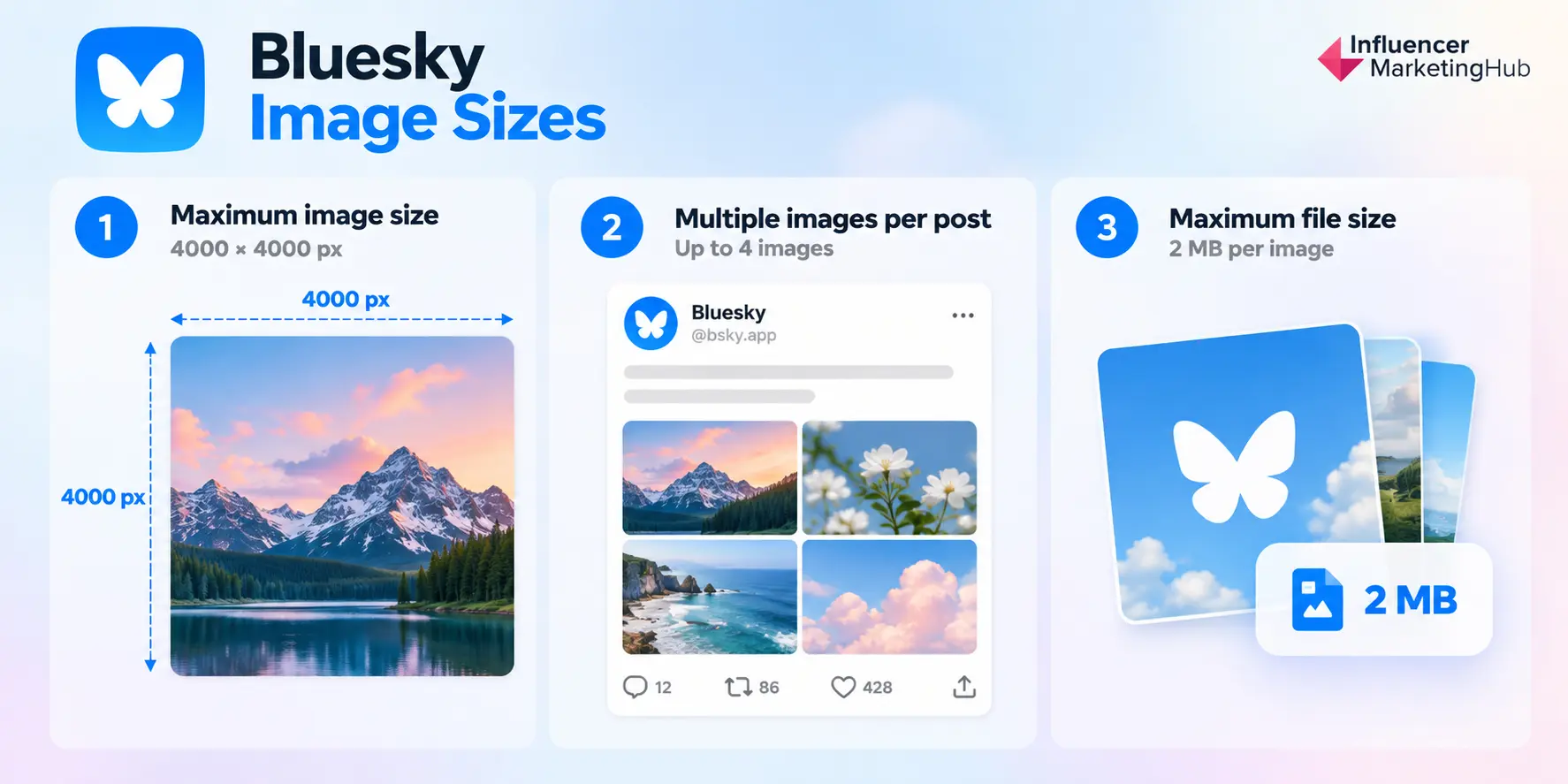
Bluesky is one of the more flexible platforms in this guide. There is no single recommended pixel size for an organic image post, so marketers do not need to design around one rigid canvas.
What matters more is staying within Bluesky's current upload limits.
| Bluesky image type | Current limit |
| Post image | Up to 4000 × 4000 px |
| Maximum file size | 2 MB per image |
| Images per post | Up to 4 images |
Bluesky Post Image Size
Bluesky increased its image-resolution limit in April 2026 to 4000 × 4000 pixels while also doubling the maximum file size to 2 MB per image.
That does not mean every Bluesky image should be designed at 4000 × 4000. It simply gives creators and brands considerably more room to upload higher-quality photography and graphics without relying on a fixed platform canvas.
For everyday social design, you can still work comfortably with the same high-resolution square or portrait masters you use elsewhere. Bluesky will preserve the image's aspect ratio rather than forcing every post into one standard shape.
Multi-Image Bluesky Posts
Bluesky supports up to four images in a single post, and each image can include its own alt text.
That makes multi-image posts useful for product collections, event photography, campaign recaps, before-and-after comparisons, and visual explainers.
If the images belong to the same sequence, keeping their dimensions and aspect ratios consistent will generally give the post a cleaner presentation.
Image Quality Matters More Than a Fixed Canvas
This flexibility makes Bluesky different from platforms such as Pinterest, where 2:3 is clearly preferred, or Instagram, where specific Feed ratios play a much larger role.
On Bluesky, the more useful rule is use a high-quality source image, stay below 2 MB, and avoid unnecessary resizing unless the image exceeds the platform's 4000 × 4000-pixel limit.
Bluesky's growing use of imagery also makes that flexibility worth paying attention to. Its 2025 Transparency Report recorded 235 million posts containing images during the year.
What About Bluesky Profile and Banner Images?
Bluesky supports both profile photos and profile banners, but it does not currently publish clear fixed pixel recommendations for those user-profile assets in its public documentation.
Rather than repeat unofficial dimensions from third-party guides, I would leave them out of the main reference table until Bluesky provides a clear specification.
Social Media Safe Zones and Cropping
Getting the pixel dimensions right is only half the job.
A design can be exactly 1080 × 1920 pixels and still lose an important headline, logo, product, or face once the platform adds navigation, captions, buttons, profile information, or other interface elements on top of it.
That is where safe zones matter.
A safe zone is the part of the canvas where important content is least likely to be cropped or covered across different devices and placements.
Keep Important Content Away From the Edges
As a general rule, keep the elements that matter most toward the center of the creative.
That includes:
- headlines and supporting copy,
- logos and brand marks,
- faces,
- products,
- prices and promotional information,
- calls to action.
Background imagery and decorative elements can safely extend toward the edge because losing a small portion of them will not change the meaning of the post.
The exact safe area varies by platform and format, so there is no single universal margin that works everywhere.
Vertical Content Needs Extra Space for the Interface
The biggest safe-zone problems tend to happen with 9:16 content, including Instagram Stories and Reels, TikTok, and Snapchat.
These platforms place interface elements around the edges of the screen. Depending on the placement, that can include usernames, captions, engagement buttons, navigation controls, music information, or reply fields.
The practical solution is straightforward:
Treat the outer edges as interface space and keep the message itself closer to the center.
This becomes especially important when the same 1080 × 1920 asset is being reused across multiple networks. A graphic that looks perfectly clear on Instagram may sit underneath different controls when published to TikTok or Snapchat.
Profile Pictures Need a Circular Safe Area
Facebook, Instagram, TikTok, LinkedIn, X, and YouTube all display profile images inside circular frames in at least some parts of their interfaces.
That means the source file may be square, but the visible area often is not.
Keep the primary logo, face, or icon inside the center of the square and leave breathing room around it. Text and fine details placed in the corners are particularly likely to disappear when the circle is applied.
Cover Images Can Crop Differently Across Devices
Cover and banner images need even more care because desktop and mobile layouts frequently show different portions of the same file.
LinkedIn Page covers, Facebook covers, X headers, and YouTube banners can all change depending on the viewer's screen.
YouTube provides one of the clearest examples. It recommends a 2560 × 1440-pixel channel banner, but at its minimum 2048 × 1152 canvas, YouTube defines a central 1235 × 338-pixel safe area for text and logos. The wider artwork remains visible on larger displays, while portions can be cropped on other devices. Google Help
The design lesson applies well beyond YouTube:
Use the full canvas for imagery. Use the center for information.
Carousels Need Consistent Cropping
Carousels create another issue.
Even when a platform accepts several image ratios, changing dimensions from one slide to the next can make the sequence feel inconsistent or cause awkward crops.
For carousel-style content, start with one master canvas and use it for every slide.
That gives the campaign a more consistent visual rhythm and makes text placement much easier to control.
Preview Before You Publish
No sizing chart can replace an actual preview.
Before publishing an important campaign asset, check it:
on mobile, in the relevant placement, and ideally on more than one screen size.
That is especially important for:
cover images, banners, Stories, Reels, TikTok creative, carousel posts, and graphics containing important text near the edges.
The correct dimensions give you the right canvas. Safe-zone planning makes sure the important parts of that canvas actually survive publication.
Try our Free Social media Image Resizer Tool
Final Thoughts
Social media image sizing has become more flexible, but that does not mean dimensions no longer matter.
The right aspect ratio helps your content make better use of the screen, while the right resolution gives the platform enough image quality to work with. Safe zones, cropping behavior, and interface overlays determine whether the most important parts of that design actually stay visible.
You also do not need to memorize every specification in this guide.
For most day-to-day social publishing, a small library of master canvases will take you surprisingly far:
1080 × 1080 for square content, 1080 × 1350 for cross-platform portrait posts, 1080 × 1920 for full-screen vertical creative, and a landscape version for links and horizontal placements.
From there, adapt the creative where a platform has a genuinely different requirement, such as Instagram's 3:4 Feed format, Pinterest's 2:3 Pins, or YouTube's banner and thumbnail dimensions.
And when a platform changes its specifications, come back to this guide. We'll continue updating the dimensions so your design team does not have to keep chasing them across ten different help centers.
Frequently Asked Questions
What is the best image size for social media?
There is no single best size for every social network. 1080 × 1080 pixels is one of the most reusable square formats, while 1080 × 1350 works well for cross-platform portrait content and 1080 × 1920 is the standard working canvas for full-screen vertical content.
What is the most universal social media image size?
1080 × 1080 pixels at 1:1 is probably the most universal option. It works across most major social networks and is easy to repurpose, although portrait formats often take up more screen space on mobile.
Is 1080 × 1080 still a good social media image size?
Yes. Square content remains widely supported across platforms including Instagram, Facebook, X, Threads, LinkedIn, and Pinterest. It is especially useful when you need one asset that can be distributed across several networks with minimal redesign.
What size should vertical social media images be?
For Feed-based portrait posts, 1080 × 1350 pixels at 4:5 is a strong cross-platform working size. Instagram also supports 1080 × 1440 at 3:4 for taller Feed images. For full-screen vertical formats such as Stories, Reels, TikTok, and Snapchat, use 1080 × 1920 pixels at 9:16.
Why does my social media image get cropped?
Platforms may crop images to fit different placements, devices, profile grids, previews, or multi-image layouts. Interface elements can also cover parts of full-screen vertical content. Keeping important elements toward the center and using the recommended aspect ratio reduces the risk of important content being cut off.
Should I use the same image size on every social platform?
You can reuse the same master creative, but you will usually get a better result by adapting it. A practical workflow is to create versions for square, portrait, full-screen vertical, and landscape formats, then adjust text placement and cropping for the platforms where the content will appear.
What resolution should social media images be?
For most social content, starting with a width of roughly 1080 pixels or more gives platforms enough resolution to display the image cleanly on modern screens. Some formats require different dimensions, such as 1000 × 1500 for a Pinterest Pin, 2560 × 1440 for a YouTube channel banner, or higher-resolution YouTube thumbnails.

SUGGESTED

X (Twitter) Image Sizes for 2026: Profile, Header, Post & Ad Dimensions Guide
Ultimate X (Twitter) image sizes guide including profile header post ad and Twitter Card...

The 2026 Social Media Image Size & Safe Zone Cheat Sheet | Influencer Marketing Hub
Download the 2026 Social Media Image Size & Safe Zone Cheat Sheet for dimensions aspect...
![Instagram Ad Sizes for All Post Formats [2026 Cheat Sheet]](https://s.influencermarketinghub.com/imaginary/resize?width=400&height=200&type=webp&url=https://influencermarketinghub.com/wp-content/uploads/2020/01/58e98fbd-instagram-ad-sizes-for-all-post-formats-2026-cheat-sheet.jpg)
Instagram Ad Sizes for All Post Formats [2026 Cheat Sheet]
Instagram ad sizes for Feed Stories Reels carousel and Explore with 2026 specs safe zones...