
Why does the same video go viral on TikTok but stall on Instagram Reels? And why do YouTube Shorts seem to favor content with clickable links while Instagram buries anything that tries to leave the app?
These are the new realities of cross-posting in 2026; a year where every platform rewrote its creative rules.
Short-form ecosystems are converging in format but diverging in behavior. Instagram now leans taller in its grid previews, TikTok enforces commercial-sound policies, and YouTube continues rewarding metadata-rich Shorts. For marketers, creators, and brands, the challenge isn’t just posting everywhere—it’s adapting everywhere.
This Cross-Posting Matrix breaks down what to change per platform: from aspect ratios and safe zones to caption rewrites, audio rights, and link behaviors.
The goal isn’t to rebuild from scratch, but to master one key principle of 2026 content distribution, optimize once, localize smartly, and let every upload reach its native peak.
Visual Formatting: Aspect Ratios and Safe Zones
As cross-posting becomes standard practice in 2026, visuals are no longer one-size-fits-all. The same 15-second clip behaves differently on TikTok, Reels, and Shorts, each with its own display logic, cropping rules, and safe-zone layouts.
Failing to adapt can cause text overlays, captions, or faces to be cut off in previews or covered by interface buttons. Optimizing for aspect ratios and safe zones is therefore the first step in any cross-posting workflow.
Aspect Ratios To Lock Before You Edit
Understanding each platform’s recommended framing ensures your visual fits cleanly without awkward letterboxing or trimming.
- Instagram Reels supports a range of aspect ratios from 1.91:1 to 9:16. This flexibility lets you reuse slightly wider footage while still maintaining compatibility with vertical delivery.
- YouTube Shorts strongly favors 9:16 vertical video. Google’s specifications emphasize that vertical orientation “delivers better performance” in Shorts placements versus square or horizontal videos.
- TikTok is defaulted to the 9:16 vertical format, and the platform offers official creative templates and guides aligned with that orientation.
Because TikTok and Shorts are strictly vertical, many creators adopt 1080×1920 as their master canvas. That vertical master can then be reused for Reels with little friction, given Reels’ flexibility.
At the same time, Instagram’s shift toward vertical-first grid previews (such as the 3:4 photo update) reinforces the value of designing for portrait-first.
By building your master content vertical, you ensure direct reuse on TikTok and Shorts, while minimizing wasted space or awkward framing in Instagram Reels.
Safe Zones: Keep Text And Faces Out Of The UI
Even with the correct aspect ratio, interface elements may block vital messaging or branding—safe zones protect against that.
Platforms overlay captions, icons, user handles, and engagement buttons differently. Your visual must anticipate that.
- TikTok provides downloadable safe zone overlays for In-Feed placements. These files demarcate areas at the top and bottom where UI elements typically live, warning creators that “key elements such as text and logos must be within the safe zone.”
- Meta (Instagram & Facebook) also recommends that creatives be crafted “within the safe zone” to prevent UI overlap, even in Reels, which is useful guidance for organic posting.
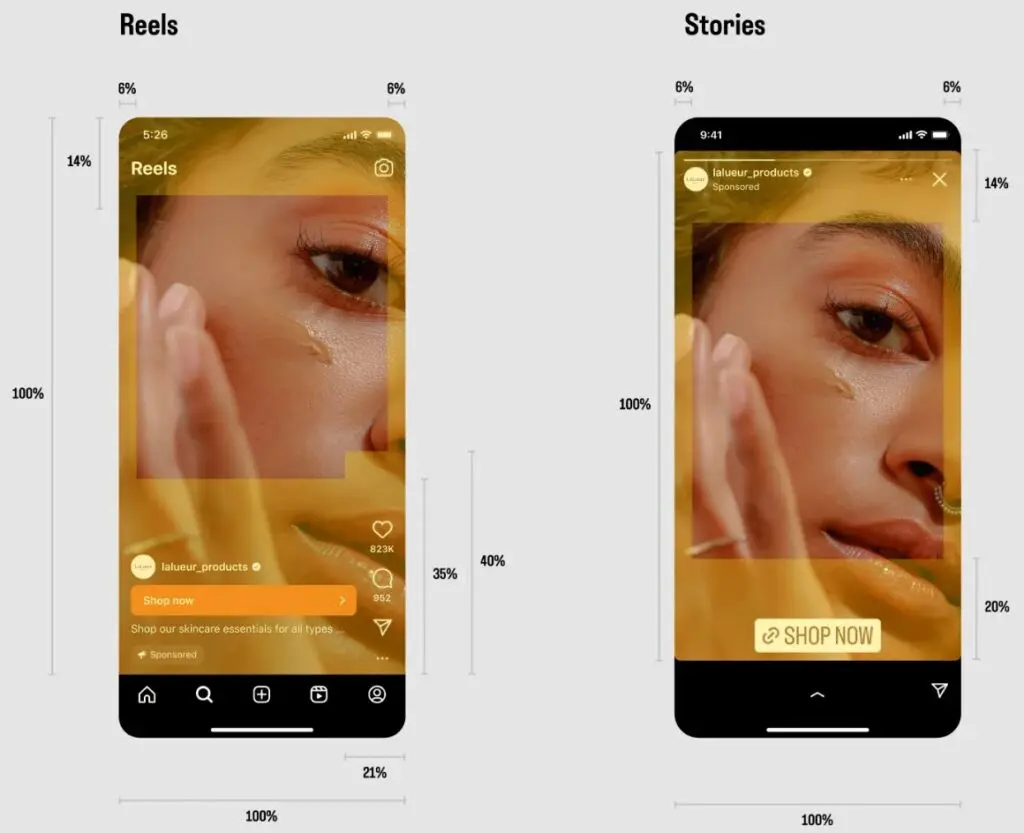
A reliable rule-of-thumb is to confine primary text, face visuals, and branding to the central vertical band, roughly 60–70 % of the frame height. Avoid placing anything too close to the top or bottom edges where captions or buttons may live.
Use preview modes within Instagram, TikTok, and YouTube apps to double-check that nothing gets masked or cut off.
Brands like Alo Yoga and Gymshark have public content strategies that reflect this approach: they frame actors and branding toward the middle of the frame so that call-outs, tags, or overlays remain visible across any cropping or interface shift.
Templates And Tools For Consistency
Templates and built-in tools let you preserve safe zones and aspect ratios across all posts without recreating them from scratch.
Use software tools that support aspect reframe and overlay guides:
- Premiere Pro’s Auto Reframe lets you import a landscape edit and converts it into vertical, maintaining your safe-zone boundaries.
- CapCut, Canva, and Later offer templates sized for 1080×1920 with built-in overlay guides for TikTok safe zones or generic “center safe bands.”
- Keep a visual specs matrix (shared internally) that lists each platform’s preferred specs, safe-zone margins, and overlay examples.
- Optionally create a PNG overlay (semi-transparent) with your own safe-zone boundaries so that any editor can drop it atop a new cut as a visual guide.
@benkaluza Premiere Pro Safe Zone Templates #videoediting #videoeditingtips #videoeditingtutorial #videoeditingapps #videoeditingsoftware #videoeditingforbeginners
Once your team adopts these templates, your creative assets become cross-post-ready almost immediately. The safe-zone overlay ensures no one forgets to account for UI blocking. Editors no longer have to eyeball boundaries — the template enforces them. Over time, it accelerates production without sacrificing delivery quality across platforms.
Caption Rewrites: Platform Link Behavior
Captions are the connective tissue between content and conversion. When cross-posting, a single caption can’t travel untouched because link behavior, tone, and CTA design differ per platform.
A caption that performs on YouTube Shorts could underperform—or look spammy—on Instagram Reels. Understanding these nuances prevents engagement loss and keeps calls-to-action both compliant and clickable.
Instagram: No Clickable Links In Captions
Instagram remains the strictest environment for outbound linking. Links in post captions are not clickable—only profile, story, and sticker links are. This forces brands and creators to reroute audiences through link-in-bio tools or story link stickers.
Because captions can’t carry functional URLs, strong Instagram copywriting focuses on retention and engagement within the platform itself.
Brands typically use short CTAs like “see link in bio” or “DM us ‘SHOP’ for links.” Meta also supports automated DM reply flows. For instance, brands using Manychat or MobileMonkey automate a product link when users comment on a keyword.
Glossier demonstrates this approach perfectly. In one UGC Instagram Reel, the creator encourages users to type “SHOP” in the comments. That trigger activates an automated DM containing product links, guiding the viewer straight to checkout the LTK app. It’s an elegant way to turn a linkless caption into a shoppable moment that still feels conversational and native to Instagram.
For creators, Instagram’s link limitation is one reason platforms like Linktree, Beacons, and Koji remain popular. They consolidate clickable destinations while maintaining a consistent bio link across TikTok, YouTube, and Reels.
TikTok: Link In Bio Or Shop Integration
TikTok allows clickable links, but only through specific surfaces. Business accounts can include a link in bio, while brands selling through TikTok Shop can attach product anchors directly in videos.
Here's a video walkthrough from TikTok creator Keira Jones:
@thekeirajones Replying to @Katie | @katieyowyow First you do have to apply to be an affiliate and you need 5K followers to qualify! #tiktokshop #creatorgrowth #tiktokshopforcreators #howtobecomeaninfluencer #tiktokstrategy
TikTok’s own case studies document this native behavior. In The Raw. cosmetics campaign, users could view the Product Detail Page of featured items by clicking on the Product Anchor Link at the bottom of the video, which connected directly to the TikTok Shop.
Similarly, fashion retailer Willow Boutique and beauty brand MizuMi both leveraged shoppable anchors in their organic and paid videos to turn scrolls into instant purchases.
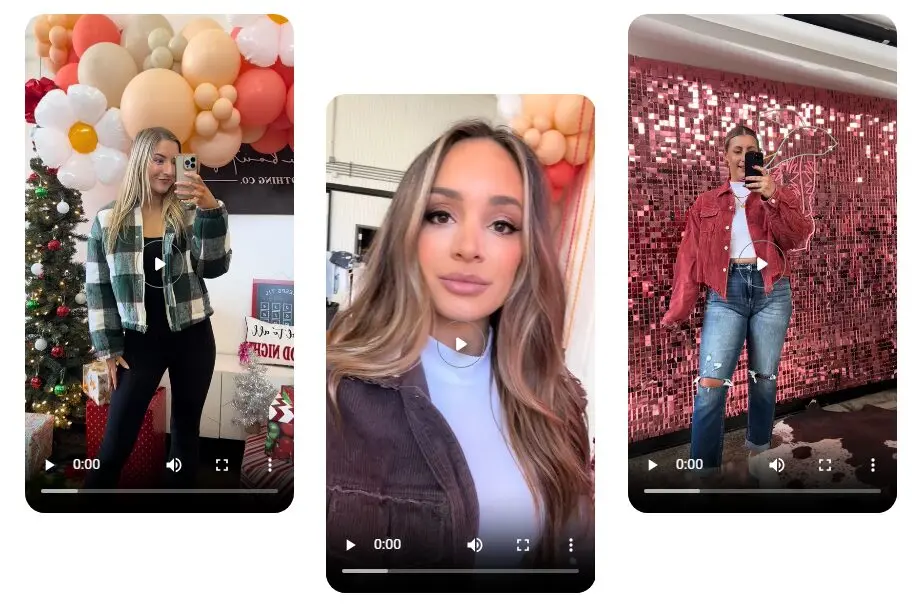
These anchors appear identically in organic TikTok Shop videos and Video Shopping Ads, letting creators or brands attach multiple products to one piece of content. TikTok's Ads guide on anchor links explains the placement and interaction behavior in detail.
When cross-posting, always rewrite captions to match TikTok’s link architecture. Replace “see link in bio” with “tap the cart” or “shop above.” For commerce-heavy content, attach a product anchor link to your TikTok upload and track conversions through TikTok Shop’s analytics dashboard.
This maintains native behavior, avoids user confusion, and drives higher click-through rates than static bio links.
YouTube Shorts: Clickable Links And Pinned Comments
YouTube Shorts offers the most flexibility with external links among the major short-form platforms. Creators can include clickable URLs in both the video description and pinned comments, allowing direct traffic to products, affiliate pages, or long-form companion videos.
These links remain functional across devices, provided they comply with community and advertiser policies.
Because Shorts are fully integrated into the YouTube ecosystem, creators can guide audiences deeper into their content funnel—something Instagram and TikTok still restrict. Optimized captions and pinned comments are powerful tools for discovery-to-conversion paths: a short teaser can lead directly to a review, storefront, or subscription page.
A good example of this workflow comes from Linus Tech Tips, where short product demos link in both description and pinned comments to extended benchmarks or affiliate pages. These workflows demonstrate measurable referral traffic, showing how creators can turn Shorts engagement into monetized or educational views.
When cross-posting from TikTok or Reels, repurpose your caption to include a clear, clickable CTA like “Watch the full review below” or “Find specs in the pinned comment.” YouTube’s link support turns short-form awareness into direct conversion, making it the ideal platform for driving traffic—especially when paired with consistent UTM tracking or affiliate IDs for attribution.
Tone, Structure, And CTA Placement
Each platform rewards a different tone. YouTube favors descriptive, keyword-rich captions. TikTok thrives on humor and authenticity. Instagram succeeds with conversational, community-driven phrasing.
Examples:
- YouTube Shorts: Inform + Link → “Watch the full review below.”
- TikTok: Relate + Engage → “Ever tried this? Tap my bio for details.”
- Instagram: Inspire + Converse → “Tag a friend who’d wear this.”
When rewriting captions, audit for three elements: linkability, tone, and CTA phrasing. Pair that with consistent UTM tracking codes across platforms to maintain attribution accuracy.
By tailoring captions to native link behavior—Instagram’s DM-driven or sticker flow, TikTok’s bio/shop structure, and YouTube’s full link support—you ensure each post drives measurable action without breaking the audience’s platform expectations.
Audio Rights And Music Licensing
Cross-posting short-form videos gets risky when background audio crosses platform borders. Music licensing rules differ across TikTok, Instagram Reels, and YouTube Shorts, meaning the same track can be fully playable on one platform, muted on another, or flagged for copyright elsewhere.
To maintain reach and compliance, creators and brands must understand each platform’s audio licensing structure, especially since all three tightened enforcement in 2024–2025.
Platform Music Rights In 2025
Each platform now enforces distinct audio rules depending on whether you’re using a business/branded account versus a personal/creator account. These distinctions matter deeply when cross-posting—what works on one platform might be muted or flagged on another.
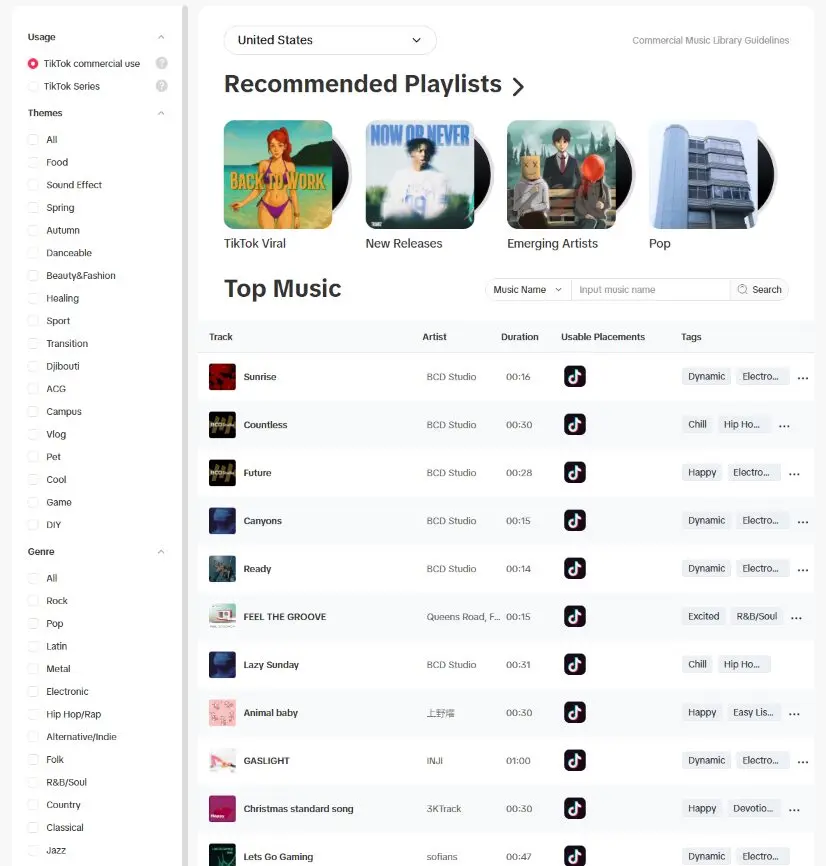
- TikTok & the Commercial Music Library (CML): TikTok’s own guide confirms that the CML is a global library of 1 million tracks, intended for businesses and brand content to avoid audio muting or copyright issues. Also, TikTok’s rules state that when promoting a brand, product, or service, creators should only use music from the CML because their external music licenses don’t cover commercial use.
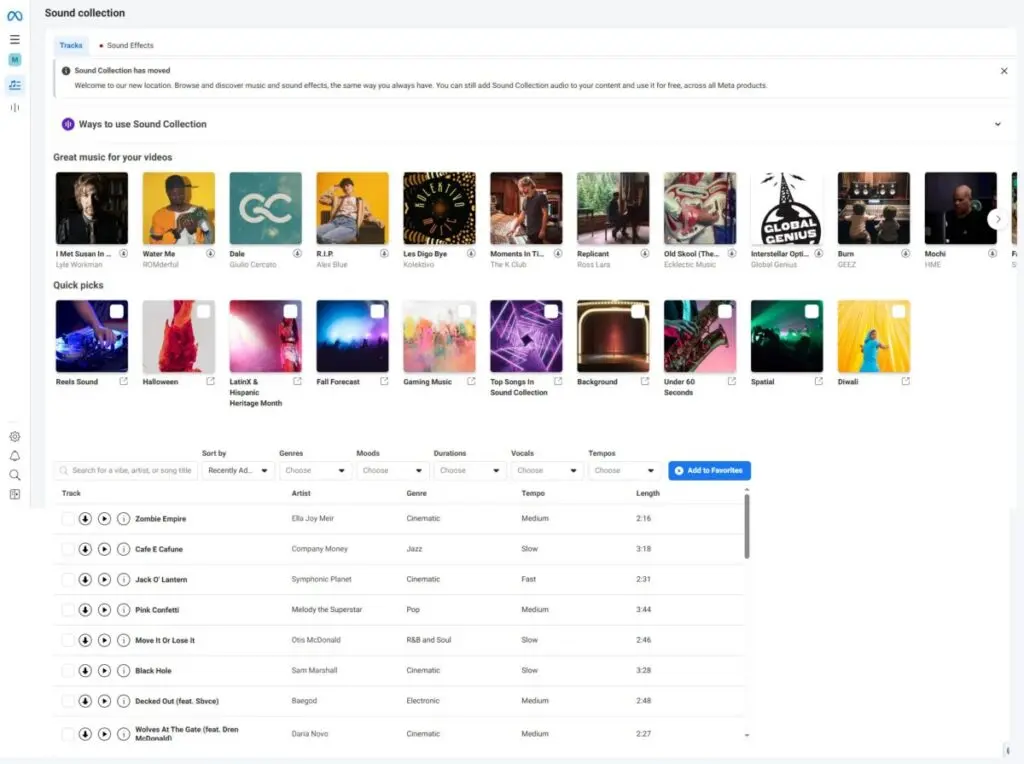
- Meta/Instagram Sound Usage: Meta offers a Sound Collection that includes royalty-free music and sound effects, which business users can download and use without violating rights. However, that same Meta Sound Collection is mostly intended for business/advertising use; non-business (creator/personal) content sometimes has access to a broader “licensed music” library for non-commercial use—though using those for branded content can risk copyright claims.
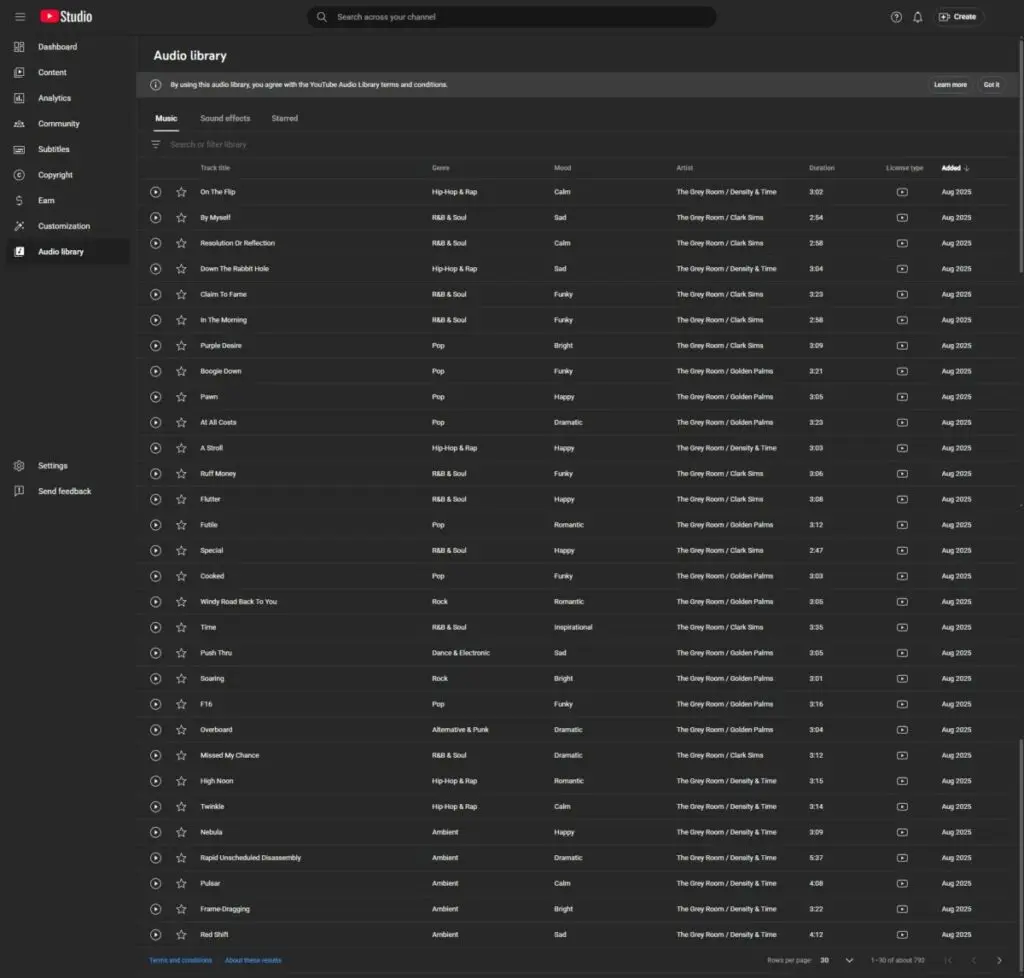
- YouTube’s Audio Library/Licensing Options: YouTube’s Audio Library program lets creators use licensed tracks either by paying a fee or entering a revenue-share deal. The documentation states that for tracks marked “licensable,” you can retain full monetization if you license them properly.
Best Practices For Cross-Posting Audio
- Strip Audio Before Exporting: Always export your vertical master muted. Add platform-specific sound natively during upload to inherit each app’s licensing protection.
- Check Account Type: Personal profiles can access trending songs; business accounts can’t. Switching to business for analytics or TikTok Shop? Your soundtrack options change immediately.
- Maintain An Internal Music Log: Track every audio source, license type, and corresponding platform ID. If the same video appears on multiple channels, this audit trail proves compliance.
- Use Built-In Attribution Tools: YouTube’s “Music in this video,” TikTok’s “Sound on video,” and Instagram’s “Original Audio” tags automatically credit artists and prevent most muting issues.
Cross-posting isn’t just about video dimensions; it’s about licensing zones. Always treat audio as platform-specific metadata. Rely on cleared libraries like TikTok’s CML, Meta’s Sound Collection, or YouTube’s Audio Library to protect monetization and distribution. A single unlicensed trending sound can block visibility or demonetize content across platforms—making audio compliance as essential as safe-zone framing or caption rewrites.
One Post, Many Platforms: Adapt Once, Thrive Everywhere
Cross-posting isn’t just a time-saver—it’s a precision exercise in platform fluency. A video that shines on TikTok can stumble on Instagram or YouTube if aspect ratios, captions, or sound rights aren’t tuned to each ecosystem.
Successful repurposing means balancing efficiency with authenticity: keeping your creative core consistent while adjusting every surface detail—frame size, safe-zones, link structure, and licensed audio—to fit local rules.
As platforms evolve, so do their quirks: Instagram now favors taller visuals, TikTok enforces commercial-sound usage, and YouTube Shorts rewards clear metadata and clickable links. Marketers, creators, and brands who master these nuances turn a single idea into a network-wide performance engine.
The takeaway: Treat cross-posting less like duplication and more like translation—same message, different language. When every edit respects the native context, your content doesn’t just travel; it performs.
Frequently Asked Questions
How can I manage posting to multiple platforms without duplicating effort?
Using multi-social media posting tools lets you schedule, resize, and caption content for each platform automatically while maintaining native formatting.
Can I cross-post from Facebook directly to Instagram without losing quality?
You can connect accounts and share posts seamlessly through cross-posting to Instagram from a Facebook Page, preserving resolution and engagement metrics.
What’s the best way to link TikTok and Instagram for unified publishing?
By enabling linking TikTok to Instagram in your TikTok settings, you can streamline bio links and cross-promote Reels or Stories without third-party apps.
Which scheduling platforms work best for teams managing several accounts?
Enterprise marketers often rely on robust social media posting scheduling tools that support approvals, analytics, and format optimization for different networks.
Are there mobile-friendly options for creators who post on the go?
Lightweight social media posting apps make it easy to upload 9:16 videos or carousel previews directly from mobile while maintaining safe-zone compliance.
How does cross-posting fit into a broader digital marketing plan?
It complements a unified social media marketing strategy by adapting one core message to the strengths of each channel’s audience and algorithm.
Is it possible to publish Instagram content directly from desktop tools?
Yes—Meta now supports Instagram direct publishing, allowing creators to post Reels, Stories, and carousel updates straight from connected scheduling dashboards.
Can YouTube Shorts reuse clips from live streams?
Yes, creators can instantly generate vertical edits by turning livestream segments into YouTube Shorts clips for quick cross-posting on mobile.


