
TikTok Coins are digital items users can purchase and use to access Gifts and other eligible features on TikTok. For U.S. users, Coins can be purchased through the TikTok app or directly through TikTok’s website, but the amount you pay per Coin can differ depending on the bundle you choose and where you buy it. TikTok requires users to be at least 18 years old to purchase Coins.
That difference in pricing matters if you regularly recharge your balance or are buying Coins for a specific TikTok Gift. A package with the lowest checkout price is not necessarily the best value, and the cash cost of a Gift ultimately depends on what you paid for the Coins used to send it.
With more than 1.58 billion monthly active users, and live streaming being a core part of that ecosystem, TikTok Live alone generates over 8 billion total watch hours, with roughly 1 in 5 users regularly tuning into live sessions.
This guide explains how TikTok Coin recharge works in the U.S., how to buy Coins through the app and TikTok website, how current Coin pricing works, and how many Coins popular TikTok Gifts require. We’ll also show you how to compare recharge options so you can understand what you are actually paying before completing a purchase.
You can also use our TikTok Gift Cost & Coin Recharge Calculator to compare U.S. recharge options, estimate what popular Gifts could cost, and see how many Coins your budget can cover.
- What Are TikTok Coins and How Do They Work?
- TikTok Coin Prices in the U.S. In 2026
- How to Recharge TikTok Coins (Step-by-Step)
- How Much Do TikTok Gifts Cost in Coins?
- How to Get More Value From TikTok Coin Recharge
- TikTok Coin Recharge Payment Options
- Common TikTok Coin Recharge Issues and How to Fix Them
- Creator and Brand Enablement Strategies
- Get More Coins, Spend Less
- Frequently Asked Questions
What Are TikTok Coins and How Do They Work?
TikTok Coins are digital items that users can purchase and use within TikTok to access certain virtual features and services. They are most commonly associated with TikTok Gifts, but TikTok also allows Coins to be used for other eligible features, such as Promote and Star Comments when those services are available.
TikTok does not define Coins as currency, and they cannot be exchanged for cash or transferred between users.
For most users interested in TikTok LIVE, the important distinction is between Coins, Gifts, Diamonds, and Rewards:
- Coins are digital items you purchase from TikTok or through an authorized app store. You spend them to access Gifts and other eligible TikTok features.
- Gifts are digital items activated using Coins. Each Gift requires a specific number of Coins, which TikTok displays before you send it.
- Diamonds are used by TikTok to measure the popularity of eligible creators and their content. The type and number of Gifts activated during a LIVE can contribute to this measurement.
- Rewards are separate from the amount a viewer spends on Coins. TikTok may consider Diamonds alongside other factors when determining Rewards under an applicable Rewards Program. Holding Diamonds does not automatically entitle a creator to a cash payment.
Understanding these mechanics matters because sending a Gift does not mean that its purchase price is transferred directly to the creator.
TikTok explicitly states that gifting does not transfer money, Coins, or anything else of value from one user to another. Instead, gifting contributes to engagement and can affect how TikTok measures a creator's popularity.
For viewers, the practical process is much simpler: you buy Coins, choose a Gift or another eligible feature, and TikTok shows you how many Coins are required before you use them.
The amount you ultimately spend depends on the price you paid for those Coins, which is why comparing recharge options and bundle prices matters before making a purchase.
TikTok Coin Prices in the U.S. In 2026
TikTok Coins do not have one fixed dollar value. TikTok’s current U.S. Virtual Items Policy states that the cost per Coin can differ depending on how many Coins you buy and where you purchase them. That means the effective price of a Coin can change between bundle sizes and between TikTok’s website and an in-app purchase.
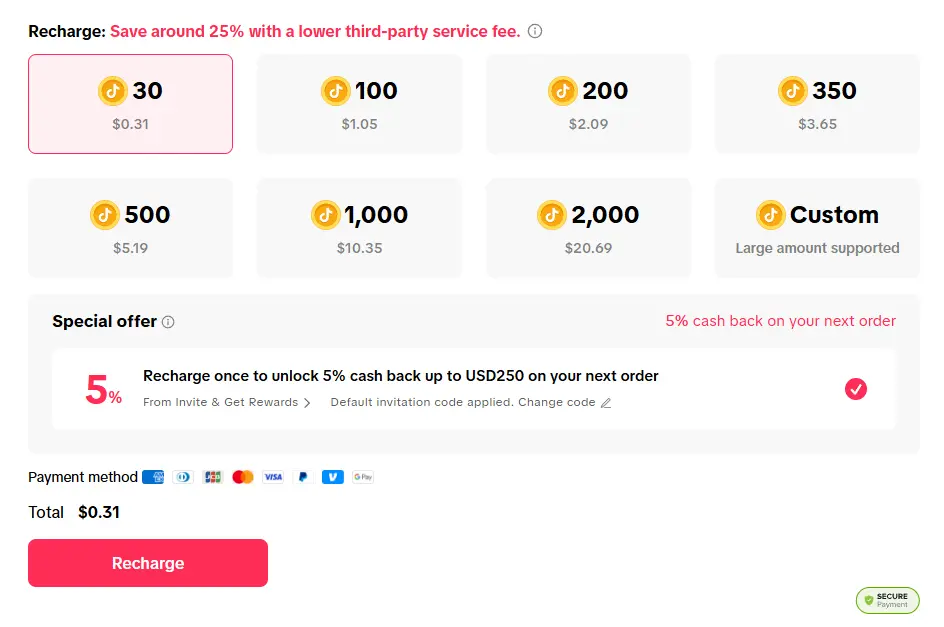
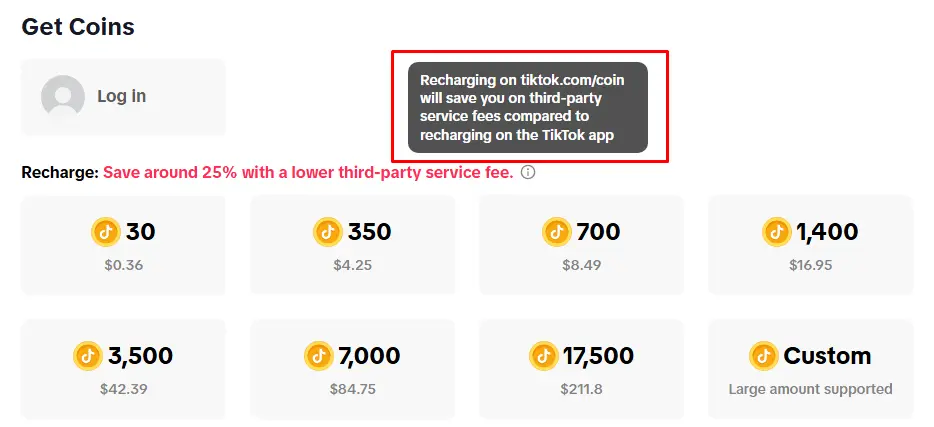
As of current time of writting, TikTok’s U.S. web recharge page displayed the following Coin packages:
|
Coins |
U.S. Web Price | Approx. Cost per Coin |
| 30 | $0.31 | $0.01033 |
| 350 | $3.65 | $0.01043 |
| 700 | $7.25 | $0.01036 |
| 1,400 | $14.49 | $0.01035 |
| 3,500 | $36.20 | $0.01034 |
| 7,000 | $72.39 | $0.01034 |
| 17,500 | $180.99 | $0.01034 |
How TikTok Website and App Coin Prices Compare
Coin pricing can also differ depending on where you recharge. TikTok supports purchases both through its WebApp and through third-party app stores, and its policy specifically notes that the cost per Coin may vary by purchase route.
For example, Apple’s current U.S. App Store listing for TikTok includes a 350-Coin in-app purchase for $5.00 and a 700-Coin purchase for $10.00. By comparison, TikTok’s U.S. web pricing snapshot showed 350 Coins for $3.65 and 700 Coins for $7.25.
For those two comparable packages, the website price was lower at the time the prices were checked. That does not mean every web purchase will always be a fixed percentage cheaper. The better comparison is the cost per Coin shown for the specific package available to you.
Do Larger TikTok Coin Bundles Give You Better Value?
Not necessarily.
Based on the web prices above, the effective cost per Coin stays within a very narrow range of roughly $0.0103 to $0.0104 per Coin. The 350-Coin package actually has a slightly higher cost per Coin than several of the larger packages, but the difference is small.
So, rather than assuming the largest bundle automatically offers the best deal, compare:
- the number of Coins you need,
- the total purchase price,
- and the effective cost per Coin.
This is especially useful if you are recharging for a specific TikTok Gift, since Gifts require different numbers of Coins.
Our TikTok Gift Cost & Coin Recharge Calculator does this comparison for you using current U.S. reference pricing. You can choose a recharge method, Coin package, and TikTok Gift to estimate your effective Gift cost and how many Coins you would have left after the purchase.
How to Recharge TikTok Coins (Step-by-Step)
TikTok currently allows U.S. users to purchase Coins through the TikTok app or directly through TikTok’s website. Depending on availability, Coins can also be redeemed through eligible TikTok gift cards. The cost per Coin can vary depending on both the number of Coins purchased and where the purchase is made.
Method 1: Recharge TikTok Coins in the App
This is the fastest and most common option, especially for first-time users.
- Open TikTok and go to your Profile
- Tap the menu icon (☰) in the top right corner

- Tap Balance

- Choose Get Coins
- Select the coin bundle you want

- Confirm your purchase using your app store payment method
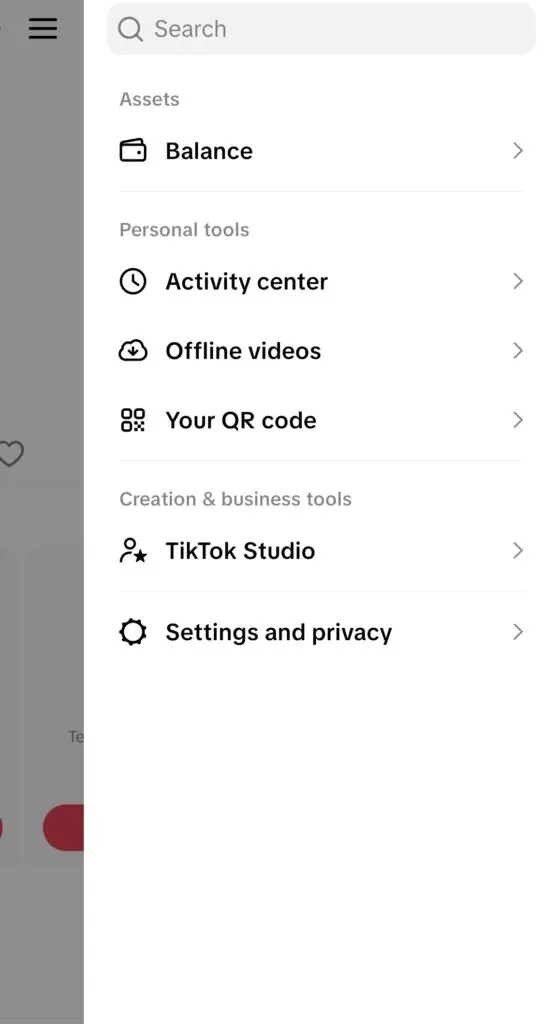
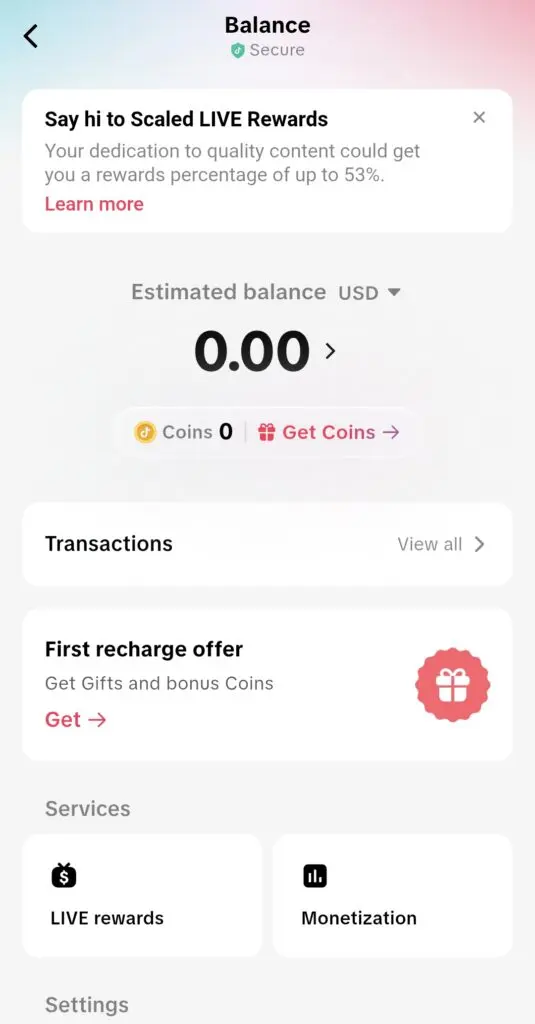
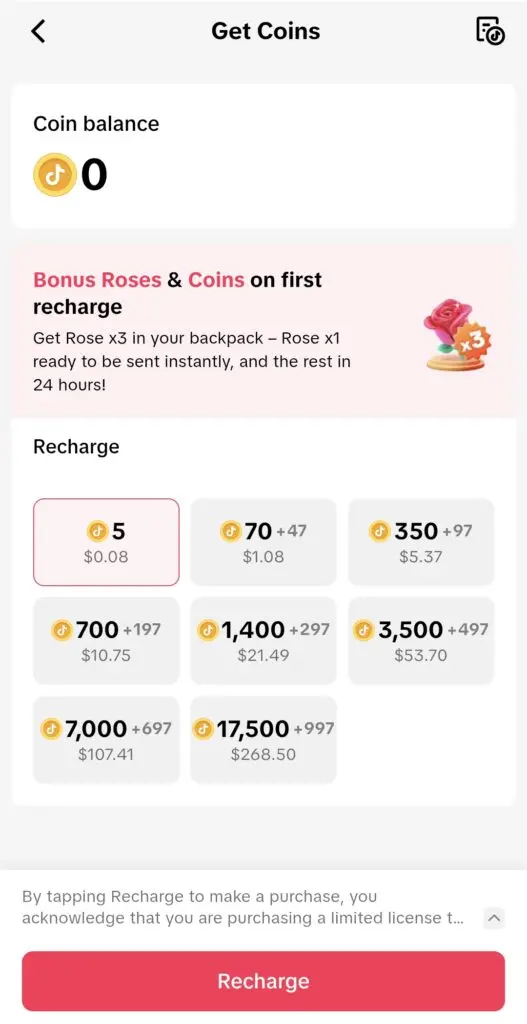
Once completed, your coins should appear instantly in your balance.
In-app purchases are processed through an app store such as Apple’s App Store, Google Play, or Amazon’s Appstore. The app store’s own purchase terms apply to the transaction. For example, both Apple and Google charge an additional 30% cut, which you pay in the end.
Method 2: Recharge via TikTok Website (tiktok.com)
This option is often preferred by users who want more flexibility or better value when they recharge TikTok coins.
- Open a browser and go to tiktok.com/coin
- Log in to your TikTok account
- Navigate to the coin purchase page
- Choose your preferred coin package or enter a custom amount (if available)
- Select a payment method, such as card or PayPal
- Complete any verification step required by your bank
- Confirm the transaction
Your coins will typically be added to your account within seconds.
Because this method avoids in-app purchase fees, many users choose it as their default TikTok recharge option. According to TikTok, you save 25% when buying TikTok coins through the website.
Extra Method 3: Recharge Coins While Watching a TikTok LIVE
If you are watching a LIVE and want to send a Gift but do not have enough Coins, TikTok also allows users to purchase Coins as part of the gifting flow.
Viewers need Coins to send Gifts during LIVE. The available recharge options are shown within the LIVE experience when additional Coins are needed.
This can be useful when you already know which Gift you want to send, since TikTok displays the Gift’s Coin requirement before it is activated.
Can You Recharge TikTok Coins With a Gift Card?
TikTok’s U.S. Virtual Items Policy also allows for Coins to be purchased through a gift card where that option is available. Eligible gift cards are redeemed through TikTok’s WebApp and are subject to the terms attached to the gift card.
Availability can vary, so users should check TikTok’s current checkout and gift-card options before purchasing one specifically for Coins.
Which Method Should You Use?
Both options are safe and officially supported, but they serve slightly different needs:
- In-app recharge is faster and more convenient, but you pay more for less.
- Website recharge can offer better value and more payment flexibility.
If you recharge TikTok coins occasionally, the app is perfectly fine. But if you plan to buy coins regularly, using tiktok.com recharge through a browser is often the smarter long-term choice.
Now that you know how to recharge TikTok coins, the next step is understanding how to get the most value from every purchase.
How Much Do TikTok Gifts Cost in Coins?
TikTok Gifts do not have a single fixed dollar price. Each Gift requires a specific number of Coins, and the actual amount you spend depends on what those Coins cost you when you recharge.
TikTok displays the number of Coins required before you activate a Gift. Coin requirement depends on the type of Gift.
Here are several popular TikTok Gifts currently available to U.S. users:
| TikTok Gift | Coins Required |
| Rose | 1 |
| Finger Heart | 5 |
| Perfume | 20 |
| Sunglasses | 199 |
| Galaxy | 1,000 |
| Lion | 29,999 |
| TikTok Universe | 44,999 |
Current U.S. gift catalogs consistently list the Rose at 1 Coin, Finger Heart at 5, Perfume at 20, Sunglasses at 199, Galaxy at 1,000, Lion at 29,999, and TikTok Universe at 44,999 Coins.
TikTok’s Gift catalog changes over time, and the Gifts available to an individual user can vary. The Coin requirement displayed inside TikTok when you are about to send a Gift should therefore be treated as the current value for your account.
How Much Does a TikTok Gift Cost in Dollars?
To estimate the cash cost of a Gift, you need to know the effective price you paid for each Coin.
For example, if you purchase 700 Coins for $7.25 through TikTok’s U.S. website, your effective cost is approximately $0.01036 per Coin.
At that rate:
| Gift | Coins | Approx. Cost at That Coin Rate |
| Rose | 1 | $0.01 |
| Sunglasses | 199 | $2.06 |
| Galaxy | 1,000 | $10.36 |
| Lion | 29,999 | $310.70 |
| TikTok Universe | 44,999 | $466.06 |
These are estimates based on that specific Coin package, not fixed prices assigned to the Gifts themselves. Someone who buys Coins through a different package or purchase method may effectively pay a different amount for the same Gift.
That distinction is particularly important for higher-value Gifts. A Lion still requires 29,999 Coins, for example, but the dollar amount represented by those Coins depends on how they were purchased.
Does the Creator Receive the Value of the Gift?
No. The amount a viewer spends on Coins should not be treated as the amount transferred to a creator.
Activating a Gift does not transfer money, Coins, or anything else of value to another user. Instead, the type and number of Gifts activated during a LIVE contribute to TikTok’s measurement of a creator’s popularity, which TikTok measures using Diamonds.
TikTok may then consider a creator’s popularity, including Diamonds and ranking, as one of several factors when determining Rewards under an applicable Rewards Program. TikTok also explicitly states that Diamonds do not automatically entitle a creator to a Reward or cash payment.
For that reason, there is no official fixed rule that allows us to say a creator receives a particular percentage of the amount a viewer spent on a Gift.
How to Get More Value From TikTok Coin Recharge
Once you understand pricing and gift values, the next step is making sure you’re getting the most out of every TikTok coin recharge. Small differences in how you buy coins can have a noticeable impact, especially if you recharge regularly.
Use the Website Instead of the App
The simplest way to improve value is to buy coins through the browser instead of inside the app.
When you recharge TikTok coins in-app, purchases are processed through Apple or Google. These platforms typically apply service fees, which can reduce the number of coins you receive for the same amount of money.
When you go to tiktok.com/coin, those extra layers are often avoided. As a result, many users find that buying through tiktok.com offers slightly better value or more flexible payment options.
This difference becomes more noticeable over time. If you frequently send gifts during live streams, even a small improvement in value adds up across multiple recharges.
@littledumplin.deals GET more tiktok coins for your money #tiktoklive #recharge #tiktokcoins #coins #tiktoktips
Choose the Right Bundle Size
Not all coin bundles offer the same efficiency. While smaller packs are convenient, larger bundles are generally more practical if you plan to recharge often.
Bigger purchases reduce the need for repeated transactions and can sometimes include bonus coins during promotional periods. If you already know you’ll be using coins regularly, choosing a larger bundle can help you stretch your budget further.
Avoid Risky “Shortcuts”
You may come across advice suggesting ways to get cheaper coins by changing your region or using third-party tools. This usually refers to using a VPN to access different pricing.
While this approach is widely discussed, it comes with real risks. Payments can fail, accounts may be flagged for unusual activity, and in some cases, access to features can be restricted.
For most users, the safest and most reliable approach is to stick with official TikTok recharge methods. Using the website already improves value without introducing unnecessary risk.
Think in Terms of Value, Not Just Price
Getting more value from a TikTok coin recharge is not just about paying less. It’s about understanding how your coins translate into real interactions.
If you:
- Choose the right purchase method
- Pick bundles that match your usage
- Avoid unnecessary friction
You’ll get more out of every recharge while keeping the experience smooth and secure.
With this approach, your coins go further, your gifting becomes more intentional, and your overall experience on TikTok Live improves.
TikTok Coin Recharge Payment Options
When it comes to paying for coins, TikTok gives you several choices. The goal is simple: pick the method that feels safest and easiest for you.
Most users go with a debit or credit card. Once you enter your card details on tiktok.com/coins, the system saves it securely, and you can use it again the next time.
But cards aren’t the only option. Many people prefer PayPal because it acts as a buffer between TikTok and their bank account. Depending on your country, you may also see Apple Pay, Google Pay, or Venmo as alternatives.

Some creators even recommend using virtual cards if you don’t want to share your main card details. It’s a good option if you recharge often and want an extra layer of security.
The one thing to keep in mind is verification. Many banks now require you to enter a one-time password (OTP) or confirm a code sent via text before your payment goes through. This step may feel like an extra hassle, but it’s there to protect your account.
In short, TikTok’s payment options are flexible. Whether you want the speed of a saved card, the security of PayPal, or the control of a virtual card, you can choose what fits your style. Just make sure you’re ready for the verification step — it’s normal, and it only takes a moment.
Common TikTok Coin Recharge Issues and How to Fix Them
Even though the TikTok coin recharge process is usually quick and seamless, issues can occasionally come up. Most of them are temporary and easy to resolve once you know what to look for.
TikTok Coins Not Showing Up After Purchase
In most cases, TikTok coins are added instantly after a successful transaction. If they don’t appear right away, it’s usually a short delay rather than a failed purchase.
Start by refreshing the app or logging out and back in. You can also check your Balance section again after a few minutes. If the payment went through, the coins typically show up shortly after.
If the delay continues, check your payment confirmation or receipt to make sure the transaction was completed successfully.
Payment Failed or Declined
Payment issues are one of the most common problems during a TikTok recharge. This can happen if your bank flags the transaction or if there’s a mismatch in billing details.
Try the following:
- Re-enter your payment details carefully
- Use a different payment method
- Wait a few minutes before trying again
If you’re using the in-app option, switching to tiktok.com recharge on a browser can sometimes resolve the issue, especially if it’s related to app store processing.
Recharge Option Missing
Some users report that the recharge option disappears from the app or is harder to find after updates.
If this happens, don’t worry. You can always access the coin purchase page directly through the website. Using tiktok.com/coins ensures you still have a reliable way to recharge, even if the app interface changes.
Unusual Activity or Account Flags
If TikTok detects something unusual, such as multiple rapid attempts or location inconsistencies, it may temporarily block the transaction.
This often happens when:
- Switching networks frequently
- Using tools that change your location
- Retrying failed payments too quickly
The best approach is to pause and try again later using a stable connection and consistent account details.
A frustrated user described the experience:
@blknfil I. Can’t. Fkn. Recharge. And. I’m. Pissed. Too many people are having this issue. What chall on TikTok? 🤬😒 #recharge #irritated #fyp
If this happens, don’t keep retrying immediately. Wait a bit, clear your browser cache, and try again with the same payment method.
Keep This In Mind
Avoid using VPNs to change your location for cheaper TikTok coin prices. Some tutorials encourage it, but it can backfire. While it might work sometimes, it increases the chance that TikTok or your bank flags the payment.
There’s also the question of device restrictions. Some users noted that the in-app recharge button disappeared for them. The official site remains the most stable option, even when the app changes.
Finally, don’t panic if coins don’t appear instantly. It might take a few minutes for your TikTok coins to arrive in your balance.
Delays and Sync Issues
Occasionally, there may be a short delay between completing a purchase and seeing the coins reflected in your account. This is usually a syncing issue between TikTok’s systems and resolves on its own.
Avoid making repeated purchases while waiting, as this can lead to duplicate charges or additional flags. Give it a few minutes, then check your balance again.
The safest path is sticking to the official website, using your real account details, and paying with trusted methods like cards or PayPal. That way, you avoid risk flags, skipped transactions, or account lockouts.
Creator and Brand Enablement Strategies
For most people, recharging coins isn’t just about sending a random gift — it’s about supporting creators they care about. Whether it’s a favorite streamer, a musician doing lives, or a gamer in daily battles, coins are how fans show appreciation in real time.
That’s why many TikTokers stress the importance of recharging in the most cost-effective way. This kind of advice often comes straight from creators themselves, who know their fans want to maximize the value of their support.
Some creators even point out how to recycle earnings from gifts. One walkthrough explained:
@globalxagency The Cheapest way to Recharge on TikTok #recharge #coins #agencyuk #support
This cycle helps creators stretch their earnings and keep gifting flowing in the community.
Fans also talk about how recharging outside the app builds momentum in live streams. The more fans use the cheaper route, the more visible gifts appear on-screen, which encourages others to join in.
If you want your coins to have maximum impact, recharge through the website and share the tip with others in the community. It’s a small shift that helps you support more creators, keeps the energy high in lives, and ensures your money goes further.
Get More Coins, Spend Less
Recharging TikTok coins doesn’t need to be confusing or expensive. The app’s in-platform option might be convenient, but it also means paying more and getting fewer coins. By switching to the official website — tiktok.com/coins — you cut out the extra charges, unlock more payment choices, and make sure your money goes further.
For everyday fans, that means more gifts to send and more ways to back the creators you enjoy. For creators, it means your supporters feel like they’re getting better value when they choose to recharge. Stick to the official website, avoid risky VPN tricks, and always confirm your account before paying.
With these steps, you’ll keep your recharges smooth, safe, and cost-effective — and keep the fun going on TikTok Lives.
Frequently Asked Questions
Why do people use TikTok coins during livestreams?
Coins are TikTok’s in-app currency that viewers convert into gifts, creating real-time interaction and support during live broadcasts. This culture of digital tipping is one reason TikTok has become a major hub for live shopping events where entertainment blends with e-commerce.
Can TikTok coins be connected to product promotions?
Yes. When creators go live, they often combine gifts with shoppable links. This setup mirrors strategies in TikTok live selling, where fans not only send gifts but also purchase products directly during streams.
How do TikTok coins compare with features on other platforms?
While TikTok relies on coins and gifts, other platforms are experimenting with their own tools. For example, YouTube has tested gift goals to boost livestream donations, showing how digital tipping is spreading beyond TikTok.
Are influencers central to TikTok coin use?
Absolutely. Coins gain traction because influencers encourage gifting during lives, often making it part of their content strategy. This aligns with how live-shopping influencers use interaction to increase engagement and fan loyalty.
How does TikTok’s focus on live events affect coin spending?
Coin usage spikes around special streams like product drops or interactive sessions. These events are similar to the TikTok Live Shopping Drop playbook, where time-limited broadcasts push viewers to recharge coins and participate more actively.
What makes TikTok different from other social platforms when it comes to digital currency?
Unlike older networks that rely heavily on ads, TikTok combines entertainment with direct user contributions. Its mix of gifting, shopping, and interactive features makes it stand out compared to the broader definition of what TikTok is as a social platform.
What is tiktok coin recharge?
TikTok coin recharge simply refers to the process of buying coins on TikTok. You can do this either inside the app or through the website, and those coins can then be used to send gifts during live streams or on eligible content.
Do tiktok coins expire?
TikTok coins do not expire as long as your account remains active and in good standing. However, if your account is suspended or deleted, you may lose access to your remaining balance.
Can you get free tiktok coins
TikTok occasionally runs promotions, referral programs, or limited-time events where users can earn small amounts of coins. However, most websites or tools claiming to offer free coins are not legitimate and should be avoided.



