15 Best TikTok Scheduling Tools (+ How to Schedule TikTok Posts)

Advertising Disclosure

TikTok has evolved from a reactive, post-in-the-moment platform into a channel where consistency, timing, and operational discipline directly influence reach and growth.

As brands publish more frequently and campaigns span multiple regions, creators, and stakeholders, manual posting is no longer realistic. This shift explains why TikTok scheduling tools have become a core part of modern social media stacks rather than a nice-to-have add-on.

But which tools actually support professional workflows, and which simply automate publishing? Do you need deep analytics and approvals, or just reliable auto-posting at the right time?

In 2026, clear patterns are emerging. Agencies prioritize collaboration, approvals, and client visibility. Brands demand data-backed posting times and cross-channel alignment. Creators and lean teams want speed, simplicity, and mobile flexibility.

TikTok’s own native scheduler still plays a role, but its limitations push most serious marketers toward third-party platforms.

This guide breaks down the 14 best TikTok scheduling tools, showing not only what they do, but who they are built for and how to use them like a pro.

Summary
Platform:
Best For:
Pricing:
Mid to Large-sized Businesses
On request
Businesses of all sizes and agencies
From $25
Marketing agencies, multi-location brands, multi-brand companies
From $33
Marketers, Agencies, Creators and Growth Teams
From $5
Agencies and teams
From $50


Best Tools to Schedule Your Posts on TikTok:

Top
tiktok scheduling tools
2026

1. Brandwatch Social Media Management

Brandwatch Social Media Management

Best for: Mid to Large-sized Businesses running TikTok at scale with strict approvals, multi-account scheduling, and performance reporting requirements.

Pricing: Upon request

Brandwatch Social Media Management is built for teams that view TikTok as a strategic channel rather than a standalone posting tool.

As an official TikTok partner, Brandwatch enables direct TikTok video scheduling and publishing, removing the need for reminder-based workflows and allowing teams to manage TikTok content inside a unified social calendar.

TikTok scheduling is handled through the Publish module, where teams can preview videos, assign roles, apply approval workflows, and schedule posts across multiple TikTok accounts.

Read More
4.8 out of 5 stars
A consumer intelligence platform, a social media marketing platform, and an influencer marketing platform were all acquired and forced to play well with each other—and they do!
Ratings
Features & Pricing
Pros and Cons
Ratings
Features
5.0
Ease of Use
4.5
Support
5.0
Overall Score
4.8
Features & Pricing
Analytics
Automated Publishing
Content Management
Keyword Filtering
Multi-Account Management
Post Scheduling
Brand Tracking
Social Media Monitoring
Hashtag Tracking
Sentiment Analysis
Reputation Management
Social Media Management
Price on request
Pros and Cons
Consumer Intelligence product uses social listening to help brands understand what people want
Audience tools give deep insights into the aggregate AND individuals
Newly added TikTok support goes further than you’d expect
Confusing array of products and services from three different companies
You can't post on multiple networks at once, but you can choose multiple channels within the same network for posting
Best for: Mid to Large-sized Businesses
4.8 out of 5 stars
A consumer intelligence platform, a social media marketing platform, and an influencer marketing platform were all acquired and forced to play well with each other—and they do!
Visit Website View Profile

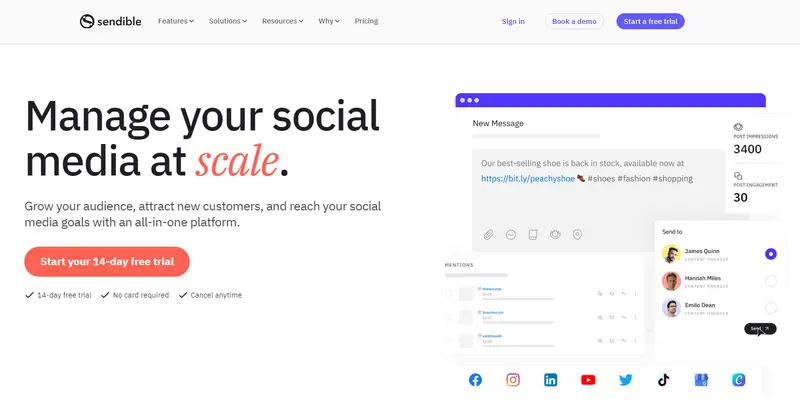
2. Sendible

Sendible

Best for: Businesses of all sizes and agencies that want reliable, direct TikTok scheduling with approvals, repurposing, and time-saving workflows from a single desktop dashboard.

Pricing: From $29 per month

Sendible positions itself as a practical TikTok scheduling solution within a broader social media management platform trusted by agencies and brand teams. Its TikTok scheduling feature supports direct auto-posting to both TikTok Business and Personal accounts, eliminating reminder-based publishing and manual uploads.

Read More
4.8 out of 5 stars
Sendible’s ease of use and social scheduling capabilities make the platform ideal for businesses of all sizes, from sole traders to enterprises and agencies. No matter who you are, you will find a plan suitable for your needs, with each plan including all you need to manage your social accounts but scaling to add those additional features needed by larger organizations.
Ratings
Features & Pricing
Pros and Cons
Ratings
Features
4.6
Ease of Use
5.0
Reporting
4.9
Overall Score
4.8
Features & Pricing
Analytics
Automated Publishing
Content Management
Keyword Filtering
Multi-Account Management
Post Scheduling
Price starting at:$25
Pros and Cons
Excellent social scheduling features
Smart queues ensure you always have evergreen content to share
Centralized social engagement platform
Canva and other useful integrations
Value for money
Pricing tiers can be confusing
Best for: Businesses of all sizes and agencies
4.8 out of 5 stars
Sendible’s ease of use and social scheduling capabilities make the platform ideal for businesses of all sizes, from sole traders to enterprises and agencies. No matter who you are, you will find a plan suitable for your needs, with each plan including all you need to manage your social accounts but scaling to add those additional features needed by larger organizations.
Visit Website View Profile

3. Planable

Planable

Best for: Any size brand or agency that prioritizes TikTok collaboration, approvals, and cross-channel planning over fully hands-off automation.

Pricing: Free plan available, paid plans start at $33 per month

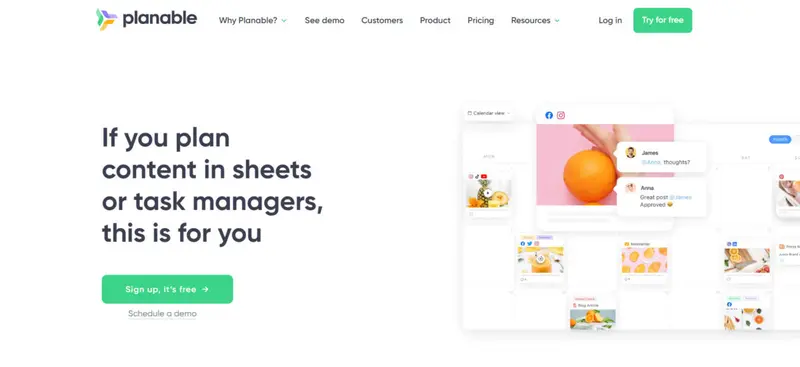
Planable is built first and foremost as a collaborative content planning and approval platform, and its TikTok scheduling capabilities reflect that positioning. Rather than focusing purely on autopublishing, Planable excels at bringing TikTok content into a shared workspace where creatives, strategists, clients, and approvers can work together before anything goes live.

TikTok content lives inside Planable’s visual calendar alongside other social channels, making it easy to batch plan campaigns, drag and drop posts, and maintain consistency across short-form platforms.

Read More
4.7 out of 5 stars
Planable is a social media management tool for agencies and brands. It helps teams plan, collaborate, and approve social media content in one place, making it ideal for managing multiple clients or stakeholders.
Ratings
Features & Pricing
Pros and Cons
Ratings
Features
5.0
Ease of Use
5.0
Reporting
4.0
Overall Score
4.7
Features & Pricing
Analytics
Post Scheduling
Scheduling
Social Media Management
Team Workflow & Collaboration
Content Planning
Marketing Calendar
Price starting at:$33
Pros and Cons
Best-in-class collaboration for social media teams
Highly customizable approval workflows
Built for agencies and multi-brand teams
Advanced features like analytics and engagement cost extra
Less focused on full-stack social media management
Best for: Marketing agencies, multi-location brands, multi-brand companies
4.7 out of 5 stars
Planable is a social media management tool for agencies and brands. It helps teams plan, collaborate, and approve social media content in one place, making it ideal for managing multiple clients or stakeholders.
Visit Website View Profile

4. GeeLark

GeeLark

Best For: Marketers, Agencies, Creators and Growth Teams

Pricing: Free plan available; paid plans from $9.75/month + usage-based cloud phone costs

GeeLark approaches TikTok scheduling differently from traditional tools by operating directly within mobile environments rather than relying on API-based publishing.

Through its cloud phone system, users can schedule and publish TikTok videos from real Android devices in the cloud, which is particularly relevant for TikTok’s mobile-first infrastructure.

This setup allows users to manage and schedule content across multiple TikTok accounts simultaneously. Instead of queuing posts in a calendar, users can assign publishing workflows to specific accounts, define timing rules, and automate execution across profiles.

Read More
4.7 out of 5 stars
GeeLark is a productivity tool for social media marketing that combines cloud phone and browser to help you scale social media marketing across leading social platforms.
Ratings
Features & Pricing
Pros and Cons
Ratings
Features
5.0
Ease of Use
4.0
Automation
5.0
Overall Score
4.7
Features & Pricing
Analytics
Automated Publishing
Content Management
Conversion Tracking
Multi-Account Management
Post Scheduling
Customer Engagement
Multi-User Collaboration
Reporting/Analytics
Visual Analytics
Dashboard
Data Exporting
Direct Publishing
Scheduling
Social Media Calendar
Teams/Collaboration
Content Amplification/Boost
Marketing Project Management
Teams / Collaboration
Social Media Management
Content Planning
Content storage
integrations
Campaign Analysis
Auto Post Deletion
Customer Messaging
AI Insights
AI Content Assistant
Real-Time Engagement
Advanced Analytics
Price starting at:$5
Pros and Cons
Cloud phones enable scalable multi-account management
Strong automation across posting and engagement
Built for organic growth and AI visibility
Steeper learning curve than typical SMM tools
Usage-based pricing can add complexity
Best for: Marketers, Agencies, Creators and Growth Teams
4.7 out of 5 stars
GeeLark is a productivity tool for social media marketing that combines cloud phone and browser to help you scale social media marketing across leading social platforms.
Visit Website View Profile

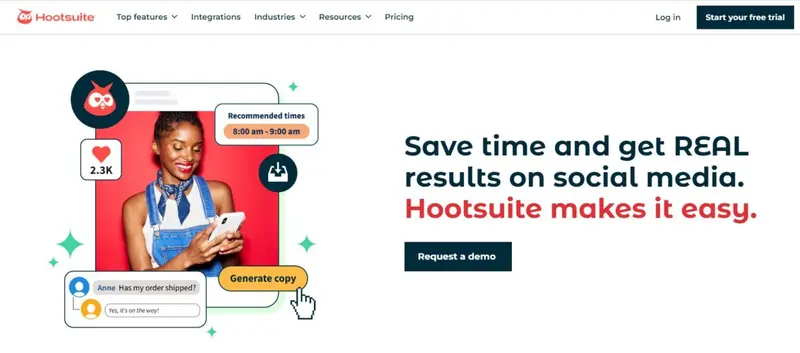
5. Hootsuite

Hootsuite

Best for: Small, Medium, and Large Businesses that need scalable TikTok scheduling, analytics, and engagement management in one platform.

Pricing: From $99 per month

Hootsuite extends its long-standing social media management capabilities to TikTok with a mature scheduling and analytics layer designed for scale. TikTok content can be planned, scheduled, published, and analyzed directly alongside Instagram, LinkedIn, Facebook, and other networks from a single dashboard, making it well-suited for brands running integrated, cross-platform strategies.

Read More
5 out of 5 stars
One of the first platforms designed to streamline social media management, Hootsuite continues to be one of the market leaders.
Ratings
Features & Pricing
Pros and Cons
Ratings
Features
5.0
Ease of Use
5.0
Reporting
5.0
Overall Score
5
Features & Pricing
Analytics
Automated Publishing
Contact Management
Content Management
Conversion Tracking
Customer Targeting
Keyword Filtering
Multi-Account Management
Post Scheduling
Brand Tracking
Customer Engagement
Multi-User Collaboration
Reporting/Analytics
Social Media Monitoring
Price starting at:$99
Pros and Cons
Customizable feeds show you all the social posts you need to see—no filler
Highly flexible post composer and scheduler, with a bulk option, drastically simplifies the most challenging part of the job
Inbox consolidated every message, comment, and mention—you’ll never miss a conversation
Best for: Small, Medium, and Large Businesses
5 out of 5 stars
One of the first platforms designed to streamline social media management, Hootsuite continues to be one of the market leaders.
Visit Website View Profile

6. Iconosquare

Iconosquare

Best for: Brands and agencies that prioritize TikTok analytics, reporting depth, and data-backed scheduling decisions.

Pricing: From $33 per month

Iconosquare approaches TikTok scheduling from an analytics-first perspective. While its scheduling capabilities are newer than some competitors’, they are tightly integrated with one of the most robust TikTok analytics stacks available, making the platform especially appealing to performance-driven marketers.

From a single dashboard, teams can schedule TikTok videos, photos, and carousels, manage multiple accounts, and maintain a centralized media library for reuse and repurposing.

Read More
Iconosquare Social Media Management Platform
4.5 out of 5 stars
Manage your social media and your analytics all in one place with Iconosquare. Businesses and agencies can easily manage the performance of their content as well as analytics, posting, and more. The platform supports Instagram, Facebook, TikTok, LinkedIn, and Pinterest.
Ratings
Features & Pricing
Pros and Cons
Ratings
Features
4.6
Ease of Use
4.4
Support
4.4
Overall Score
4.5
Features & Pricing
Analytics
Automated Publishing
Contact Management
Keyword Filtering
Multi-Account Management
Post Scheduling
Social Media Management
Price starting at:$49
Pros and Cons
Evolving functionality
Industry benchmarks
Competitive analysis features
Excellent automated posts
Customer support may not be helpful
Some features may glitch
Some platforms are not included
Best for: Brands and Agencies
Iconosquare Social Media Management Platform
4.5 out of 5 stars
Manage your social media and your analytics all in one place with Iconosquare. Businesses and agencies can easily manage the performance of their content as well as analytics, posting, and more. The platform supports Instagram, Facebook, TikTok, LinkedIn, and Pinterest.
Visit Website View Profile

7. Loomly

Loomly

Best for: Teams and brands that want streamlined TikTok planning, scheduling, and approvals with built-in content inspiration.

Pricing: Upon request

Loomly positions itself as a practical TikTok scheduling and content planning tool that prioritizes clarity, speed, and collaboration. It combines scheduling, post optimization, approvals, and idea generation into a single workflow, making it especially useful for brands and agencies managing steady TikTok output without complex operational overhead.

TikTok videos can be auto-published directly from Loomly, removing the need for manual uploads or reminders. Each TikTok account can have its own dedicated content calendar, which is particularly useful for brands managing regional profiles, multiple products, or creator-led sub-brands.

Read More
4.8 out of 5 stars
One of the social media management platforms we’ve seen is also the easiest to use and designed to meet any sized marketing need.
Ratings
Features & Pricing
Pros and Cons
Ratings
Features
4.8
Ease of Use
5.0
Reporting
4.5
Overall Score
4.8
Features & Pricing
Analytics
Automated Publishing
Contact Management
Customer Targeting
Keyword Filtering
Multi-Account Management
Post Scheduling
Customer Engagement
Multi-User Collaboration
Reporting/Analytics
Price starting at:$32
Pros and Cons
Post creation process leaves nothing to chance: every aspect is well thought out
Multiple social calendars eliminate confusion/accidental postings
Workflow templates are suitable for large teams and one-person operations
Reporting could use more audience insights
Best for: Literally everyone: Creators, Brands, Agencies, Marketing teams and solo freelancers, Franchises
4.8 out of 5 stars
One of the social media management platforms we’ve seen is also the easiest to use and designed to meet any sized marketing need.
Visit Website View Profile

8. Agorapulse

Agorapulse

Best for: Mid-sized to enterprise teams that need reliable TikTok scheduling, comment moderation, and reporting inside a unified social media workflow.

Pricing: From $79 per month

Agorapulse approaches TikTok scheduling as part of a broader, operationally mature social media management stack. Rather than treating TikTok as a standalone channel, it integrates scheduling, publishing, engagement, and reporting into a single dashboard, making it particularly effective for teams managing TikTok alongside multiple networks.

TikTok videos can be scheduled and auto-published in advance, with all planned content visible inside Agorapulse’s Publishing Calendar. Teams can switch between daily, weekly, and monthly views to balance cadence, avoid content clashes, and align TikTok posts with broader campaign timelines.

Read More
4.5 out of 5 stars
Agorapulse is a social media management platform stocked full of features for individuals, businesses, and enterprises. Their added listening tool helps users monitor brand mentions. Features include a variety of ways to publish content, reporting, analytics, and more.
Ratings
Features & Pricing
Pros and Cons
Ratings
Features
4.0
Ease of Use
4.6
Support
4.8
Overall Score
4.5
Features & Pricing
Analytics
Automated Publishing
Contact Management
Content Management
Conversion Tracking
Keyword Filtering
Multi-Account Management
Post Scheduling
Reporting/Analytics
Social Media Monitoring
Competitive Analysis
Scheduling
Social Media Calendar
Social Media Management
Team Workflow & Collaboration
Social Media Listening
Price starting at:$49
Pros and Cons
Easy social media management
Simple platform
Makes it easy not to double reply etc
Lack of post editing features
Limited third party integrations
Engagement platform can be difficult to use
Best for: Mid-sized agencies, mid-sized businesses and some enterprise brands.
4.5 out of 5 stars
Agorapulse is a social media management platform stocked full of features for individuals, businesses, and enterprises. Their added listening tool helps users monitor brand mentions. Features include a variety of ways to publish content, reporting, analytics, and more.
Visit Website View Profile

9. Sprout Social

Sprout Social

Best for: Brands and Agencies of All Sizes that want TikTok scheduling optimized around audience behavior, governance, and cross-channel performance insights.

Pricing: From $199 per month

Sprout Social positions TikTok scheduling as a performance optimization problem, not just a publishing task. As an official TikTok Marketing Partner, the platform combines advanced scheduling with audience-level data to determine when content is most likely to perform, making it particularly effective for brands that publish at scale.

Read More
5 out of 5 stars
One of the most recognized names in social media management shows why it’s been so successful, with a platform that changes the game for social media managers.
Ratings
Features & Pricing
Pros and Cons
Ratings
Features
5.0
Ease of Use
5.0
Support
5.0
Overall Score
5
Features & Pricing
Analytics
Automated Publishing
Contact Management
Content Management
Conversion Tracking
Customer Targeting
Keyword Filtering
Multi-Account Management
Post Scheduling
Brand Tracking
Reporting/Analytics
Social Media Monitoring
Price starting at:$199
Pros and Cons
Highly flexible and customizable calendar keeps users organized
AI assisted social listening casts a wide net while keeping results useful/relevant
Inbox features take social comms to new levels of efficiency
Deeply holistic reporting
Getting the most out of the platform requires a lot of upfront setup and organization
You need to use the platform awhile to understand what you should have set up first
Best for: Brands and Agencies of All Sizes
5 out of 5 stars
One of the most recognized names in social media management shows why it’s been so successful, with a platform that changes the game for social media managers.
Visit Website View Profile

10. HeyOrca

HeyOrca

Best for: Agencies and teams that need airtight TikTok approvals, client feedback, and centralized scheduling without complexity.

Pricing: Free plan available; Paid plans start at $59 per month

HeyOrca approaches TikTok scheduling as a collaboration and governance challenge rather than a pure publishing problem. Its TikTok integration is designed for teams managing multiple stakeholders, where visibility, approvals, and feedback loops matter as much as posting on time.

At its core is a highly visual content calendar that gives teams a clear, month-level view of what is going live next. TikTok posts are created directly in the calendar, complete with captions, hashtags, mentions, and engagement settings such as comments, duets, and stitches.

Read More
4.5 out of 5 stars
HeyOrca is a social media scheduling platform built for teams. It permits unlimited users on all pricing plans. You can plan, schedule, and publish posts directly to Facebook, Instagram, Instagram Reels, Twitter, LinkedIn, Google My Business, & Pinterest, and indirectly to TikTok and Instagram Stories. In addition, you can use it to manage multiple brands, giving each a dedicated social media calendar, media library, and user permissions.
Ratings
Features & Pricing
Pros and Cons
Ratings
Features
4.2
Ease of Use
4.9
Reporting
4.5
Overall Score
4.5
Features & Pricing
Automated Publishing
Contact Management
Multi-Account Management
Post Scheduling
Multi-User Collaboration
Reporting/Analytics
Team Workflow & Collaboration
Content Calendar
Facebook Ads Moderation
Price starting at:$50
Pros and Cons
Excellent collaboration and approvals system
Integration with Canva for post designs
Simple interface that shows scheduled posts at a glance
No bulk upload feature or way to reshare others' posts
No engagement-related features (although these are reportedly coming soon)
Limited paid post tracking
Best for: Agencies and teams
4.5 out of 5 stars
HeyOrca is a social media scheduling platform built for teams. It permits unlimited users on all pricing plans. You can plan, schedule, and publish posts directly to Facebook, Instagram, Instagram Reels, Twitter, LinkedIn, Google My Business, & Pinterest, and indirectly to TikTok and Instagram Stories. In addition, you can use it to manage multiple brands, giving each a dedicated social media calendar, media library, and user permissions.
Visit Website View Profile

11. Later

Later

Best for: Businesses of all sizes that want a strong focus on turning TikTok views into website traffic through link in bio.

Pricing: From $18.75 per month

Later positions TikTok scheduling as part of a broader growth loop that connects content, engagement, and conversion. While it supports full TikTok auto publishing, analytics, and comment moderation, its standout strength is the tightly integrated Link in Bio feature that helps creators and brands drive measurable traffic from TikTok profiles to websites, shops, and other social channels.

Read More
Later
4.3 out of 5 stars
Later is a calendar-focused social media scheduling platform with a drag-and-drop interface. Their planning and scheduling tools make it easy to visualize your social media management. Features include photo editing, publishing for stories, and more.
Ratings
Features & Pricing
Pros and Cons
Ratings
Features
4.0
Ease of Use
4.5
Support
4.3
Overall Score
4.3
Features & Pricing
Analytics
Automated Publishing
Content Management
Multi-Account Management
Post Scheduling
Reporting/Analytics
Price starting at:$16.67
Pros and Cons
Easy to use, simple interface and media gallery
Competitive pricing plans
"Best time to publish" feature
You need business accounts on social
Limited features compared to competition
Free version has basic features
Best for: Businesses of all sizes
Later
4.3 out of 5 stars
Later is a calendar-focused social media scheduling platform with a drag-and-drop interface. Their planning and scheduling tools make it easy to visualize your social media management. Features include photo editing, publishing for stories, and more.
Visit Website View Profile

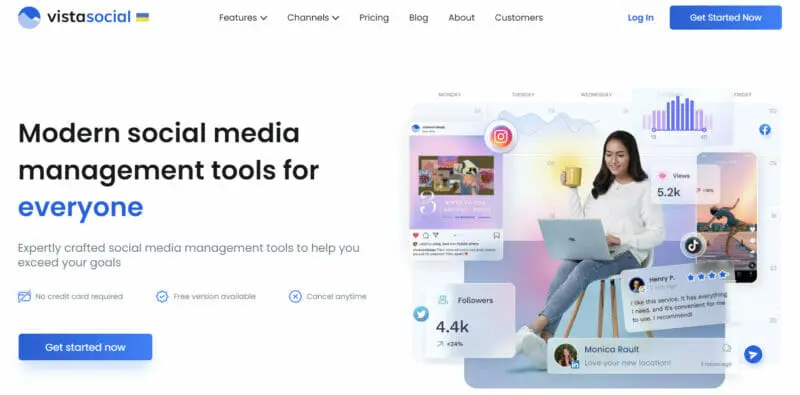
12. Vista Social

Vista Social

Best for: Teams and agencies seeking TikTok management with omni platform campaigns, advanced publishing controls, and deep performance analytics.

Pricing: From $64 per month

Vista Social stands out as one of the few TikTok scheduling platforms that has been officially recognized by TikTok for optimized content creation and direct publishing.

This distinction matters for brands and agencies that want maximum confidence in API level support, compliance, and feature depth without relying on workaround-based workflows.

Read More

13. SocialPilot

SocialPilot

Best for: Digital marketing agencies and SMBs looking for streamlined TikTok scheduling and social media management.

Pricing: From $25.50 per month

SocialPilot is designed for marketers who want reliable TikTok scheduling without the operational overhead of heavier platforms. It supports both direct publishing and mobile reminder-based workflows, giving teams flexibility depending on how closely they want to control final posting.

For smaller agencies and in-house teams, this balance between automation and manual oversight is often a practical advantage.

Read More
4.5 out of 5 stars
SocialPilot centralizes your social media management to help improve efficiency. The tool features an automated post schedule, easy integration with Canva, marketing tools, and other unique features to propel your social strategy.
Ratings
Features & Pricing
Pros and Cons
Ratings
Features
4.1
Ease of Use
4.7
Support
4.7
Overall Score
4.5
Features & Pricing
Analytics
Automated Publishing
Content Management
Conversion Tracking
Multi-Account Management
Post Scheduling
Price starting at:$25.50
Pros and Cons
Excellent value for money
Canva integration makes creating beautiful posts simple
Easy-to-navigate dashboard
No automated TikTok posting
Lacks advanced features that would attract large businesses and enterprises
Doesn’t offer a lot of third-party apps or integrations
Best for: Digital marketing agencies and SMBs
4.5 out of 5 stars
SocialPilot centralizes your social media management to help improve efficiency. The tool features an automated post schedule, easy integration with Canva, marketing tools, and other unique features to propel your social strategy.
Visit Website View Profile

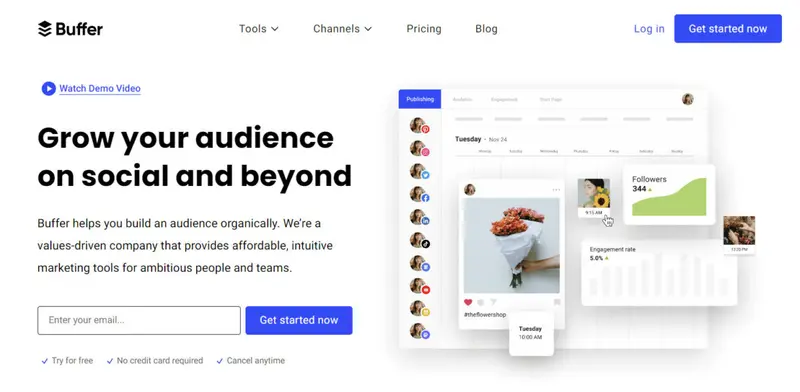
14. Buffer

Buffer

Best for: Streamlining TikTok scheduling and cross-platform distribution with a lightweight workflow built for consistency and reach.

Pricing: Free plan available; Paid plans start at $5 per month

Buffer is a strong fit for marketers, creators, and lean teams that prioritize clarity, speed, and predictable execution over heavy governance layers. Its TikTok scheduler focuses on helping teams stay consistent without adding operational friction, making it especially effective for brands managing frequent short-form output across multiple channels.

Read More
4.4 out of 5 stars
Buffer is one of the most popular social media scheduling platforms. This software helps drive engagement and traffic on social media with the help of their scheduling, engagement, and analytics tools.
Ratings
Features & Pricing
Pros and Cons
Ratings
Features
4.0
Ease of Use
4.6
Support
4.5
Overall Score
4.4
Features & Pricing
Automated Publishing
Content Management
Multi-Account Management
Post Scheduling
Reporting/Analytics
Price starting at:$5
Pros and Cons
Simple cross-posting
Straightforward calendar view
Integrates with almost every social platform
Buffer Analyze may be too basic for some
Buffer may glitch with Instagram
Arbitrary character limits for Facebook, Twitter
Pay-as-you-go packaging
Best for: Publishers, mid-stage startup teams, non-profits, higher education, sports teams, e-commerce, solopreneurs, businesses
4.4 out of 5 stars
Buffer is one of the most popular social media scheduling platforms. This software helps drive engagement and traffic on social media with the help of their scheduling, engagement, and analytics tools.

15. Social Champ

Social Champ

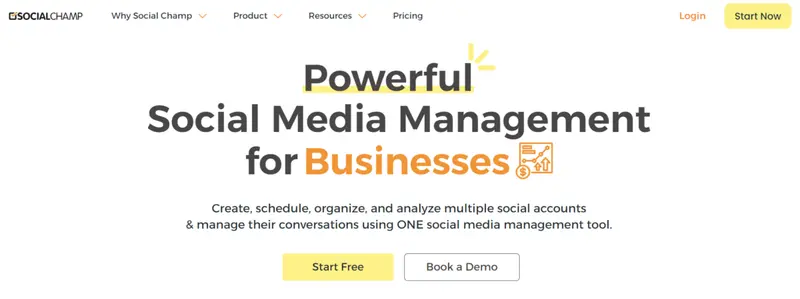
Best for: Video-first TikTok scheduling with bulk publishing, automation, and structured collaboration for teams and agencies.

Pricing: From $4 per month

Social Champ positions itself as a TikTok-focused scheduling and automation platform designed to handle high-volume video workflows without operational drag. It is particularly well-suited to agencies, growing brands, and multi-account managers that need speed, consistency, and clearly defined collaboration roles.

At the publishing layer, Social Champ supports direct TikTok scheduling alongside notification-based posting, giving teams flexibility depending on approval or final edit requirements.

Read More


Which TikTok Scheduling Tool Fits Your Workflow Best?

Choosing the right TikTok scheduling tool depends less on features in isolation and more on how well it supports your specific workflow. Below is a practical, use-case-driven comparison to help brands, agencies, and marketing teams quickly narrow down the best fit based on how they actually operate day to day.

Best for Agencies Managing Clients and Approvals

If your workflow involves client reviews, multi-step approvals, and shareable previews, Planable, HeyOrca, Loomly, and Social Champ stand out. They prioritize collaboration, role-based access, and feedback loops without forcing clients into the tool itself.

Best for Data-Driven Teams and Advanced Reporting

For marketers who optimize based on performance data rather than intuition, Brandwatch, Sprout Social, Hootsuite, Iconosquare, and Vista Social offer deeper analytics, benchmarking, and reporting that scale beyond basic scheduling.

Best for Multi-Platform Campaign Management

If TikTok is part of a broader omnichannel strategy, Brandwatch, Hootsuite, Buffer, Later, Vista Social, and GeeLark excel at coordinating TikTok alongside Instagram, LinkedIn, YouTube, and more from a single system.

Best for Creators and Small Teams

Solo creators and lean teams benefit most from tools that reduce friction. Later, Buffer and SocialPilot focus on ease of use, affordable pricing, and fast scheduling without heavy governance layers.

Best for TikTok-First Workflows

If TikTok is your primary growth channel, Brandwatch, Vista Social, Social Champ, Sprout Social, and GeeLark offer strong TikTok-specific capabilities, including direct publishing, automation, and multi-account execution.

Tool

Auto-Publish Approvals & Collaboration Analytics Depth Multi-Platform Support

Best For

Brandwatch Yes Strong Advanced Yes Enterprise & analytics
Planable Yes Strong Basic Yes Agency approvals
GeeLark Yes Moderate Moderate Yes Multi-account TikTok and cross-platform scaling
Hootsuite Yes Moderate Advanced Yes Large teams & enterprise
Iconosquare Yes Moderate Advanced Yes Analytics-driven teams
Loomly Yes Strong Moderate Yes Structured content workflows
Agorapulse Yes Strong Moderate Yes Mid-to-large brands
Sprout Social Yes Strong Enterprise-grade Yes Data-led organizations
HeyOrca Yes Very strong Moderate Yes Client collaboration
Later Yes Light Moderate Yes Creators & traffic focus
Vista Social Yes Strong Advanced Yes TikTok-centric campaigns
SocialPilot Notification-based Moderate Moderate Yes Small teams & SMBs
Buffer Yes Light Basic Yes Simplicity & crossposting
Social Champ Yes Strong Moderate Yes Video-heavy execution

TikTok for Influencers and Marketers

One of the biggest reasons brands and influencers are attracted to TikTok is because of the potential to go viral.

Despite the complex algorithm of TikTok, it’s evidently clear that content is more likely to go viral on TikTok compared to other social media platforms like Instagram or Facebook. And, lest you think TikTok is just a replacement for Vine, take a closer look at what TikTok offers.

Music

TikTok includes a database of sounds, including those shared by other users, that are accessible prior to filming and play as you’re recording. Most trends and viral challenges are associated with specific audio clips. Be it a character’s line from a movie, a chorus from an old song, or an odd remix of two starkly different genres, music is pivotal to a content creator’s success on TikTok.

Personalization

TikTok’s algorithm is a bit of mystery, but what we do know is that it uses AI to recommend videos based on what you’ve watched and liked in the past. Similar or related videos then show up on the For You page to keep you in the loop on content that you’re most likely interested in.

Diverse Content Creation Tools

TikTok has a pretty extensive set of pre- and post-recording tools that make it easy to film and edit in-app. Voice effects, camera filters, and closed captions are just some of the most commonly used tools in TikTok.

Duets

Using the Duets feature, content creators on TikTok can air their sentiments or share their reactions to another user’s video side-by-side. To get started with TikTok, here’s our beginner-friendly guide on TikTok marketing


Making Money on TikTok

Want to learn how to make money as an influencer on TikTok? We’ve created a TikTok influencer engagement and earnings calculator to help you.

Our TikTok Money Calculator lets you calculate your estimated earnings from your TikTok account. The TikTok Money Calculator isn’t an official TikTok tool. We created this tool to help influencers find out their earning potential. It’s the perfect tool to help you negotiate rates for endorsing a product or service on the platform.


How to Schedule TikTok Posts With Loomly

While any of these TikTok scheduling tools can help you schedule and manage your TikTok content, we’re going to take a closer look at how to schedule TikTok posts with Loomly to give you an idea of how these tools work.


Step 1. Connect TikTok to Loomly

Start by going to the Social Accounts tab of your calendar settings page.

Click on the Connect button in the TikTok row:

You’ll be prompted to enter your TikTok username for the account that you want to connect to Loomly.
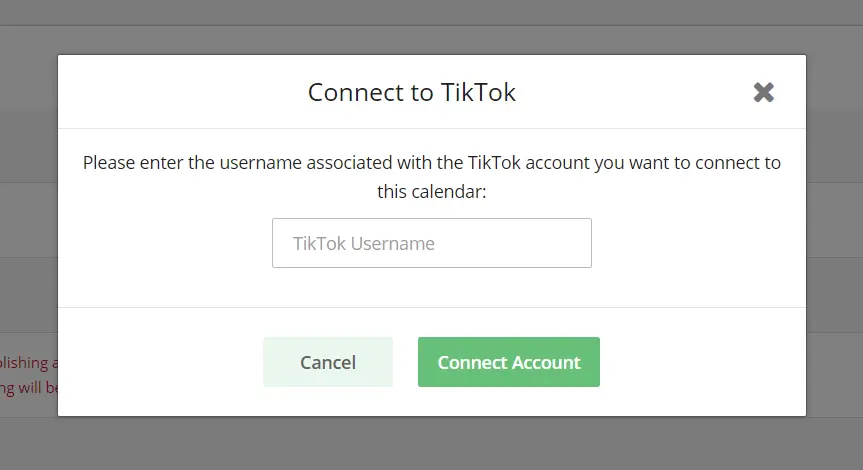
connect to TikTok

Enter your TikTok username and click Connect Account.


Step 2. Build Your TikTok Post

Now it’s time to create a new TikTok post.

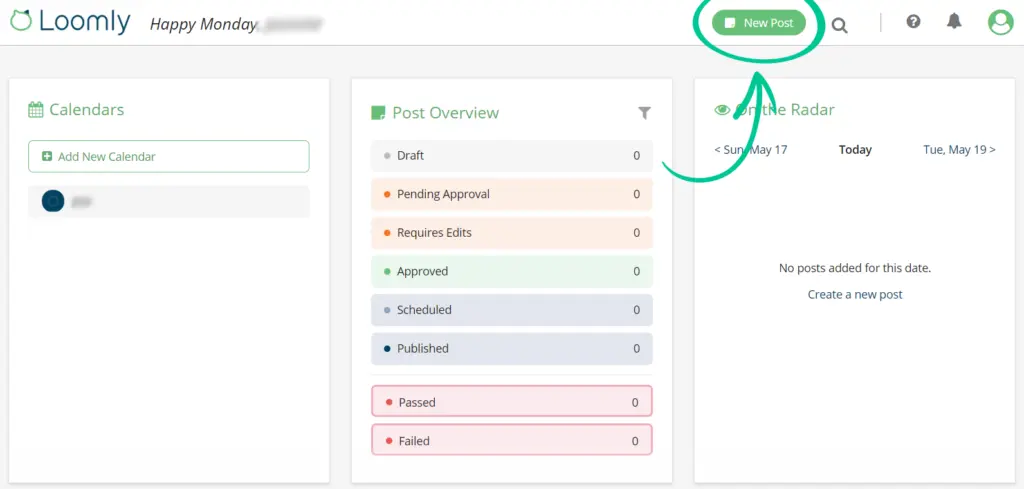
Once you’ve successfully connected your TikTok account to Loomly, go to your account dashboard and click New Post at the top right of the page.
loomly-create-new-post

In the screen that pops up, choose the calendar you want to use from the dropdown and click Build Post.
loomly-content-inspiration

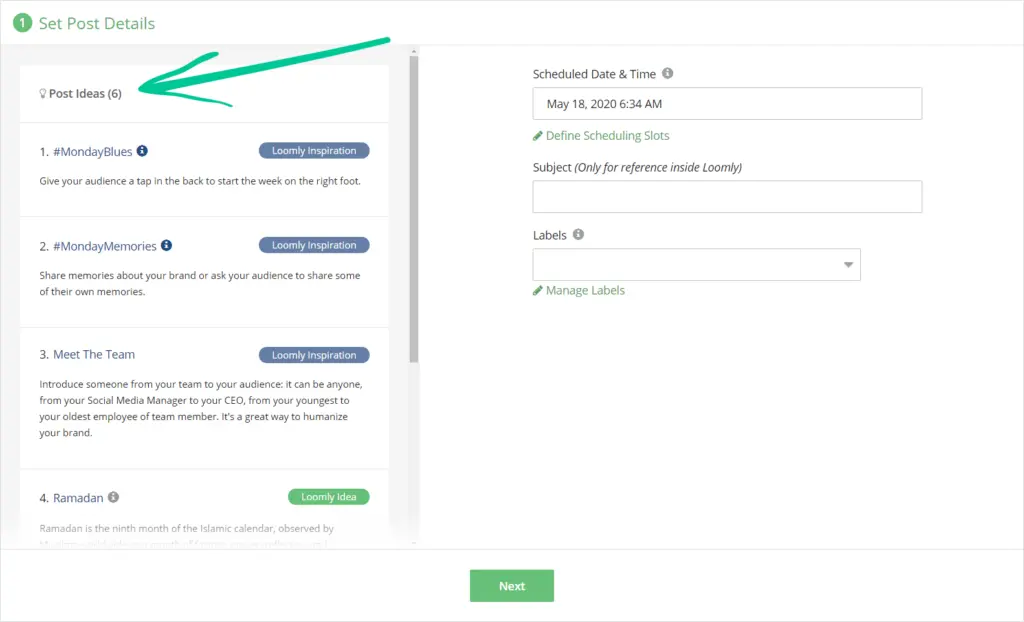
On the left side of the Build New Post screen, you’ll see Loomly Inspiration and Loomly Ideas. These are content ideas that Loomly provides for you if you’d like to use them.

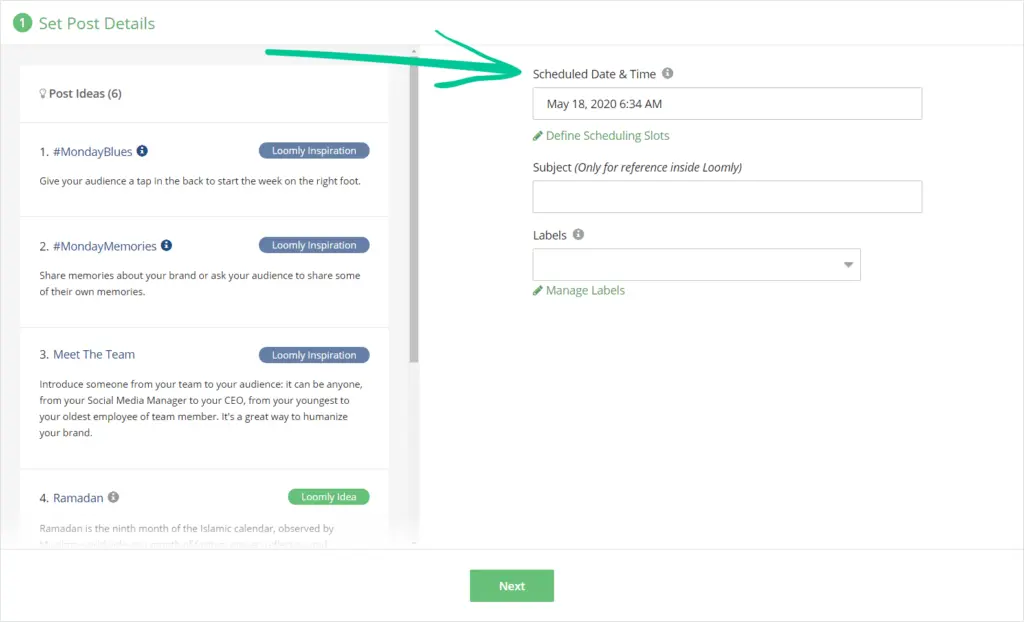
On the right side of the Build New Post screen is where you’ll set the scheduled date and time for your TikTok post, as well as a descriptive subject for use within Loomly, and labels that help you classify and identify your posts.
loomly-scheduling-info

Click Next once you have your TikTok scheduling basics set.

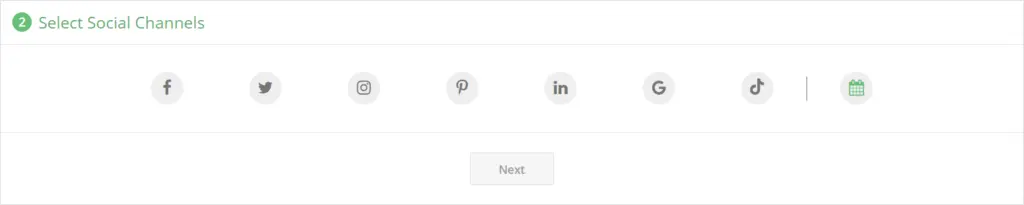
Your next step is to choose the social media platforms you want to share your content to.
loomly-choose-social-channels

Choose TikTok and click Next.

Now it’s time to set your message using text, links, and relevant  hashtags. Then, you can choose media files common to all channels available in Loomly. In the next step, you’ll be able to customize your post for each specific channel and add @mentions.
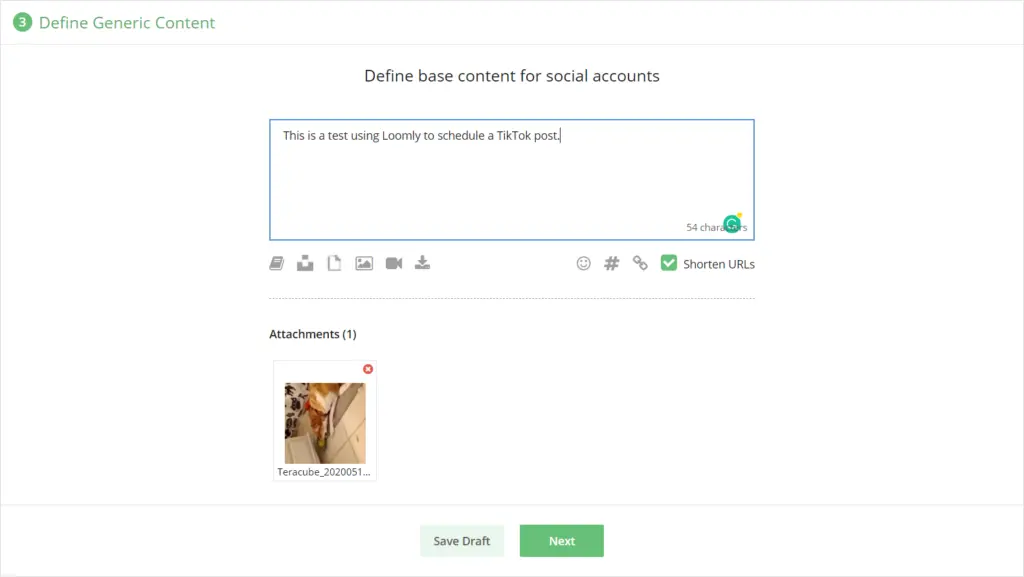
loomly-define-generic-content

Once you’ve defined the base content for your social accounts, you’ll be able to preview and adjust the TikTok version in the fine-tuning panel.
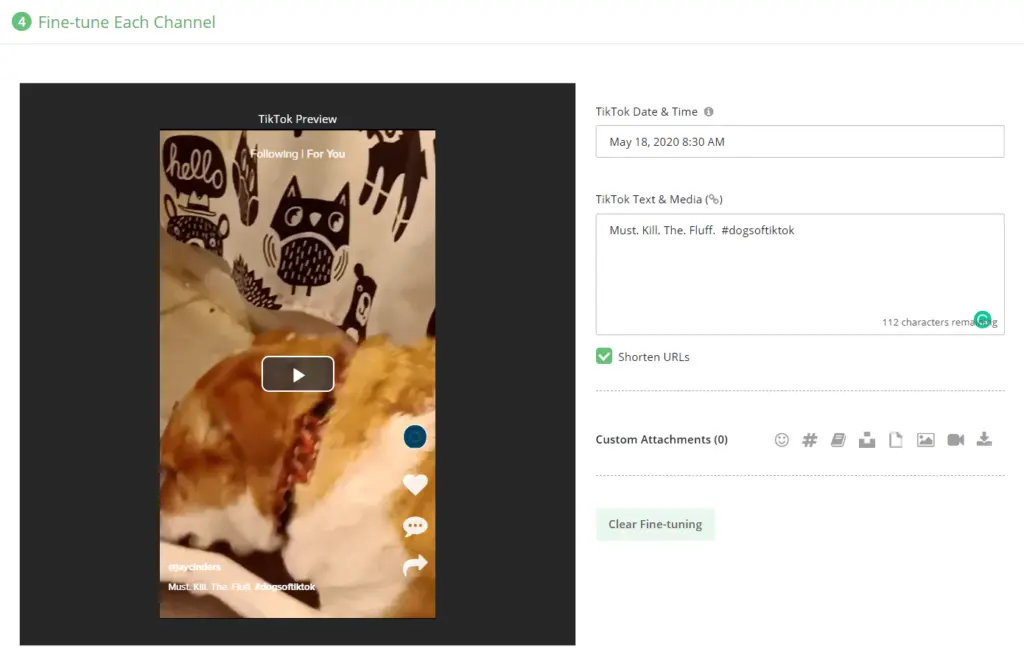
loomly-fine-tune-content

Pro Tip: Hashtags are a great way to get your content noticed by the right people. If you’re stuck for ideas, check out our handy TikTok hashtag generator.

Loomly includes TikTok post optimization tips at the bottom of the Fine-tune section:
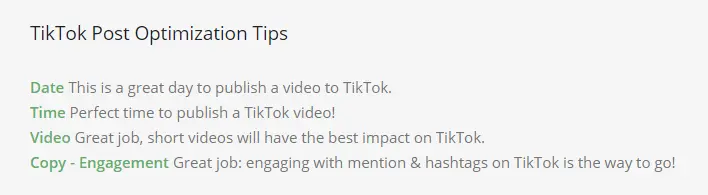
loomly-tiktok-optimization-tips

Click Next once you’re done with fine-tuning your TikTok content.

Here’s where you can create your final TikTok post. You have multiple options:

  • Save as draft. Save your post as a draft so you can return to it later for editing.
  • Submit for approval. If you have collaborators, submit your post for approval to mark it as ready for review.
  • Schedule. If your post doesn't need approval or has already been approved, schedule it. Loomly will natively publish it at the scheduled date & time for you.
  • Publish Now. Ready to publish your post right now? Select this option to have Loomly publish it immediately for you.

Go ahead and click on Schedule.

loomly-create-post

Congratulations! You just scheduled your first TikTok post using Loomly’s TikTok scheduling tools.


Step 3. Publish Your TikTok Post

TikTok publishing via Loomly has to be done manually through the Loomly iOS or Android apps.

You’ll get a push notification via the app to publish your TikTok post at the right time. You’ll also get an email reminder that includes the copy and media from your scheduled TikTok post.

You can set up your notification settings to notify you via email, an app push notification, Slack, or Microsoft Teams.

Loomly TikTok Publishing Reminder

When you receive the notification you’ll be able to open the post in the Loomly app on your smartphone and share it to TikTok.

Clicking on Publish to TikTok will open your post in the TikTok mobile app so you can easily publish your post. Your video or photos will be loaded automatically.
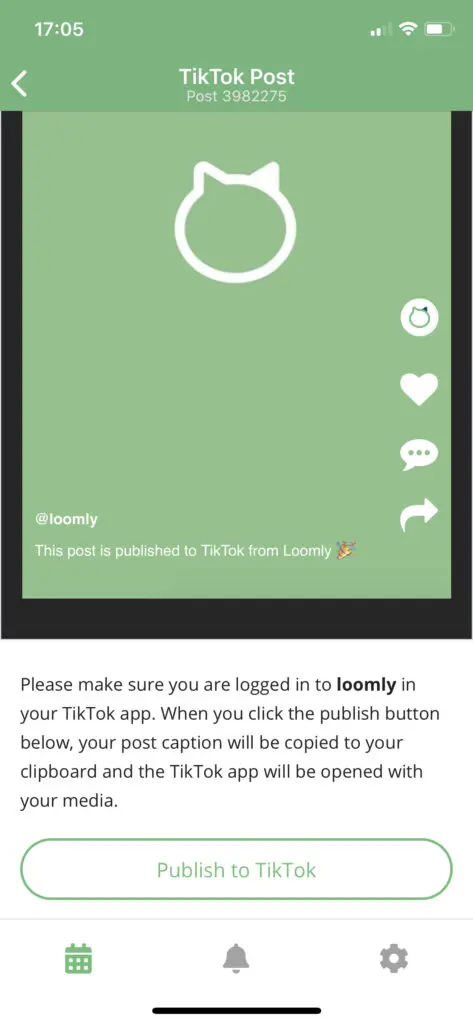
Loomly TikTok Publish Mobile App

The copy of your post will be automatically saved to the clipboard of your smartphone, so you can paste the copy directly into your TikTok post.

Then, just click Post
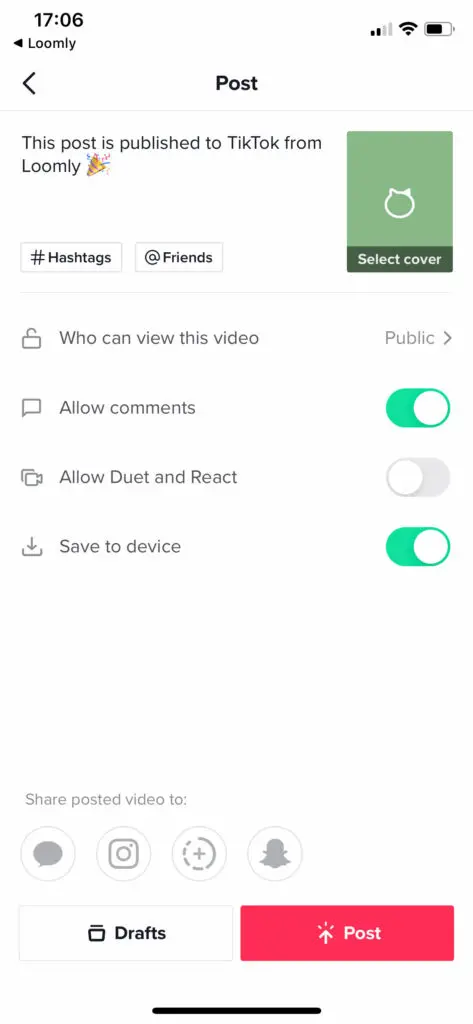
Loomly TikTok Post

And that’s it! You’ve published your scheduled TikTok post using Loomly’s TikTok scheduling tools.


Step 4. Monitor Your TikTok Post Performance

Loomly’s analytics lets you measure your post’s real-time performance once they’ve been published. This makes it easy to see at a glance the topics and content types your audience likes most so you can provide more of that content.

Loomly analytics includes:

  • Account, post, and URL metrics
  • Data filtering and time period comparison
  • Analytics for all posts, not just those published using Loomly

The Right TikTok Scheduler Is a Growth Decision, Not a Tool Choice

Choosing a TikTok scheduling tool in 2026 is no longer about convenience. It is a strategic decision that directly impacts content velocity, collaboration efficiency, and performance optimization.

As TikTok continues to shape social discovery and commerce, brands and agencies need platforms that do more than queue posts. They need tools that align publishing with data, workflows, and business objectives.

For smaller teams and creators, simplicity and speed matter most. For agencies, approval flows, client visibility, and consistency are non-negotiable. For enterprise teams, analytics depth, governance, and omni-channel coordination define value. The best tools in this guide stand out because they solve specific operational problems, not because they offer the longest feature lists.

Ultimately, the right scheduler is the one that fits how your team works today while supporting where your TikTok strategy is headed next.

Prioritize alignment over volume, and your content calendar will become a growth engine, not just a planning document.

Frequently Asked Questions

How does scheduling TikTok posts affect community engagement?

Scheduling helps brands stay consistent, but engagement quality depends on how actively comments and replies are handled, which is why many teams pair schedulers with TikTok community management agencies to maintain real-time interactions.

Can TikTok scheduling tools support competitive benchmarking?

Yes, many advanced tools integrate insights that complement TikTok competitor analysis, helping marketers understand posting frequency, content themes, and performance gaps without manual tracking.

Is scheduling compatible with TikTok’s algorithm preferences?

When used correctly, scheduling aligns well with broader TikTok marketing best practices, as consistency and timing matter more than whether posts are published manually or via tools.

Should brands use a dedicated TikTok scheduler or an all-in-one platform?

That depends on scale. Teams managing multiple networks often prefer multi-social media posting tools to centralize workflows while still supporting TikTok-specific requirements.

How does scheduling fit into larger TikTok campaign planning?

Schedulers are most effective when embedded into a structured TikTok marketing campaign, where content themes, creators, and publishing cadence are mapped in advance.

Can scheduling tools help content go viral on TikTok?

They cannot guarantee virality, but by supporting testing and consistency, they reinforce tactics commonly associated with going viral on TikTok, such as trend timing and rapid iteration.

How do TikTok scheduling tools support broader social strategies?

They often integrate tagging, approvals, and analytics that align with proven social media marketing tactics, making TikTok execution easier to coordinate with other channels.

Do scheduling tools support advanced creative features like filters?

Most schedulers require videos to be fully edited beforehand, so creative elements like TikTok filters are typically applied natively before uploading into the scheduling workflow.

About the Author
The Influencer Marketing Hub Team brings together a diverse group of experts with a passion for influencer marketing, digital trends, and social media strategies. Each piece of content crafted by this team is researched and written to provide valuable insights, tips, and updates for our readers. Our authors are dedicated to delivering high-quality, informative, and engaging articles that help businesses and influencers thrive in this rapidly changing digital world.